Transcribing Poor Audio: What Can Be Saved (2026)
Summarize this article with:
Can It Be Saved?
Modern AI transcription recovers a lot more than people expect from bad audio. A phone-quality voicemail, a cassette tape from the 1990s in decent shape, a field interview with an open window, all of these are workable. The honest answer to "can it be saved?" is usually yes, with one major caveat: the floor is set by what was captured at the source, not by how smart the engine is. Audio that was genuinely inaudible when recorded is inaudible to AI too.
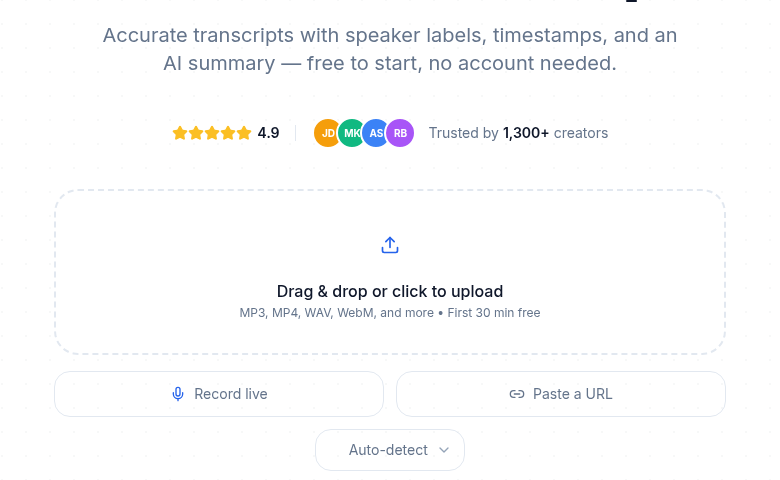 The free preview shows quickly whether bad audio is salvageable
This post covers realistic accuracy expectations, the small number of pre-processing steps that actually help, and the specific scenarios where AI hands off to humans.
For guidance on how to prevent bad audio in the first place, see recording environment tips for best results. For techniques focused specifically on background noise, see dealing with background noise in transcription.
What AI Handles Surprisingly Well
Whisper Large-v3 was trained on a broad, noisy corpus that includes phone calls, distant mics, accented speech, and analog recordings. Independent benchmarks put its Word Error Rate around 2.7% on clean audio and 8-12% on real-world noisy conditions, a meaningful improvement over earlier versions.
Phone-quality audio (8 kHz, narrow-band). Old voicemails, archived helpline recordings, conference calls. The narrow frequency band removes a lot of the cues humans use, but Whisper adapts reasonably well to this signal type.
Heavy accents. The model covers global English including West African, South Asian, East Asian, Caribbean, and Latin American variants. Accuracy on non-native speakers is typically within a few percentage points of native US English.
Steady background noise. Coffee shop ambient sound, HVAC hum, traffic outside a window. The engine is good at separating speech from noise that does not change much over time.
Echo from untreated rooms. Hardwood floors, empty conference rooms, basement recordings. Mild reverb degrades accuracy modestly but rarely makes a transcript unusable.
Cassette tapes from the 1990s in good condition. Tape hiss is steady-state noise, the kind the model handles well. A well-preserved recording often comes out at 78-88% accuracy, which is editable.
What AI Struggles With
These are the hard cases, in order from "manageable with prep" to "needs a human":
Multiple speakers talking simultaneously. Two people cutting each other off cuts accuracy by 15-30 percentage points. Three or more overlapping in a small room is genuinely difficult to recover. Diarization labels who spoke when, but it cannot reconstruct what was said when speech overlaps.
Vocal music at similar volume to speech. The engine may transcribe lyrics as part of the dialogue, or simply drop the speech underneath. Instrumental music is far less disruptive.
Severely degraded analog source. A heavily-played cassette from 1985 with loud tape hiss, speed drift, and dropout gaps can fall below the recovery threshold. Some sections will be marked unclear or simply missing.
Whispered speech or anything below the noise floor. If the speaker was quieter than the ambient sound at capture time, no engine and no amount of post-processing retrieves content that was not recorded.
Heavy accent combined with degraded audio. Each is manageable alone. Combined, they compound each other.
Pre-Processing That Actually Helps (and What to Skip)
Counterintuitively, most "audio enhancement" hurts AI transcription more than it helps. The engine was trained on raw, imperfect input. Aggressive cleanup distorts the spectral characteristics the model expects. A few specific steps do help:
Normalize Volume
If your recording peaks below -20 dB, the engine has too little signal to work from. Normalize to around -16 LUFS using a two-pass approach, which applies a consistent gain rather than dynamic compression:
# Pass 1: measure
ffmpeg -i quiet.mp3 -af loudnorm=I=-16:TP=-1.5:LRA=11:print_format=json -f null -

# Pass 2: apply (fill in measured_I, measured_TP, measured_LRA, measured_thresh from pass 1)
ffmpeg -i quiet.mp3 -af loudnorm=I=-16:TP=-1.5:LRA=11:measured_I=-28:measured_TP=-6:measured_LRA=10:measured_thresh=-38:linear=true output.mp3
Single-pass loudnorm applies dynamic processing on the fly and can create pumping artifacts that hurt transcription. Two-pass is worth the extra step for important files.
Correct Tape Speed Errors
If a cassette played back too fast or too slow (common with worn decks), the pitch and timing are off. Correct with atempo:
# Slow down a recording that plays ~5% too fast
ffmpeg -i input.mp3 -filter:a "atempo=0.95" corrected.mp3
Large deviations (more than 5-10%) hurt recognition more than the correction helps. Listen first to assess.
Leave Everything Else Alone
Do not apply EQ, compression, de-essing, or reverb removal before submitting to an AI engine. These tools are designed for human listening, not for speech models. Aggressive noise reduction (removing 25+ dB of noise) also removes consonant clarity. The transcript gets worse, not better.
If you want to try noise reduction anyway, use Audacity's Noise Reduction at a very conservative setting (8-10 dB reduction, not the default 12-18 dB range) and compare the two versions.
For a deeper look at what microphone and room choices mean for source quality, see improve audio quality before transcription.
Realistic Accuracy Expectations by Source Type
Set expectations before you start. The numbers below reflect Whisper Large-v3 on typical examples of each category:
| Source type | Typical accuracy range | Editable? |
|---|---|---|
| Studio recording, single speaker | 97-99% | Yes, minor cleanup |
| Zoom call, all on good mics | 94-97% | Yes |
| Mixed meeting, some speakerphone | 88-94% | Yes, moderate effort |
| Field interview, lavalier mic, moderate noise | 92-96% | Yes |
| Phone recording (8 kHz) | 88-93% | Yes |
| Single distant mic in a large room | 82-89% | Yes, heavier editing |
| Cassette tape from the 1990s, good condition | 78-88% | Yes, notable effort |
| Cassette tape with significant degradation | 60-80% | Borderline |
| Multiple overlapping speakers, noisy room | 55-75% | Often not worth editing |
Above 90% accuracy, a transcript is publishable with light cleanup. Between 80-90%, editing time is significant but usually faster than human transcription. Below 80%, do the math: if the file is short or the content is high-value, edit it. If it is long or the content is secondary, a human service may be cheaper total cost.
My take: the 80% line is where I stop trying to AI-transcribe without listening to the audio first. Below that, spot-checking a few minutes tells you whether editing is worth it or whether you are better off sending it to a human.
When to Hand Off to a Human Transcriptionist
Three clear signals that a human tier is the right call:
More than 10% of the transcript has obvious errors or unclear sections. Editing an AI transcript with that error density often takes longer than working from a clean human transcript. The cost comparison shifts.
The content is legally or officially sensitive. Court recordings, depositions, regulatory testimony, HR interviews. AI transcripts need human verification before they become part of any official record. AI vs. human transcription covers this tradeoff in more detail.
Multiple speakers with significant overlap. Human listeners use context, rhythm, and inference to separate overlapping speech. AI diarization does not. For anything where speaker attribution matters, a human tier is the reliable path.
For human transcription, Rev charges $1.99 per audio minute for standard delivery (12 hours or less), with rush options available for faster turnaround. GoTranscript starts around $0.99-$1.02 per audio minute for standard 1-5 day delivery and rises sharply for rush. Both are per-minute metered with no subscription required.
If you just need a clean transcript without a turnaround deadline, ConvertAudioToText's free tier lets you run a sample file first to see the accuracy before committing time to editing.
Old Tape Recordings: A Specific Workflow
Digitized analog recordings (cassette, microcassette, reel-to-reel) have a few patterns worth knowing:
Tape hiss is steady-state. AI handles it. Do not aggressively de-noise, a moderate pass at most.
Speed drift from worn mechanisms. Listen to the digitized file. If words sound pitch-shifted or speech is noticeably fast or slow, use atempo to correct before submitting. A file 5% fast will drop accuracy measurably; a file 10% fast will produce near-unintelligible output.
Wow and flutter. Pitch wavering from a worn capstan. Modern Whisper handles mild flutter surprisingly well, the model adapts to underlying speech patterns. Severe flutter from a damaged mechanism is a different matter.
Dropouts (silent gaps). The engine handles these as silence and continues normally on the other side. You will see gaps in the transcript that correspond to gaps in the audio. Nothing to fix.
Short versus long archives. A single 30-minute cassette: run it, review the result, decide on a human pass if needed. A large archive (family recordings, oral history project, radio show backlog): batch-process overnight and accept that a fraction of files will need human review. Identify the problem files by accuracy first, then decide.
Using Multiple Channels
If your recording has multiple audio tracks (a lavalier mic on channel 1 and a camera mic on channel 2, for example), extract only the cleaner channel before submitting:
ffmpeg -i interview.mov -map 0:a:0 -ac 1 channel1.mp3
Mixing both channels dilutes the better source. More input is not always better for speech recognition.
FAQ
How accurate is AI transcription on old cassette tape recordings?
A well-preserved cassette from the 1990s with moderate tape hiss typically falls in the 78-88% accuracy range on Whisper Large-v3. Accuracy drops further with heavy dropouts, severe speed drift, or loud tape saturation. A degraded tape that was borderline-audible at playback may come in below 65%, at which point human transcription is usually faster and cheaper total.
Should I clean up audio before sending it to an AI transcription service?
Only specific steps help: normalize volume if the recording is very quiet, and correct speed errors on analog tape. Aggressive noise reduction, EQ, compression, and de-essing typically hurt accuracy by distorting the spectral characteristics the model expects. Submit raw or lightly normalized audio.
When is a human transcription service worth the extra cost?
Three situations: when your AI transcript has error rates above roughly 10% (editing becomes slower than starting fresh), when the content has legal or official standing (depositions, regulatory filings, HR records), and when multiple speakers overlap significantly. Human transcriptionists handle overlapping speech and contextual speaker attribution better than any current AI diarization.
Does processing a phone-quality recording in segments help accuracy?
Sometimes. If a long recording has one or two very noisy sections and the rest is cleaner, processing the sections separately with different normalization levels can help on the noisy parts. For a uniformly noisy recording, segment processing typically does not change the outcome, the engine sees the same audio quality either way.
Sources
Try transcription free
Convert any audio or video to clean, unwatermarked text — speaker labels, timestamps, and AI summaries included. First 30 minutes free, no account.
Related Articles
Background Noise and Transcription: Fix Existing Audio
How to diagnose background noise in existing recordings, which software tools actually help, and when re-recording beats repair for cleaner transcripts.
Handling Room Noise in Recording: Acoustic Prevention
Stop echo, HVAC hum, and hard-surface reflections before they ruin a take. Practical acoustic treatment for home and office recordings without spending much.