
Best No-Signup Transcription Tools (2026, No Account)
Summarize this article with:
If you want zero account and maximum privacy, the cleanest option in 2026 is a browser-based Whisper tool that runs on your own device (Whisper Web, or the Transformers.js WebGPU demo) or the Vibe desktop app. Your audio never leaves your computer. If you would rather upload a file and get a result in minutes, ConvertAudioToText transcribes without an account, with caps (TurboScribe needs a free account). "No signup" gets fuzzy fast: Otter needs an email, and Microsoft Word Transcribe needs a paid Microsoft 365 login, so neither is truly account-free.
What "no signup" actually means in 2026
Most "no signup required" claims have a catch. The tool transcribes a teaser for free, then asks for an email to show you the rest. Or it works without an account until your file passes a small size limit. Or the transcript appears on screen but the download button is gated behind a login.
So before ranking anything, it helps to sort tools by how account-free they really are. There are four honest tiers, and the privacy story gets weaker as you go down:
- Local, zero account, audio never leaves your device. In-browser Whisper tools and the Vibe desktop app. The most private option there is.
- Cloud, zero account, you upload the file. ConvertAudioToText (TurboScribe works the same way but needs a free account). Fast and easy, but your audio does reach a server.
- Email but no card. Otter.ai. You hand over an email address, not a payment method.
- Only "free" if you already pay for something else. Microsoft Word Transcribe needs a paid Microsoft 365 login.
The tools below are grouped by that order, not by raw accuracy. For the "I just need this one file done without making an account" job, the tier matters more than a benchmark score.
Tier 1: Local tools, zero account, audio stays on your device
This is the only category that is genuinely, completely account-free with no privacy trade. The transcription runs on your own hardware. Nothing uploads.
Browser-based Whisper (Whisper Web and the WebGPU demos)
A small wave of sites now run OpenAI's Whisper model entirely inside your browser using WebGPU and WebAssembly. You open the page, pick an audio file or record from your mic, and the transcription happens on your machine. Whisper Web (whisperweb.net) states it plainly: "no signup, privacy-first," and "all speech recognition processing happens locally in your browser. No data uploads, no cloud processing." It advertises 80+ languages.
The most credible reference implementation is the open Transformers.js demo, Whisper Large v3 Turbo WebGPU (a Hugging Face Space by the webml-community team). It transcribes in 100+ languages on-device using your GPU, with nothing leaving the browser.
Where in-browser Whisper wins: True zero-signup, true privacy. Your audio never touches a server, which makes this the right call for anything sensitive. Free with no daily count or file limit imposed by a vendor.
Where it struggles: The first run downloads the model, which can be slow and is a few hundred megabytes. Speed depends entirely on your hardware and whether your browser supports WebGPU. It is not built for long files on a weak laptop, and Whisper is not a real-time streaming model, so live captioning is awkward. Treat it as "drop a file, wait, copy the text," not a live tool.
Vibe (open-source desktop app)
Vibe is a free, MIT-licensed desktop app for Mac, Windows, and Linux that runs Whisper locally through whisper.cpp. No account, no internet needed after the model downloads. The latest release line is v3.x (v3.0.19 shipped in March 2026). It handles files, URLs, and recordings, and supports many languages.
Where Vibe wins: No signup ever, no file size or duration cap, and everything stays on your device. Because it is a native app rather than a browser tab, it handles long files more gracefully than the WebGPU sites. Free forever.
Where it struggles: You have to download and install it. First launch pulls the Whisper model (allow several minutes). Quality and speed scale with your hardware. It needs roughly 4GB RAM for the small model and more for larger ones. Comfortable on M-series Macs and modern GPUs, slow on older machines.
Bottom line for Tier 1: if "no signup" really means "I do not want my audio on anyone's server," a local tool is the only honest answer.
Tier 2: Cloud tools, zero account, you upload the file
These let you upload and transcribe with no account at all. The trade is that your file reaches a server to be processed, and each has a cap that nudges heavy users toward a plan.
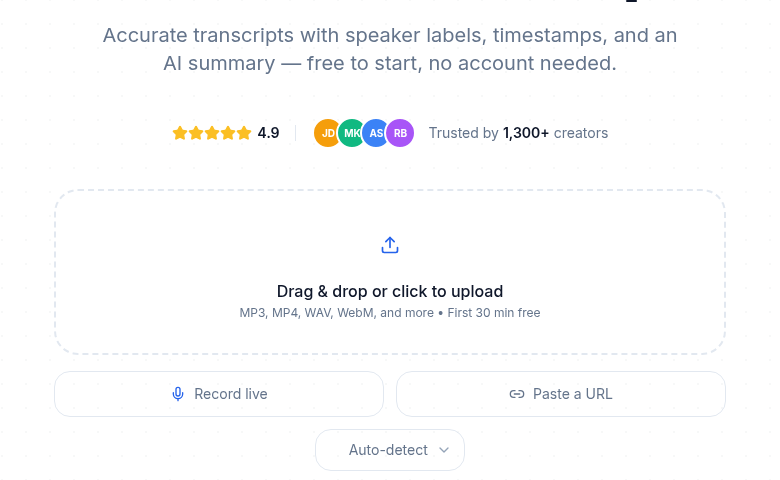 ConvertAudioToText with no account: drag and drop, record live, or paste a URL, and the first 30 minutes are free
ConvertAudioToText
Our own free audio-to-text tool transcribes without an account. You drop a file or paste a URL, pass a single anti-bot check, and get a real transcript on screen, with a language selector, not a watermarked teaser. Speaker labels come with the premium engine.
The honest limits on the no-account path: the first 30 minutes of each file, up to 3 files a day, a 100 MB file size cap, and one quick verification check. The transcript shows in the browser, and reading it is free; to copy it, keep it, edit it, and build an archive, you save it to an account. Note that the logged-in free tier is a separate thing: your first file runs on the premium engine with speaker labels (up to an hour, with file downloads), and then the account keeps transcribing free, up to 30 files a day, up to 30 minutes each. TXT downloads stay free; SRT, VTT, DOCX, PDF and JSON downloads after that first file come with paid plans, a minutes top-up or the Weekly Pass. The no-account number you care about for one-off files is the first 30 minutes of each file.
Where CATT wins for no-signup: A genuine transcript with language detection, no account, no card. Works for both file upload and pasted YouTube or podcast URLs.
Where CATT does not lead: There is no persistent archive without an account, and to pull every export format (SRT, VTT, TXT) you save the transcript first. For the strictest privacy, a Tier 1 local tool beats any cloud tool, ours included.
TurboScribe
TurboScribe gives you 3 transcriptions per day, up to 30 minutes each, with a free account and no credit card. It runs a Whisper-based pipeline and the interface is clean. For a casual "a few files this week" pattern, it is a solid free cloud option, though it does need an account.
Where TurboScribe wins: A daily free quota with no card, 30-minute files, free export files, solid accuracy.
Where it struggles: Three files per day is the binding limit. The paid Unlimited plan is $20/month, or $10/month billed yearly ($120/year), which removes the cap if you outgrow free.
A note on "under 5 minute" cloud tools
Some newer sites (for example 1Transcribe) transcribe files under five minutes free with no signup. They are fine for a voice memo, but the five-minute ceiling makes them a poor fit for interviews, lectures, or podcasts. Read the per-file cap before you start, because that is where most no-signup cloud tools quietly draw the line.
Tier 3: Email, but no credit card (Otter.ai)
Otter.ai is not truly no-signup, but it asks for only an email, never a card, so it belongs on this list with an asterisk. The headline is "300 minutes per month," and that part is real with no daily limit and no rollover.
The catches are bigger than the headline suggests. Each conversation or import is capped at 30 minutes, and the free Basic plan allows only 3 lifetime audio or video file imports per account, not three per month. After those three imports, you are limited to live recording inside the app, and transcripts are kept for 30 days.
Where Otter wins: Strong live, in-meeting note-taking and a searchable archive once you have an account. Good mobile capture.
Where it struggles: Email signup required, only 3 lifetime file imports, a 30-minute per-conversation cap, and weaker handling of three or more speakers than dedicated tools. For transcribing your own existing files without an account, it is the wrong tool.
Tier 4: "Free" only if you already pay (Microsoft Word Transcribe)
If you already hold a paid Microsoft 365 subscription, Word's Transcribe feature works without any extra signup. The monthly upload allowance is 300 minutes on a standard Microsoft 365 plan. Microsoft has pushed that ceiling far higher for accounts with a Copilot license, up to 30,000 minutes per month.
Two real caveats. First, this is not account-free in any meaningful sense, because it requires a paid Microsoft 365 login. Second, Microsoft has been moving the Transcribe feature behind app updates, so older, un-updated Office installs lost access in early 2026. Keep the apps current.
Where Word Transcribe wins: No extra account beyond your existing Microsoft 365, and the transcript drops straight into Word for editing.
Where it struggles: It is only "free" because you already pay for 365. English is solid, but non-English accuracy is inconsistent and language coverage is narrower than the Whisper-based tools above.
The honest no-signup comparison
Caps and account requirements verified June 2026. "No account" means you can get a usable transcript without creating one.
| Tool | Tier | Account needed | Free cap (no account) | Audio stays local | Best for |
|---|---|---|---|---|---|
| Whisper Web / WebGPU demos | Local | No | No vendor cap (your hardware) | Yes | Privacy-sensitive files, any length you can wait for |
| Vibe (desktop) | Local | No | No cap | Yes | Heavy, offline, private use |
| ConvertAudioToText | Cloud | No | First 30 min/file, 3 files/day, 100 MB | No | A real transcript fast, no install |
| TurboScribe | Cloud | Yes (free account) | 3 files/day, 30 min each | No | A few short files per day |
| 1Transcribe (and similar) | Cloud | No | Files under 5 min | No | Voice memos only |
| Otter.ai | Email only | 300 min/mo, 30 min/conv, 3 lifetime imports | No | Live meeting notes | |
| Microsoft Word Transcribe | Paid login | Microsoft 365 (paid) | 300 min/mo (30,000 with Copilot) | No | Existing 365 users editing in Word |
How free no-signup tiers are funded (so you know what you trade)
Knowing how a free tool pays its bills tells you what you are giving up.
- Runs on your machine, funded by open source. In-browser Whisper and Vibe cost the provider almost nothing per transcription because your device does the work. This is why they can be truly free and truly private. The trade is your hardware and a slow first run.
- Vendor freemium. ConvertAudioToText and TurboScribe use the free path as a top of funnel for paid plans. The free transcript is genuine, and the upgrade prompts are the price of that.
- Email as the product. Tools that demand an email before showing a result, like Otter, are building a list. The trade is marketing mail and, sometimes, a weaker free cap than the headline.
The pattern: if a "no-signup" tool keeps pushing you to sign up before you can read the transcript, the signup, not the transcription, is the product.
When a no-signup tool is enough, and when it is not
Reach for a no-signup tool when:
- You have one or two short files.
- The content is not sensitive enough to need a privacy guarantee (or you use a Tier 1 local tool, which removes that concern entirely).
- You do not need a saved archive of past transcripts.
- You are testing the category before committing.
Move to an account when:
- You handle many files a day and keep hitting daily caps.
- You want a searchable archive. Without an account, nothing is stored server-side for you.
- You need every export format, AI summaries, or template-driven output reliably.
- You need programmatic API access to wire transcription into a workflow.
A practical recommendation
For most people in 2026 who want no-signup transcription:
- One short, sensitive file: an in-browser Whisper tool or Vibe. Nothing leaves your device.
- One short file, want it fast: our free tool, no account, the first 30 minutes of each file.
- A few files a day: TurboScribe (3 free per day, free account).
- Heavy or offline use: Vibe, installed locally.
If you find yourself fighting daily caps or re-uploading the same file, the math usually favors a cheap plan over the workarounds. CATT Pro is $14.99/month, or $99.99/year billed yearly, and TurboScribe's paid tier is $10/month billed yearly, both of which remove the caps. If you want a one-time option, CATT's Weekly Pass is $9.99 for 1,200 minutes (20 hours) valid for 7 days. The no-signup tools exist for the honest "I just need this once" job. For anything recurring, a $10-a-month plan buys back the friction permanently, and a subtitle or archive workflow stops being a daily fight.
I keep this guide current because the limits move. Otter quietly cut free file imports, Microsoft reshuffled its minutes, and new in-browser tools keep appearing. If a number here ever stops matching what you see on the vendor's page, trust the vendor and let me know.
Bello M. Amadou
Frequently Asked Questions
Which transcription tool truly needs no account at all?
In-browser Whisper tools (like Whisper Web or the Transformers.js WebGPU demo) and the Vibe desktop app are the only options that need zero account and keep your audio entirely on your device. Cloud tools also work, ConvertAudioToText with no account and TurboScribe with a free account, but your file is uploaded to a server to be processed. Otter needs an email, and Microsoft Word Transcribe needs a paid Microsoft 365 login, so those are not truly account-free.
Can I transcribe audio without uploading it anywhere?
Yes. Browser-based Whisper tools run the model locally using WebGPU or WebAssembly, so the audio never leaves your browser. Vibe does the same as an installed desktop app. The trade is a slow first run while the model downloads, and speed that depends on your hardware. If your file is sensitive, this local route is the safest no-signup choice.
Is ConvertAudioToText's free tool really free with no account?
Yes. You can upload a file or paste a URL and get a real transcript with a language selector, no account and no card. The no-account limits are the first 30 minutes of each file, up to 3 files a day, and a 100 MB file size cap, plus one quick anti-bot check. To save the transcript or build an archive, you create a free account, which runs your first file on the premium engine and then transcribes up to 30 files a day, up to 30 minutes each.
What is the catch with TurboScribe's free plan?
TurboScribe lets you transcribe 3 files per day, up to 30 minutes each, with a free account and no credit card. The binding limit is the 3-files-per-day cap. If you need more, the Unlimited plan is $20 per month, or $10 per month billed yearly ($120 per year).
Is Otter.ai really 300 free minutes a month?
The 300 minutes per month is real, but the free Basic plan caps each conversation or import at 30 minutes and allows only 3 lifetime file imports per account, not 3 per month. After those 3 imports, you can only use live recording in the app, and transcripts are kept for 30 days. It is good for live meeting notes, not for transcribing your own existing files.
Do I need to pay for Microsoft Word's Transcribe feature?
Word's Transcribe feature is not in the free or standalone version of Word. It requires a paid Microsoft 365 subscription. Standard 365 plans include 300 minutes of uploaded-audio transcription per month, and accounts with a Copilot license get up to 30,000 minutes per month. Older Office installs lost the feature in early 2026 unless updated, so keep the apps current.
How accurate are no-signup transcription tools?
The Whisper-based tools (in-browser Whisper, Vibe, TurboScribe) reach professional-grade accuracy on clean English audio, often above 95 percent, because they use the same underlying Whisper models. ConvertAudioToText's premium engine, on a paid plan or a new account's first file, reaches 99 percent on clear audio. Browser dictation tools like Speechnotes are noticeably less accurate (closer to 87 to 92 percent) because they rely on the browser's built-in Web Speech API. Accuracy drops for everyone on noisy, heavily accented, or multi-speaker audio.
What's the most private way to transcribe a sensitive recording for free?
Use a local tool: an in-browser Whisper page or the Vibe desktop app. Both process the audio on your own machine, so nothing is uploaded to any server, and no account is involved. That removes the privacy question entirely, at the cost of a slow first model download and hardware-dependent speed. Avoid email-gated or ad-funded cloud tools for anything confidential.
Try transcription free
Convert any audio or video to clean, unwatermarked text — speaker labels, timestamps, and AI summaries included. First 30 minutes free, no account.
Related Articles
Best Free Transcription Tools in 2026: Every Cap Verified
The genuinely free transcription tools in 2026, with every cap verified: local Whisper, free tiers, and what each locks behind payment.
Otter Free Plan Limits 2026: 30 Minutes per Recording
Otter's free plan stops each recording at 30 minutes and allows 300 minutes a month and 3 file imports ever. Pro allows 90 minutes, Business 4 hours.