Best Free Transcription Tools With No Watermark (2026)
Summarize this article with:
The main genuinely-free unwatermarked options in July 2026 are TurboScribe (3 files of 30 minutes daily, with free export files) and self-hosted Whisper (unlimited, technical setup). MacWhisper covers Mac users locally. ConvertAudioToText is the only no-install, no-signup path: the first 30 minutes of any file free instantly, then a free account keeps transcribing with up to 30 files a day, up to 30 minutes each. All five produce clean text with no branding; the caps, not watermarks, are what differ.
Why "No Watermark" Matters
If you transcribe to publish (articles, show notes, video captions, course transcripts), watermarked output is a daily friction.
Watermarked transcripts come with branding tags like "Transcribed by ToolX" in the export, "Powered by Tool" footers in SRT files, or "Free version" labels in DOCX exports. They look unprofessional. They mean you have to find-and-replace before publishing.
A lot of free tools do this to push you to upgrade. A handful of free tools genuinely give you clean output, no strings attached.
This guide ranks the best free transcription tools that produce no watermarks, no branding, and no "free version" markers, ranked by what they actually deliver.
What Counts as a Watermark
Three forms of watermarking are common:
Text watermarks in the transcript. "Transcribed by ToolX" appended to the file, sometimes hidden in metadata.
Visual watermarks on video captions. If you export SRT and burn it into video, some tools include their logo as a visual element.
Hidden metadata. Some tools embed identifying strings in EXIF data or document metadata that surface when you share files.
Real free tools deliver clean text, clean SRT/VTT, and no hidden metadata.
Top Free Tools With No Watermarks
1. TurboScribe Free Tier: Free Export Files
- Free quota: 3 files of 30 minutes each per day (effective ~45 hr/mo)
- Output: Clean TXT, DOCX, SRT, VTT, PDF
- Languages: 90+ via Whisper
- Features: Raw transcript only, no structured AI output
- Restrictions: 30-minute file cap on free tier
TurboScribe's free tier is generous if you can split files to under 30 minutes. No watermarks on any export format.
2. Self-Hosted Whisper: Unlimited and Private
- Free quota: Unlimited (your hardware)
- Output: Whatever format you script
- Languages: 99
- Features: Raw transcript, no AI on top unless you build it
- Restrictions: Requires Python, command-line, and a decent computer
OpenAI's Whisper is open source. Zero watermarks because there is no service to add them. Output is whatever you script.
Setup: install with pip install openai-whisper, then run whisper audio.mp3 --model large-v3 from terminal.
3. MacWhisper Free Tier: The Mac-Native Option
- Free quota: Unlimited locally
- Output: TXT, SRT, VTT, all clean
- Languages: 99
- Features: Smaller Whisper models on the free tier (the high-accuracy Large model requires Pro)
- Restrictions: Mac only, free version uses smaller models with lower accuracy
For Mac users, MacWhisper's free tier is a polished GUI for local Whisper. No watermarks. Accuracy is lower on the free models than Pro, which unlocks Whisper Large for a one-time license (44 EUR on the developer's page as of July 2, 2026; pricing shifts with promotions).
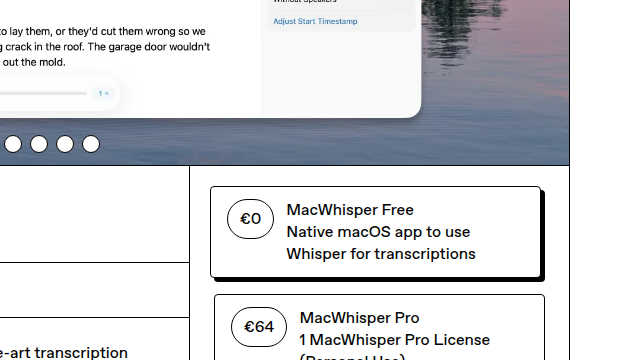 The MacWhisper page, checked July 2, 2026: free tier plus a one-time Pro license at 44 EUR
4. Whisper.cpp Web UI: Fastest Local Option
- Free quota: Unlimited (your hardware)
- Output: TXT, SRT, VTT
- Languages: 99
- Features: Browser-based local interface
- Restrictions: Setup requires compiling C++ binaries
For technical users, whisper.cpp is the fastest local Whisper implementation. Web UIs available open source.
5. ConvertAudioToText: Zero Setup, Instant Start
The only tool on this list you can run without installing anything or creating an account, drop a file (or paste a YouTube/podcast link) and get clean, unwatermarked text in minutes.
- Try instantly: First 30 minutes of any file free, no sign-up, no card (up to 3 files a day)
- Free tier (with account): your first file on the premium engine (up to an hour), then up to 30 files a day, up to 30 minutes each
- Output: Clean TXT, DOCX, SRT, VTT, PDF, all unwatermarked, no hidden metadata (every format free on your first file, then DOCX, PDF, SRT and VTT on paid plans, a minutes top-up or the Weekly Pass; reading, copying and TXT downloads stay free on a free account)
- Languages: 99 languages
- Features: Your first file gets the same premium engine as the paid tier, with speaker labels, timestamps, an AI summary and the 11 use-case templates (interview, podcast, lecture and the rest), on a file up to an hour long. After that, files up to 30 minutes each stay free, and the AI features come with paid plans
- No watermark on any export format; reading, copying and TXT downloads are free on a free account, and DOCX, PDF, SRT, VTT and JSON downloads after the first file need the Weekly Pass, a minutes top-up or a paid plan.
Its free account allows more files than TurboScribe's daily quota (30 a day against 3), but only TXT downloads stay free after the first file. Where it wins is friction: no install, no account, structured output in minutes. Try it free.
Tools That Watermark or Restrict Heavily
Watch out for these patterns in "free" tools:
Otter free tier: 300 min/mo, but a 30-minute cap per conversation and only 3 file imports total (ever, not per month). Output is clean and covers 6 languages, but those limits block most real transcription work.
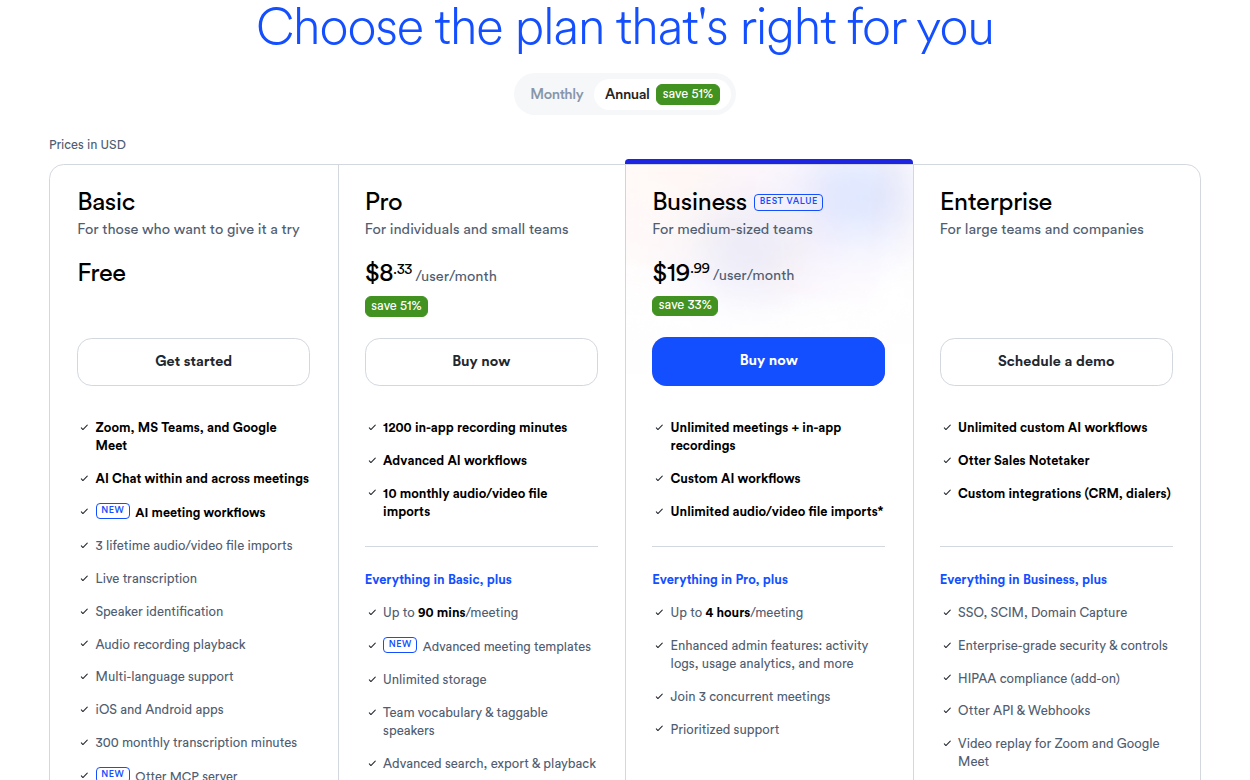 Otter's pricing page, checked July 2, 2026: the free Basic plan's 300 monthly minutes and 3 lifetime file imports are stated in the plan column
Rev free tier: 45 min/mo. Clean output but tight limit.
Happy Scribe: 10-minute trial only. After that, paid.
Random "free" transcription sites: Often add visible branding to exports, require account creation, and silently degrade audio quality. Avoid unless they explicitly state "no watermark" in their feature list.
YouTube auto-captions: Free if you upload to YouTube, but captions are limited to that video on the platform. Not suitable for general transcription.
Comparison Table
| Tool | Free Quota | File Length Cap | AI Features | Languages | Watermark |
|---|---|---|---|---|---|
| TurboScribe Free | 90 min/day | 30 min | None | 90+ | None |
| CATT Free Tier | Up to 30 files a day | 30 min per file | AI summary and templates on first file, then paid | 99 | None |
| Whisper (self-host) | Unlimited | None | None | 99 | None |
| MacWhisper Free | Unlimited | None | None | 99 | None |
| Otter Free | 300 min/mo | 30 min/convo | Generic summary | 6 | None |
| Rev Free | 45 min/mo | None | None | 1 | None |
Picking the Right Free Tool
Free export files: TurboScribe's daily quota (3 files of 30 minutes) comes with free DOCX, SRT and PDF downloads, if splitting files into 30-minute chunks does not bother you. We break down the exact caps, the splitting workaround, and the $10/mo Unlimited math in TurboScribe free plan limits.
Unlimited and private: self-hosted Whisper, when the audio cannot leave your machine and a terminal does not scare you.
Zero setup, instant, structured output: ConvertAudioToText. Up to 30 files a day on a free account, and the only one that goes from link to publish-ready transcript with no account and no install.
Maximum raw volume, OK with plain transcripts: self-hosted Whisper, or a free CATT account (up to 30 files a day, copy and TXT free), if you transcribe hours a day and don't need templates or summaries. If you need free DOCX, SRT or PDF files, pick TurboScribe's free tier.
If what you actually want is to avoid a recurring plan rather than avoid paying at all, we compare pay-once and no-subscription options separately in transcription without a subscription.
Privacy-critical (audio can't leave your machine): Self-hosted Whisper.
Mac user wanting a local GUI: MacWhisper free tier (with the option to upgrade to Pro for the Large model).
Meeting-heavy, calendar-driven: Otter free tier, within the caps shown above.
Practical Tips for Free Tier Users
Keep your file sizes reasonable. Free tiers often have file size limits (100-500 MB). Compress with ffmpeg if needed:
ffmpeg -i audio.wav -c:a libmp3lame -b:a 96k smaller.mp3
This typically reduces size by 80% with negligible accuracy loss.
Pick the right language manually. Free tiers usually have auto-detect, but specifying the language adds 2-5 accuracy points. Especially for Spanish, French, or Arabic content.
Use the right template if available. On CATT the 11 templates and the AI summary unlock on your first file (on the premium engine) and on paid plans. Pick the template matching your content type for better output.
Split long files for TurboScribe. The 30-min cap on free tier means a 90-min file needs to be split into 3 chunks. Use Audacity or ffmpeg:
ffmpeg -i long.mp3 -f segment -segment_time 1800 -c copy part_%03d.mp3
Combine free tiers strategically. Use a free CATT account for bulk files you only need as text, TurboScribe for files you need as free DOCX, SRT or PDF exports, and self-hosted Whisper for unlimited overflow. Total cost: $0.
When Free Tools Are Not Enough
Free tiers cap volume. If you transcribe 50+ hours per month, you outgrow free.
The cheapest paid step up is usually $9.99-$10/mo for unlimited transcription:
- ConvertAudioToText at $14.99/mo with 11 AI templates
- TurboScribe at $10/mo annual for raw unlimited
For sales-team or meeting-heavy workflows:
- Otter at $8.33/seat annual
- Fireflies at $10/seat annual
See pricing for CATT details.
When Watermarked Tools Are Actually Acceptable
A few cases where watermarks do not matter:
Personal note-taking. If transcripts are for your own reference, the watermark is invisible to you.
Internal documents. Company docs that never leave your organization can carry watermarks without issue.
Sketches and drafts. Initial transcripts for personal review before manual rewriting.
For anything published, shared with clients, or attached to your professional name, clean output matters. Stick with one of the tools above.
Frequently Asked Questions
Is free Whisper as good as paid services?
Yes. The Whisper Large-v3 model that powers most commercial transcription tools is the same open-source model you can run for free. The differences between free self-hosted Whisper and paid services are UX, integrations, and supplementary AI features, not transcription accuracy.
Are free tools really free, or just trial?
Some are real free tiers (CATT, TurboScribe, Otter, Rev). Some are trials (Happy Scribe 10-min). Read the fine print. "Trial" usually means time-limited; "free tier" usually means quota-limited.
Will free tools watermark my SRT exports?
Among the tools listed above, no. CATT, TurboScribe, MacWhisper, and self-hosted Whisper all produce clean, unwatermarked SRT/VTT output. On CATT, free-tier users can copy transcript text; TXT downloads are free, and SRT/VTT downloads come with your first file, the Weekly Pass, a top-up or a paid plan. Verify before publishing by opening exported files in a text editor.
Can I use free tools for commercial content?
Yes, for the tools listed above. CATT, TurboScribe, and self-hosted Whisper all permit commercial use of transcripts. Check the terms of service of each tool to confirm; most free tiers from reputable services allow commercial use.
What's the most generous free tier?
Self-hosted Whisper by unlimited use (but requires technical setup). Among hosted tools, CATT by file count: up to 30 files a day, up to 30 minutes each on a free account, plus the premium engine and an AI summary on your first file. TurboScribe by free export files: 3 x 30 minutes a day with free DOCX, SRT and PDF downloads.
Try transcription free
Convert any audio or video to clean, unwatermarked text — speaker labels, timestamps, and AI summaries included. First 30 minutes free, no account.
Related Articles
Otter Free Plan Limits 2026: 30 Minutes per Recording
Otter's free plan stops each recording at 30 minutes and allows 300 minutes a month and 3 file imports ever. Pro allows 90 minutes, Business 4 hours.
How to Get a Spotify Podcast Transcript Free (2026): Every Method, Honestly Compared
Spotify already shows free transcripts for many episodes, so start there. When it doesn't, here is every real way to get a Spotify podcast transcript free, including the limits of each, and when a paid tool is honestly the answer.