
Video to Text: Transcribe Video to Text Online, Free
Upload a video or paste its link and get the transcript
No account? The first 30 minutes of any file are free. Create a free account for premium on your first file.
To turn a video into text, upload the file or paste its link here. We pull the audio out of the video and transcribe it into a timestamped transcript, which a free account can copy or download. The first 30 minutes are free with no signup, and a 29-minute video typically takes 33 seconds.
Last updated · How we measure speed and accuracy
Why use Video to Text?
Any Video Format
Upload MP4, MOV, WebM, AVI, MKV, and more, or paste a link. We extract the audio and transcribe it automatically.
Timestamped Output
Get precise timestamps for every sentence, perfect for creating subtitles or navigating long videos.
Speaker Labels
See who said what in interviews, meetings and panels. Speaker labels come with paid plans and passes.
Subtitle Ready
Export directly as SRT or VTT subtitle files, ready to upload to YouTube, Vimeo, or any video platform.
How it works
Upload Your Video
Drag and drop your video file or click to browse, or paste a video link. We support MP4, MOV, WebM, AVI, MKV, and more.
Audio Extraction & Transcription
We automatically extract the audio track from your video and run it through our AI transcription engine.
Download Your Transcript
Get your text with timestamps. Download TXT free, or SRT and VTT subtitles with paid plans, the Weekly Pass or your first file.
How to transcribe a video to text
Transcribe a video to text in four steps
- Upload the video file (MP4, MOV, WebM, AVI, MKV, WMV or FLV), or press Paste a URL and paste a YouTube, Vimeo, Loom or Google Drive address. You do not need to convert the video to audio first.
- Leave the language on automatic detection, or pick the spoken language for the most reliable result.
- Read the transcript on screen: each line starts with the time it was said in the video.
- Copy the text, or download it. TXT is free with a free account; Word, PDF, SRT and VTT come with your first file, the Weekly Pass, a minutes top-up or a paid plan.
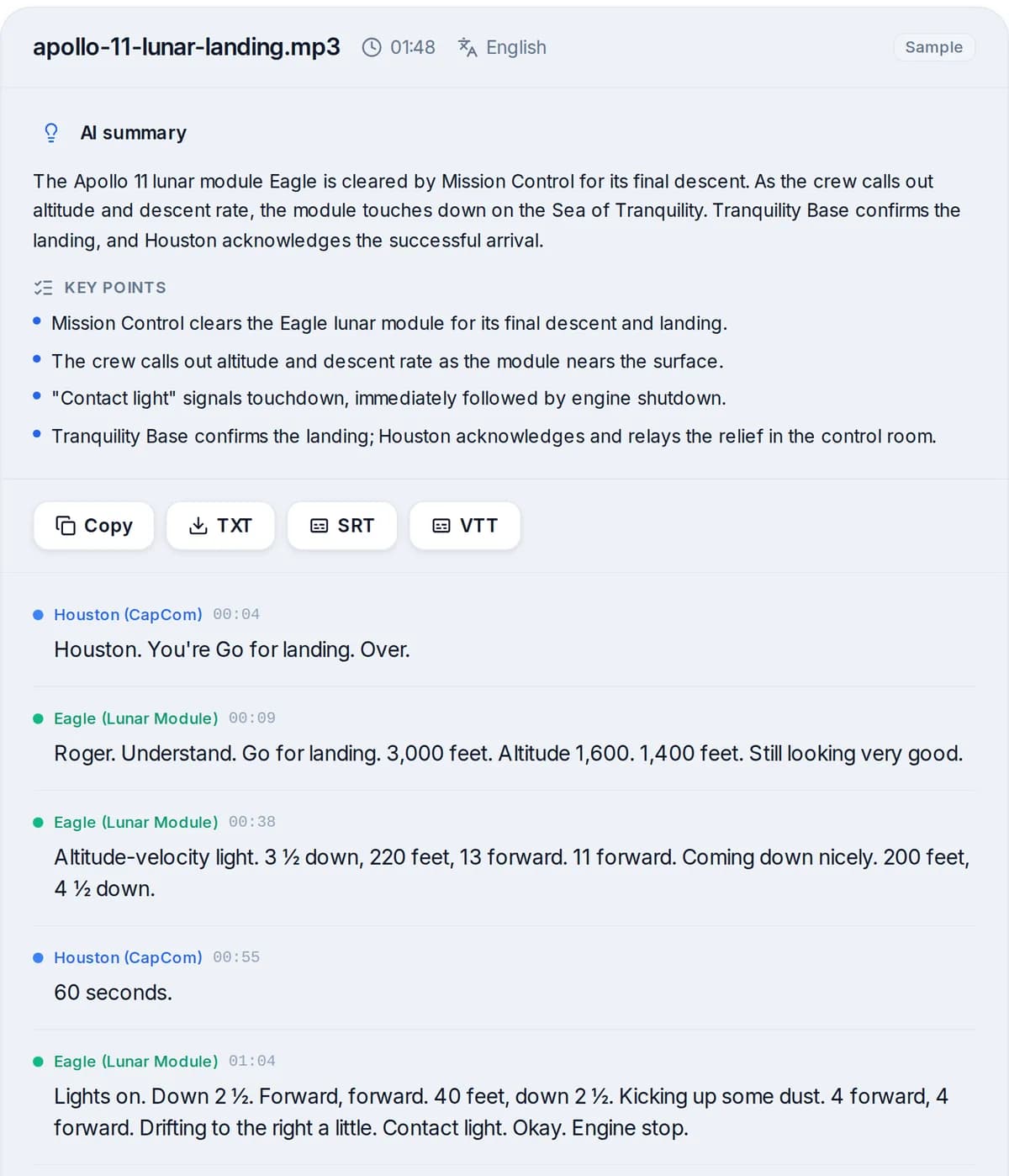
What the finished transcript looks like
A real result from our premium engine, on a public-domain NASA recording.
How fast and how accurate: our measured numbers
A 29-minute video typically finishes in 33 seconds.
Wait times below are from upload to finished transcript, for files on our premium engine between September 20, 2026 to October 19, 2026. We publish the slow end too: 9 in 10 files finished within the time in the fourth column.
| File length | Typical file | Median wait | 9 in 10 done within | Files measured |
|---|---|---|---|---|
| Under 10 minutes | 3 min | 13 seconds | 49 seconds | 1,093 |
| 10 to 60 minutes | 29 min | 33 seconds | 2 min 19 s | 2,016 |
| 1 to 3 hours | 61 min | 2 min 10 s | 6 min 45 s | 226 |
Word error rate by language
About 1 word in 20 needs a fix in English (4.8% word error rate).
Word error rate is the share of words a transcript gets wrong. These come from public test sets of read speech, run on October 20, 2026. Clean recordings do better than the average video; noisy ones do worse. Hindi and Arabic are clearly weaker, so check those transcripts closely.
| Language (test set) | Premium engine | Standard engine |
|---|---|---|
| English | 4.8% | 6.6% |
| Spanish | 2.2% | 2.6% |
| French | 2.8% | 4.7% |
| German | 2.9% | 5.0% |
| Portuguese | 2.8% | 4.0% |
| Hindi | 21.7% | 31.4% |
| Arabic | 17.1% | 17.6% |
Free limits, stated plainly
| No account | Free account | Paid plan or pass | |
|---|---|---|---|
| Video upload size | 100 MB | 1 GB | 5 GB |
| Minutes transcribed per video | First 30 | Up to 30 (first file up to 60) | The whole video |
| Video links | Up to 3 hours long | Up to 3 hours long | Up to 24 hours long |
| Speaker labels | No | No | Yes |
| Copy and download | Read on screen | Copy, TXT (first file: every format) | TXT, Word, PDF, SRT, VTT, JSON |
To remember: a phone video over 100 MB needs a free account, or paste its link if it is online.
Video to transcript, subtitles or notes: pick the output
| You want | Use | Export |
|---|---|---|
| A readable transcript of the video | This page | TXT, Word or PDF |
| Subtitles or closed captions | Subtitle Generator | SRT or VTT |
| The words burned into the picture | Add Subtitles to Video | A new MP4 |
| A summary or key points | Video Summarizer | Text |
| The text in another language | Translate Video | TXT, SRT or VTT |
Subtitle GeneratorAdd Subtitles to VideoVideo SummarizerTranslate Video
Other ways to get text from a video
| Method | Good for | Watch out for |
|---|---|---|
| Upload or paste the link here | Any video file or public link, any of 99+ languages | Free files stop at 30 minutes without an account |
| YouTube's own transcript panel | Reading along on YouTube | Only videos with captions; copying loses the structure |
| Typing it yourself | Very short clips | Several hours of typing per hour of video |
| Your phone's voice typing | Dictating notes | Does not take a video file; you would replay the audio into the microphone |
YouTube Transcript GeneratorHow to convert video to text: every method
Accuracy, and where it drops
Clear speech close to the microphone transcribes best. Music under the voice, several people talking at once, strong background noise and unusual names cause most of the errors, so read the transcript and fix what matters before you publish it.
When speakers overlap, pick the spoken language instead of automatic detection and upload the best-quality copy of the video you have: a re-encoded or screen-recorded copy loses detail in the audio.
Frequently asked questions
We support all major video formats including MP4, MOV, WebM, AVI, MKV, WMV, and FLV, plus links to YouTube, Vimeo, Loom and Google Drive videos. The first 30 minutes of any video are transcribed for free.
Yes. After transcription you can export the transcript as SRT or VTT subtitle files, ready to upload to any video platform. Subtitle exports come with your first file, the Weekly Pass, a minutes top-up or a paid plan.
Without an account, the first 30 minutes of any video are transcribed free: uploads up to 100 MB, or a link to a video up to 3 hours long. A free account takes uploads up to 1 GB and files up to 30 minutes each, and your first file can run up to 60 minutes. Full-length videos come with the Weekly Pass, a minutes top-up or a paid plan.
We extract the audio track from your video file, then run it through our AI transcription engine. The entire process is automatic.
Yes. Paste the YouTube link in the box above instead of uploading a file. Vimeo, Loom and Google Drive links work the same way, and you do not need to download the video first.
On a public English test set our premium engine got 4.8% of words wrong, about 1 word in 20, measured on October 20, 2026. Real videos vary: music under the voice, people talking over each other and heavy accents add errors, so read the transcript before you publish it.
Usually less than a minute. For files between 10 and 60 minutes long on our premium engine, the median wait from upload to finished transcript was 33 seconds (2,016 files, September 20, 2026 to October 19, 2026).
Yes. Fix any word in the editor while you listen, then copy the text or download it. TXT is free with a free account; Word (DOCX), PDF, SRT and VTT come with your first file, the Weekly Pass, a minutes top-up or a paid plan.
TXT if you want to read, quote or paste the words. SRT or VTT if the text goes back onto the video as subtitles, because they keep the timing of every line. JSON if you are a developer and need word-level timestamps.
Related tools
Video to SRT
Upload a video or paste a link and download SRT subtitles
MP4 to SRT
Upload an MP4 and download an SRT subtitle file that matches it
Audio to Text
Turn any audio file into text in minutes
Link to Text Converter
Paste a link to an article, video, podcast, public Google Doc or PDF and get editable text

YouTube Video Summarizer
Paste a YouTube link and get an AI summary and the full transcript in minutes

Facebook Video Transcript Generator
Paste a public Facebook video or Reel link and get the transcript. The first 30 minutes are free, no account needed.
Video to MP3
Pull the sound out of any video as an MP3. No account, no ad before the download.