 YouTube Transcript
YouTube Transcript Generator: Free, No Signup
Paste a YouTube link, get the full transcript
Only use links you have the right to use, and follow the source site's terms.
No account? The first 30 minutes of any file are free. Create a free account for premium on your first file.
Watching on YouTube? Add Transcript Panel for YouTube to Chrome
 Spotify
 Apple PodcastsYouTube
 TikTokVimeoLoomGoogle DriveDropbox
Transcribe & summarize in 99+ languages
 English
 Español
 Français
 Português
 Deutsch
 日本語
日本語 Italiano
 中文
中文 हिन्दी
 العربية+89 more
Built for students, researchers & creators
From lecture recordings to interviews and webinars, turn any video into notes you can search, quote, and share.





- 99%
- Accuracy
- 99+
- Languages
- Anytime
- Cancel, no contract
- Free
- 30 min, no signup
Why use YouTube Transcript Generator?
Just Paste the Link
Drop in any YouTube video URL. We pull the video's audio and transcribe it: no downloads, no browser extensions.
Speaker Labels & Timestamps
Timestamps on every line and a label for each speaker, so you can follow along and pull exact quotes.
AI Summary
Get a concise AI summary of the video alongside the full transcript, ready for notes or video descriptions.
Export & Search
Download as TXT or SRT, copy to your notes, and search every word across the video.
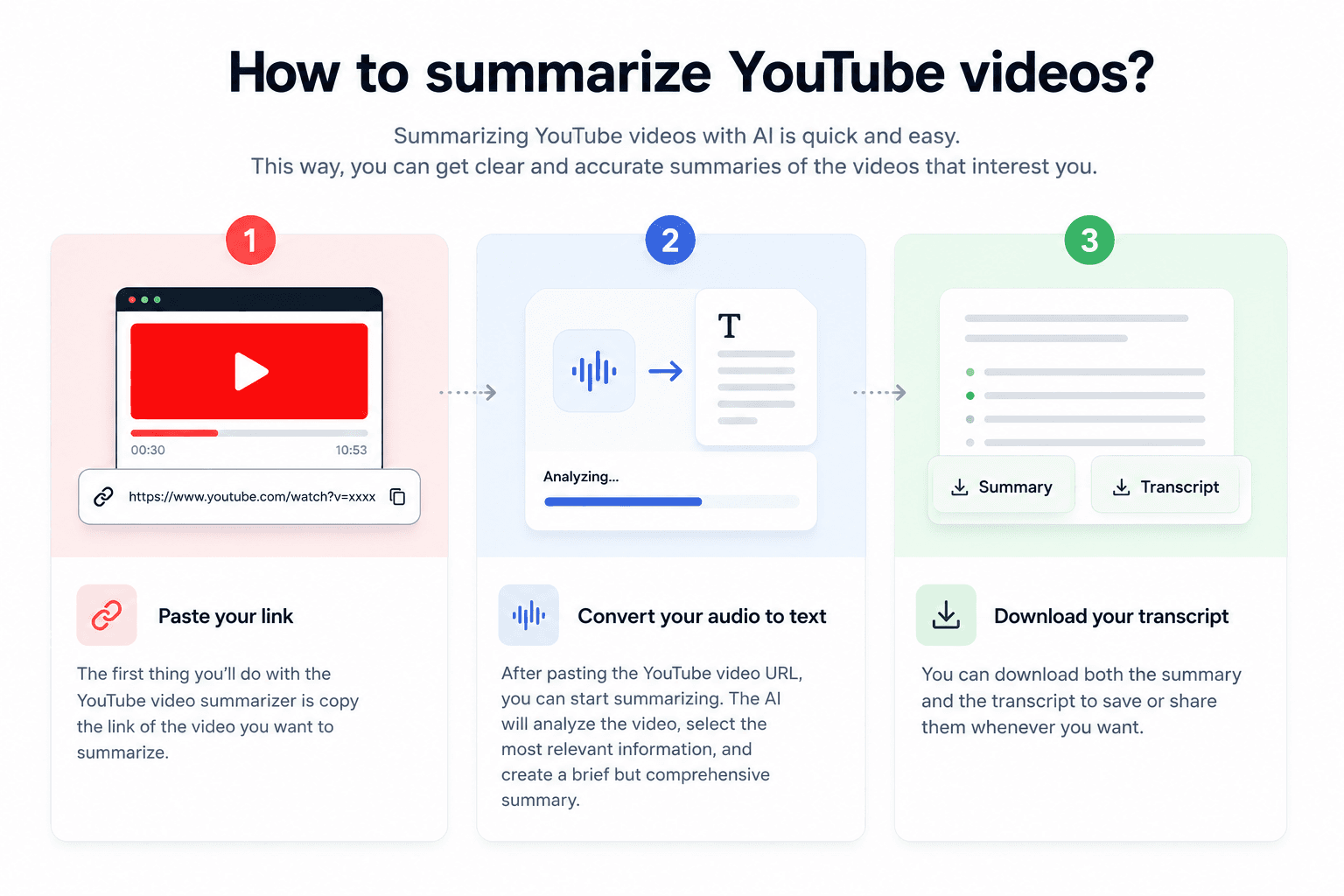
How it works
Paste the YouTube Link
Copy a video link from YouTube (Share -> Copy) and paste it in.
We Fetch & Transcribe
We pull the video's audio and transcribe it with speaker labels and timestamps.
Read, Summarize, Export
Read the full transcript, grab the AI summary, and export to TXT or SRT.
YouTube to text: what you get and how
How to get the transcript of a YouTube video
Copy the video link, paste it above and press Get Transcript.
Watch links, youtu.be short links and Shorts links all work. A playlist link points at many videos, so open the video you want and copy its own link.
- On a phone, tap Share under the video, then Copy link. On a computer, copy the address from the browser bar.
- Paste the link in the box at the top of this page and press Get Transcript.
- Read the transcript with timestamps, search it, and copy the parts you need.
To remember: only public and unlisted videos can be fetched. Private, members-only and age-restricted videos return a clear message instead of a transcript.
What each access level includes
| Access | Length | What you can do with the text |
|---|---|---|
| No account | First 30 minutes of a video, up to 3 videos a day | Read and search |
| Free account | Up to 30 files a day, up to 30 minutes each, on the premium engine; your first file up to an hour | Copy, TXT download and speaker labels, plus the AI summary and every format on the first file |
| Weekly Pass | 1,200 premium minutes for 7 days | Speaker labels, AI summary and every format |
| Paid plan | Full-length videos | Speaker labels, AI summary and every format |
YouTube's own transcript panel versus this one
Many videos have a transcript panel on YouTube, built from the uploader's captions or from automatic captions. It is fine for a quick look, but you scroll and copy it from a side panel, it has no speaker names, and some videos have no captions at all.
Here you get the whole text on one page with timestamps, ready to copy, and to download as a file on the plans that include files. A video with no captions still works, because we transcribe its audio.
My take: if you only need one line, YouTube's panel is enough. If you need the whole talk as text you can search, quote or reuse, paste the link here.
What people do with a YouTube transcript
- Study notes from a lecture or a tutorial, searchable later
- Exact quotes from an interview, with the time they were said
- A first draft of a blog post or a newsletter from your own video
- Subtitles for your own uploads, from the SRT file on eligible plans
- Text to paste into a translator when the video is in another language
To remember: automatic transcripts still need a review. Check names and technical terms before you quote a video.
Want the key points only? YouTube video summarizerSave the audio as an MP3: YouTube to MP3Step by step: how to transcribe a YouTube videoPaste a link from any platform: URL to text
YouTube Transcript Generator vs typing it out by hand
Why upload-and-go beats manual transcription every time.
| Capability | CATT | Manual transcription |
|---|---|---|
| Time to first draft | Minutes per file | 8 to 10 hours per audio hour |
| Accuracy | 99% on clear audio | Depends on the typist |
| Speaker detection | Automatic | Tagged by hand |
| Languages | 99+ supported | Whatever you speak |
| Exports | TXT, DOCX, PDF, SRT, VTT | Whatever you build by hand |
| Cost | Free for the first 30 minutes | Your time, every time |
Weighing transcription services instead? Read the full CATT vs Otter.ai comparison
Simple pricing
Free for files up to 30 minutes, no card needed. Paid plans start at $14.99.
Free
- Every file on our premium engine, with speaker detection and top accuracy
- 30 free transcriptions every day, each up to 30 minutes, and your first file up to an hour with an AI summary
- Free TXT download, plus copy and edit every transcript
Cancel anytime. Try the free plan before you upgrade. See all plans
Frequently asked questions
Copy the video link from YouTube (Share -> Copy), paste it here, and click Get Transcript. We pull the audio and return a full transcript with timestamps, and speaker labels on the premium engine.
It works for any public or unlisted YouTube video. Private or age-restricted videos that can't be accessed return a clear message.
Usually yes. We run dedicated speech-to-text with punctuation, and speaker labels on the premium engine, which is typically cleaner than YouTube's auto-generated captions, especially with multiple speakers.
99 languages with automatic language detection, including English, Spanish, French, German, Portuguese, and Japanese.
No. You can paste a YouTube link and get a transcript without signing up or logging in. Creating a free account keeps your transcript history; longer files come with the Weekly Pass or Pro.
Most videos are transcribed in a fraction of the video's runtime: a 10-minute video typically takes under a minute. Longer videos take a few minutes.
Yes. A free account can copy the transcript text and download it as a TXT file. SRT files come with a free account's first file, the Weekly Pass, a top-up or a paid plan.
Related tools
Video to Text
Extract text from any video file automatically
URL to Text Converter
Paste a link to an article, video, podcast, public Google Doc or PDF and get editable text
Spotify Podcast Transcript Generator
Paste a Spotify episode link and get the transcript. The first 30 minutes are free, no account needed.