
Cost-Optimizing Transcription API Calls: 7 Ranked Levers (2026)
Summarize this article with:
The Levers That Matter
Your transcription bill is low until it suddenly isn't. At $0.0043 per minute (Deepgram Nova-3 pre-recorded, pay-as-you-go), 500 hours of audio costs about $129. At $0.024 per minute (AWS Transcribe standard), the same volume runs $720. The difference is not which vendor you chose at signup, it is whether you applied the right cost levers before volume climbed.
The levers below are ranked by typical impact on a mixed-use production pipeline. Work down the list until the bill is acceptable.
Lever 1: Deduplicate Before You Submit
The highest-leverage tactic is also the most overlooked: never transcribe the same audio twice. On most platforms with user uploads, 20-40% of submissions are re-uploads of files already in the system.
Hash the audio buffer before calling the API, store the hash alongside the transcript, and return the cached result on a hit:
import crypto from 'crypto';

async function getOrTranscribe(audioBuffer) {
  const hash = crypto
    .createHash('sha256')
    .update(audioBuffer)
    .digest('hex');

  const cached = await db.transcripts.findOne({ audio_hash: hash });
  if (cached) return cached.transcript;

  const result = await transcribeAPI(audioBuffer);
  await db.transcripts.insert({ audio_hash: hash, transcript: result });
  return result;
}
On a platform processing 10,000 files per month at Deepgram rates ($0.0043/min, average 5 min per file), a 30% re-upload rate costs $645 per month in avoidable API calls. Caching collapses that to zero. The full pattern with TTL handling is in caching transcription results.
One caveat: cache keys must version correctly. If users can edit and re-upload a revised file, use a content hash (not a filename hash) so the cache invalidates on actual audio changes.
Lever 2: Switch Pricing Model at the Volume Crossover
Per-minute pricing is the right choice at low volume. Above a crossover point, flat-fee or volume tiers win.
Current verified per-minute rates (pay-as-you-go, pre-recorded/batch, as of July 2026):
| Provider | Model | Per-Minute Rate | Per-Hour Rate |
|---|---|---|---|
| Deepgram | Nova-3 Monolingual | $0.0043 | $0.26 |
| AssemblyAI | Universal-2 | $0.0025 | $0.15 |
| AssemblyAI | Universal-3.5 Pro | ~$0.0035 | $0.21 |
| OpenAI | Whisper-1 | $0.006 | $0.36 |
| OpenAI | GPT-4o-mini Transcribe | ~$0.003 | $0.18 |
| AWS Transcribe | Standard (batch) | $0.006 | $0.36 |
| AWS Transcribe | Streaming | $0.010 | $0.60 |
| Google Cloud STT | Dynamic batch | ~$0.003 | $0.18 |
Source: vendor pricing pages, verified July 2026. AWS Transcribe volumes above 250K minutes/month qualify for tier discounts (down to $0.015/min at 250K-1M minutes). AssemblyAI raised in-region model prices 10% on July 1, 2026, adding "model_region": "global" to API requests maintains the prior rate.
The crossover math for CATT Pro (unlimited transcription, $14.99/month): at Deepgram Nova-3 rates, you hit $14.99 at roughly 3,486 minutes, or about 58 hours per month. Above 58 hours per month on Deepgram, the flat-fee model costs less. At AWS Transcribe batch rates ($0.006/min), the crossover is 42 hours per month.
For teams processing 200+ hours per month, the model switch typically saves $200-600/month before touching anything else.
A transcription API comparison for 2026 breaks down the full feature-vs-cost tradeoffs across providers.
Lever 3: Route by Job Type, Not by Default
If you stay on per-minute pricing, use the cheapest model that meets the quality bar for each job type. Routing decisions that save 15-25% on a mixed workload:
function pickModel({ language, durationSec, needsDiarization, isNoisyAudio }) {
  // Fast, cheap: short English clips without diarization
  if (language === 'en' && durationSec < 300 && !needsDiarization) {
    return { provider: 'assemblyai', model: 'universal-2' };  // $0.0025/min
  }
  // Mid-tier: longer English, diarization needed
  if (language === 'en' && !isNoisyAudio) {
    return { provider: 'deepgram', model: 'nova-3' };  // $0.0043/min
  }
  // Premium path: multilingual, noisy, or diarization-heavy
  return { provider: 'assemblyai', model: 'universal-3.5-pro' }; // ~$0.0035/min
}
The routing logic does not need to be complex. Even a two-tier split (short-English vs. everything-else) typically saves 15% on a real workload.
For a deep comparison on two of the highest-value API choices, see Deepgram vs AWS Transcribe.
Lever 4: Prepare Audio Before Sending (Mono, 16 kHz, 64 kbps)
APIs bill by audio duration, not file size. Pre-processing does not reduce billed minutes directly, but it reduces two real costs: bandwidth and multichannel overcharges.
Deepgram charges per audio channel on multichannel files. A stereo file (2 channels) costs twice the per-second rate if you do not collapse it to mono first. If you do not need speaker diarization from multiple microphone tracks, convert to mono:
ffmpeg -i input.wav -ac 1 -ar 16000 -b:a 64k output.mp3
Flags explained:
-ac 1: mono (single channel, halves Deepgram cost on multichannel input)-ar 16000: 16 kHz sample rate (adequate for speech, accepted by all major APIs)-b:a 64k: 64 kbps bitrate (below this, accuracy begins to drop noticeably, do not go lower)
For 1,000 stereo WAV files per month at Deepgram Nova-3 rates, the mono conversion alone saves ~$0.0043/min * average duration, roughly half the per-file cost. On 5-minute average files, that is $21.50 per month just from this flag.
The compression also reduces upload bandwidth. A 100 MB WAV compresses to roughly 10-15 MB MP3 at 64 kbps. At cloud egress of $0.09/GB, 1,000 such conversions saves about $7.65/month in bandwidth, not transformative, but free.
Lever 5: Trim Silence With VAD (With Care)
Silence trimming reduces billed duration because APIs bill on what you send. A 60-minute recording with 8 minutes of silence costs 60 billed minutes. Trimmed, it costs 52.
Voice Activity Detection (VAD) tools like WebRTC VAD, Silero VAD, or ffmpeg's silenceremove filter can strip non-speech segments before upload:
ffmpeg -i input.mp3 -af "silenceremove=start_periods=1:start_silence=0.5:start_threshold=-50dB" output_trimmed.mp3
The important nuance: Deepgram explicitly warns against aggressive VAD on streaming input because removing silence degrades their model's finalization accuracy. On pre-recorded (batch) jobs, trimming is safer, but start conservatively, strip only leading/trailing silence and gaps above 3 seconds, not all pauses. Keep start_threshold high enough (-50 dB) to avoid clipping natural speech.
At $0.0043/min and 1,000 files per month with 10% silence on average, trimming saves roughly $0.86 per 200-minute total reduction. The math is modest per file but scales at volume.
Lever 6: Use Batch Endpoints, Not Streaming Ones
Streaming transcription is consistently 2-4x more expensive than batch for the same model and provider. AWS Transcribe charges $0.006/min for batch and $0.010/min for streaming. AssemblyAI's Universal-3.5 Pro costs $0.21/hr for pre-recorded and $0.45/hr for streaming (per AssemblyAI documentation as of July 2026).
If your workload does not need results in under 30 seconds, use the async/batch endpoint. Every major provider has one. The API pattern is submit-then-poll:
// Submit
const { id } = await client.transcripts.submit({ audio_url: url });

// Poll until done (or use a webhook)
let transcript;
while (!transcript) {
  const result = await client.transcripts.get(id);
  if (result.status === 'completed') transcript = result;
  if (result.status === 'error') throw new Error(result.error);
  await sleep(3000);
}
Webhooks eliminate the polling loop and are worth wiring up above 100 jobs/day. See webhook vs polling for transcripts for the tradeoffs.
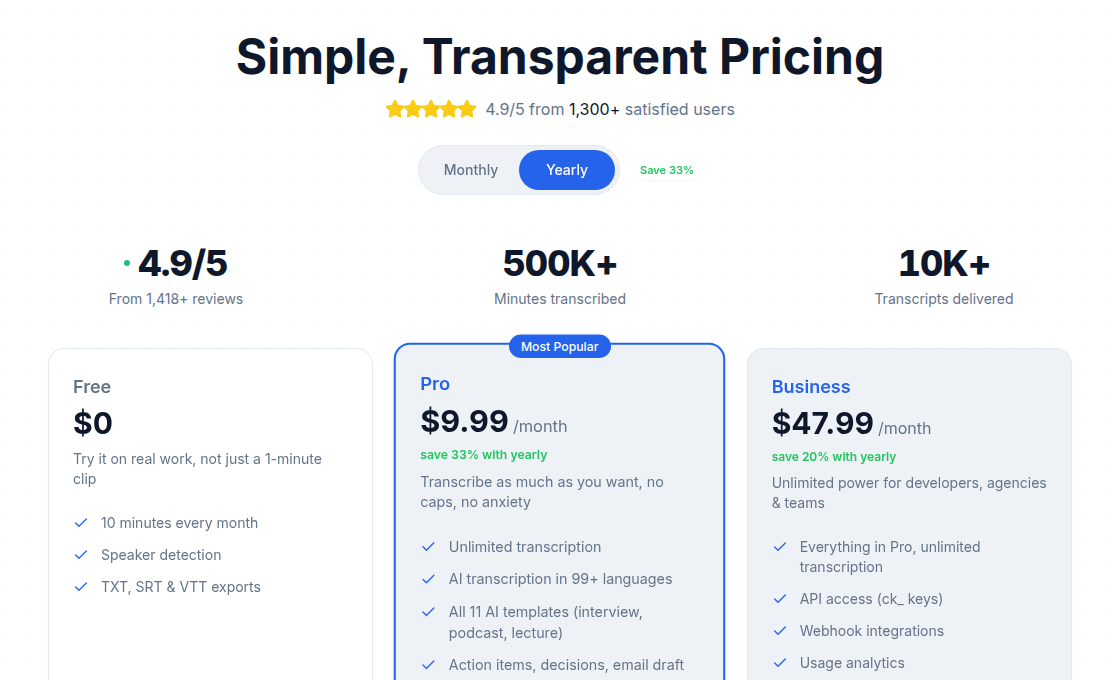 Flat-rate pricing is itself a cost lever worth benchmarking against
Lever 7: Fix Retry Policies to Avoid Double Billing
Default exponential backoff retries re-submit the entire job on failure. If a transcription job processes 40 minutes of audio and then hits a 5xx at the response step, naive retry logic submits the audio again and bills for 40 more minutes.
The fix is to separate the submit step from the fetch step, then retry only the fetch:
async function transcribeWithRetry(audioUrl) {
  // Submit once
  const { id } = await submitJob({ audio_url: audioUrl });

  // Retry only the result fetch
  for (let attempt = 0; attempt < 5; attempt++) {
    try {
      const result = await fetchResult(id);
      if (result.status === 'completed') return result;
      if (result.status === 'error') throw new Error(result.error);
      await sleep(2 ** attempt * 2000);
    } catch (err) {
      if (attempt === 4) throw err;
    }
  }
}
This pattern retries the cheap status check, not the expensive transcription job. On high-volume pipelines with occasional network instability, it prevents a class of double-billing that is invisible in normal monitoring.
Putting It Together: A Practical Optimization Sequence
- Audit last month's invoice. Pull the total minutes billed and the cost. Divide cost by minutes to confirm your effective per-minute rate.
- Enable dedup caching immediately. No vendor changes required. This typically shows 20-40% reduction on platforms with user uploads.
- Check your volume crossover. If you exceed 50-60 hours per month, compare a flat-fee plan against your current per-minute total.
- Convert to mono before upload. One FFmpeg flag, zero API changes.
- Switch streaming calls to batch wherever result latency can tolerate a few seconds of delay.
- Add model routing if you process a mix of short English and multilingual or long-form audio.
- Audit retry policies. Make sure failed jobs do not re-submit the audio.
My take: most teams get 60-70% of the available savings from just levers 1 and 2. The audio prep and routing work is real but yields diminishing returns unless you are processing hundreds of hours per month.
If you build for developers and need API access alongside unlimited transcription, ConvertAudioToText's Business plan ($59.99/month) includes API keys, webhooks, and usage analytics, a different model than per-minute billing worth evaluating at high volume.
Watch Out For
Premature optimization. Below 30 hours per month, transcription cost is rounding error at any provider. Spend the engineering hours elsewhere.
Bitrate floors. Dropping bitrate below 64 kbps causes audible quality loss and measurable accuracy drops on AI transcription. The bandwidth savings are not worth the accuracy degradation.
Stale cache hits. If users can re-record or replace a file while keeping the same filename, a filename-based cache key will serve the old transcript. Always hash the audio content, not the file metadata.
Multichannel accounting. If your current workflow sends stereo files to Deepgram and you were not aware of per-channel billing, check your invoice for channel counts. The savings from switching to mono can be immediate and significant.
FAQ
Does Deepgram charge for silence in audio files?
Deepgram bills on the total duration of audio you send, not just speech segments. It does not round up to the nearest minute, billing is per second. Silence in the file is billed, which is why trimming leading and trailing silence before uploading reduces your invoice. However, Deepgram's Nova-3 model includes internal voice activity detection that suppresses false-positive transcription of silent sections, so you are paying for silence but not getting hallucinated text from it.
Is batch transcription cheaper than streaming for the same provider?
Yes, consistently. AWS Transcribe charges $0.006/min for batch versus $0.010/min for streaming. AssemblyAI's Universal-3.5 Pro costs $0.21/hr for pre-recorded and $0.45/hr for streaming. If your use case can tolerate async results (meeting transcriptions, podcast episodes, uploaded recordings), always use the batch endpoint.
When does converting to mono audio actually reduce API costs?
On Deepgram specifically, multichannel audio is billed per channel. A two-channel stereo file costs twice the per-minute rate. Converting to mono before upload halves that cost when you do not need separate per-channel transcripts for diarization. Most other providers (AssemblyAI, AWS Transcribe, OpenAI Whisper) bill on audio duration regardless of channel count, so mono conversion there saves bandwidth but not API cost directly.
What is the cheapest transcription API option available in 2026?
On pure per-minute cost for pre-recorded audio, AssemblyAI Universal-2 ($0.0025/min) and Google Cloud STT dynamic batch (~$0.003/min) are among the lowest verified rates for high-accuracy models. OpenAI's GPT-4o-mini Transcribe runs ~$0.003/min. These rates do not include add-on features like diarization or sentiment. At high enough volume, flat-fee models beat all per-minute options regardless of rate, see the crossover math in Lever 2 above.
Can you really save 40-70% by combining these tactics?
The range is realistic for a specific scenario: a team that is re-transcribing duplicates (lever 1), on a streaming endpoint that could be batch (lever 6), sending stereo audio with silence (levers 4 and 5), and on a per-minute plan above the flat-fee crossover (lever 2). Applying all four eliminates the most expensive behaviors simultaneously. A team already on batch with no duplicates and clean mono audio might see 15-25% from the remaining levers. Your baseline matters.
Sources
- Deepgram pricing page (Nova-3 pre-recorded $0.0043/min, streaming $0.0048/min, Growth plan ~20% discount, per-second billing): https://deepgram.com/pricing
- AssemblyAI pricing page (Universal-2 $0.15/hr, Universal-3.5 Pro $0.21/hr pre-recorded vs $0.45/hr streaming, July 2026 in-region price increase, model_region=global workaround): https://www.assemblyai.com/pricing
- AWS Transcribe pricing page (batch $0.006/min, streaming $0.010/min, volume tiers): https://aws.amazon.com/transcribe/pricing/
- OpenAI API pricing (Whisper-1 $0.006/min, GPT-4o-mini Transcribe ~$0.003/min): https://openai.com/api/pricing/
- Google Cloud Speech-to-Text pricing (dynamic batch ~$0.003/min, standard and enhanced models unified): https://cloud.google.com/speech-to-text/pricing
- Deepgram VAD and silence billing discussion: https://github.com/orgs/deepgram/discussions/1216
Try transcription free
Convert any audio or video to clean, unwatermarked text — speaker labels, timestamps, and AI summaries included. First 30 minutes free, no account.
Related Articles
Best Transcription Tools with API Access (2026)
Which transcription SaaS tools actually give you API keys, and on which plan? Verified pricing and plan gates for Descript, Sonix, Fireflies, Happy Scribe, AssemblyAI, and more.

Internal Transcription Tool: Build vs Buy, Then Build
A practical architecture guide for building an internal transcription tool: when to build vs buy, SSO, access control, data retention, and real API integration code.