
How to Transcribe a Day-Long Conference (8+ Hours of Audio)
Summarize this article with:
A full conference day can produce 8 to 32+ hours of audio depending on how many tracks run in parallel. The right approach is to split recordings by session before transcribing, not to process a single long file. AI batch transcription handles a 12-session day in well under an hour of wall-clock time, at a fraction of what human services cost. This guide covers the end-to-end workflow: AV handoff, ffmpeg splitting, batch upload, speaker labeling, and same-week publishing.
A full conference day produces roughly 8 hours of recorded audio per track. A two-track event generates 16 hours. A four-track tech conference hits 32 hours in a single day. Multiply by three days and you are looking at anywhere from 24 to 100 hours of audio to process.
Human transcription of 24 hours of audio runs $1,440 to $4,320 at current market rates ($60 to $180 per audio hour, per Ditto Transcripts and SpeakWrite's published 2026 pricing), with multi-day turnaround that almost never fits a same-week publishing schedule. AI batch transcription changes the economics completely: that same volume processes in a few hours of wall-clock time, at a cost of a few dollars to a few hundred dollars depending on the platform you choose.
This is the practical workflow for getting it done.
Split by Session Before You Upload Anything
The most common mistake on conference transcription is treating the day as one long file. Do not concatenate into a single 8-hour recording. Process each session as its own job, in parallel.
Sessions are the natural unit of publication. Each talk has its own speaker, topic, and metadata. Processing them separately lets you tag and publish independently.
Speaker labels are cleaner per session. When you upload an 8-hour file, "Speaker 3" across the whole day might be four different people. Per-session files scope diarization to one talk.
Recovery is surgical. If one session fails, you re-run that one file.
Parallel processing wins on wall-clock time. Eight 60-minute files running in parallel finish in roughly the same elapsed time as one 60-minute file. Most AI services process audio at 3 to 5 times faster than real-time on batch jobs, so a 60-minute session typically completes in 12 to 20 minutes. Eight sessions at once: under 30 minutes total.
The Day-Of Workflow
Step 1: Keep a Session Manifest During the Event
While the event runs, maintain a simple spreadsheet:
| Session | Start | End | Speakers | Room |
|---|---|---|---|---|
| Opening Keynote | 09:00 | 09:50 | Jane Lee | Main |
| Panel: AI in Edu | 10:00 | 10:55 | 4 speakers | Main |
| Workshop: Prompts | 10:00 | 11:30 | Carlos Ruiz | Room B |
This manifest becomes the cut list for splitting the master recording. The AV team usually has something similar already.
Step 2: Get the Master Recording From AV
Most conference AV setups produce one continuous recording per room per day. Common formats are WAV (multitrack), MP3 (compressed continuous), or MP4 (video with embedded audio). Ask the AV team for:
- A continuous WAV or MP3 per room.
- Timestamps in the recording that align with real wall-clock time, so you can map your session list to file offsets.
Step 3: Split Into Per-Session Files With ffmpeg
Use ffmpeg for fast, lossless splits. The -c copy flag skips re-encoding entirely:
ffmpeg -i day1_main.mp3 -ss 09:00:00 -to 09:50:00 -c copy 01_keynote_lee.mp3
ffmpeg -i day1_main.mp3 -ss 10:00:00 -to 10:55:00 -c copy 02_panel_ai_edu.mp3
A full day splits into 8 to 12 files in under a minute. Use a consistent naming convention: {track:02d}_{session-slug}_{speaker-lastname}.mp3. That slug becomes the filename you search for when you are publishing at midnight the day after the conference.
Step 4: Batch Upload
For a single-day event with up to 15 sessions, drop each file into the audio to text tool and submit them in rapid succession. The tool handles concurrent jobs natively.
For multi-day events or multiple simultaneous tracks, a simple shell loop hits the API:
for f in sessions/*.mp3; do
  curl -X POST https://convertaudiototext.com/api/v1/transcribe \
    -H "Authorization: Bearer $API_KEY" \
    -F "source=upload" \
    -F "language=en" \
    -F "file=@$f"
done
Each job fires and returns a job ID immediately. You poll or use webhooks for completion.
If you want to track overnight batch jobs, see the transcribe overnight batch workflow for the webhook setup that notifies you per-file rather than requiring you to poll.
Step 5: Wait Roughly the Length of One Session
In parallel processing, total wall-clock time is bounded by the longest individual job, not the sum. In practice, expect 15 to 30 minutes for a full 8-session conference day, depending on file length and queue load. The AV file handoff almost always takes longer.
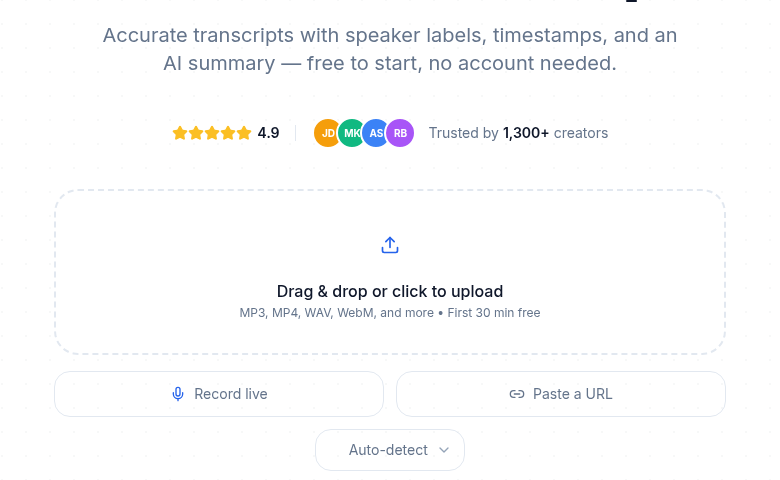 Session by session: batch upload keeps the day organized
Submitting multiple session files in parallel. Each file gets its own job ID and processes independently.
Choosing a Service for Conference Volume
The right tool depends on how often you do this and how many hours you are processing.
| Service | Pricing model | Good for conferences? | File import limit |
|---|---|---|---|
| Sonix | $10/hr pay-as-you-go; subscription from $25/month (5 hrs included) | Yes, built for file-upload batch work | No stated limit |
| Rev | Essentials $25.49/month (annual), 5,000 AI min/seat/month | Yes, high minute cap on annual plans | Unlimited on paid |
| Otter.ai Business | $19.99/user/month (annual), unlimited meetings, 4-hr per-session limit | Meeting-bot oriented; usable for files | Unlimited imports |
| Otter.ai Pro | $8.33/user/month (annual), 1,200 min/month, 10 file imports/month | Small single-track events only | 10/month |
| Trint Advanced | Unlimited files, ~$100+/seat/month (verify current rate at trint.com) | Yes, journalism and media focus | Unlimited |
Per-hour pricing (Sonix) is predictable at conference scale because your cost is directly proportional to audio volume. Minute-capped subscription plans can hit walls mid-conference on large events.
For cost benchmarking across these services, the transcription pricing comparison has current numbers for most major platforms.
What to Do After Transcripts Land
Per-session transcripts unlock several concrete outputs:
Session pages on the conference website. Each session becomes a page with transcript, speaker bio, slides, and video embed. These rank for "session title 2026" queries indefinitely after the conference ends.
Speaker packages. Email each speaker their session transcript. Many turn it into a blog post on their own site, which generates inbound links back to the conference.
Quote cards. Best moments from each session as social images in the week after the event.
Sponsor recaps. Each sponsor of a specific session gets the transcript of "their" session for their own marketing use.
Searchable archive. All sessions across all years in a single search index. This is how a conference becomes a permanent reference instead of a one-week event.
Handling Speaker Labels Across the Day
Day-long conferences with panels produce a lot of speaker labels. Two approaches:
Per-session relabeling. For each transcript, the engine produces labels like "Speaker 1," "Speaker 2." Map them to real names in the editor. This takes 30 to 60 seconds per session. For a 12-session day, that is 6 to 12 minutes of total work.
Pre-enrollment for recurring speakers. If your conference host or keynote moderator appears across multiple sessions, voice enrollment lets the engine label them by name automatically. This is a Pro-tier or API feature on most platforms.
For most events, manual relabeling is faster than setting up enrollment.
Handling the Hard Sessions
Three session types need extra attention:
Workshops with audience Q&A. Many overlapping voices, often off-mic. The transcript text is usually accurate; speaker attribution gets messy. Expect to do a manual pass on speaker turns. See interview transcription for multi-speaker tooling that helps here.
Roundtables in noisy rooms. Background chatter from adjacent tables degrades speaker separation. If your AV setup captures separate mic stems, transcribe each stem as its own file and merge the labeled outputs. Otherwise, transcribing only the moderator's close mic (if available as a separate stem) gives you the clearest text.
Multilingual panels. A panel that mixes two languages mid-sentence is genuinely hard. Most engines pick one language and transcribe the other poorly. The practical fix: split the recording at natural language boundaries and transcribe each segment in the correct language. For panels where translation matters, the audio translation tool handles source-language transcription with translation output.
The Cost Case for AI at Conference Scale
A 30-session, 22-hour conference costs roughly $220 at Sonix's $10/hour rate. The same volume with human transcription would run $1,320 to $3,960 at current market rates, with turnaround measured in days, not hours.
For teams publishing transcripts as part of a content strategy, the math compounds: the AI output published same-week creates a searchable archive that compounds in search value for years. The human transcript delivered three weeks later mostly doesn't.
My take: the real unlock is not just cost but timeline. Same-week publishing is a realistic goal with AI transcription. It is not with human services at this volume.
When This Becomes a Repeatable System
After you do one conference end-to-end, the second one is a system, not a project:
- AV file capture protocol (delivered to a shared folder by end of each day).
- ffmpeg splitting script that reads your session manifest and outputs named per-session files.
- Batch upload loop that submits all sessions in parallel.
- Template for processing each transcript into session-page content.
- Editorial pass to catch proper nouns and verify speaker labels.
- Publish to conference site within five business days of the event.
Manual approaches stop scaling above 30 sessions. For conferences in that range, this system is the only workflow that actually ships on time.
If your next conference is more than a month out, ask the AV team one question now: what file format can you deliver per session, and by what time each evening? That one answer determines 80 percent of the rest of the workflow.
If you want to start without setting up API keys, ConvertAudioToText lets you upload session files directly in the browser with no account required for short files, which is useful for testing the workflow on a few sessions before committing to a full-conference batch setup.
FAQ
How long does it actually take to transcribe a full conference day?
With AI batch transcription, wall-clock time is bounded by the longest individual session, not the sum of all audio. Eight 60-minute sessions running in parallel finish in roughly 15 to 30 minutes total, depending on queue load. A full 30-session day, processed in batches of 10, typically completes in under two hours. The real bottleneck is usually how fast the AV team can deliver split files.
Should I upload one long recording or split it into sessions first?
Always split by session before uploading. A single 8-hour file produces speaker labels like "Speaker 3" that could represent four different people across the day. Per-session files keep speaker labels scoped to one talk, make re-runs surgical if one file fails, and let you publish sessions independently as they finish.
Which transcription services handle large batch conference volumes well?
For batch volume, Sonix ($10/hour pay-as-you-go, or subscription plans from $25/month) and Rev (Essentials at $25.49/month annual for 5,000 AI minutes/month) are built for high throughput. Otter.ai's Business plan removes per-conversation limits and allows unlimited imports, but caps each conversation at 4 hours and is meeting-bot oriented rather than file-upload oriented. For raw file-upload batch work, a per-hour or per-minute service usually beats a meeting-bot subscription.
What do I do about panels with multiple overlapping speakers?
Workshops and roundtables with audience Q&A are the hardest sessions to label cleanly. Expect 10 to 15 percent manual cleanup on speaker turns in noisy multi-speaker rooms. The transcript text is usually accurate; it is attribution that needs a human pass. If your AV setup captures separate mic stems per speaker, transcribe each stem individually and merge the labeled outputs afterward.
Sources
- Otter.ai pricing page: https://otter.ai/pricing (checked 2026-07-02)
- Sonix pricing page: https://sonix.ai/pricing (checked 2026-07-02)
- Rev pricing page: https://www.rev.com/pricing (checked 2026-07-02)
- Ditto Transcripts, human transcription cost guide: https://www.dittotranscripts.com/blog/how-much-do-human-transcription-services-cost/ (checked 2026-07-02)
- Trint pricing (verified via third-party sources, direct page returned 404): https://sonix.ai/resources/trint-pricing/ (checked 2026-07-02)
- AI transcription benchmark and speed data: https://summarizemeeting.com/en/blog/ai-transcription-benchmark-january (checked 2026-07-02)
Try transcription free
Convert any audio or video to clean, unwatermarked text — speaker labels, timestamps, and AI summaries included. First 30 minutes free, no account.
Related Articles

How to Transcribe a Conference Talk (With Q&A)
A workflow for conference talk transcription: handling stage audio, unintelligible audience Q&A, slides sync, and speaker permission etiquette before you publish.
Transcribe a Keynote Fast: Same-Day Publish Workflow
Turn a 45 to 90 minute conference keynote into a published blog post within an hour of walking off stage. AI transcription workflow for speakers and comms teams.