
Transcribe a Keynote Fast: Same-Day Publish Workflow
Summarize this article with:
AI transcription processes a 60-minute keynote in roughly 2 to 5 minutes, making same-day publication realistic. The bottleneck is not transcription speed: it is getting the audio file from the AV team and doing a targeted spot-check on proper nouns and numbers. With the right workflow, a speaker can have a blog post live before evening search traffic peaks.
A 45 to 90 minute conference keynote can be transcribed in under 5 minutes with current AI engines. That makes same-day publishing realistic for any speaker or communications team willing to build a short workflow around it. Here is exactly how to close the gap from "walked off stage" to "blog post live."
The Same-Day Publish Window
You have a narrow window. Search traffic for your name and the talk title peaks within 24 to 48 hours of the event. Journalists checking on what you said want a transcript link, not a promise. Social momentum from the talk itself is highest in the first few hours.
Same-day publishing used to require either pre-writing every word (so the "transcript" was really the script) or paying rush rates for human transcription, which takes four to twelve hours for a 60-minute recording. AI transcription closes this gap in minutes, not hours.
The practical target: audio file in hand, blog post live, within 90 minutes of walking off stage.
What Makes Keynote Audio Tricky
Keynotes have specific challenges that affect accuracy. Knowing them in advance saves cleanup time.
Single dominant speaker is actually an advantage. Speaker diarization is irrelevant when one person speaks for 45 minutes. AI engines are most accurate on continuous monologue, which is exactly what a keynote is.
Microphone distance varies. Lavalier mics drift when presenters move. Handheld mics produce inconsistent levels. Headset mics stay the most consistent. If you have any control over the AV setup before your talk, request a headset or clip-on that stays fixed to your face.
Crowd noise and applause do not break the transcript. A 30-second standing ovation appears as a quiet patch. The engine picks back up cleanly when you start speaking again.
Industry jargon and product names are the real quality issue. According to AssemblyAI's transcription error research, substitutions make up over 80% of all AI transcription errors, and proper nouns are the most vulnerable category. "Kubernetes" can become "cooper natives." Your product name can become a phonetic neighbor. Plan for a targeted spot-check on these, not a full line-by-line edit.
See also: transcription accuracy explained for a deeper look at how error rates are measured and where they hide.
The Workflow
Step 1: Get the File From the AV Team
Most conference AV teams produce a master recording within 30 to 60 minutes of a talk ending. Ask specifically for audio-only if available. A 60-minute WAV at standard CD quality (44.1kHz, 16-bit stereo) is about 600 MB. The same hour as an MP3 at 128kbps is around 60 MB. Either works for transcription.
If you only have the MP4 video file, the video-to-text tool extracts the audio server-side. You do not need to convert locally first.
Ask the AV team this question before your talk, not after: "How quickly after my session can you get me the master audio file, and what format?" That answer, plus 90 minutes, is your actual same-day publish window.
Step 2: Upload and Set the Language Explicitly
For an English keynote, set the language to English rather than leaving it on auto-detect. Auto-detection adds a processing step, and on keynote audio with applause at the start, it occasionally misdetects. Setting the language explicitly locks the engine into the right mode from the first word.
For non-English keynotes, select the source language. If you need a translated version of the transcript, process the original-language file and translate the resulting clean transcript rather than transcribing a simultaneous interpreter track. Interpreter audio loses 10 to 20% of the speaker's phrasing and timing; translating a clean original transcript is more accurate.
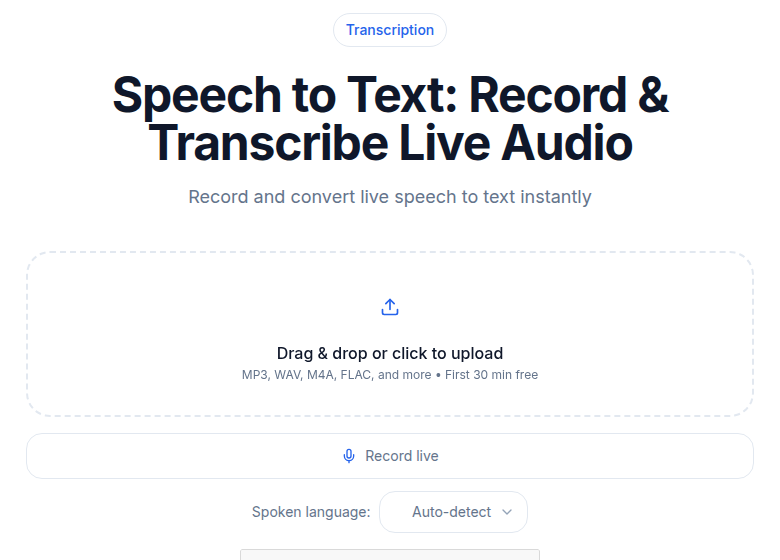 Keynote audio in, quotable transcript out, same afternoon
Step 3: Wait 3 to 8 Minutes
Processing time for a keynote depends on file length, audio quality, and current queue load. Realistic ranges based on current AI processing speeds:
- 45-minute clean single-speaker talk: 2 to 4 minutes
- 60-minute talk plus a Q&A section: 3 to 6 minutes
- 90-minute extended keynote: 4 to 8 minutes
These are honest ranges, not guarantees. Audio quality, server load, and file format all affect actual time. Budget 10 minutes in your workflow so you are not stressed if it runs toward the upper end.
The Q&A portion is where speaker diarization matters. If you had a moderator and four audience questioners, expect multiple speaker labels and some manual cleanup on the transitions between them. See speaker diarization explained for how to read and fix these.
Step 4: Extract the Usable Assets
Once the transcript is ready, you need three outputs for same-day publishing:
The blog post draft. Copy the transcript into your CMS. The transcript is raw material, not the post. You will rewrite the introduction, add subheadings, and cut the verbal filler. Most keynote transcripts need 20 to 30 minutes of editing to become a readable blog post.
Pull quotes for social. A 60-minute keynote yields 6 to 10 quotable lines. Scan the transcript for moments where you made a clear, self-contained claim. These work on LinkedIn as text-only posts (no image needed), on X with a timestamp link if the event uploaded to YouTube, and as graphic cards in your brand template for broader distribution.
A summary for press and the event organizers. A 150 to 200 word abstract drawn from the transcript is useful for journalists who want to cite the talk, for event recap posts by the organizers, and for your own press kit.
No template or additional tool is required for these. The transcript itself is the asset.
Step 5: Spot-Check Before Publishing
Before the post goes live, check four specific things:
Proper nouns and product names. Search the transcript for every company, product, or technology name you mentioned. Phonetic substitutions on proper nouns are the most common AI error on technical content. "Synapse Inc" can become "Synapsing." "GPT-4o" can become "GBT for." This is the one check that always takes the extra five minutes.
Numbers and statistics. AI engines occasionally drop or transpose zeros in financial figures. If your keynote cited a memorable number, verify it. A misquoted statistic in a published blog post is worse than a delayed post.
Quoted external sources. If you read a quote from another person or document on stage, check it against the original. Misattributing a quote in print is a credibility problem.
First 30 and last 30 seconds. These are where applause, music, and emcee introductions can confuse the engine. The rest of the transcript is usually reliable if the audio was clean.
For a 60-minute keynote with typical conference audio quality, this spot-check takes 5 to 10 minutes when you know what to look for.
What to Do With the Pull Quotes
The quotes you extract from the transcript have specific homes:
LinkedIn: Quote as text, talk title in the first line. No image required. LinkedIn's algorithm still favors native text posts over link shares for organic reach.
X (Twitter): Quote plus timestamp link if your event uploaded the session to YouTube. The timestamp link deeplinks to that exact moment in the video, which is more credible than a quote alone.
Graphic cards: Take three of the strongest quotes and set them in your brand template. These work across Instagram, LinkedIn carousels, and the press kit.
Press kit addition: A "selected quotes" sheet alongside the full transcript gives journalists approved soundbites they can pull directly. This reduces the risk of being quoted out of context.
Beyond the Keynote: Panel Discussions
Panel discussions are harder than keynotes. The multi-speaker dynamic means more speaker label errors and more cleanup.
For panels, expect 5 to 10% manual review of speaker assignments. Use settings tuned for multiple speakers rather than single-speaker mode. If you know the moderator's name, label them first in the transcript review; the remaining speakers become easier to sort by topic.
The how to transcribe an interview recording guide covers the multi-speaker workflow in detail, and most of it applies directly to conference panels.
For longer events beyond a single keynote, see transcribing a day-long conference for batch approaches.
Same-Day Workflow Checklist
A condensed version to keep accessible at the venue:
- Get audio file from the AV team (30 to 60 minutes after the talk, usually).
- Upload to the transcription tool, set language explicitly.
- Wait 3 to 8 minutes for the transcript.
- Extract pull quotes, draft blog post intro, write press summary.
- Spot-check proper nouns, numbers, quotes, intro, and outro (5 to 10 minutes).
- Edit blog post from transcript (20 to 30 minutes of actual writing).
- Publish.
Total elapsed time from "audio file received" to "blog post live" is 60 to 90 minutes for someone who has done this before. The first time takes longer because you are making format decisions. Build those into a template before the talk, not after.
My take: the biggest bottleneck in this workflow is not the transcription itself, it is waiting on the AV team's file. Email them before you walk on stage to confirm the delivery path. Everything else can happen in under an hour.
If your team just needs a clean transcript without a meeting bot or complex integrations, ConvertAudioToText handles this without an account required for short files: upload the audio, get the transcript, read it, and sign in free to copy it out.
FAQ
How long does it take to transcribe a 60-minute keynote with AI?
AI transcription currently processes a 60-minute audio file in roughly 2 to 6 minutes, depending on audio quality, server load, and file format. Budget 10 minutes in your workflow to account for variability. The total time from upload to a usable blog post draft, including the spot-check and basic editing, is typically 60 to 90 minutes.
What audio format should I ask the AV team for?
MP3 or M4A at decent quality (128kbps or higher) is practical: a 60-minute session is around 60 to 90 MB, which uploads quickly even on venue wifi. Uncompressed WAV is ideal for quality but runs about 600 MB for 60 minutes, which can be slow to transfer. If the AV team offers WAV, take it; if you are in a hurry, MP3 at 128kbps is fine for transcription.
Will AI transcription handle industry jargon and product names correctly?
Often yes, but this is the area most likely to need manual correction. Proper nouns are the highest-frequency error class in AI transcription: phonetically similar common words substitute for your product names, company names, and technical terms. A targeted search through the transcript for your key terms takes 5 minutes and catches most of these before they reach the published post.
What is the best use of a keynote transcript beyond the blog post?
A keynote transcript is a content multiplier. Beyond the blog post, the most useful derivatives are: a 150 to 200 word abstract for press and event organizers, 6 to 10 pull quotes for social channels, a Q&A summary if you took questions, and a full transcript in your press kit for journalists. These all come from the same source file with no extra transcription step.
Sources
- AssemblyAI, "Handling transcript errors: Homophones, corrections and AI quality improvement": https://www.assemblyai.com/blog/transcription-errors
- BrassTranscripts, "AI Transcription Speed: Real Processing Times": https://brasstranscripts.com/blog/how-long-does-ai-transcription-take-real-processing-times
- Colin Crawley Audio File Size Calculator (WAV size verification): https://www.colincrawley.com/audio-file-size-calculator/
Try transcription free
Convert any audio or video to clean, unwatermarked text — speaker labels, timestamps, and AI summaries included. First 30 minutes free, no account.
Related Articles

Fix Wrong Speaker Labels in Your Transcript (2026 Guide)
Speaker labels wrong after transcription? This diagnosis-led guide covers the five systematic fixes for diarization errors, from label renaming to tool switching and manual repair workflows.

How to Transcribe a Conference Talk (With Q&A)
A workflow for conference talk transcription: handling stage audio, unintelligible audience Q&A, slides sync, and speaker permission etiquette before you publish.