
Transcription as a Service: Build a Niche SaaS in 2026
Summarize this article with:
A vertical transcription SaaS is more defensible than a general one because you compete on workflow, not on who processes audio fastest. This tutorial covers the full service layer: job queue with retries, per-user credit metering, white-label output, and billing. The transcription itself is delegated to an API; your product is everything around it. A solo developer can ship an MVP in one to two weeks targeting a paying niche before the general players notice.
A vertical transcription SaaS is more defensible than a general one. You are not competing with Otter.ai on features. You are competing on workflow output: the court reporter draft, the podcast show notes, the sales call scorecard. The transcription API is the engine; the niche is the product.
This tutorial builds the service layer: the queue, retries, cost metering, white-label output, and billing that sit between your users and a transcription API. For the raw API integration call, see building with transcription API. For an org-internal tool instead of a customer-facing product, see building an internal transcription tool.
Step 1: Pick a Niche
Generic transcription is a crowded market. Pick a niche where users pay for the output workflow, not just the text.
Court reporter assistance. A working draft that matches court reporting software input format. Pricing: $99 to $299/month per reporter.
Podcast production. Episode to transcript, show notes, chapter markers, and social pulls in one click. Pricing: $29 to $99/month per show.
Sales call coaching. Transcribed rep calls scored on talk-time ratio, question count, and objection patterns. Pricing: $50 to $150/month per rep seat.
Journalism school workflows. Interview corpora with auto-citation and timecode linking. Pricing: institutional contracts, $5k to $50k/year.
Faith community archives. Weekly sermons published as searchable transcripts with study guides. Pricing: $49 to $199/month per congregation.
The pattern: the transcript is input to a deliverable your specific user already needs. Otter.ai cannot compete with a tool built only for court reporters. Trint (starter plans starting around $80/month, per vendor documentation) cannot compete with a tool built only for broadcast journalists.
Step 2: Design the Service Layer Before Writing Code
The user experience is: upload a file, see "Processing," see a result. The service layer between those states is where complexity lives.
User browser
    |
Your Next.js API route
    |
Credit check (abort if insufficient)
    |
Upload to your S3/R2
    |
Enqueue job (Redis/BullMQ)
    |
Worker process
    |  -> Call transcription API
    |  -> Retry on failure (exponential backoff)
    |  -> Format niche output
    |  -> Write result to DB
    |
Webhook or polling updates your UI
This async design is load-bearing. Transcription takes 10 to 60 seconds. Blocking an HTTP request that long makes your service fragile and breaks load balancers. Enqueue and return a job ID immediately.
Step 3: The Job Queue
BullMQ backed by Redis is the standard Node.js choice for this pattern. It handles retries, exponential backoff, dead-letter queues, and horizontal worker scaling out of the box.
import { Queue, Worker } from 'bullmq';

const transcriptionQueue = new Queue('transcription', {
  connection: { url: process.env.REDIS_URL }
});

// Enqueue from your API route
export async function enqueueJob(userId, audioUrl, options) {
  const job = await transcriptionQueue.add(
    'transcribe',
    { userId, audioUrl, options },
    {
      attempts: 3,
      backoff: { type: 'exponential', delay: 2000 },
      removeOnComplete: { age: 3600 },
      removeOnFail: false  // keep failed jobs for inspection
    }
  );
  return job.id;
}
Set removeOnComplete aggressively. A queue doing thousands of jobs per day will bloat Redis memory if completed jobs accumulate. Failed jobs should stay until you review and clear them.
Step 4: Credit Metering
Store a minutes_used and minutes_limit column on your user row. Debit atomically at job start, not at job completion, using a database transaction:
async function debitAndEnqueue(userId, estimatedMinutes, audioUrl, options) {
  return await db.transaction(async (trx) => {
    const user = await trx('users')
      .where({ id: userId })
      .forUpdate()
      .first();

    if (user.minutes_used + estimatedMinutes > user.minutes_limit) {
      throw new Error('QUOTA_EXCEEDED');
    }

    await trx('users')
      .where({ id: userId })
      .increment('minutes_used', estimatedMinutes);

    const jobId = await enqueueJob(userId, audioUrl, options);

    await trx('jobs').insert({
      user_id: userId,
      job_id: jobId,
      debited_minutes: estimatedMinutes,
      status: 'queued',
      created_at: new Date()
    });

    return jobId;
  });
}
If the job later fails, refund the debited minutes in the failure handler. If you cannot get an accurate duration before transcription, use a conservative estimate (file size divided by an average bitrate), then reconcile against actual transcript duration on completion.
Step 5: The Transcription Worker
Your worker calls the transcription API, handles failures, and writes results to your database. Users never see the upstream provider:
const worker = new Worker('transcription', async (job) => {
  const { userId, audioUrl, options } = job.data;

  await updateJobStatus(job.id, 'processing');

  const response = await fetch('https://api.convertaudiototext.com/v1/transcribe', {
    method: 'POST',
    headers: {
      'Authorization': `Bearer ${process.env.CATT_API_KEY}`,
      'Content-Type': 'application/json'
    },
    body: JSON.stringify({ input_url: audioUrl, language: options.language || 'en' })
  });

  if (!response.ok) {
    throw new Error(`Transcription API error: ${response.status}`);
  }

  const result = await response.json();

  // Store raw result for reprocessing
  await db('transcripts').insert({
    job_id: job.id,
    user_id: userId,
    full_text: result.transcript,
    metadata: JSON.stringify(result),
    created_at: new Date()
  });

  // Run niche output layer
  const nicheOutput = await generateNicheOutput(userId, result, options.niche);

  await db('jobs').where({ job_id: job.id }).update({
    status: 'completed',
    niche_output: JSON.stringify(nicheOutput)
  });

}, { connection: { url: process.env.REDIS_URL } });

worker.on('failed', async (job, err) => {
  await refundUserMinutes(job.data.userId, job.data.estimatedMinutes);
  await updateJobStatus(job.id, 'failed', err.message);
});
BullMQ will retry three times with 2s, 4s, and 8s delays before calling the failed handler. The failed handler is your one place for refunds and user notification.
Step 6: Authentication and Billing
For most SaaS the standard stack works:
- Auth: Stack Auth, Clerk, or Supabase Auth. Magic links plus OAuth.
- Billing: Stripe Checkout for plan signup, Stripe Customer Portal for self-service.
Use a hosted billing service. Building billing from scratch is the most common way to introduce chargeback vulnerabilities and audit gaps.
A minimal Stripe subscription setup:
import Stripe from 'stripe';
const stripe = new Stripe(process.env.STRIPE_SECRET);

app.post('/api/checkout', requireAuth, async (req, res) => {
  const session = await stripe.checkout.sessions.create({
    payment_method_types: ['card'],
    line_items: [{ price: req.body.priceId, quantity: 1 }],
    mode: 'subscription',
    success_url: `${process.env.APP_URL}/dashboard?paid=true`,
    cancel_url: `${process.env.APP_URL}/pricing`,
    customer_email: req.user.email,
    client_reference_id: req.user.id
  });
  res.json({ url: session.url });
});

app.post('/webhooks/stripe', express.raw({ type: 'application/json' }), async (req, res) => {
  const event = stripe.webhooks.constructEvent(
    req.body,
    req.header('Stripe-Signature'),
    process.env.STRIPE_WEBHOOK_SECRET
  );

  // Idempotency: skip if already processed
  const exists = await db('processed_stripe_events').where({ event_id: event.id }).first();
  if (exists) return res.sendStatus(200);

  if (event.type === 'customer.subscription.updated') {
    await updateUserSubscription(event.data.object);
    await db('processed_stripe_events').insert({ event_id: event.id });
  }

  res.sendStatus(200);
});
Stripe delivers webhooks at least once: the same event can arrive multiple times during a retry storm. Store each processed event.id and short-circuit on duplicates before mutating state.
Step 7: White-Label Output
Three surfaces where your brand must be the only brand:
Export files. Format transcripts yourself. Fetch the raw result from the API, run it through your SRT/VTT/TXT formatter, and emit files named after your product's conventions. Do not proxy the API's export URLs to users.
Email notifications. Send "your transcript is ready" from your domain, via your email provider. The API's notification system, if it has one, is not for your users.
Storage. Store uploaded audio in your own S3 or R2 bucket. If a user downloads their original file later, it comes from your domain. The transcription API's storage is internal infrastructure.
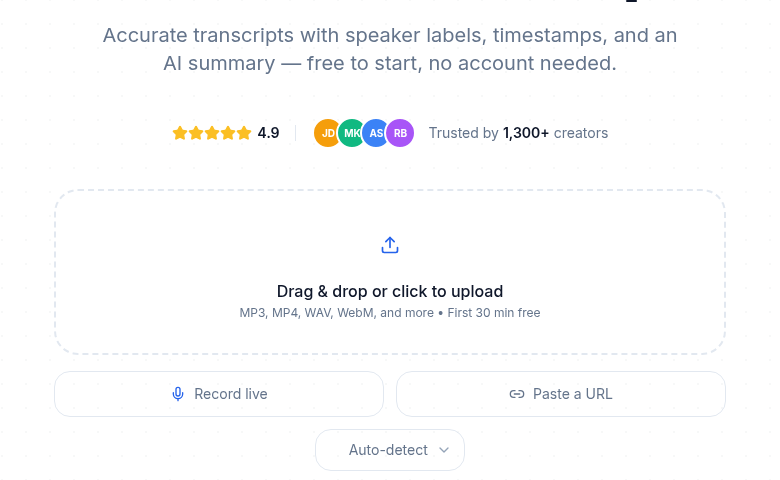 The user-facing end of the service you are building
Done correctly, your users never encounter the name of the underlying transcription provider.
Step 8: The Niche Output Layer
The transcript is the input. The niche-specific deliverable is the product.
Podcasters: Extract chapters by topic shift, write show notes from the summary, pull three social-ready quotes. Deliver as a downloadable Markdown file formatted for the user's CMS.
Journalism schools: Auto-cite extracted quotes with timecodes that deep-link to audio playback. Store the quote corpus searchably so students can search across interviews.
Sales coaches: Compute talk-time ratio (speaker A vs. speaker B word counts per segment), question frequency (sentences ending in "?"), and surface the top three moments by pause length. Display as a rep scorecard.
Court reporters: Format output as RTF matching the input format of court reporting software like Case CATalyst or Eclipse.
The output layer is where you spend most of your custom development time. The transcription problem itself is solved by the API.
What You Are Competing With
The general transcription tools are real competition at the surface level, but thin competition in a specific niche:
| Tool | Audience | Pricing (verified July 2026) |
|---|---|---|
| Otter.ai | Meeting transcription | Free (300 min/mo), Pro $16.99/seat/mo, Business $30/seat/mo |
| Rev | Individuals and teams | Free (45 min/mo), Essentials $25.49/seat/mo (annual) |
| Sonix | High-volume media | $10/hr pay-as-you-go, or $22/user/mo + $5/hr |
| Trint | Newsrooms | Starter ~$80/mo, Advanced pricing on request |
Your niche tool does not need to beat Otter on meeting features. It needs to beat Otter at producing a court reporter draft, a podcast episode package, or a journalism citation corpus, none of which Otter even tries to do.
For deeper API-level cost comparisons, see speech to text API pricing in 2026 and transcription pricing models explained.
Pricing Model for Your SaaS
Three patterns that work:
Per-seat monthly. $29 to $99/month per active user. Works for team tools: sales, journalism, podcasting.
Per-volume monthly. A fixed amount per month for a set number of hours. Works for hobbyists and small-business tiers where usage is predictable.
Institutional annual. $5k to $50k/year flat for an organization. Works for schools, congregations, and law firms where individual seat pricing creates budget friction.
My take: start with per-seat monthly because it is easiest to explain and creates a natural upsell path. Add institutional pricing once you have three users from the same organization asking to consolidate billing.
The unit economics work in your favor at small scale. If you run the API backend on the CATT Business plan ($59.99/month, which includes API access and webhooks), and charge ten niche users $49/month each, you collect $490/month against roughly $50 in infrastructure. The marginal cost of the eleventh user is essentially zero on the transcription side.
What to Build First
An MVP in priority order:
- Auth (signup, login, email verification).
- File upload to your S3 or R2 bucket.
- Debit-and-enqueue function with a basic minutes ledger.
- BullMQ worker calling the transcription API.
- Job status polling endpoint (or a webhook to your frontend).
- Transcript viewer page.
- One niche-specific output (pick the simplest one first).
- Stripe Checkout for one plan.
That is one to two weeks of focused development. Ship it. Get five users. Iterate based on real usage before building the second niche output or a second pricing tier.
If you just need clean transcripts without building a whole service layer, ConvertAudioToText does the file-to-text step instantly with no signup required.
Distribution
The product is the easier half.
Niche communities. A podcast tool belongs in podcast subreddits and Discord servers before it belongs anywhere else. A journalism tool pitches journalism professors directly.
Niche SEO. "Best transcription tool for court reporters" is a real query with low competition. Write the content. Rank.
Partnerships. Recording platforms, scheduling tools, and CRM tools with adjacent users. Cross-promote. Offer a referral arrangement.
Direct outreach. For institutional pricing, individual calls to administrators. One signed contract at $10k/year pays for months of development time.
The 1,000 true fans model applies exactly here: 1,000 niche users at $50/month is $600,000 ARR on infrastructure that costs a few hundred dollars per month.
FAQ
Can I resell CATT transcription under my own brand?
Yes. The Business plan gives you API access and webhooks. Your users never see the underlying provider; they interact only with your domain, your brand, and your output files. You control the transcript formatting, export naming, and email notifications.
How do I handle jobs that fail partway through?
Use a dead-letter queue pattern. On first failure, retry with exponential backoff (2s, 4s, 8s). After three failed attempts, move the job to a separate failed queue and alert the user with an honest error message. Log the raw error for debugging. Never silently drop a job.
What is the cheapest way to run this infrastructure?
For an MVP, Vercel handles the Next.js frontend and API routes for free under their hobby tier, a $6/month Redis Cloud instance covers the queue, and a $5/month VPS or Railway worker handles job processing. Total infrastructure cost before the transcription API is roughly $10 to $20 per month at low volume.
How do I meter per-user usage without a credits table?
You need a credits or minutes ledger, not just a job count. Store minutes_used and minutes_limit on the user row. Debit atomically when a job starts (using a database transaction), not when it finishes. If the debit fails, reject the job immediately. This prevents over-quota jobs from running and then having nowhere to charge.
Sources
- Otter.ai pricing page - verified July 2026
- Rev.com pricing page - verified July 2026
- Sonix pricing page - verified July 2026
- Trint plans page - verified July 2026
- ConvertAudioToText pricing page - verified July 2026
- BullMQ documentation - verified July 2026
- Stripe webhook documentation - verified July 2026
Try transcription free
Convert any audio or video to clean, unwatermarked text — speaker labels, timestamps, and AI summaries included. First 30 minutes free, no account.
Related Articles
Best Transcription Tools with API Access (2026)
Which transcription SaaS tools actually give you API keys, and on which plan? Verified pricing and plan gates for Descript, Sonix, Fireflies, Happy Scribe, AssemblyAI, and more.

Internal Transcription Tool: Build vs Buy, Then Build
A practical architecture guide for building an internal transcription tool: when to build vs buy, SSO, access control, data retention, and real API integration code.