Accessibility Captions and ADA Compliance: A 2026 Guide
Summarize this article with:
For US web video, the legal bar is WCAG 2.1 AA, which means accurate, synchronized captions on every prerecorded video (criterion 1.2.2, Level A) and live captions on live streams (1.2.4, Level AA). After the DOJ's April 2026 extension, large state and local governments have until April 26, 2027, and small ones until April 26, 2028. Raw auto-captions do not clear the accuracy bar on their own. The workflow that passes an audit is an AI draft followed by a human review pass, then a timing check.
- Deadlines moved. After the DOJ's April 2026 extension, large state and local governments (population 50,000 or more) have until April 26, 2027, and smaller ones and special districts until April 26, 2028.
- Auto-captions alone do not pass. The rule requires captions that are accurate. YouTube's auto-captions run roughly 90 to 95 percent on clean studio audio and drop to 60 to 75 percent with music or noise, which leaves errors a court treats as non-compliant.
- The audit-safe workflow is AI draft, then human review, then a timing check. That is the same shape professional caption vendors use; the AI does the bulk and a person catches the residual.
This guide covers which rules apply to you, what the captions have to do technically, the honest cost of doing it yourself versus hiring a vendor, and a repeatable workflow.
Why ADA Compliance Matters for Video in 2026
Web video accessibility moved from a nice-to-have to a documented legal duty over the past few years. In April 2024 the Department of Justice finalized a Title II rule that, for the first time, set a concrete technical standard (WCAG 2.1 AA) and a concrete deadline for state and local governments. Private-sector ADA Title III litigation has separately treated video without captions as a failure to provide effective communication.
The clearest precedents are not vague. In National Association of the Deaf v. Harvard and NAD v. MIT, two of the most prominent universities in the country agreed to consent decrees (Harvard's approved in February 2020, MIT's in July 2020) requiring them to caption their public online content going forward, with the plaintiffs' attorney fees in the Harvard matter exceeding $1.5 million. These were injunctive settlements, not headline damages, but they set the expectation that an institution publishing video to the public is expected to caption it.
If you publish video that customers, students, employees, or constituents are expected to watch, captions are a legal requirement in 2026, not a polish item. This guide covers the rules that apply, the specifications captions have to meet, and the practical workflow that gets you compliant without burning a quarter of your production budget.
Which Rules Apply to You
Three US frameworks touch web video captioning, each with a different scope and a different enforcement mechanism.
| Framework | Who it covers | Standard it points to | How it is enforced |
|---|---|---|---|
| ADA Title II | State and local governments | WCAG 2.1 AA (2024 DOJ rule) | DOJ rule with fixed deadlines |
| ADA Title III | Places of public accommodation, read to include commercial websites | Courts reference WCAG as the benchmark | Private-party litigation |
| Section 508 | Federal agencies and contractors | WCAG 2.0 AA (incorporated by reference) | Procurement and agency review |
ADA Title II is the one with hard dates. The DOJ's 2024 rule required WCAG 2.1 AA, and in April 2026 the Department issued an interim final rule extending the deadlines: entities with a population of 50,000 or more now have until April 26, 2027, and smaller entities and special districts until April 26, 2028. The standard itself did not change; only the clock did.
Outside the US, the European Accessibility Act took effect on June 28, 2025. It does not name a single technical spec in the law, but the EU harmonized standard EN 301 549 is the presumptive measure of conformity, and that standard currently tracks WCAG 2.1 (with an update toward 2.2 in progress). The UK's Equality Act 2010 covers similar ground for British audiences.
If you operate across regions, treat WCAG 2.2 AA as your working target. The caption criteria are identical across WCAG 2.0, 2.1, and 2.2, so building to 2.2 clears the US legal bar (2.1 AA) and the EU standard at the same time.
The Caption Requirements in Plain English
WCAG defines four media criteria that touch captions and description. The levels matter, because Level A is the floor and AA is what the regulations point to.
| Criterion | What it requires | Level |
|---|---|---|
| 1.2.2 Captions (Prerecorded) | Synchronized captions for all prerecorded video with audio | A |
| 1.2.3 Audio Description or Media Alternative | A full transcript or audio description for prerecorded video | A |
| 1.2.4 Captions (Live) | Live captions for live audio in synchronized media | AA |
| 1.2.5 Audio Description (Prerecorded) | An audio description track for prerecorded video | AA |
The captions themselves have to meet these technical points:
- Synchronized with the audio. Captions should appear in step with the speech, not lag or race ahead.
- Accurate to the spoken words. All dialogue, verbatim or near-verbatim when a speaker is heavily hesitant or filler-heavy.
- Speaker-identified when multiple people speak and the frame does not make it obvious who is talking.
- Non-speech sounds noted where they carry meaning, like
[APPLAUSE],[GLASS BREAKING], or[OMINOUS MUSIC]. - In the same language as the audio, unless an alternative language is the only viable option.
What captions are not required to do, despite the common myths: they do not need to be in multiple languages, they do not need to be styled like a movie title sequence, and they do not need to caption purely instrumental music that carries no meaning.
Closed Captions vs Open Captions for Compliance
Both closed captions (a separate track the viewer toggles) and open captions (text burned into the video pixels) satisfy 1.2.2. The choice affects user experience, not whether you are compliant. Most accessibility advocates lean toward closed captions where the platform supports them, because viewers can resize the text, switch languages, or turn them off if on-screen text conflicts with a screen reader.
Open captions are the right call when the destination strips soft tracks. TikTok, Instagram Reels, and most short-form platforms remove external caption files on upload, so burning them in is the only way to guarantee they show. The add subtitles to video tool produces a burned-in version from the same source file. For the full trade-off, the open vs closed captions breakdown walks through every platform.
For compliance purposes, pick whichever survives on the platform you publish to. Both satisfy the standard when the text is accurate and synchronized.
Auto-Generated Captions Are Not Enough on Their Own
This is the part organizations get wrong most often. YouTube's auto-captions and similar features do not, by themselves, meet the accuracy bar that the rules require.
The DOJ's web guidance states that video can be made accessible with "synchronized captions that are accurate and identify any speakers." The operative word is accurate. Independent testing puts auto-caption accuracy at roughly 90 to 95 percent on clear, single-speaker studio audio, 85 to 90 percent on conversational audio, and 60 to 75 percent once you add background music or noise. At even 90 percent, one word in ten is wrong, and the errors cluster exactly where they matter most: proper nouns, technical terms, speaker changes, and meaningful sound cues that auto-captions skip entirely.
Courts and agencies have consistently held that captions present but inaccurate still fail the law. So the practical workflow that passes an audit is:
- Generate a draft with a good AI tool. The subtitle generator at CATT produces 95 to 98 percent accurate captions on clear audio and exports SRT, VTT, TXT, or ASS.
- Have a human review the file. Catch proper nouns, technical terminology, and any segment with poor audio. This is the step auto-captions skip, and it is the step that makes the difference legally.
- Verify timing against playback. Confirm the captions land in step with the speech, not half a line behind.
- Publish the corrected file.
The honest version of this matters: AI captions, including ours, still need that human review pass to be compliant. Any tool that promises captions are audit-ready straight out of the box without a human looking at them is overselling. The AI removes most of the labor; it does not remove the review.
Live Captioning Compliance
Live captioning is the harder problem, because real-time captions cannot get a human review pass before they go on air. Criterion 1.2.4 still requires captions for live content at Level AA. The accepted practice in 2026 is AI captioning with a real-time human editor in the loop for high-stakes events, accepting that live accuracy will be lower than a reviewed recording.
For streams that are recorded and replayed, the replay must carry full-quality captions before it is made available. Many teams ship a best-effort live caption during the broadcast, then replace it with the AI-plus-human pipeline before archiving. CATT's live captions tool covers the real-time side; the post-event recording goes through the same review workflow as any other prerecorded video.
How Compliant Captions Actually Get Made: DIY vs Vendor
There are two honest paths to compliant captions, and they fit different organizations. There is no single right answer.
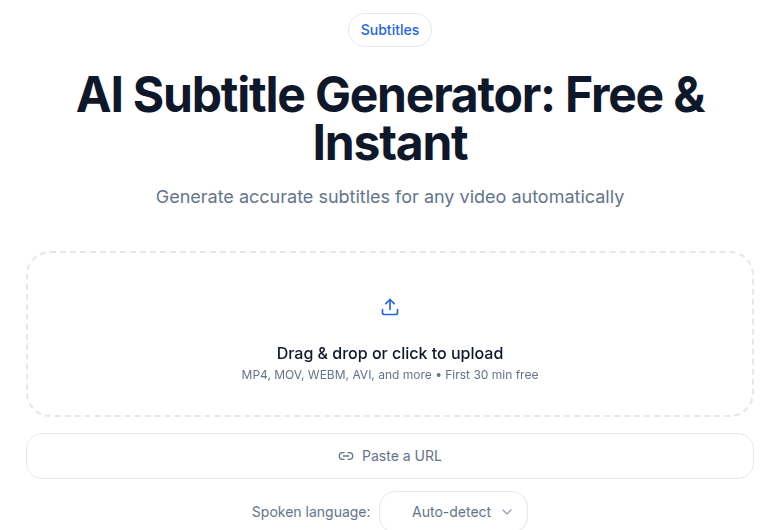 The AI subtitle generator on ConvertAudioToText: upload a video, get an editable caption track to correct to compliance standard
| Approach | Typical cost | Turnaround | What you get | What you own |
|---|---|---|---|---|
| DIY: AI draft plus in-house review (CATT subtitle generator, then your reviewer) | Tool cost only; CATT transcribes the first 30 minutes of any file free with no sign-up, and a free account covers up to 30 files a day, up to 30 minutes each | Minutes to generate, plus your review time (roughly 10 to 15 minutes per 30-minute video) | Clean SRT/VTT/TXT/ASS you review and own | The review burden sits with you |
| Professional caption vendor (Rev, 3Play Media) | Rev: about $1.99 per video minute for human-verified captions; general market $1 to $15 per minute | Hours to a few days depending on tier | Captions with a contractual accuracy figure (3Play advertises 99.6 percent) | A vendor SLA and paper trail you can show an auditor |
Pricing is current as of June 2026 and moves; check each vendor's own page before you budget. Rev lists human-verified captions at $1.99 per video minute and AI-only captions at $0.25 per minute, with Spanish at $3.25. 3Play prices per minute on a sliding scale and publishes a 99.6 percent accuracy guarantee. The broad market for human-reviewed captioning sits between $1 and $15 per minute depending on turnaround, speaker count, and add-ons.
The honest split: DIY is cheaper and faster and keeps you in control, but the accuracy review is your job. A vendor costs more but sells you a contractual accuracy figure and a paper trail, which some buyers (federal contractors, large institutions facing audits) need for procurement or legal reasons more than they need to save money. Pick by which constraint binds you: budget, or documented accountability.
Audio Descriptions, Not Just Captions
WCAG 2.2 AA also requires audio description for prerecorded video at criterion 1.2.5. Audio description is a separate audio track that narrates the visual content for blind and low-vision viewers, with the narrator speaking during natural pauses in the dialogue.
This is harder and pricier than captioning, because it needs a written script and a recorded narrator. Professional traditional audio description typically runs about $15 to $30 per minute of source video, though lighter workflows can land lower; Cornell University's published 3Play rates, for example, show $7.50 per minute for standard description and $12 per minute for extended description. Dense, fast-cut entertainment sits at the high end; corporate, educational, and informational video sits lower.
For lower-stakes content, an extended transcript that includes both spoken dialogue and visual description satisfies criterion 1.2.3 at Level A, which is the floor. Full AA conformance requires the audio description track.
Common Compliance Failures
The gaps that show up most often in audits:
- Relying on raw auto-captions. Captions are technically present but the accuracy is low enough that courts treat them as non-compliant.
- Missing live captions on streaming events. Teams caption the recording but not the live broadcast, which fails 1.2.4.
- No speaker identification. Captions that do not distinguish speakers when the frame is ambiguous fail an audit even when the text is otherwise correct.
- No retrievable caption files. When a complaint or audit lands, you need the caption file per asset; teams that burned captions in with no source file have nothing to produce.
A pre-audit self-check: pull three random videos from your published library and confirm each has synchronized captions, accurate text, speaker labels where needed, non-speech sound notes, and timing in step with the audio. If any of those fail, the rest of the library probably has the same gap.
Practical Workflow for ADA Compliance
The repeatable process that gets you compliant and keeps you there:
- Write the policy down. Document that all published video must have human-reviewed captions before it goes live. Most legal exposure comes from gaps in the policy, not from a single missed caption.
- Pick your toolchain. A 2026 stack is a transcription or subtitle tool plus a review step. The free transcription tool gets you a clean draft; editing happens in any text editor or the subtitle editor.
- Build review into publishing. The reviewer should be someone other than the video's creator. A 30-minute video takes roughly 10 to 15 minutes to review for caption accuracy.
- Archive caption files alongside the video. When an audit or complaint comes, the SRT or VTT for each asset should be retrievable.
- Re-caption historical content that does not meet the bar. Prioritize high-traffic content and anything referenced from regulated processes.
What to Do This Week
Pick the five highest-traffic videos in your library, run them through the free transcription tool to get clean drafts, have someone other than the original creator review the captions, and publish them. That moves your highest-exposure assets to compliance.
For new content, add the caption review step to your publishing checklist so nothing ships without it. Compliance here is a process you run on every video, not a one-time project you finish. Get the workflow right once and it scales to whatever you publish next.
Frequently Asked Questions
Are YouTube auto-captions ADA compliant?
Not on their own. The rules require captions that are accurate, and auto-captions run roughly 90 to 95 percent on clean audio and lower with noise or multiple speakers, which leaves errors in exactly the places that matter (names, terms, speaker changes). They are a fine starting draft, but they need a human review pass before the captions clear the accuracy bar.
What WCAG version does ADA Title II require?
The DOJ's 2024 Title II rule incorporates WCAG 2.1 Level AA. If you operate internationally, building to WCAG 2.2 AA is a safe working target, because the caption criteria are identical across 2.0, 2.1, and 2.2 and 2.2 clears the EU standard too.
When is the ADA Title II web accessibility deadline?
After the DOJ's April 2026 extension, state and local governments with a population of 50,000 or more have until April 26, 2027, and smaller entities and special districts until April 26, 2028. The interim final rule that moved these dates took effect on April 20, 2026; the WCAG 2.1 AA standard itself did not change.
Do I need open captions or closed captions to be compliant?
Either satisfies the standard when the text is accurate and synchronized. Use closed captions where the platform supports them so viewers can resize, translate, or turn them off. Use open (burned-in) captions on platforms like TikTok and Instagram Reels that strip external caption tracks.
How much does compliant captioning cost?
If you do it yourself with an AI draft plus an in-house reviewer, the cost is just the tool plus your review time (CATT transcribes the first 30 minutes of any file free with no sign-up, and a free account covers up to 30 files a day, up to 30 minutes each). A professional vendor like Rev charges about $1.99 per video minute for human-verified captions, and the broader market runs $1 to $15 per minute depending on turnaround and add-ons.
Do I also need audio descriptions?
For full WCAG AA conformance, yes, at criterion 1.2.5, when the video has meaningful visual content not conveyed by the audio. Professional audio description typically runs about $15 to $30 per minute. For lower-stakes content, an extended transcript that describes the visuals satisfies the Level A floor (criterion 1.2.3).
Does the law apply to private companies, not just governments?
Title II's hard deadlines apply to state and local governments. Private companies fall under Title III, where courts have repeatedly treated commercial websites and video as covered, enforced through private lawsuits rather than a fixed-date rule. The NAD settlements with Harvard and MIT show how that plays out for large institutions.
Can one caption file work for every platform?
Yes. Generate one accurate SRT, review it once, then reuse it: upload it as a closed-caption track where platforms support it, and use the same file to burn open captions for platforms that strip tracks. The source file is the single point of truth, so fixes only happen in one place.
Try transcription free
Convert any audio or video to clean, unwatermarked text — speaker labels, timestamps, and AI summaries included. First 30 minutes free, no account.
Related Articles
ADA Compliance for Audio Content: What Applies in 2026
What the ADA actually requires for prerecorded audio-only content. WCAG 1.2.1, the 2026 Title II rule, Title III case law, and the transcript-first compliance pattern.
Open vs Closed Captions: How to Decide in 2026
Open captions are burned into pixels; closed captions are a toggleable track. Here is how to choose the right format for each platform, audience, and workflow.