
Best Transcription for Content Creators 2026
Summarize this article with:
The Creator Short List
If you need one sentence: Descript leads for video-first editing workflows, Castmagic for turning episodes into social copy, and OpusClip for automated short-form clipping. Everything else below serves a narrower niche, and the right choice is whichever solves the bottleneck in your specific pipeline.
This ranking focuses on what comes after the transcript: blog posts, captions, clips, newsletters, show notes. Transcription accuracy is table stakes in 2026. Nearly every tool here exceeds 90% on clean audio. The differentiator is what the tool does with the text next.
| Tool | Starting price | Creator strength | Key limit |
|---|---|---|---|
| Descript | $24/mo (annual) | Text-based video editing, 4K export | 30 hrs/mo on Creator tier |
| OpusClip | $15/mo | Long-to-short clipping, auto-captions | 150 processing min/mo on Starter |
| Riverside | $24/mo (annual) | Interview recording plus show notes | 5 hrs/mo separate-track downloads on Pro |
| Castmagic | From $21/mo (annual) | Episode-to-social-copy templates | Usage-based tiers by hours/month |
| Submagic | $12/mo (annual) | Captioned vertical video export | 15 videos/mo (2 min max) on Starter |
| Happy Scribe | €17/mo | 150-plus languages, subtitle export | 120 min/mo on Basic |
| Notta | $8.17/mo (annual) | Mobile recording, meeting integration | 3-min/file cap on free tier |
| ConvertAudioToText | $14.99/mo | No-signup transcription, structured text output, free browser editor that cuts video by deleting words | Editor is single-track: no multi-track timeline, overdub or screen recording |
Descript: Best for Video-First Creators
Descript is built so the transcript and the timeline are the same surface. Delete a paragraph of text and the corresponding video clip disappears with it. Put multi-track projects, overdub, screen recording and 4K export behind that and it earns the top spot for creators producing long-form YouTube content, documentary-style videos, or anything that requires real editing rather than just cutting silence.
If cutting by deleting words is the only part you need, our free browser editor runs that same loop on a single track and exports MP4, with no account and nothing uploaded. It is a cutter, not a production suite, so nothing else on the Descript feature list has an equivalent there.
The Creator plan (billed as $24/mo annually, $35/mo monthly) includes 30 hours of media per month, 4K watermark-free export, Underlord AI features, and royalty-free stock media. The free plan gives you 1 hour with 720p exports. Hobbyist ($16/mo annual, $24/mo monthly) fills the gap with 10 hours and 1080p.
Where it wins: Integrated transcript-driven editing. Short-form clip generation by selecting transcript sections. Audio cleanup in the same window.
Where it falls short: The Creator tier is only realistic for creators producing at volume. It is resource-intensive. If you mostly need clean transcripts and not integrated editing, it is overkill and you will pay for features you never touch.
A direct comparison with Otter on the meeting-transcription side is at Descript vs Otter if that use case overlaps your workflow.
OpusClip: Best for Long-Form to Short-Form
OpusClip's core trick is identifying the most compelling moments in a long video and auto-generating vertical clips with captions. Upload a one-hour episode; get back 10-15 TikTok, Reels, or Shorts candidates scored by an AI virality model.
Pricing: Free gives you 60 processing minutes per month with watermarked exports that expire after 3 days. Starter is $15/mo and unlocks 150 processing minutes, watermark-free exports, virality scoring, and social posting to YouTube Shorts, TikTok, and Instagram. Pro at $29/mo adds 300 minutes, custom reframing, and full aspect ratio support.
The credit model matters for creators at volume: 1 credit equals 1 minute of source video processed. A 60-minute episode costs 60 minutes of your monthly budget regardless of how many clips you extract.
Where it wins: The clipping and captioning are genuinely useful, not just a marketing slide. If you produce both long-form and short-form simultaneously, this removes the manual clip-hunting step.
Where it falls short: As a pure transcription tool, it is the wrong choice. If you do not need the automated clipping, you are paying for infrastructure you will not use.
Riverside: Best for Interview-Format Creators
Riverside separates audio and video tracks per participant at the recording stage, which produces cleaner per-speaker audio and feeds better transcription downstream. That upstream advantage flows into the clip generation, show notes, and transcript quality on the back end.
Pro plan is $24/mo (annual) or $29/mo monthly. It includes 5 hours of separate-track downloads per month, unlimited transcription, AI-generated show notes and Magic Clips, and podcast hosting with analytics. The Grow plan at $34/mo annual adds 20 hours of downloads, social scheduling, and a creator website.
Where it wins: The recording quality advantage is real and measurable. If you do remote interviews and the audio quality of your guest's track matters, the per-track recording is a meaningful edge over recording a Zoom call.
Where it falls short: If you record elsewhere, you lose the main reason to be here. The content repurposing tools exist but are not as deep as Castmagic. The value proposition narrows sharply if you are only using Riverside for transcription.
Castmagic: Best for Turning Episodes into Social Copy
Castmagic is less a transcription tool and more a structured-output machine built around audio and video content. You upload an episode; it produces show notes, a blog draft, Twitter threads, LinkedIn posts, and an email newsletter section. All from a single upload.
Pricing is usage-based tiers by hours per month. The Hobby plan starts at $21/mo (annual), the Starter at $79/mo (annual), and the Business plan at $790/mo (annual). Each tier adds more monthly hours and team seats. Per the vendor page, checked July 2026, overages are available at per-minute rates within each tier. There is no meaningful free tier.
Where it wins: For creators producing a podcast or YouTube show and distributing written content across four or five channels per episode, the templated outputs save a serious amount of time. The social copy quality is the strongest of any tool in this list.
Where it falls short: The starting price is higher than every other tool here. If you can write social copy yourself in 20 minutes per episode, the markup is hard to justify. The underlying transcription quality is good but not the differentiator.
Submagic: Best for Captioned Short-Form Video
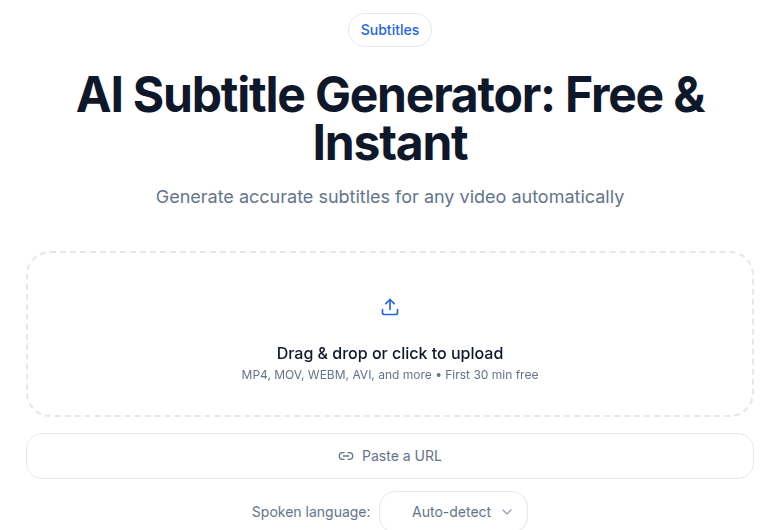 Submagic competes here on caption styling, not raw transcription. For short-form, CATT's subtitle generator handles the SRT side.
Submagic focuses entirely on captioned vertical video, and the caption styling options are the best-in-class among the tools here. Upload a short clip, choose an animated caption style matching current creator aesthetics, export a polished Reel or Short.
Starter plan: $12/mo (annual) or $19/mo (monthly) for 15 videos per month with a 2-minute maximum per video. Pro: $23/mo (annual) or $39/mo (monthly) for 40 videos up to 5 minutes each. Business: $41/mo (annual) for 100 videos up to 30 minutes. Free plan covers 3 watermarked videos per month.
Where it wins: If short-form vertical content is a primary output and caption styling matters to your brand, this is the right tool. The quality of animated captions is noticeably higher than what most video editors produce from an imported SRT.
Where it falls short: Strictly for short-form vertical video. For long-form transcription, podcast show notes, or blog repurposing, look elsewhere. The per-video caps mean heavy producers hit the ceiling quickly.
For creators who already have a transcript and just need caption files, the subtitle generator at ConvertAudioToText generates SRT and VTT captions from any audio or video; TXT downloads are free on every account, and DOCX, PDF, SRT, VTT and JSON come with your first file (on the premium engine, up to an hour), the Weekly Pass, a top-up or a paid plan.
Happy Scribe: Best for Multi-Language Creators
Happy Scribe covers 150-plus languages with both AI transcription and subtitle generation, and its translation pipeline has a strong reputation for European language quality specifically. It is also priced in EUR, which matters for creators budgeting in other currencies.
Basic plan: €8.50/mo (annual) or €17/mo (monthly) for 120 minutes per month, €0.20/min overage. Pro: €19/mo (annual) or €29/mo (monthly) for 600 minutes per month. Business: €59/mo (annual) for 6,000 minutes. The free tier is a 10-minute one-time trial only.
Human proofreading is available as an add-on from €1.75/minute for creators who need verified accuracy on published captions.
Where it wins: Multi-language transcription, subtitle export for video creators, and translation between major languages. The subtitle export formats cover SRT, VTT, and several video-editor-native formats.
Where it falls short: Repurposing templates (show notes, social copy, blog drafts) are weaker than Castmagic. At high volume, the per-minute overage model gets expensive before you hit the next tier. For more on how Happy Scribe compares in a head-to-head, see Rev vs Trint for the broader transcription service context.
Notta: Best for Mobile-First and Meeting-Heavy Creators
Notta's mobile app is genuinely polished, and for creators who record on their phone (interviews on the go, voice memos, event capture), the mobile-first design is a real differentiator over tools built desktop-first.
Pro plan: $8.17/mo (annual) or $13.99/mo (monthly). The free tier gives 120 transcription minutes per month but caps individual files at 3 minutes, which makes it impractical for any episode-length content. The Pro plan removes the per-file cap and adds Zoom and Google Meet integration, transcript translation, and export to common formats.
Where it wins: Mobile recording workflow. Meeting integration for creators who transcribe interviews or workshops. The CRM integrations are more extensive than any other tool in this list if that matters.
Where it falls short: Repurposing features are thin. No show notes, social copy templates, or structured output. The desktop experience is less polished than Descript or Castmagic. If you produce primarily from a desktop setup, the Notta advantage disappears.
ConvertAudioToText: Best for No-Friction Transcript and Text Repurposing
If your repurposing pipeline runs from audio or video to written output (blog drafts, newsletters, structured summaries), ConvertAudioToText handles that without an account on the first file. The audio-to-text tool works without signup, which removes the barrier for testing before committing.
Pro plan is $14.99/mo month-to-month, or $99.99/yr billed annually, for unlimited transcription in 99+ languages, 11 AI templates covering podcast summaries, key takeaways, episode show notes, and pull quotes, plus speaker labels, SRT/VTT export, and full editor access. The free tier transcribes the first 30 minutes of any file with no account, and a free account runs your first file with the premium engine and the AI templates, then keeps transcribing up to 30 files a day, up to 30 minutes each.
My take: CATT fits creators whose primary output from an episode is written content. It is not a video editor, a clipping tool, or a caption animator. If those are the bottlenecks, pair it with Submagic or Descript. Where it earns its place is in the blog-from-podcast and newsletter-from-interview workflows: fast, no-login for a first test, structured output that does not require three rounds of cleanup.
For more on how to build that workflow in detail, best transcription for podcasts covers the end-to-end pipeline.
How to Match Tool to Workflow
You edit long-form YouTube videos and want transcript-driven cuts: Descript Creator ($24/mo annual). The transcript-edit-equals-video-edit workflow pays for itself if you produce more than a few videos per month.
You produce a podcast or interview show and want show notes plus social copy: Castmagic. The social template depth is unmatched. If the budget is tight, ConvertAudioToText's structured summaries cover show notes and key takeaways at a lower price point.
You produce both long-form YouTube and short-form Reels/Shorts/TikTok: OpusClip Starter ($15/mo) for the automated clipping layer. Pair with Descript or ConvertAudioToText for the long-form transcript side.
You do short-form vertical content as a primary output: Submagic Pro ($23/mo annual). The caption styling and per-video workflow beats importing SRT files into an editor manually.
You produce content in multiple languages or need subtitle export for global audiences: Happy Scribe Pro (€19/mo annual). Test against your actual language pair before committing.
You record interviews remotely and want per-track audio quality to feed everything else: Riverside Pro ($24/mo annual). Especially strong if you also want integrated show notes and podcast hosting.
You want fast, no-friction transcripts for blog and newsletter output without learning a new editing environment: ConvertAudioToText. Test the first file without an account.
FAQ
What is the best free transcription tool for content creators?
Descript's free plan gives you 1 hour of media per month with basic AI tools. OpusClip's free plan gives you 60 processing minutes for short-form clipping, with watermarked exports that expire after 3 days. Notta's free tier covers 120 transcription minutes per month but caps each file at 3 minutes, making it impractical for episodes. ConvertAudioToText transcribes the first 30 minutes of any file with no login at all, and a free account runs your first file on the premium engine, then transcribes up to 30 files a day, up to 30 minutes each. For creators producing regularly, every free tier here has a ceiling somewhere: minute caps, file-length caps, watermarks, or (on ConvertAudioToText) DOCX, PDF and subtitle downloads and AI templates after the first file.
Do I need a separate tool for captions and transcription?
Not necessarily. Descript, Riverside, and Submagic all handle both in one workflow. Submagic is purpose-built for captioned short-form exports (Reels, Shorts, TikTok) and does it better than generalist transcription tools. If you already have a transcript file, you can import an SRT into your video editor or use a subtitle tool directly. The subtitle generator at ConvertAudioToText generates SRT and VTT captions from any audio or video; TXT downloads are free on every account, and DOCX, PDF, SRT, VTT and JSON come with your first file, the Weekly Pass, a top-up or a paid plan.
Can I use transcription to write blog posts from my videos?
Yes, and this is one of the highest-ROI uses of any transcript. The transcript gives you the raw text; you then reshape it for search-indexed prose. Castmagic and ConvertAudioToText both offer AI templates that produce blog drafts, show notes, and pull quotes directly from the upload. The practical difference is that Castmagic is structured around multi-platform social copy (Twitter threads, LinkedIn, newsletters) while CATT focuses on the structured text file itself: summaries, key takeaways, and export formats.
Which tool is best for creators who publish in multiple languages?
Happy Scribe covers 150-plus languages with both AI transcription and subtitle generation, and its translation pipeline is well-regarded for European languages. OpusClip supports multi-language transcription in the caption layer. ConvertAudioToText supports 99+ languages with speaker labels. If translation quality in a specific non-English language is your main requirement, test Happy Scribe and your chosen tool on the same clip before committing to a plan.
Sources
- Descript pricing page, checked July 2026
- OpusClip pricing page, checked July 2026
- Riverside pricing page, checked July 2026
- Castmagic pricing page, checked July 2026
- Submagic pricing page, checked July 2026
- Happy Scribe pricing page, checked July 2026
- Notta pricing page, checked July 2026
- ConvertAudioToText pricing page, checked July 2026
Try transcription free
Convert any audio or video to clean, unwatermarked text — speaker labels, timestamps, and AI summaries included. First 30 minutes free, no account.
Related Articles

Best No-Signup Transcription Tools (2026, No Account)
Eight transcription tools you can use without making an account, sorted by how "no-signup" they actually are. Honest 2026 limits on minutes, file caps, and where each one starts asking for an email.

Best Transcription Software for Mac in 2026 (Native and Web)
The best transcription tools for Mac in 2026, covering MacWhisper, Audacity, Descript, Otter, and web services. Apple Silicon performance notes verified.