Encryption in Transcription Tools: Reading the Claims
Summarize this article with:
Cloud transcription services advertise encryption heavily, but the terms mean specific, limited things. TLS protects your audio while it travels to the provider. AES-256 protects it while sitting on their disks. Neither prevents the provider from reading your data, because the AI model requires plaintext audio to produce a transcript. True end-to-end encryption, where the provider is cryptographically locked out, is not possible for any cloud ASR service today. Understanding these three layers separately helps you ask the right questions and ignore the marketing noise.
Most encryption claims in transcription marketing describe two protections that apply to every respectable cloud service: TLS in transit and AES-256 at rest. Understanding what each one actually covers, and where both stop, lets you evaluate providers honestly and avoid spending effort on the wrong questions.
Two Layers, Two Threat Models
For any cloud transcription service, encryption operates at two distinct points in the data's journey.
Encryption in transit protects audio while it moves from your device to the provider's servers. The protocol is TLS (Transport Layer Security). TLS 1.3 is now the current standard, with roughly 75% adoption among major websites as of mid-2025 according to SSL Pulse tracking. TLS 1.2 remains cryptographically acceptable. TLS 1.0 and 1.1 are obsolete and should not appear anywhere.
Encryption at rest protects audio and transcripts while stored on the provider's disks. The standard is AES-256 (Advanced Encryption Standard with 256-bit keys). Major object stores implement AES-256-GCM with provider-managed keys. AWS S3, used by Otter.ai and others, provides the same algorithm via server-side encryption.
These two protections solve different problems. In-transit encryption defeats network eavesdroppers on public WiFi, ISPs, and intermediate routers. At-rest encryption defeats anyone who steals a physical disk or gets unauthorized access to storage infrastructure.
What neither protection covers: the provider's own application, which decrypts data transparently to process it. This is the limit most marketing materials quietly skip past.
What TLS in Transit Actually Guarantees
When you upload a file, TLS creates an encrypted tunnel between your browser or app and the provider's server. Even on an untrusted network, a passive observer sees only encrypted gibberish.
TLS specifically guarantees three things:
- Confidentiality: the content is unreadable to third parties on the network
- Integrity: the data was not modified in transit
- Authentication: the server you connected to is who the certificate says it is
You can check any provider's TLS quality yourself at ssllabs.com/ssltest. The tool grades the full configuration, including which protocol versions are supported and which cipher suites are active. Look for an A or A+ rating, and flag anything that still supports TLS 1.0 or 1.1.
Is TLS 1.2 still acceptable for a transcription service in 2026?
Yes, TLS 1.2 remains cryptographically acceptable, though TLS 1.3 is now the preferred standard. What TLS does not protect against: an attacker who has already compromised your device, a compromised server, or the provider reading your data after it arrives. TLS ends at the server. After that, the data is plaintext inside the application.
What AES-256 at Rest Actually Guarantees
AES-256 at rest means the storage layer encrypts your data on disk. Cloudflare's documentation for R2 describes this explicitly: all objects and their metadata are encrypted using AES-256-GCM. Amazon S3 uses AES-256 via SSE (server-side encryption), which Otter.ai, Descript, and several other transcription services inherit from their AWS storage layer.
Does AES-256 encryption mean a transcription provider can't read my files?
No. At-rest encryption specifically protects against physical disk theft from a data center, decommissioned hardware that was not properly wiped, and cross-tenant access at the infrastructure level in multi-tenant cloud environments.
It does not protect against:
- The application server reading data through normal code paths (it holds the decryption keys and uses them automatically)
- Provider employees with application-level access
- A compromised key management system
- Misconfigured access controls that expose a storage bucket publicly (which would bypass encryption entirely)
The provider has access. That is not a flaw in their implementation. It is how server-side encryption works by design.
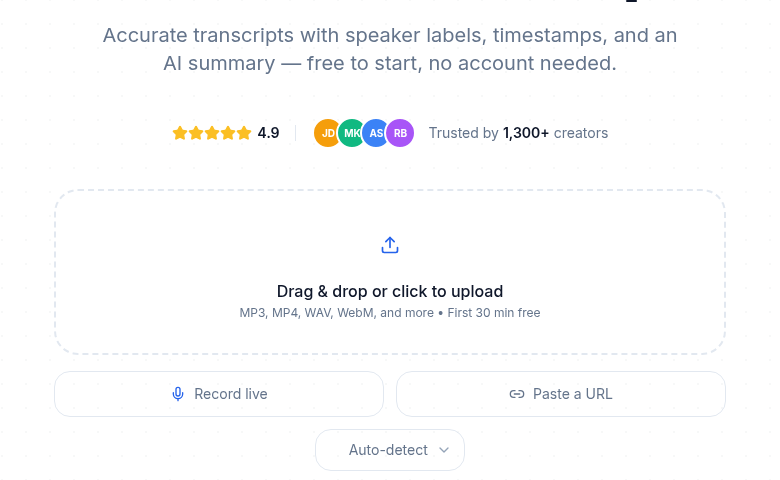 Uploading audio to CATT's transcription tool
Why True End-to-End Encryption Is Impossible for Cloud ASR
What does 'end-to-end encrypted' mean when a transcription tool claims it?
End-to-end encryption (E2EE) in the Signal sense means the provider is cryptographically locked out: they cannot decrypt your data even if compelled to. The private key never leaves your device.
This is not achievable for cloud speech-to-text, and any vendor claiming otherwise deserves careful scrutiny. The AI model must process plaintext audio to produce a transcript. You cannot transcribe audio that remains encrypted at the processing layer.
When transcription vendors use the phrase "end-to-end encrypted," they typically mean one of two weaker things:
Client-side encryption before upload. The user's device encrypts audio before sending it to the server. The server decrypts it, runs the model, re-encrypts the transcript, and sends it back. The provider has plaintext access during the transcription window. This limits exposure duration but does not eliminate it.
Confidential computing enclaves. Server-side processing happens inside a hardware-isolated enclave (Intel SGX, AMD SEV, Intel TDX) where the provider's operators cannot inspect memory even though the provider's code is running. Azure has offered Whisper transcription inside confidential containers using AMD SEV-SNP. This narrows the exposure surface significantly but still requires the model to access plaintext inside the enclave. The guarantee is the hardware isolation, not cryptographic lockout.
Research into homomorphic encryption for audio, where computation happens on ciphertext without decryption, is active but not production-ready. A 2025 paper on quantized approximate signal processing achieved the first secure raw audio pipeline using fully homomorphic encryption. The benchmark: computing a 64-millisecond audio window in FHE took 12,970 seconds on an Apple M2. In clear took 0.004 seconds. This is a research direction, not a vendor feature.
The only path to genuinely provider-inaccessible transcription today is self-hosting. Run Whisper on your own hardware and there is no provider to expose your audio.
What Major Transcription Services Actually Disclose
Here is what major providers publish about their encryption posture, checked against vendor documentation:
| Provider | In Transit | At Rest | SOC 2 | HIPAA BAA |
|---|---|---|---|---|
| Otter.ai | TLS (version unspecified on public page) | AES-256 via AWS SSE | Type II | Yes (contact sales) |
| Descript | TLS 1.2 | AES-256 | Type II | Not published |
| Fireflies.ai | TLS | AES-256 | Type II | Enterprise only |
| Rev.com | HTTPS/TLS | Secure data centers (specific algorithm not published) | Type II (enterprise) | Yes (paid tier) |
| Happy Scribe | TLS | AES-256 (published in SOC 2 docs) | Type II | Enterprise (contact sales) |
| AWS Transcribe | TLS | AES-256, KMS-managed | N/A (AWS platform) | Covered under AWS BAA |
| Google Cloud STT v2 | TLS | AES-256, CMEK available | N/A (GCP platform) | Covered under GCP BAA |
| CATT | TLS 1.2+ | AES-256-GCM, provider-managed keys | Not audited | Not available |
Sources: vendor security pages and public documentation, checked July 2026. BAA availability often requires enterprise contracts. Verify current terms with each vendor.
If a provider does not publish these details at all, treat that as a signal: either they have not implemented baseline standards or they have not invested in documentation for security-conscious customers.
Customer-Managed Encryption Keys: When They Matter
Standard deployments use provider-managed keys: the vendor's system encrypts your data and holds the keys. You have no ability to revoke access by rotating a key on your side.
Customer-managed encryption keys (CMEK) flip this arrangement. You bring your own keys via a key management service (AWS KMS, Google Cloud KMS), and the provider's storage cannot decrypt data without your key infrastructure responding. You can revoke access by disabling the key. You have an audit trail of every key use.
AWS Transcribe supports KMS-managed keys for output encryption. Google Cloud Speech-to-Text v2 supports CMEK for all resources and batch transcription jobs. Both are documented in their respective developer references.
CATT does not offer CMEK. Files are encrypted at rest with provider-managed keys. For customers whose security requirements include key ownership and revocability, AWS Transcribe or Google Cloud STT v2 are the appropriate paths via the speech-to-text API pricing comparison.
What Encryption Does Not Solve
This matters as much as what it does solve.
Provider access. TLS and AES-256 do not prevent a provider's own application from accessing your data. Internal access controls, least-privilege policies, and audit logging are the relevant protections here. Ask whether employees can access customer audio, under what circumstances, and whether access is logged.
Compromised accounts. If your login credentials are stolen, the attacker authenticates as you and gets access through normal application paths. Encryption provides no protection here. Multi-factor authentication on your account matters more than the encryption algorithm.
Compromised endpoint. If your laptop is compromised before you upload, the audio is readable on your device before it enters any encrypted channel. Endpoint security is a separate domain from transit and storage encryption.
Misconfigured access controls. A storage bucket set to public read exposes your data regardless of AES-256. Correct configuration of access policies is necessary alongside encryption. Ask whether providers have had public exposure incidents.
AI training data. If the provider uses customer audio to train or improve their models, encryption protects the data in storage but does not address what happens when the model processes it. Ask explicitly whether audio is used for training, and get it in the contract. Fireflies.ai, for example, publishes a 0-day data retention policy with their transcription vendors, which addresses this specifically.
A complete security posture layers encryption with access controls, authentication, audit logging, vendor management, and clear data-use policies. Encryption is one layer, not the whole answer.
See is AI transcription private for the broader data handling picture, and GDPR-compliant transcription for the regulatory framing in European contexts.
What to Ask a Vendor Before Committing
For most business use cases, these five questions cover the baseline:
- What TLS versions and cipher suites do you support? (A/A+ on SSL Labs is the benchmark)
- Is data encrypted at rest, and with which algorithm?
- Who holds the encryption keys, and can I bring my own?
- Are backups and logs also encrypted?
- Do you use customer audio to train or improve your models?
What encryption options exist for regulated industries like healthcare?
The most important document is not encryption specification but a signed Business Associate Agreement (BAA) from the provider. Without a BAA, using a transcription service with protected health information (PHI) may violate HIPAA regardless of AES-256 claims. Rev, Otter.ai, and Fireflies.ai (enterprise tier) publish BAA availability. For full key control, AWS Transcribe and Google Cloud Speech-to-Text v2 both support customer-managed encryption keys (CMEK) via their respective KMS services.
For regulated industries, add these questions:
- Do you have a signed Business Associate Agreement (BAA) for HIPAA?
- Do you have a Data Processing Agreement (DPA) for GDPR?
- Are you SOC 2 Type II audited, and can I see the report?
- Do you support customer-managed encryption keys?
- How do you handle key rotation and respond to a breach?
A note on compliance language. Saying a tool "is HIPAA compliant" or "is GDPR compliant" is imprecise. Compliance is a property of the specific deployment and the agreements you have in place with the vendor, not a badge the tool carries independently. A signed BAA with a provider that has appropriate technical controls is what matters for HIPAA. A signed DPA with appropriate data handling commitments is what matters for GDPR. Ask for the documents, not the badge.
Honest Disclosure for CATT
What CATT does:
- TLS 1.2+ in transit
- AES-256-GCM at rest, with provider-managed keys
- Encrypted backups
- Role-based access controls in the application
What CATT does not do:
- Customer-managed encryption keys (CMEK)
- Hardware security module (HSM) integration
- FIPS 140-3 certified key handling (note: FIPS 140-2 validations sunset September 2026)
- Confidential computing enclaves for processing
- True client-side encryption at upload
For the majority of business and personal transcription use cases, the first list is adequate. If you need the second list, you are operating in an enterprise or regulated industry context that likely requires a different provider, or self-hosting. If you need a clean, fast transcript without a meeting bot or complex compliance overhead, CATT's audio-to-text tool handles it directly without sign-up.
See auto-deletion of transcription files for practical steps to reduce your data footprint after transcription.
Sources
- Cloudflare R2 Data Security Documentation - AES-256-GCM at rest, TLS in transit, Cloudflare-managed keys
- Otter.ai Privacy and Security Page - AES-256 via AWS SSE, SOC 2 Type II
- Descript Security Page - AES-256 at rest, TLS 1.2 in transit, SOC 2 Type II
- Fireflies.ai Security Page - AES-256 at rest, TLS in transit, SOC 2 Type II, HIPAA-BAA enterprise
- Google Cloud Speech-to-Text CMEK Documentation - Customer-managed encryption keys, v2 API
- AWS Transcribe Data Encryption Documentation - KMS integration for output encryption
- Qualys SSL Labs Server Test - TLS configuration grading tool
- SSL Pulse TLS 1.3 Adoption Tracking - 75% TLS 1.3 adoption among top websites, mid-2025
- Quantized Approximate Signal Processing for FHE Audio (2025 preprint) - Homomorphic encryption audio processing benchmarks
- Rev.com HIPAA Security Page - BAA availability and HIPAA tier details
Try transcription free
Convert any audio or video to clean, unwatermarked text — speaker labels, timestamps, and AI summaries included. First 30 minutes free, no account.
Related Articles

Spotify Transcript Extractor: How to Copy and Download Episode Text
Get a Spotify podcast transcript you can copy and download: paste a public episode link, 30 minutes free with no signup, TXT or SRT files on eligible plans.
Focus Group Transcription for UX Researchers: Turn Multi-Speaker Audio Into Usable Evidence
A practical guide to focus group transcription for UX and insights teams. See how CATT handles speaker labels, timestamps, AI summaries, and clean export.