
Subtitle Translation for Video: The Reliable Path
Summarize this article with:
The Translation Path
Translating subtitles is not the same job as translating prose. Every subtitle line is locked to a timestamp window, capped at a character limit, and governed by a reading-speed ceiling. Translate word-for-word from English to Spanish and your 40-character subtitle often becomes a 50-character one, which either reads too fast or gets cut off before the viewer finishes.
This post covers the translation segment of the subtitling process specifically: how machine translation handles SRT files, what expansion by language means for your timing, how to re-fit lines that run long, and what to check on the review pass. If you are still working on getting a clean source SRT from your audio or video, start with the subtitle translation workflow post first, then return here.
Why Translation Breaks Timing
A standard subtitle cue follows these constraints:
- On screen for 2 to 6 seconds.
- Maximum 2 lines per cue (the Netflix standard, and the practical limit for readability across platforms).
- Up to 42 characters per line for most Latin-script languages (Netflix's cap, widely followed in broadcast).
- A reading speed ceiling of 17 characters per second for general audiences, or 20 CPS for adult audiences on platforms like Netflix.
When you translate, the timestamps stay exactly where they are. What changes is the volume of text that must fit inside each window. If a 6-second cue previously held 38 characters of English and your Spanish translation comes out at 48, the viewer is reading at 8 CPS above the comfortable threshold.
The result is not a translation error but a timing problem that the translator has to solve.
Text Expansion by Language
Translation from English into most European languages makes text longer. The figures below are drawn from industry localization benchmarks (Eriksen Translations, Andiamo, the Netflix Timed Text Style Guide system):
| Target Language | Typical Expansion from English |
|---|---|
| Spanish | +20 to 25% |
| French | +15 to 25% |
| Portuguese | +15 to 25% |
| German | +20 to 35% |
| Italian | +15 to 20% |
| Dutch | +15 to 20% |
| Japanese | Shorter in chars; more info per character |
| Chinese | Shorter in chars; more info per character |
| Korean | Shorter in chars; pacing varies |
| Arabic / Hebrew | Similar length; right-to-left rendering adds a check |
German is the hardest case for subtitle translators: compound words create long indivisible strings that break awkwardly at line-wrap points. French is second: elision and liaison in spoken French produce shorter audio, but the equivalent written form is longer, so the subtitle is running against a tighter clock than it appears.
East Asian scripts (Japanese, Chinese, Korean) are shorter in raw character count, but each character carries more semantic weight, meaning the reader needs more processing time. The slower effective reading pace applies slightly different constraints.
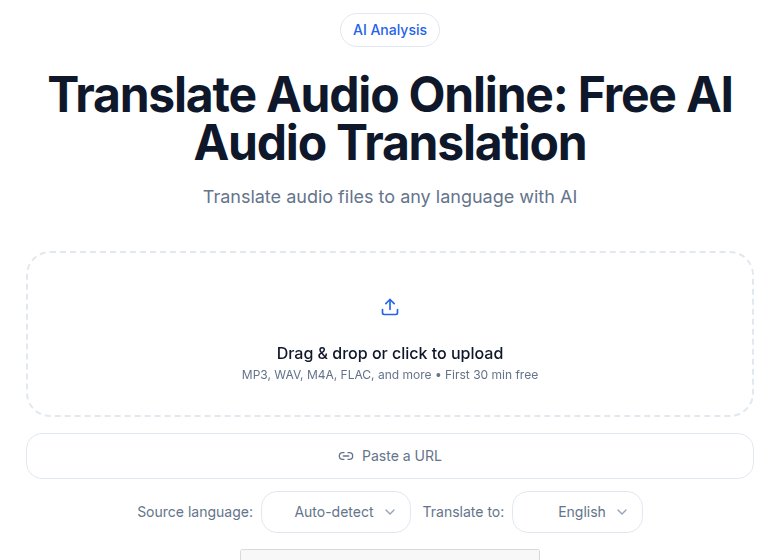 The CATT audio translation tool, showing file upload and target language selection
If you are starting from a non-English source, CATT's audio translation tool can transcribe and generate an initial English SRT that you then use as the translation base, keeping one canonical source version from which all target-language files derive.
Three Tools That Handle SRT Translation
Not every translation tool respects the SRT format. If your tool strips the timestamps and returns plain text, you have lost the timing structure and will need to reconstruct it manually. The tools below all process SRT without destroying the format.
DeepL Pro
DeepL is the most reliable machine translation choice for European language pairs. It processes SRT files with timestamps intact on the Individual plan (billed annually at around $8.74/month, or about $10.40/month billed monthly) and above. The API is available separately at around $5.49/month plus $25 per million characters, which is practical for automated pipelines.
Caveat: DeepL's SRT support preserves timestamps but does not automatically compress lines that run long. You still need the timing re-fit pass described below.
LLM APIs (GPT-4o, Claude)
For technical content, legal material, or any text where idiom and precision matter, an LLM with a good system prompt outperforms statistical machine translation. GPT-4o is currently priced at $2.50 per million input tokens and $10 per million output tokens. A 200-line subtitle file for a 30-minute video is a few thousand tokens, making per-file cost negligible.
The approach: paste the full SRT into the prompt with an instruction to translate, preserve all timestamp lines unchanged, and compress any translated line that would exceed 42 characters. An LLM can follow that constraint more faithfully than a phrase-based translation engine.
Smartling
Smartling has a dedicated subtitle translation workflow for teams running ongoing video localization. It ingests SRT and VTT files, presents each line to the translator with video context, and has an Enhanced Subtitle Parsing feature that recombines lines split across multiple timestamp entries into a single translatable string before splitting them back. Useful at scale; priced for enterprise.
For lower-volume work, Google Translate Web handles SRT files and costs nothing. Quality is lower than DeepL for most language pairs, but it is a usable starting point for a draft you plan to review.
The Timing Re-Fit Pass
After machine translation, every long line needs to be checked. The workflow:
-
Open the translated SRT in a subtitle editor. Aegisub (free, cross-platform, version 3.4.2 in 2026) shows waveform and video simultaneously, making it easy to spot lines that overflow their window. Subtitle Edit (free, Windows) shows reading-speed warnings per cue.
-
Filter for any cue where the translated text exceeds 42 characters per line or 17 CPS. Both tools can highlight violations automatically.
-
For each long line, choose one of three fixes:
- Compress the translation. Use a synonym, drop an article, restructure the sentence. Meaning-preserving compression is the translator's core skill in this context.
- Split the cue. If the original cue has empty space in the timestamp window (the speaker pauses mid-sentence), split into two consecutive cues.
- Widen the end timestamp. Only if the following cue begins late enough to allow it without overlap. One to two frames is usually enough.
-
Watch the video with the translated SRT. Pause on any cue that still feels rushed. Trust your eye more than the character count for the final pass.
Right-to-Left Languages
Arabic and Hebrew need one extra check: confirm the subtitle player renders RTL correctly. Most modern players (YouTube, Vimeo, VLC, MPV) handle RTL in SRT and VTT. The risk is when you hand off to an older broadcast encoder or a custom video player. Test on the actual delivery system.
Vietnamese and Thai require fonts that render diacritics and complex clusters correctly. Embed font instructions in the delivery package if handing off to a platform you do not control.
The Review Pass
Machine translation at the SRT level is a draft, not a deliverable. The review pass is where quality is actually set. What to check:
- Compressed lines that lost meaning in shortening.
- Proper nouns: person names, place names, product names. Machine translation handles these inconsistently.
- Tense and register. The target language may require a formal or informal register that the source did not signal.
- Idiomatic expressions that translated literally but land as non-idiomatic in the target language.
- Consistency across the file: the same speaker should be referred to the same way in every cue.
For high-stakes content (branded marketing, paid courses, anything with a professional translation credit), hire a native-speaking reviewer for the polish pass rather than a full re-translation. The reviewer corrects a machine draft, which is faster and cheaper than producing from scratch.
For daily-volume content where cost matters more than polished quality, a personal review reading through the translated SRT once while the video plays is enough to catch the obvious errors.
Multi-Language Subtitle Strategy
For creators publishing one video across multiple audience segments, the cleanest workflow is:
- One canonical source-language SRT, thoroughly cleaned before any translation starts.
- Tier 1 languages (largest audiences): machine translate, full human review and compression pass.
- Tier 2 languages (medium audiences): machine translate, light review for obvious errors.
- Tier 3 languages (smallest audiences): machine translate, no review.
Match the tier to your audience size and what the content is. A product walkthrough going to a 50,000-person French audience warrants Tier 1. A tutorial going to a 500-person Vietnamese audience is a Tier 3 situation.
Platform Upload
YouTube, Vimeo, and most platforms accept SRT or VTT files uploaded per language track. When uploading:
- Name the file with the BCP 47 language code in the filename (e.g.,
video-es.srt,video-fr.srt) so the platform sets the correct language tag automatically. - Verify the language is set correctly in the platform's subtitle manager after upload. YouTube occasionally defaults to the wrong language.
- For creating SRT files from scratch or understanding the differences between SRT, VTT, and TTML, the linked posts cover the format specifics in detail.
If you just need a clean source transcript to start the translation pipeline, ConvertAudioToText's video-to-text tool transcribes in 99+ languages. TXT downloads are free on every account; SRT export comes with your first file, the Weekly Pass, a top-up or a paid plan. The free tier keeps transcribing free: up to 30 files a day, up to 30 minutes each. The Pro plan at $14.99/month covers longer content and all language pairs.
My take: the single highest-leverage step in any subtitle translation project is cleaning the source SRT before you hand it to a translation tool. A messy source with broken line breaks, filler words, and wrong proper nouns produces a messy translation regardless of what engine you use. Spend the extra 15 minutes on the source and you save an hour on the translation review.
FAQ
Can I use Google Translate to translate an SRT file?
Yes, for a rough draft. Paste each subtitle block into Google Translate, or use a tool that accepts SRT files directly. The result will need a review pass: timing stays intact since you are replacing only the text, but the translated lines often run long and need compression. For anything you plan to publish, at least one read-through against the video is worth doing.
What happens to timing when I translate subtitles?
The timestamps themselves do not change during translation. What changes is how much text has to fit inside the existing timestamp window. If your translated text is 20-30% longer than the source (common with Spanish or French from English), the line may read faster than the audience can comfortably follow. You then either compress the translation, split the cue into two display blocks, or slightly widen the end timestamp when the surrounding speech allows.
Which languages cause the most expansion problems?
Spanish, French, Portuguese, and German all expand roughly 20-30% beyond English source text on average, with German compound words occasionally pushing higher. Arabic and Hebrew are right-to-left, which adds a rendering check on top of length. East Asian scripts (Japanese, Chinese, Korean) are character-dense but carry more information per character, so length in characters is shorter even though pacing constraints still apply.
Do I need a professional translator for subtitle translation?
It depends on the stakes. For internal training videos or personal content, AI translation with a light review pass is often adequate. For customer-facing marketing, course content, or anything broadcast under your brand, a professional reviewer who speaks the target language natively will catch tone, idiom, and compression errors that machine translation misses. A common middle path: machine-translate, then hire a native-speaking reviewer for a polish pass at lower cost than full professional translation.
Sources
- DeepL Pro pricing (verified via secondary sources): eesel.ai/blog/deepl-pricing
- Netflix character-per-line cap: partnerhelp.netflixstudios.com - Max characters per line
- Netflix reading speed standard: partnerhelp.netflixstudios.com - Reading speed
- Text expansion factors by language: Eriksen Translations and Andiamo
- Subtitle language specs: SubLingo guides
- Maestra AI pricing: maestra.ai/pricing
- Smartling SRT support: help.smartling.com
- Aegisub 3.4.2 release: aegisub.org
- Subtitle Edit: subtitleedit.org
- OpenAI GPT-4o pricing: pecollective.com/tools/gpt-4o-pricing
Try transcription free
Convert any audio or video to clean, unwatermarked text — speaker labels, timestamps, and AI summaries included. First 30 minutes free, no account.
Related Articles

How to Translate Video to English: The Three-Step Path
A practical step-by-step guide to translating any foreign-language video to English: get a transcript, generate SRT subtitles, and deliver them across platforms.
Burning Subtitles into Video: Settings That Work
Learn when and how to burn subtitles permanently into video for TikTok, Reels, and social media. Covers FFmpeg commands, video editor workflows, styling, and quality tips.