
How to Transcribe a 2-Hour Meeting Fast (Honest Workflow)
Summarize this article with:
The Fast Path
Upload a compressed audio file and you can have a searchable, speaker-labeled transcript of a 2-hour meeting within 10 to 15 minutes total, including upload time. That estimate assumes you've converted the recording to M4A or MP3 first. Skip that step, upload a 2 GB MP4 on a typical home connection, and the upload alone can take 15 to 20 minutes. The workflow below is built around closing that gap.
Why 2-Hour Meetings Are a Special Case
Most transcription tools are built around short clips or 30-to-60-minute meetings. At two hours, three things change:
File size balloons. A 2-hour Zoom MP4 video recording can run 1.5 to 2.5 GB. That's not a transcription problem; it's an upload problem. The audio track from the same meeting, saved as M4A, is typically 80 to 150 MB.
Speaker diarization gets harder. Engines that separate speakers by voice work well up to about four to six voices. Add crosstalk, phone dial-ins, or more than six participants and you will need to reassign some speaker labels by hand. That is normal, expect to fix roughly 5% of turns on a busy call.
Per-meeting caps can block you entirely. Otter.ai's Pro plan, for example, caps each conversation at 90 minutes (verified at otter.ai/pricing, July 2026). A 2-hour meeting exceeds that cap, requiring a Business plan at $19.99/user/month. If your team uses Otter Pro and you need to transcribe a full 2-hour session, you either pay to upgrade or split the file.
Tool Comparison: Long-Meeting Handling
| Tool | Per-meeting cap (paid entry tier) | Bot joins live? | Approx. price (entry paid) |
|---|---|---|---|
| Otter.ai Pro | 90 min | Yes | $8.33/user/mo (annual) |
| Otter.ai Business | 4 hr | Yes | $19.99/user/mo (annual) |
| Fireflies.ai Pro | No cap stated | Yes | $10/user/mo (annual) |
| Rev (human) | No cap | No (upload) | $1.99/min (~$240 for 2hr) |
| ConvertAudioToText Pro | Long files (links and videos up to 24 hours) | No (upload) | $14.99/mo (unlimited) |
Tool selection matters most here: if you need a bot to join live, Otter Business or Fireflies are your main options. If you already have a recording and just need the transcript, an upload-based tool that handles long files is faster and cheaper for this use case.
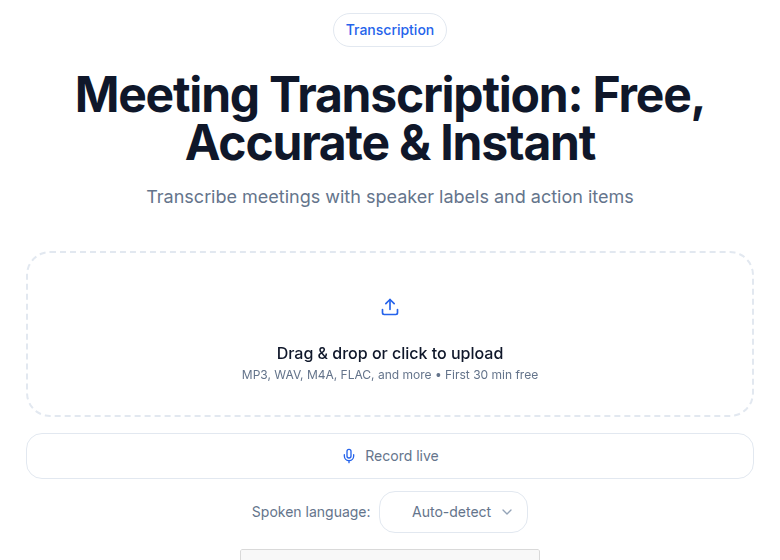 Meeting transcription tool on ConvertAudioToText
The Step-by-Step Workflow
Step 1: Compress the File Before You Upload
This is the single highest-leverage change you can make. Convert your video recording to audio before uploading.
On Mac, QuickTime > File > Export Audio saves an M4A. On Windows, VLC's Convert/Save converts to MP3 or M4A in a few minutes. Both are free. What you get: a file that is 10 to 20 times smaller than the source video, with no loss of transcription quality (the engine only needs the audio track anyway).
A 150 MB M4A uploads in roughly 1 to 3 minutes on a typical broadband connection. That is the window you are working with.
Step 2: Enable Speaker Detection
Turn on speaker diarization before you submit. It adds roughly 15 to 30 seconds to processing but changes the output from an undifferentiated wall of text to something like:
[Speaker 1] Where are we on Q3 numbers?
[Speaker 2] Down 12% consumer, up 8% enterprise.
[Speaker 1] Walk me through enterprise.
You rename "Speaker 1" to the actual person after the fact, but the turn positions are automatic. For a 2-hour board meeting, that attribution is what makes the transcript actually usable. Read more on how speaker separation works in the speaker diarization explained guide.
Step 3: Submit and Let It Run
Cloud-based batch transcription processes audio significantly faster than realtime, commercial STT engines routinely handle a 2-hour file in 4 to 8 minutes, depending on audio quality and server load. Submit the file, get a coffee, come back. You do not need to watch a progress bar.
One honest caveat: that range assumes good audio quality. Recordings with heavy background noise, telephone-quality dial-ins, or strong reverb take longer and produce more errors regardless of which engine you use.
Step 4: Pull Action Items with an AI Template
The raw transcript of a 2-hour meeting is too long to hand to someone who missed the call. The point of transcription at this length is not the text itself, it is what you pull out of the text.
Most AI transcription tools include summary templates. Look for:
- Meeting minutes: Decisions made, action items, owner per item.
- Executive summary: A 200-to-300-word digest of what happened.
- Decision log: Every "we decided" moment, with the surrounding context.
These run on the finished transcript and take seconds, not minutes.
Step 5: Navigate by Section, Not by Scrolling
A 2-hour transcript at typical speaking pace is around 18,000 to 22,000 words. You do not read that linearly; you search it. Every worthwhile tool includes timestamp search. Before you share the document, add a brief header comment with the major topic blocks and approximate timestamps ("0:00 - Quarterly review, 42:00 - Product roadmap, 1:18:00 - Budget discussion"). That turns the transcript into a navigable document rather than a scroll-forever wall.
What to Do When Speaker Labels Come Out Wrong
Two-hour meetings with six or more voices are the hardest case. Three practical fixes:
Record separate audio streams. Zoom's local recording offers a "Record a separate audio file for each participant" option (Settings > Recording, desktop app only). When each participant's audio is captured on its own track, the engine does not have to guess speakers by voice profile. This is the best-available fix for large, talkative meetings.
Drop anchor notes in chat. During the meeting, type short chat messages like "Maya joining now" or "back to Vikram." The transcript does not pull these automatically, but they give you timestamp anchors to use when you manually reassign speaker labels afterward.
Batch reassign in the editor. Good transcript editors let you select all instances of "Speaker 3" and rename them in one action. Use that instead of fixing every utterance one by one.
For a deeper look at how separation actually works, see speaker diarization explained.
The Searchable-Archive Dividend
The most underrated benefit of transcribing every long meeting is not the immediate summary. It is that six months later, when someone asks "did we decide to ship that feature in Q3 or Q4?", you can search across every transcript from the year and find the exact moment it was discussed.
Teams that treat transcripts as institutional memory stop having "I thought we decided..." arguments. The retrieval cost drops from re-watching recordings to a keyword search. Creating meeting minutes from audio covers the longer archival workflow if you're setting this up systematically.
When Not to Use AI Transcription for a Long Meeting
A small set of 2-hour meetings should stay with human transcription. Legal depositions, HR investigations, regulatory testimony, and proceedings where chain-of-custody matters require human verification and, in some cases, certified transcription. The AI vs human transcription comparison covers the decision framework for those cases.
For standard strategy sessions, board meetings, product reviews, and all-hands: AI is the right call. The accuracy is high on clean audio, the turnaround is fast, and the cost is a fraction of the human alternative ($240-plus at Rev's current $1.99/min rate for a 2-hour file, checked July 2026).
A Note on the Free Tier
Most free AI transcription tiers will not handle a 2-hour file in one shot. ConvertAudioToText's free plan runs your first file on the premium engine up to an hour, then keeps transcribing free: up to 30 files a day, up to 30 minutes each. For a 2-hour recording, the Weekly Pass or Pro covers the rest of the file. Otter's Basic plan caps conversations at 30 minutes. Fireflies's free tier limits storage to 800 minutes and applies an AI-credit cap on summaries.
For recurring long-meeting transcription, a paid plan is not optional, it's the baseline. My take: the break-even for most teams is the first meeting where someone asks "what did we decide?" and gets the answer from a search instead of re-watching the recording.
If you just need a clean transcript of a long meeting without a live bot, ConvertAudioToText starts at $14.99/month, and paid plans handle long recordings (links and videos up to 24 hours). It won't join your calendar, but it handles the upload-and-transcribe workflow for a 2-hour file.
Common Questions
How long does it actually take to transcribe a 2-hour meeting?
Total time depends on upload speed and file format. A 2-hour meeting saved as M4A (roughly 80-150 MB) uploads in 1 to 3 minutes on a typical broadband connection. Cloud transcription then takes 4 to 8 minutes depending on audio quality and server load. Budget 10 to 15 minutes total for the compressed audio path. If you upload the original video file (1.5 to 2.5 GB), upload alone can take 15 to 20 minutes before processing starts.
Will speaker labels work for a meeting with 8 or more participants?
Diarization degrades past 4 to 6 speakers, especially with crosstalk. Expect to manually reassign some labels. The best mitigation is Zoom's "record a separate audio file for each participant" option (local recording, desktop app). When individual speaker tracks exist, engines assign labels far more reliably. For meetings with many participants and overlapping conversation, plan for some manual cleanup.
What AI transcription tools can handle a full 2-hour meeting without splitting the file?
Tools that impose per-meeting caps include Otter.ai Pro (90-minute cap, per otter.ai/pricing). Tools without a per-meeting duration cap include Otter Business (4-hour cap), Fireflies Pro, and upload-based tools like ConvertAudioToText Pro (links and videos up to 24 hours). Human services like Rev have no duration cap but charge per minute (~$1.99/min as of July 2026 per rev.com/pricing).
Is human transcription worth it for a 2-hour executive meeting?
Rarely, for most meetings. AI transcription on clean audio is accurate enough for strategy sessions, board meetings, and product reviews. Human transcription costs $1.99/minute or more (per Rev's current published rate), which is around $240 for a 2-hour file with a 12-to-24-hour turnaround. The only cases where human transcription earns its cost at this length are legal proceedings, HR investigations, or any context requiring certified accuracy and chain-of-custody. For everything else, the AI workflow delivers a comparable result in 10 to 15 minutes at a fraction of the cost. See AI vs human transcription for a fuller comparison.
Sources
- Rev pricing (human transcription per minute): https://www.rev.com/pricing, checked July 2026
- Otter.ai plan limits and per-conversation caps: https://otter.ai/pricing, checked July 2026
- Fireflies.ai plan details and storage limits: https://fireflies.ai/pricing, checked July 2026
- ConvertAudioToText pricing and per-file policies: https://convertaudiototext.com/pricing, checked July 2026
- Zoom separate audio track per participant: https://support.zoom.com/hc/en/article?id=zm_kb&sysparm_article=KB0076922
Try transcription free
Convert any audio or video to clean, unwatermarked text — speaker labels, timestamps, and AI summaries included. First 30 minutes free, no account.
Related Articles

How to Create Meeting Minutes from Audio Recordings in 2026
Turn any meeting recording into formal, legally accurate minutes in under 30 minutes. Step-by-step workflow covering transcription, motion capture, vote tallies, and approval cycles.
Transcribe Meeting Recordings Automatically (2026)
How to transcribe meeting recordings automatically in 2026. Compare bot-based tools, native platform transcription, and watch-folder pipelines with honest scoping.