
Transcribe and Translate Workflow: The Right Pipeline for 2026
Summarize this article with:
The fastest path from foreign-language audio to English text is usually a two-step pipeline: transcribe to the original language first, verify the transcript, then translate. One-step models like Whisper's translate task skip that verification window and lock you into English-only output. This guide covers when each approach wins, what quality gates to apply between steps, and how to choose translation tools based on your volume and language pairs.
The right workflow depends on one question: do you need the original-language text, or just the English output? If you only need English and you will discard the source, a one-step model works. For almost every professional use case, you want the original transcript, which means two steps.
Two-Step: Transcribe First, Translate Second
The two-step pipeline:
- Transcribe the audio into the source language using an AI transcription service (Deepgram, AssemblyAI, Whisper, or a product built on them).
- Translate the resulting text into your target language using DeepL, the Google Translate API, or an LLM.
The critical advantage is verifiability. You can play the source audio and check the source-language text before translation. Errors that survive into the translation step are harder to trace back to their cause and harder to fix, because translators and editors are now working from a downstream artifact, not the original.
When two-step wins
Two-step is the right choice whenever the original-language transcript has independent value. That covers:
- Archive and search use cases (a Spanish transcript is indexable in Spanish).
- Editorial workflows where journalists need to quote the original and the translation side by side.
- Qualitative research where coding and annotation happen on the source language.
- Any workflow where you might need to re-translate later (into Portuguese today, French next month).
- Subtitle generation, where the source-language SRT file anchors timing for all translated versions.
When two-step costs more
One transcription call plus one translation call does add time and cost. For a 60-minute Spanish podcast, the transcription step costs roughly whatever your transcription service charges for 60 minutes. The translation step adds the cost of sending the resulting text (typically 10,000-15,000 characters of Spanish) through a translation API. At DeepL's Growth API rate of $27.50 per million characters, that is well under $1 for a single episode.
The added cost is real but small. The added time is usually the bigger concern for high-volume pipelines.
One-Step: Translation Transcription
Whisper large-v3 has a built-in translate task. You send audio in any of its 99 supported input languages, and the model outputs English text directly. One API call, English out, source language gone.
This is not a general-purpose multilingual translation system. The output language is English only. If you need German audio into French text, Whisper's translate task does not help: you would still need a second translation step from English to French.
When one-step wins
One-step makes sense for rapid English-only consumption: a researcher who needs a quick read of a foreign-language clip and will not cite it, a journalist checking whether a recording is worth pursuing, or a batch pipeline that ingests foreign-language audio for English-only indexing.
Use cases where one-step is appropriate:
- Newsroom triage of foreign-language feeds.
- Personal research notes from interviews you conducted in another language.
- Monitoring pipelines where English keyword detection is the goal, not the transcript itself.
What one-step loses
The source-language transcript is permanently gone unless you re-run the model in transcription mode. Speaker labels apply to the English output, which makes quote verification against the original audio much harder. You cannot re-translate to a third language from the source: you would be translating from an English machine translation, adding a second generation of quality loss.
Translation transcription also lacks context. The model processes audio in chunks and translates as it goes, without seeing the full document structure first. For speeches, lectures, and interviews with callbacks and references to earlier statements, this can produce coherent but contextually flat English.
Quality Gates Between Steps
The most common mistake in transcribe-and-translate pipelines is sending an unreviewed transcript to translation. Errors compound. A mistranscribed name in the source becomes a mistranslated name in the target, and nobody catches it because editors are reading the target language.
Apply these quality checks between the transcription and translation steps:
Check proper nouns and technical terms first. AI transcription models interpolate unfamiliar names, brands, and domain vocabulary from phonetics. Search the transcript for the names of key speakers, company names, product names, and acronyms. Fix these before translation: "GPT" transcribed as "G-P-T" or "GBT" will produce different translations depending on the tool.
Verify numbers. Dates, statistics, dollar amounts, and percentages are high-value and error-prone. A transcribed "14" and "40" sound similar in many languages. Spot-check any figure that would matter if wrong.
Check speaker boundaries. If your transcript has speaker diarization, verify that the speaker boundaries are correct on a sample of exchanges, particularly during interruptions and crosstalk. Misattributed quotes survive into translated output without flags.
Confirm sentence boundaries. AI transcription sometimes breaks sentences incorrectly, particularly around long pauses. A sentence fragment fed to a translation model can produce grammatically odd output. Review the first paragraph of each major speaker's contribution before translating the full text.
These checks take 5-15 minutes for a typical 60-minute recording and prevent hours of downstream editing.
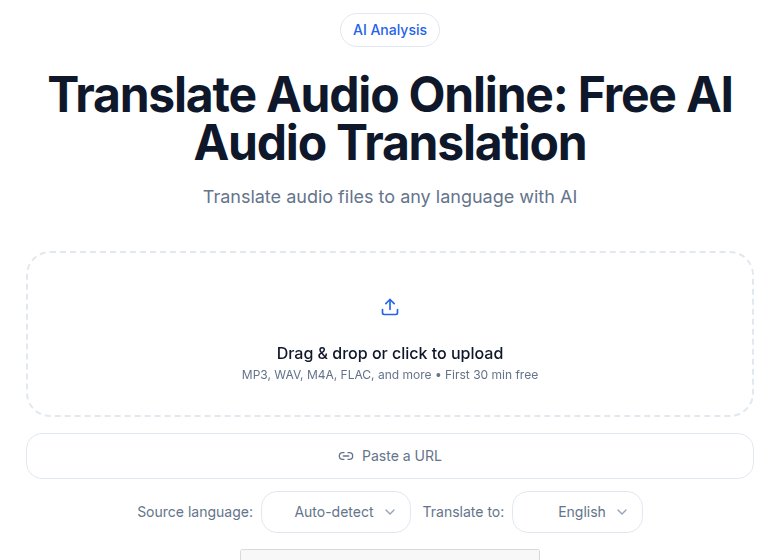 ConvertAudioToText audio translation tool showing source language selection and target language picker
When to Translate the Transcript vs Re-Transcribe Target Audio
This question comes up whenever you have both an original-language recording and a target-language version: a dubbed video, a professionally translated speech read aloud, or a bilingual interview where each speaker uses a different language.
Translate the transcript (the usual answer) when:
- You have the original speaker on record. The source audio is the authoritative version. Transcribe it, verify it, translate the text.
- The target-language version is a dub. Dubbed audio carries prosody shifts, timing distortions, and occasionally altered phrasing from the dubbing process. Transcribing the dub and treating it as ground truth means you are working from a derivative artifact with its own error layer.
- You need to output multiple target languages. One verified source transcript can be translated into Portuguese, French, and German in parallel. Three separate dubs transcribed separately will inevitably diverge.
Re-transcribe the target audio directly when:
- You do not have the source recording. A dubbed video without the original is what you have: transcribe the dub directly.
- The target-language version was created by human speakers reading original copy, not a mechanical dub. Conference speeches delivered simultaneously in two languages, for example, are each original performances.
- The two language versions have substantially different content. Many dubbed productions cut or rewrite scenes; if the content differs, each version needs its own transcript.
For subtitle translation workflows, the practical rule is: always start from the source-language SRT or VTT, translate the cue text segment by segment, and verify timing against the source audio before publishing the translated subtitle file.
Choosing a Translation Tool for Your Pipeline
The right translation tool depends on your volume, language pairs, and how much context matters.
| Tool | Pricing model | Strengths | Limits |
|---|---|---|---|
| DeepL Individual | ~$8.74/mo annual | Strong quality on European pairs | 300K chars/mo; not for high volume |
| DeepL API Growth | ~$26/mo + $27.50/1M chars | Production-ready, structured input | Character-based billing adds up at scale |
| Google Translate API | Per-character metered | Widest language coverage | Quality lags on less common pairs |
| GPT-4o API | $2.50/1M input + $10/1M output tokens | Handles nuance, domain context, instructions | Higher cost; slower for bulk |
| GPT-4o mini API | $0.15/1M input + $0.60/1M output tokens | Cost-effective for high volume | Less reliable on specialized vocabulary |
| Rev human translation | $1.99/min for human transcription; translation separately | Highest quality for legal, medical | Expensive and slow for large files |
For most content work (podcasts, interviews, lectures, business calls), DeepL on European language pairs or an LLM like GPT-4o mini for non-European pairs gives a strong result at low cost. Human translation is worth the cost only when accuracy has legal or medical consequences.
For translating podcasts to Spanish or other major languages, DeepL's accuracy on Spanish-English pairs specifically is well-regarded in head-to-head benchmarks. For multilingual team communication, see the note on transcription for international teams.
Speaker Labels Through Translation
Speaker labels survive translation only if you handle the format correctly.
The fragile approach: copy the full transcript text into a translation interface as one block. Speaker labels like "Speaker 1: [text]" may survive, or may not, depending on whether the translation tool treats them as translatable content.
The robust approach: export in a structured format (SRT, VTT, or JSON with per-utterance objects) and translate each segment's text field independently. The speaker attribution lives in a separate field and never touches the translation process. Most LLM and API translation pipelines support this with a simple preprocessing step.
For interview-heavy work, see the interview transcription guide for how to structure transcripts before they enter a translation step.
Common Workflow Patterns
Newsroom: foreign correspondent recordings
Transcribe source-language audio with speaker labels. Apply a quality gate for proper nouns (names, locations, government bodies). Translate to English with context notes (e.g., "Speaker 1 is the minister") passed to the LLM as a system prompt. Reporters verify English quotes against the source transcript before publication.
Podcast localization
Transcribe in the source language. Generate source-language show notes and chapter markers. Translate the full transcript for each target locale. Export each locale's SRT file for subtitle distribution. The source transcript remains the canonical version: any correction propagates to all translated outputs.
Qualitative research
Transcribe interviews in the field language. Apply qualitative codes and thematic annotations to the source-language transcript. Translate to English for analysis write-up. Cite the source-language text in appendices for reproducibility. One-step translation transcription would have destroyed the source-language coding layer.
YouTube multilingual subtitles
Transcribe in source language, export source SRT. Translate SRT cue text to each target language while preserving timestamps. Upload each translated SRT to YouTube's subtitle manager. Do not re-transcribe dubbed versions if the original-language SRT already covers timing accurately. For more on this workflow, the subtitle translation workflow guide covers cue-segment handling in detail.
Where ConvertAudioToText Fits
If you need to transcribe audio in 99+ languages and then translate the resulting transcript, CATT handles the first step with speaker labels, timestamps, and AI templates. The free tier runs your first file on the premium engine (up to an hour), then keeps transcribing free (up to 30 files a day, up to 30 minutes each), and the Pro plan (unlimited transcription) runs $14.99/month. The translate-audio and translate-video tools combine transcription and LLM-based translation in one interface for supported language pairs, landing on a translated transcript with speaker labels preserved.
CATT does not offer human translation review. For that layer, pair it with a human review service after the AI translation step.
FAQ
What is the difference between transcribing and translating audio?
Transcription converts speech to text in the same language as the audio. Translation then converts that text into another language. Some tools combine both steps into a single API call, but most professional pipelines keep them separate so you can verify and edit the transcript before translation compounds any errors.
Should I use a one-step or two-step transcribe-and-translate workflow?
Use one-step (Whisper's translate task) only when you need a quick English-only pass and will discard the original-language text. Use two-step whenever you need the source-language transcript for archiving, editing, speaker verification, or re-translation, or when your target language is anything other than English.
When should I translate the transcript rather than re-transcribing target-language audio?
Translate the transcript when you have the original-language speaker recording, which is the authoritative source. Re-transcribe target-language audio directly only if you have a dubbed or professionally re-recorded version in the target language, because dubbed audio often carries timing distortions and prosody shifts that compound transcription errors.
What translation tool works best with an AI transcript?
For most content (podcasts, interviews, lectures), DeepL Individual at around $8.74 per month delivers strong quality on European language pairs. For context-heavy or domain-specific content, an LLM like GPT-4o or Claude handles nuance better. Google Translate API covers the widest language range at lower cost but quality lags on less common pairs.
How do I preserve speaker labels through a translation step?
Export your transcript in a structured format (SRT, VTT, or JSON with speaker tags) before translation, then translate each segment independently rather than feeding the full text as one block. Most LLMs and the DeepL API accept structured segment-by-segment input that preserves speaker attribution. Verify a sample of labeled quotes against the original audio before publishing.
Sources
- OpenAI Whisper large-v3 model card and translate task documentation: huggingface.co/openai/whisper-large-v3
- DeepL pricing (Individual, API Growth): eesel.ai/blog/deepl-pricing (checked 2026-07-02)
- Rev.com transcription pricing: rev.com/pricing (checked 2026-07-02)
- Otter.ai pricing plans: otter.ai/pricing (checked 2026-07-02)
- TurboScribe pricing: turboscribe.ai/pricing (checked 2026-07-02)
- OpenAI API pricing (GPT-4o): openai.com (checked 2026-07-02)
Try transcription free
Convert any audio or video to clean, unwatermarked text — speaker labels, timestamps, and AI summaries included. First 30 minutes free, no account.
Related Articles

Agentic Transcription Systems: Real Patterns for 2026
Agentic transcription goes beyond raw text. Learn the three real agent loops (verify-and-retry, terminology lookup, summary chains) that work in production today.
Batch Transcription for Large Projects: The 2026 Playbook
How to run a 1,000-file batch transcription job without losing your mind: manifest setup, API parallelism, rate limits, failure handling, QC sampling, and cost math for 2026.