How to Translate a Podcast to Spanish: 2026 Workflow
Summarize this article with:
Spanish is the second most common podcast language globally, with Mexico at 50% podcast penetration and Spain at 41%. You can localize at three levels: a Spanish transcript (lowest cost, fastest), Spanish subtitles for video, or a fully dubbed Spanish audio track. Start with Level 1 to validate demand before committing to dubbing costs. One register decision matters most before you start: tú for broad informal Latin American content, usted for formal or professional Spanish audiences in certain regions.
Why Spanish Is the Highest-Leverage Localization Target
Spanish is the second most common podcast language in the world, accounting for roughly 11% of all podcasts globally, and it is still growing. Mexico sits at 50% podcast penetration among its population, Spain at 41%. That is not a niche audience. If your English podcast has traction, Spanish is typically the first localization move worth making.
This guide covers the full workflow, from your English MP3 to a published Spanish episode, at three levels of completeness. It also covers the register choices that determine whether your Spanish sounds natural or machine-translated.
Three Levels of Podcast Localization
Before touching any tool, decide what you are actually building. The answer drives your time, cost, and tool selection.
Level 1 is a Spanish written transcript, published alongside or instead of English show notes. Spanish readers follow along or catch up in their language, even if the audio stays in English. This is the right starting point for testing Spanish audience demand with minimal commitment.
Level 2 is Spanish subtitles on your video version, typically uploaded to YouTube. Spanish speakers watch with subtitles, which YouTube indexes for Spanish search. This makes sense if you already publish video and want to extend reach without re-recording anything.
Level 3 is a fully dubbed Spanish audio track, replacing or supplementing the English episode. Spanish speakers listen to a Spanish-language version of your show. This is the highest-impact option and the most expensive. AI voice tools have improved enough in 2026 that they are credible for podcast-style narration, but the workflow is longer.
Most podcasts move through these levels in order. Do not jump to Level 3 before you know there is a Spanish audience.
The Register Decision: tú, usted, or vos
Decide this before translation begins. It affects every sentence in the output.
Informal Latin American content uses tú. This is the default for most podcasts aimed at Mexico, Colombia, Chile, Central America, and the US Latino audience. Casual, conversational, direct.
Formal or professional content uses usted. B2B podcasts, legal topics, or anything in a traditionally formal register defaults to usted in most of Latin America. Some older demographics in Colombia, for example, use usted even in casual conversation.
Argentina and Uruguay use vos, not tú. If your audience skews heavily Argentine, ask your translator or translation tool to use voseo forms ("vos querés" instead of "tú quieres"). Most AI translation tools do not do this by default and will produce generic Latin American tú.
Spain uses vosotros for informal plural address, a form that does not exist in Latin American Spanish. Peninsular content also tends toward a slightly more formal written register. If your primary audience is Spain, tell your translator to use vosotros and Spain-standard vocabulary.
For broad reach across Latin America, pick neutral Latin American Spanish with tú, no vosotros, and vocabulary that avoids strongly country-specific slang. This is sometimes called "neutral Spanish" or "international Spanish." It covers the largest audience without sounding wrong to any specific group.
Level 1 Workflow: Spanish Transcript
Step 1: Transcribe the English audio
Upload your episode to ConvertAudioToText's audio-to-text tool. A 60-minute episode transcribes in 2 to 4 minutes. Output includes speaker labels, timestamps, and an AI summary. Export as a plain-text or Word document for the next step.
If your episode has Spanish-language guests or Spanish segments, transcribing in Spanish directly may produce better results than translating a flawed English transcription of accented speech.
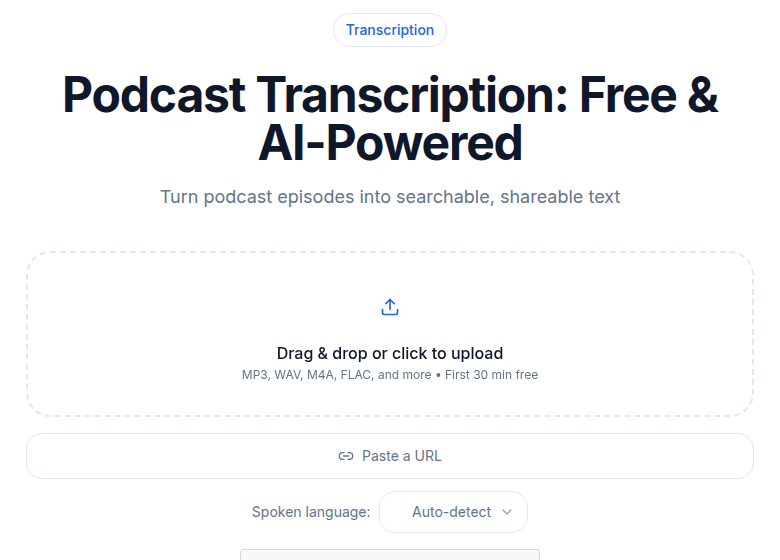 ConvertAudioToText podcast transcription tool
Step 2: Clean the English transcript
Ten to twenty minutes of editing here saves translation errors downstream. Fix proper noun spellings, guest names, and product names. Remove excessive filler words. Break long paragraphs into readable units. Verify any timestamps you plan to carry into the Spanish version as chapter markers.
Step 3: Translate to Spanish
Two options worth using in 2026:
DeepL Pro handles document uploads including plain text and Word files. The Individual plan costs $8.74 per month on annual billing and covers 300,000 characters monthly (enough for many episodes per month). A 9,000-word transcript runs roughly 55,000 characters, well within the monthly limit. DeepL also accepts SRT files directly, which matters for Level 2. Quality is publication-ready for most content.
GPT-4o via API costs $2.50 per million input tokens and $10 per million output tokens. A 9,000-word transcript is roughly 12,000 input tokens, putting the translation cost under $0.15 for a full episode. GPT-4o handles register instructions well: include your tú/usted choice and any vocabulary constraints in the system prompt. This is the better option for technically complex or highly idiomatic content where you need nuance that a dedicated translation engine cannot always replicate.
For a 60-minute episode, either option costs well under $1.
Step 4: Light human review
AI translation handles structure well but slips on idioms, culturally specific references, and proper nouns. A 30 to 60 minute review pass by a Spanish-speaking editor, or by you if your Spanish is strong enough, catches the main issues. Focus on:
- Proper nouns that may look different in Spanish (book titles, product names, cultural references).
- Idiomatic expressions that translated literally but read awkwardly.
- Register consistency (did the translation mix tú and usted in the same paragraph?).
- Country-specific vocabulary that might confuse audiences in other regions (if you are targeting broad Latin America, flag Mexican slang that might not land in Spain, and vice versa).
Step 5: Publish
Add the Spanish transcript to your episode page as Spanish show notes, or as a separate language tab if your website supports it. Use Spanish-language meta descriptions and title tags for the page to capture Spanish-language search. Tag the content in Spanish.
Level 2 Workflow: Spanish Subtitles for YouTube
Step 1: Export an English SRT file
From your transcription output, export SRT format. Most transcription tools support this. Timestamps are preserved in the SRT file, which you need for the next step.
Step 2: Translate the SRT to Spanish
DeepL accepts SRT files directly on paid plans. Upload the file, set the target language to Spanish, and download the translated SRT. Timestamps are preserved in the output.
GPT-4o also handles SRT translation when prompted to treat each subtitle block as a unit and preserve the timestamp lines verbatim. A simple system prompt that specifies "translate only the text lines, not the timestamp lines" works reliably.
For team workflows, dedicated localization platforms like Lokalise handle SRT natively with translation memory, useful if you are managing recurring series translation. See the subtitle translation workflow guide for broader context.
Step 3: Adjust for Spanish text expansion
Spanish text is typically 20 to 30 percent longer than English text. A subtitle line that fits comfortably in English will overflow in Spanish. Practical fixes:
- Split long lines into two shorter lines where sentence structure allows.
- Remove filler words from the Spanish subtitle where they add length without meaning.
- Accept that some subtitle lines run slightly over the ideal 42-character-per-line reading standard.
Subtitle Edit (free, Windows/Linux) handles timing adjustments efficiently. Aegisub handles more complex timing and supports ASS format if you need styled subtitles.
Step 4: Upload to YouTube
Upload the Spanish SRT under "Subtitles" in YouTube Studio. Set the language to "Spanish (es)" so YouTube indexes the video for Spanish-language search. Auto-generated YouTube translations have improved, but human-edited Spanish subtitles still produce noticeably higher watch time and engagement, per typical creator reports.
Level 3 Workflow: Spanish Dubbed Audio
Option A: AI voice dubbing
The workflow is: translate the transcript (Level 1), then feed the Spanish text to an AI voice tool to generate the Spanish audio track.
ElevenLabs is the most widely used tool for this. The Creator plan costs $22 per month and includes 121,000 credits. Automatic dubbing without watermark costs 3,000 credits per minute of audio (per ElevenLabs documentation, checked July 2026). At that rate, a 30-minute episode costs 90,000 credits, leaving a small monthly buffer. A step up to the Pro plan ($99 per month, 600,000 credits) comfortably handles 30-minute episodes multiple times a month.
HeyGen offers audio dubbing (without lip sync) that is unlimited on paid plans starting at $29 per month (Creator tier), making it a cost-effective option for high-volume series where you only need Spanish audio and not a lip-synced video version.
In either case, the output is a Spanish audio file you publish as a separate episode. Most podcast hosts allow uploading a separate feed or episode file for the Spanish version.
My take: AI Spanish voices in 2026 are good enough for narration-heavy podcasts and interview formats with clear source audio. They struggle with overlapping speakers, heavy accents in the source, and comedic timing. Dub a short episode first before committing the workflow to a full back catalog.
Option B: Human voiceover
Hire a Spanish-speaking voiceover artist to record the translated script. Cost varies widely by artist tier and episode length. For a 30-minute translated script, budget $200 to $1,000 depending on the market (Voices.com, Voice123, or direct referrals from Spanish-language podcasting communities). Quality and natural delivery are better than any AI option, at a clear cost premium.
Spanish Regional Variation: Pick One, Stick With It
| Variant | Best for | Pronoun choice | Platform note |
|---|---|---|---|
| Neutral Latin American | Broad Latin America, US Latino | tú / ustedes | Maximum geographic reach |
| Mexican Spanish | Mexico, Central America, US Latino | tú / ustedes | Strongest for LATAM #1 market |
| Castilian (Peninsular) | Spain | tú / vosotros | Spain-specific vocabulary and vosotros |
| Rioplatense | Argentina, Uruguay | vos / ustedes | Requires voseo verb conjugations |
For most podcasts, neutral Latin American Spanish with tú is the right default. It sounds at home across Mexico, Colombia, Chile, and the US Hispanic market, without the vosotros that marks content as specifically Spanish (from Spain) to Latin American ears.
See the Spanish transcription guide for language detection and accuracy notes when your source audio already contains Spanish.
Cost Reference: 60-Minute Episode
| Level | Tools | Approximate cost |
|---|---|---|
| Level 1, DIY | Transcription + DeepL Individual | Under $5 per episode |
| Level 1, with editor | Above + freelance Spanish editor (1 hour) | $40 to $120 per episode |
| Level 2, Spanish subtitles | SRT translation + timing edit | $5 to $30 per episode |
| Level 3, AI dubbing (ElevenLabs) | Translation + Creator plan | $22 to $99 per month flat |
| Level 3, Human voiceover | Translation + voiceover artist | $300 to $1,500 per episode |
For transcription and translation pricing models more broadly, the cost-per-hour math changes significantly at volume.
What to Measure After Publishing
Publish one or two Spanish episodes, then check:
- Spanish-language website traffic (Google Search Console, filter by language).
- Spanish RSS subscribers (separate feed for dubbed audio if you publish one).
- YouTube watch time on Spanish-subtitled videos.
- Direct audience signals: replies in Spanish, Spanish-language reviews on Apple Podcasts, comments on social posts promoting the Spanish episode.
If metrics show a Spanish audience within 3 to 6 months, expand to deeper localization. If not, maintain Level 1 (low cost, captures search) and invest elsewhere.
Tools Summary
| Category | Tool | What it handles |
|---|---|---|
| Transcription | ConvertAudioToText | English transcript with speaker labels, SRT export |
| Translation | DeepL Pro | Fast document and SRT translation, $8.74/month |
| Translation | GPT-4o API | Nuanced, instruction-following translation, pay per use |
| Subtitle timing | Subtitle Edit | Free timing adjustment, 200+ formats |
| Subtitle timing | Aegisub | Advanced styling, open source |
| AI dubbing | ElevenLabs | Voice generation, Creator at $22/month |
| AI dubbing | HeyGen | Audio dubbing unlimited on paid plans from $29/month |
| Distribution | Apple Podcasts | Separate RSS feed per language version |
| Distribution | YouTube | Direct SRT/VTT subtitle upload, indexed for Spanish search |
If you just need a clean transcript to start the translation workflow without a meeting bot or subscription, ConvertAudioToText's podcast tool handles long episodes with no file-size barrier on the paid plan ($14.99 per month, unlimited transcription). A Weekly Pass at $9.99 one-time for 1,200 minutes (20 hours) is the cheapest no-setup option if you only need a burst of transcription.
FAQ
Does AI translation capture Spanish regional differences?
Not automatically. Tools like DeepL and GPT-4o produce neutral Latin American Spanish by default. To get Castilian Spanish (Spain), you set the target language to "Spanish (Spain)" in DeepL or include explicit instructions in a GPT-4o system prompt. Rioplatense voseo requires explicit prompting in GPT-4o; DeepL does not support voseo as a separate variant. Always specify your target region before running translation.
How long does it take to translate a 60-minute podcast episode?
Transcription runs 2 to 4 minutes. Translation (DeepL or GPT-4o) takes under 5 minutes for a 9,000-word document. Human review takes 30 to 90 minutes depending on how idiomatic or technical the content is. Total for Level 1 with a light edit: under 2 hours per episode, once you have the workflow running.
Should I publish Spanish episodes on a separate RSS feed?
For dubbed audio (Level 3), yes. Most podcast hosting platforms do not support per-episode language variants on a single feed. A separate RSS feed lets you submit the Spanish show to Apple Podcasts and Spotify as a distinct show with a Spanish title and description, which helps Spanish-language search discovery. For Level 1 (text only) and Level 2 (subtitles on YouTube), no separate feed is needed.
Is Spanish text always longer than English, and does that affect subtitles?
Yes. Spanish is typically 20 to 30 percent longer than equivalent English text. For subtitles, this means English-length line breaks will overflow. Fix this during the subtitle timing step: split lines, compress filler words, or shift timing by 0.5 to 1 second per affected line. Tools like Subtitle Edit let you see and adjust line length and reading speed in a single interface.
Sources
- DeepL pricing plans: https://checkthat.ai/brands/deepl/pricing (checked July 2026)
- ElevenLabs pricing and dubbing credit costs: https://elevenlabs.io/pricing (checked July 2026)
- ElevenLabs dubbing cost per minute: https://help.elevenlabs.io/hc/en-us/articles/23338815703697 (checked July 2026)
- HeyGen pricing and plans: https://www.heygen.com/pricing (checked July 2026)
- GPT-4o token pricing: https://openai.com/business/pricing/ (checked July 2026)
- DeepL SRT file support: https://www.deepl.com/en/features/document-translation/srt (checked July 2026)
- Podcast statistics 2026, Spanish market share: https://talks.co/p/podcast-statistics/ (checked July 2026)
- Spanish localization register guidance: https://www.argotranslation.com/blog/the-ultimate-guide-to-localizing-spanish-content (checked July 2026)
- Spotify AI voice translation pilot: https://newsroom.spotify.com/2023-09-25/ai-voice-translation-pilot-lex-fridman-dax-shepard-steven-bartlett/ (checked July 2026)
Try transcription free
Convert any audio or video to clean, unwatermarked text — speaker labels, timestamps, and AI summaries included. First 30 minutes free, no account.
Related Articles

Localization vs Translation: The Budget-Changing Difference
Translation converts words. Localization adapts the whole experience. Transcreation rewrites for emotional impact. Know which level your content actually needs before you spend.
Spotify Transcript Extractor: How to Copy and Download Episode Text
Get a Spotify podcast transcript you can copy and download: paste a public episode link, 30 minutes free with no signup, TXT or SRT files on eligible plans.