Advanced ChatGPT Prompts for Better Answers From Transcripts
Summarize this article with:
The Patterns That Work
The single biggest lever for better ChatGPT answers is not a clever phrase, it is giving the model a concrete source to work from. When you paste a transcript into the context window and say "based only on this document," you remove the model's main failure mode: generating plausible-sounding text from training data rather than your actual content. The patterns below are organized by how much research backs them up, not by how impressive they sound.
This guide applies those patterns specifically to transcript Q&A: extracting answers, summaries, and structured content from audio or video recordings you have already converted to text.
Why Transcripts Make Better Context Than Notes
Before covering the patterns, a word on source quality. A rough paraphrase of a meeting is lossy input. A clean, timestamped transcript is not.
When you feed a transcript to ChatGPT, you give it:
- The speaker's actual words, not a summary of them
- Implicit context (hesitations, repetitions, follow-up questions) that outlines miss
- A ground-truth document you can ask the model to cite
If your transcript is inaccurate or missing speaker labels, the model's output will compound those errors. Tools like audio-to-text and meeting transcription produce clean enough output to use as a direct prompt payload.
Pattern 1: The Grounding Pattern (Highest Confidence)
This is the pattern with the clearest evidence behind it. You instruct the model to treat your transcript as its sole source and explicitly prohibit hallucination.
You are reviewing a [podcast/interview/meeting] transcript.
The transcript is your single source of truth.
Do not use outside knowledge.

Based ONLY on the content below, [your task here].
If the transcript does not contain enough information to answer, say so explicitly.

[TRANSCRIPT START]
{paste transcript here}
[TRANSCRIPT END]
The grounding instruction does two things: it suppresses the model's tendency to fill gaps with training data, and it gives you a check for output quality. If the model cites something that is not in your transcript, the prompt gave you grounds to reject it.
The OpenAI prompt engineering guide recommends exactly this: include proprietary or domain-specific data the model needs, and instruct it to base responses on that content rather than general knowledge (per the developers.openai.com guide, verified July 2026).
Pattern 2: The Format-First Pattern (Highest Confidence)
Specifying your output format before the task description reliably improves consistency. Research on structured output shows that models given an explicit schema or worked example match it far more reliably than models given a vague instruction like "organize this clearly."
Output a markdown document with this exact structure:
## Key Claims
- [claim 1]
- [claim 2]

## Open Questions
- [question 1]

## Action Items
- [owner]: [task]

Now, using only the transcript below, fill in each section.
Do not invent items not supported by the text.

[TRANSCRIPT]
{paste transcript here}
[/TRANSCRIPT]
The format-first approach works because the model sees the target shape before reading your content. You can adapt the schema to any output you need: meeting minutes, a blog outline, a Q&A for a sales page, speaker quotes for social media.
For a longer discussion of format decisions, see the guide on structured output vs summary prose.
Pattern 3: The Constraint Pattern (High Confidence)
Adding explicit constraints cuts generic padding. The most useful constraints for transcript work:
- Length: "No more than 150 words."
- Scope: "Cover only topics mentioned by the first speaker."
- Tone: "Plain language, no jargon, a 10th-grade reading level."
- Citation: "Quote the transcript directly to support each point."
Using only the transcript below, write a three-paragraph summary.
Each paragraph must be under 80 words.
Every factual claim must include a verbatim quote from the transcript as evidence.
Do not add background context from outside the recording.

[TRANSCRIPT]
{paste transcript here}
[/TRANSCRIPT]
This template works well for interview summaries, podcast show notes, and research interviews where you need to distinguish what the speaker actually said from what you infer.
Pattern 4: Few-Shot Examples (High Confidence)
Including one or two examples of your desired input/output before the real task is one of the more consistent techniques across research. In one sentiment analysis study, few-shot prompting beat zero-shot by roughly 10 percentage points on accuracy. The value scales with how specific your format needs are.
For transcript work, a few-shot setup looks like this:
I will give you a transcript. Extract every action item in this format:

Example:
Transcript: "Sarah said she would send the contract by Friday and asked Mike to review the Q2 numbers."
Action items:
- Sarah: Send contract by Friday
- Mike: Review Q2 numbers

Now extract action items from this transcript:

[TRANSCRIPT]
{paste transcript here}
[/TRANSCRIPT]
The example teaches the model what counts as an action item, which speaker attribution to use, and how concise to be, without you having to spell all that out in abstract rules.
Pattern 5: Explicit Role + Task Framing (Moderate Confidence)
Assigning a role to the model shifts its output style and vocabulary. The practical effect is real: asking ChatGPT to respond "as a UX researcher reviewing a usability interview" produces different word choice than asking it to respond as a "marketing copywriter." That stylistic shift is useful.
What the research does not clearly support is the stronger claim that role prompting improves factual accuracy or reasoning quality. A 2025 study testing 162 different role assignments found no consistent accuracy gain over a neutral baseline, and some roles introduced biases. The effect is on tone and framing, not on what the model knows.
My take: use role framing to get the right register, not to summon expertise the model does not have. Pair it with the grounding pattern if accuracy matters.
You are a [journalist/researcher/analyst/hiring manager] reviewing a transcript.
Your goal is to [task].
Use only what the speaker said. If you are uncertain, say so.

[TRANSCRIPT]
{paste transcript here}
Pattern 6: Iterative Decomposition for Complex Transcripts (Moderate Confidence)
Long, dense transcripts work better when you break the task into steps rather than asking for everything at once. A single prompt asking for a summary, themes, quotes, and action items will often produce shallow outputs across all four.
Step 1 prompt:
"Read the transcript below. List the five main topics discussed, in order of how much time was spent on each."

Step 2 prompt (after reviewing the list):
"For topic [X], what is the speaker's stated position? Quote the relevant section."

Step 3 prompt:
"Based on the discussion of [X], what follow-up questions were left unanswered?"
Note on chain-of-thought: a June 2025 Wharton working paper ("The Decreasing Value of Chain of Thought in Prompting," Mollick et al.) found that explicit step-by-step CoT instructions are less beneficial on current models than they were on earlier ones, because newer models already reason through problems implicitly. The decomposition above is not the same as asking the model to "show its work" mid-answer. It is you doing the structuring across multiple calls, which keeps each task tractable.
For extracting summaries specifically, the companion post on how to prompt AI for better summaries covers template variants for this workflow.
When to Use Which Pattern
| Goal | Primary pattern | Add-on |
|---|---|---|
| Meeting minutes from a recording | Format-first | Grounding |
| Speaker quotes for a blog post | Grounding | Constraint (cite verbatim) |
| Action items from a call | Few-shot | Explicit role (project manager) |
| Thematic analysis of interviews | Iterative decomposition | Constraint (quote evidence) |
| Show notes for a podcast | Format-first | Constraint (max word count) |
| Research summary from a talk | Grounding | Format-first |
A Note on Context Window Size
Current ChatGPT models support context windows from roughly 128,000 tokens (GPT-4o) to higher limits on newer versions. A typical one-hour transcript runs around 10,000 to 15,000 words, which fits comfortably. Paste the full transcript, not excerpts, when asking questions that require the model to reason across the whole conversation. Truncating creates gaps the model will fill with inferences.
If your transcription tool outputs a file with timestamps and speaker labels, keep those in. Speaker labels anchor attribution, and timestamps let you verify quotes against the original.
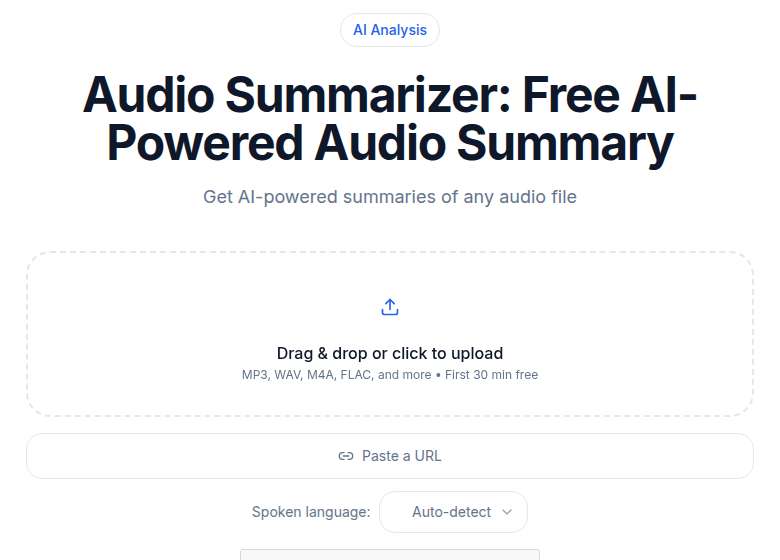 The CATT audio summarizer processes your transcript and pulls key points without manual review
If you want a transcript to start from, ConvertAudioToText processes audio files and outputs a clean, speaker-labeled text you can paste directly into any of the patterns above.
Common Questions
What is the single most important thing I can add to a ChatGPT prompt?
A concrete source document. When you give the model a transcript and instruct it to answer only from that document, you eliminate its biggest failure mode: drawing on training data rather than your actual content. Format instructions and role framing help at the margin, but grounding the model in a specific text has the clearest effect on accuracy.
Does asking ChatGPT to "think step by step" still work?
Less consistently than it used to. A 2025 Wharton working paper found declining benefit from explicit chain-of-thought instructions on current models, which already do much of that reasoning implicitly. For transcript tasks, structuring the work yourself across multiple prompts, asking one focused question at a time, tends to produce better results than asking the model to reason aloud in a single response.
How long should my prompt be?
OpenAI's own guidance, and independent research, put the practical sweet spot around 150 to 300 words for the instruction section, not counting the transcript itself. Longer instructions raise the risk of the model losing track of key constraints, especially those placed in the middle of the prompt. Lead with the most important rule: your output format or your grounding instruction.
Can these patterns work with Claude or Gemini?
Yes. The grounding pattern, format-first pattern, and few-shot approach are not ChatGPT-specific. They work because they reduce ambiguity in any large language model's input. Syntax preferences differ slightly: Claude handles XML tags well for section delimiters, while ChatGPT handles markdown headers. Adjust the formatting, keep the logic.
Sources
- OpenAI Prompt Engineering Guide: developers.openai.com (verified July 2026)
- Mollick et al., "The Decreasing Value of Chain of Thought in Prompting," SSRN Working Paper, June 2025: papers.ssrn.com/sol3/papers.cfm?abstract_id=5285532
- "Principled Personas: Defining and Measuring the Intended Effects of Persona Prompting on Task Performance," arXiv 2025: arxiv.org/pdf/2508.19764
- OpenAI Structured Output documentation: platform.openai.com/docs
- "Enhancing structured data generation with GPT-4o," Frontiers in AI, 2025: frontiersin.org
Try transcription free
Convert any audio or video to clean, unwatermarked text — speaker labels, timestamps, and AI summaries included. First 30 minutes free, no account.
Related Articles
How to Transcribe Voice Recorder Recordings (Any Device)
Get text from any voice recorder, from Anker SoundCore Work to old Olympus dictaphones. Covers file transfer, formats, WMA conversion, speaker labels, and export options.

The Future of AI Transcription: What to Watch in 2026
A grounded forecast of AI transcription in 2026: on-device shifts, multilingual gains, pricing pressure, diarization progress, and agentic workflows, anchored in verified 2026 trends.