How to Prompt AI for Better Summaries: Patterns That Work in 2026
Summarize this article with:
The six-part prompt structure (role, framing, output format, style, exclusions, transcript) is the difference between a generic paragraph and a structured, actionable summary. This post covers that structure, five paste-ready templates for meetings, interviews, podcasts, voice memos, and lectures, and the iteration loop that locks in a reliable prompt after three to five runs. Bad summaries in 2026 are almost always a prompting problem, not a model problem.
The model is not the problem. Bad summaries from AI in 2026 are almost always a prompting failure. The same transcript run through a weak prompt and a strong prompt can produce outputs so different they feel like different tools. Getting the strong version is a discipline, not a talent, and it is mostly learnable in an afternoon.
This post covers the practical patterns: the six-part structure of a strong summary prompt, five paste-ready templates for the most common content types, and the iteration loop that locks in a reliable prompt template after a few runs.
For general Q&A prompting rather than summary-specific work, see advanced ChatGPT prompts for better answers. This post stays focused on transcript summarization.
The Six-Part Prompt Structure
A reliable summary prompt has six parts, in this order:
- Role and context: Who the model is summarizing for, and why they need it.
- Source material framing: What kind of transcript follows, who the speakers are.
- Output structure: The exact sections and format you want back.
- Style instructions: Tone, voice, and length constraints.
- What to exclude: Banned phrases and content categories to skip.
- The transcript.
Each part does work. Skipping one means the model fills in a default that may not match what you want.
A note on ordering: instructions first, transcript last. Some workflows paste the transcript at the top, but that pushes the instructions far from the model's attention by the time it generates output. For transcripts longer than a few minutes, instructions-then-transcript is more reliable.
Part 1: Role and Context
The prompt should establish who the summary serves.
Weak: "Summarize this meeting."
Better: "You are summarizing a team meeting for the project manager who could not attend."
Strongest:
You are summarizing a customer discovery interview for a product manager
who is deciding which features to prioritize next quarter. The PM will
read the summary to identify common pain points across multiple interviews.
The more specific the role, the more useful the output. The model adjusts which content to emphasize based on what the reader will actually do with the summary.
Part 2: Source Material Framing
Tell the model what it is reading before it reads it.
Weak: "Here is a transcript."
Better:
The transcript below is from a 45-minute Zoom interview. Speaker A is
the interviewer (PM at our company). Speaker B is the customer. The
customer runs a small marketing agency and was being asked about how
they currently handle social media analytics.
Framing shapes interpretation. A statement from a CEO and a statement from a junior analyst carry different weight in the model's reading, but only if the model knows who is speaking.
Part 3: Output Structure
Specify exactly the sections you want.
Weak: "Summarize it."
Better:
Output:
- Two-sentence summary
- Three to five key pain points (one per topic)
- Three to seven verbatim quotes with timestamps
- Open questions for follow-up
Strongest (with a good/bad example baked in):
Output the summary as Markdown with this structure:

## Summary
Two sentences. Lead with the most important finding.

## Pain Points
Three to five bullets. Each bullet is a complete observation,
not a topic label.
Bad: "Tools are confusing."
Good: "Customer spent 4 hours last week trying to figure out which
metric in Google Analytics matched the one in their HubSpot dashboard."

## Notable Quotes
Three to seven verbatim quotes. Format: "[quote]" (timestamp).

## Open Questions
Things that came up but were not resolved. One sentence each.
The good/bad example pattern is one of the highest-leverage moves in a summary prompt. It anchors the model on the level of specificity you want, faster than any abstract instruction.
Part 4: Style Instructions
Length, tone, and voice constraints.
Keep the summary under 300 words total. Use active voice. Write
for a busy reader who will scan rather than read. Do not pad with
framing language. Do not introduce concepts the speaker did not
mention. If something is uncertain, mark it explicitly.
Length constraints matter because models default to longer output when given no limit. The "do not pad" instruction kills filler phrases like "As discussed..." and "It is worth noting...". Active voice makes attribution visible (who did what).
Part 5: What to Exclude
Negative instructions are more effective than they look.
Exclude:
- Filler exchanges ("thanks for taking the time", "no problem").
- Tangential discussion that did not produce insight.
- Phrases like "great point" or "really interesting."
- Any hypothesis about the speaker's underlying motivation.
  Stick to what they actually said.
Modern models follow "do not do X" instructions reliably, which lets you surgically remove specific failure modes you have seen in past outputs.
Part 6: The Transcript
After all of the above, paste the transcript. This is the only part that cannot be templated. Everything else can be reused across every summary of the same content type.
Template Prompts by Use Case
The six-part structure adapted for the five most common scenarios.
Meeting Recap
You are summarizing a team meeting for an attendee who needs to act
on the outcomes within the next week.

The transcript is from a [type] meeting with [N] attendees. Speakers
are labeled. The meeting was [duration] long.

Output:

## Summary
One sentence. What the meeting was about and whether it produced
its intended outcome.

## Decisions Made
Bullets. Each decision with which speaker advocated for it if relevant.

## Action Items
Table with columns: Owner | Action | Due Date | Source Quote.
Only include explicit commitments. Skip hypotheticals.

## Topics Discussed Without Resolution
Bullets. Things that came up but were not decided.

## Next Steps
One sentence. What happens next.

Style: Active voice. Specific. No filler. Under 400 words total.

Exclude: Filler exchanges, off-topic tangents, scheduling chat.

Transcript:
[paste transcript]
The meeting transcription tool pairs with this prompt for most team meeting workflows. For the full meeting minutes workflow, see how to create meeting minutes from audio.
Interview Summary
You are summarizing a customer discovery interview for a product
manager who is consolidating findings across many interviews.

The transcript is from a [duration] call. Speaker A is the
interviewer. Speaker B is the customer. Context on the customer:
[brief description].

Output:

## Participant Snapshot
Two sentences. Role, company stage, anything notable about context.

## Key Themes
Three to five themes that emerged. Each as a complete observation
with a supporting quote.

## Direct Quotes
Six to ten verbatim quotes that capture the customer's voice on
the themes above. Include timestamp.

## Pain Points
Bulleted list of frustrations described. Include the specific
moment or example, not just the topic.

## Open Questions
Things mentioned but unclear. Useful for follow-up interviews.

Style: Customer's voice should come through in the quotes. Avoid
paraphrasing strong language down to corporate-speak.

Exclude: Pleasantries, leading framing from the interviewer,
off-topic tangents.

Transcript:
[paste transcript]
For the transcription side of interview work, see how to transcribe an interview recording.
Podcast Episode Notes
You are creating show notes for a podcast episode that will be
published on the podcast website, Apple Podcasts, and Spotify.

The transcript is from a [duration] episode. The host is [Host
Name]. The guest is [Guest Name and Title]. The topic is [brief
description].

Output:

## Episode Summary
Two sentences. Lead with the most newsworthy claim or finding
the guest made.

## Key Takeaways
Three to five takeaways. Each is a complete idea, not a topic
label. Include the strongest specific claim per takeaway.

## Notable Quotes
Three to seven verbatim quotes from the guest with timestamps.

## Resources Mentioned
Books, papers, tools, websites referenced in the episode.

## High-Value Timestamps
Three to five timestamps where the conversation hit something
especially worth re-listening to.

Style: Energetic but factual. Avoid "great conversation" or
"fascinating discussion." Specifics over generalities.

Exclude: Intro/outro pleasantries, ad reads, off-topic banter.

Transcript:
[paste transcript]
For the broader podcast workflow, see best transcription for podcasts.
Voice Memo
You are converting a voice memo into structured notes for
personal use. The memo captures my thinking on a topic I want
to remember and act on later.

Output:

## Core Idea
One sentence. The main thing I was thinking about.

## Supporting Thoughts
Bullets in the order they appeared in the memo. Each bullet
captures one idea.

## Action Items for Myself
Things I said I would do. Be specific about who, what, and when
if mentioned.

## Open Questions
Things I flagged as unclear or needing more thought.

Style: Use my conversational tone. Do not introduce concepts I
did not mention. Do not pad with framing language.

Voice memo transcript:
[paste transcript]
Lecture Summary
You are summarizing a [duration] lecture for a student who
attended and wants structured notes for review.

The lecture topic is [topic]. The speaker is [name and
credentials].

Output:

## Thesis
One sentence. The main claim or argument of the lecture.

## Main Arguments
Three to seven supporting arguments. Each captures the argument
and the supporting reasoning.

## Definitions
Technical terms introduced and how they were defined.

## Examples
Specific cases or stories used to illustrate points.

## Citations
Books, papers, names referenced. With page numbers if mentioned.

## Open Threads
Topics the speaker raised but did not fully resolve.

Style: Academic but readable. Capture nuance without losing
structure.

Transcript:
[paste transcript]
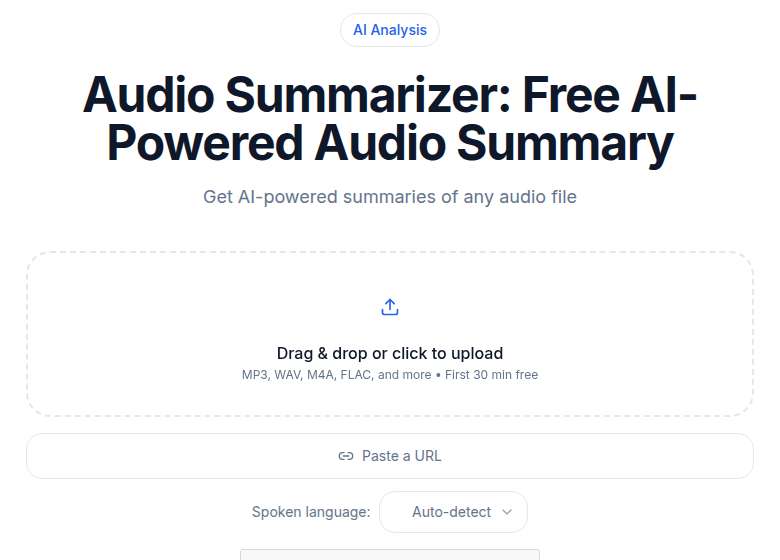 The CATT audio summarizer tool, which outputs structured summaries directly from uploaded audio
If you want the transcript generated and summarized in one step without copy-pasting, ConvertAudioToText's summarizer handles both from a single upload with no account required.
The Iteration Loop
The first prompt is rarely the right prompt. Run this loop:
- Run the initial prompt on one transcript.
- Compare the output to what you wish it had produced.
- Identify the specific gap: missing sections, wrong tone, too long, includes content you did not want.
- Update the prompt to address that specific gap.
- Repeat on three to five transcripts before calling the prompt settled.
After three to five rounds, the prompt usually stabilizes. At that point, save it as a named template and use it as the starting point for all similar content.
My take: the iteration loop is where most people give up too early. The gap between run 1 and run 4 of a well-iterated prompt is larger than the gap between any two AI models. The prompt is the leverage point.
Common Anti-Patterns
Anti-Pattern 1: Vague quality directives
"Summarize this well" or "make it good." These give the model nothing to act on. Replace with specific instructions about sections, length, and tone.
Anti-Pattern 2: One-shot expectations
Trying to nail the prompt in a single attempt. Treat runs 1 through 3 as drafts. The fastest path to a reliable prompt is iteration, not a longer initial prompt.
Anti-Pattern 3: Conflicting constraints
"Keep it brief but include everything important." The model resolves the conflict by picking one to obey. Prioritize explicitly: "Under 300 words. Skip anything that does not directly support the top three themes."
Anti-Pattern 4: Ignoring transcript quality
A perfect prompt cannot rescue a bad transcript. If the source has significant accuracy problems, the summary reflects them. The transcription accuracy tips post covers the source side of this.
Anti-Pattern 5: Treating output as final
Every AI summary needs review, especially for proper nouns, numbers, and verbatim quotes. The AI vs human summary quality post covers the verification layer.
For a complementary take on how the format of AI output affects usability, see structured output vs summary prose.
What Makes a Template Worth Saving
A reusable prompt template that will still work in six months has four things:
- Sections that map to your downstream use (the reader, the action, the format).
- Style and tone instructions that match how you or your team publishes.
- Specific exclusions that address failure modes you have actually seen.
- A clearly labeled placeholder for the transcript.
Three to five templates cover most professional workflows: meeting recap, customer interview, podcast notes, voice memo, and one custom template for whatever edge case you handle most often. Anything beyond five is usually a variation on one of those five, not a genuinely new structure.
FAQ
What is the single most important thing I can add to a summary prompt?
The output structure. Specifying exact sections (Summary, Pain Points, Action Items, etc.) does more to improve output quality than any other single instruction. A model given an explicit structure will fill it reliably. A model given no structure will invent one, and it will not match what you needed.
Should I put the transcript before or after the instructions?
After. Placing instructions first and the transcript last keeps the model's attention on the output requirements through the generation step. For very short transcripts (under a few hundred words) the order matters less, but instructions-first is the safer default at any length.
How do I handle a transcript with poor accuracy?
Address it before prompting. If the transcript has frequent errors, clean the most important sections first, particularly speaker labels and technical terms. Improving transcription accuracy at the source reduces downstream prompt failures significantly.
Can I use the same summary prompt across different content types?
The six-part structure transfers, but the output sections and exclusions should be different per content type. A meeting recap prompt (decisions, action items, owners) is structurally unlike a podcast notes prompt (takeaways, quotes, timestamps). Adapt the template to the reader's actual use, not the generic shape.
How many prompts do I need to iterate before a template is reliable?
Three to five runs on real transcripts from the same content type. One run shows you the starting quality. Run two reveals the gap. Runs three through five let you test whether the fixes from run two actually held. Templates refined on fewer than three real examples tend to have blind spots that surface later.
Sources
- OpenAI Prompt Engineering Guide: developers.openai.com/api/docs/guides/prompt-engineering (checked July 2026)
- PromptLayer Summarization Guide: blog.promptlayer.com/prompt-engineering-guide-to-summarization (checked July 2026)
Try transcription free
Convert any audio or video to clean, unwatermarked text — speaker labels, timestamps, and AI summaries included. First 30 minutes free, no account.
Related Articles
AI Key Takeaways From Podcasts: A Listener's Workflow (2026)
How to extract, structure, and save key takeaways from podcast episodes you consume. Covers capture tools, extraction prompts, note formats, and PKM sync for listeners.

AI vs Human Summary Quality: An Honest Comparison (2026)
AI summaries win on speed, coverage, and consistency. Humans win on nuance, emphasis, and judgment. Here's exactly where each fails and how to verify AI output.