AI Key Takeaways From Podcasts: A Listener's Workflow (2026)
Summarize this article with:
You can pull specific, citable takeaways from any podcast episode you've listened to by transcribing the audio, running a structured extraction prompt, and saving the output in a note format that links back to the source. The workflow takes roughly 10-15 minutes per episode and produces notes that remain searchable for years. This post covers the listener side: how to capture moments while listening, how to extract takeaways from a transcript after the fact, and how to format source citations so your notes are actually trustworthy.
The fastest way to build a searchable library of podcast insights is to treat every episode you finish as a document: transcribe it, extract the key claims, and file them with a citation pointing back to the source. This post covers that workflow entirely from the listener's side.
Why Generic Summaries Fail the Listener
Most auto-summaries read like a Wikipedia stub. "The host and guest discussed marketing strategy and customer acquisition." That tells you what the episode was about, not why a specific claim in it matters to you, and not where to find the moment in the audio when you want to verify it.
A useful listener takeaway is specific, attributed, and citable. It names who said what, at which minute, and what the claim actually was. That is the difference between "Tim Ferriss talked about sleep" and "Tim Ferriss: 'I use 0.5 mg melatonin no more than three nights a week' (The Tim Ferriss Show, Ep. 712, ~34:20)."
Two Paths: Capture While Listening vs. Extract After
Listeners have two practical entry points.
Capture While Listening
Apps like Snipd let you triple-tap your headphones to mark a moment mid-episode. The app generates a transcript of the highlighted segment, an AI summary of the insight, and a direct playback link. The free tier allows about two AI-processed episodes per week. The Premium tier (freemium model, single-digit dollars per month on an annual plan with a 900-minute monthly processing cap, per Snipd's pricing page checked 2026-07) unlocks unlimited processing and custom AI prompts.
Podwise takes a different approach: you submit an episode URL and it generates a summary, full transcript, mind map, and Q&A interface. The Standard plan costs $5.90/month for 20 AI episodes monthly; the Pro plan is $11.90/month for 50 episodes (pricing per Podwise, checked 2026-07). Both plans support export to Obsidian, Notion, Readwise, and Logseq.
Both tools are purpose-built for listeners who want structured notes without manually scrubbing through a transcript.
Extract After the Fact
If you've already listened and want to extract takeaways from an episode file you have, transcribe it first. This approach gives you a full transcript to run your own extraction prompt against, which produces more granular control than a pre-packaged summary.
If you just need clean transcription without a dedicated listening app, ConvertAudioToText accepts uploaded episode files directly and returns a speaker-labeled transcript with timestamps. Anonymous users get the first 30 minutes of any file free with no signup. A free account runs your first file on the premium engine with speaker labels (up to an hour), then transcribes up to 30 files a day, up to 30 minutes each.
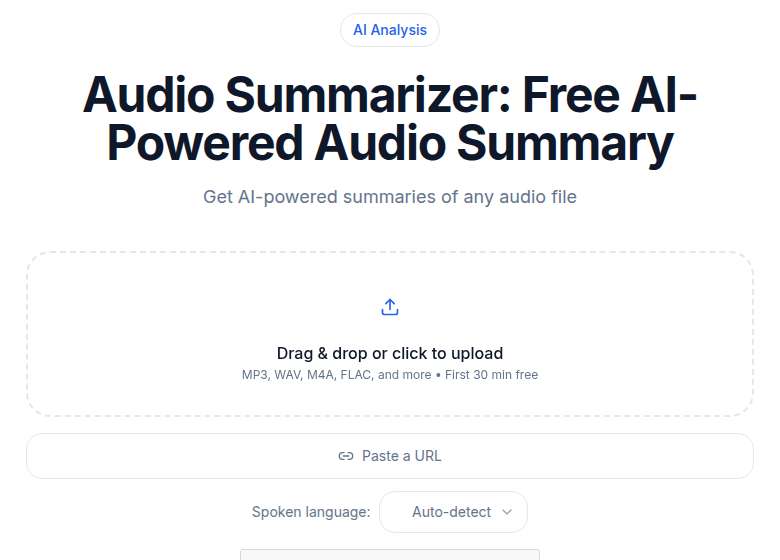 ConvertAudioToText podcast summarizer tool
Step 1: Get a Speaker-Labeled Transcript
Diarization is non-negotiable for listener notes. A transcript that quotes the host's leading question as if it were the guest's answer is worse than no transcript. When you file a note citing "John Smith said X," you need to know it was actually John Smith.
For most podcast formats (one host, one guest, clear speaker separation), diarization works reliably. Round-table formats with three or more speakers and overlapping speech are harder; current AI diarization handles these less cleanly, so spot-check the speaker labels before trusting them in your notes. The speaker diarization explained post covers what to expect by audio type.
For accuracy benchmarks, word error rates on clear podcast audio currently sit below 5 percent with top-tier services. Real-world accuracy drops with heavy accents, background noise, or rapid cross-talk.
Step 2: Run the Extraction Prompt
A structured prompt produces consistent notes. Here is the version that works for listener-side takeaways:
You are helping a listener extract specific insights from a podcast transcript.

The host is [Host Name]. The guest is [Guest Name].

From the transcript below, extract:

1. One-paragraph summary: What the episode is about and the single most
   important claim the guest made. Use specifics.

2. Three to five key takeaways: Each should be a complete, specific idea
   with a timestamp.
   Bad: "Guest discussed productivity habits."
   Good: "Guest claims checking email only twice a day (9am and 4pm)
   increased their output by ~40 percent. (~22:10)"

3. Three to five notable quotes: Verbatim from the guest, with timestamps.
   Each quote should stand alone as a self-contained idea.

4. Resources mentioned: Books, papers, tools, people, websites named in
   the episode, with timestamps.

5. One or two questions the episode left open or failed to answer.

Exclude: ad reads, sponsor mentions, intro/outro pleasantries, off-topic
tangents unrelated to the core subject.

Transcript:
[paste transcript here]
The prompt does three things: it constrains the model to specifics rather than summaries, it requires timestamps so every claim is locatable, and it explicitly excludes the filler content that inflates most AI outputs.
Step 3: Edit Before You File
AI extraction needs a review pass before the notes go into your library. Three things go wrong most often:
- Paraphrase vs. verbatim: The model sometimes rewrites a quote for clarity. Spot-check every "notable quote" against the raw transcript. If the wording changed, either use the exact original or label it as a paraphrase.
- Timestamp drift: Timestamp accuracy depends on the transcription tool. Verify two or three timestamps by jumping to those moments in the episode before trusting all of them.
- Proper nouns: Book titles, company names, and people's names are where hallucination concentrates. Cross-reference any specific reference against the guest's bio or the episode's show notes.
The review pass for a 60-minute episode takes roughly 10 to 15 minutes. That is still far faster than manual note-taking from scratch.
Step 4: Format the Note for Your Library
Listener notes should be formatted for retrieval, not just storage. The format that works across Obsidian, Notion, and Logseq:
## [Podcast Name], "[Episode Title]"
Host: [Name] | Guest: [Name]
Date aired: YYYY-MM-DD | Episode: [#Number or URL]

### Summary
[One paragraph]

### Key Takeaways
- [Specific claim] (~[timestamp])
- [Specific claim] (~[timestamp])

### Notable Quotes
> "[Verbatim quote]", [Guest Name] (~[timestamp])

### Resources Mentioned
- [Book / paper / tool] (~[timestamp])

### Open Questions
- [Question the episode raised but didn't fully answer]
The header block is the citation. If you ever need to link back to the source in a research note or share it with someone, everything required is at the top.
Source Citation for Podcast Notes
Personal notes do not need APA or MLA formatting, but they do need enough information to reconstruct where a claim came from. For a note you might use in writing or share publicly, include: host name, guest name, podcast name, episode title and number, airdate, and the timestamp of the specific claim.
A minimal format that works in any PKM tool:
Source: [Podcast Name], "[Episode Title]" (Ep. [#]), [Guest], [Airdate], [~timestamp]
Example:
Source: Acquired, "Stripe" (Ep. 113), Patrick and John Collison, 2023-05-02, ~1:04:30
This is lightweight enough that you will actually write it, and specific enough to find the moment again months later.
Syncing to Your PKM
If you use Obsidian, Notion, or a similar tool for transcription-powered knowledge management, the most reliable sync path for listener notes currently runs through Snipd.
Snipd's official Obsidian plugin exports each captured snip as a note with the transcript, AI summary, your personal notes, and a direct playback link, organized one file per episode. The plugin supports custom templates so the output lands in the structure you already use in your vault.
For Readwise users, Snipd has a native integration: enable it in the Snipd app settings, paste your Readwise access token, and new snips flow into your Readwise library automatically. From there they sync onward to Obsidian, Notion, Roam Research, or any other Readwise-connected tool.
For notes you produce from a full transcript (the "extract after the fact" path), paste the formatted note directly into your vault or database. The header citation block ensures it's retrievable by podcast name, guest, or topic just like any other source note.
This maps onto the PARA system (Tiago Forte's Projects, Areas, Resources, Archives) by filing episode notes under Resources, and onto the Zettelkasten method (Niklas Luhmann, popularized in writing practice by Sonke Ahrens) by extracting atomic idea notes that link to the episode source. See building a second brain with audio for a fuller treatment of the PKM architecture.
What to Strip From the Extraction
Three categories of content that AI sometimes pulls into takeaways and should be removed before filing:
- Filler exchanges. "It's great to be here." "Thanks for having me." These appear in every episode and contain zero information.
- Off-topic tangents. A 90-second detour about the guest's recent vacation is fine in the episode and noise in your notes.
- Ad reads and sponsor mentions. Unless you specifically want a record of products the show promotes, these clutter the value-extraction output.
Most current AI models handle the "exclude ad reads and filler pleasantries" instruction well without needing examples. Add the instruction explicitly to your prompt and it generally sticks.
Comparison: Listener-Side Tools
| Tool | Capture method | Free tier | PKM sync | Best for |
|---|---|---|---|---|
| Snipd | Tap headphones mid-episode | ~2 AI episodes/week | Obsidian, Notion, Readwise, Logseq (native) | Active capture while listening |
| Podwise | Submit episode URL | Trial only, paid from $5.90/mo | Obsidian, Notion, Readwise, Logseq | Full-episode summaries on demand |
| ConvertAudioToText | Upload episode file | First file premium, then up to 30 files a day, up to 30 min each | Manual paste | Clean transcript for custom extraction |
The right tool depends on when you want to work. Snipd fits listeners who want to capture in real time. Podwise fits those who want a summary delivered without any manual steps. ConvertAudioToText fits those who want a full transcript to run their own prompt against, which gives the most control over the output format.
FAQ
Do I need to transcribe the full episode to get key takeaways?
No, but it produces better results. Apps like Snipd let you capture individual moments without a full transcript. If you want to run a comprehensive extraction prompt covering the whole episode, you need the full transcript. For short episodes (under 30 minutes), a full transcript is usually worth it. For long episodes (90+ minutes), a moment-by-moment capture approach during listening is often more practical.
How do I cite a specific podcast claim in my own writing?
Include: guest name, podcast name, episode title and number, airdate, and the timestamp of the claim. For example: "Jane Smith, The Knowledge Project, 'How Experts Learn,' Ep. 189, 2024-11-12, ~18:45." That is enough for a reader to verify the claim or find the audio moment.
What is the most reliable way to check that a quote is verbatim?
Jump to the timestamp in the original episode audio and listen to the 30 seconds around it. AI models sometimes paraphrase for readability without flagging it. If the words changed, either restore the original or label it explicitly as a paraphrase.
Can I use these notes with Obsidian or Notion?
Yes. For Obsidian, Snipd's official plugin syncs captures directly with full metadata. For manual transcripts, paste the formatted note with the citation header block into any vault or database. Both apps support the note structure described in this post without any plugins or special configuration for the basic case.
Sources
- Snipd pricing and features: https://www.snipd.com/pricing (checked 2026-07)
- Snipd Obsidian plugin: https://www.snipd.com/blog/sync-snips-to-obsidian-plugin (checked 2026-07)
- Snipd to Readwise integration: https://docs.readwise.io/readwise/docs/importing-highlights/snipd (checked 2026-07)
- Podwise pricing and features: https://podwise.ai/ (checked 2026-07)
- Snipd PKM workflow guide: https://www.snipd.com/blog/how-to-include-podcasts-in-pkm-workflow (checked 2026-07)
Try transcription free
Convert any audio or video to clean, unwatermarked text — speaker labels, timestamps, and AI summaries included. First 30 minutes free, no account.
Related Articles

AI vs Human Summary Quality: An Honest Comparison (2026)
AI summaries win on speed, coverage, and consistency. Humans win on nuance, emphasis, and judgment. Here's exactly where each fails and how to verify AI output.
How to Prompt AI for Better Summaries: Patterns That Work in 2026
Practical prompt engineering for AI summaries in 2026. Six-part structure, real templates for meetings, interviews, and lectures, and the anti-patterns that kill output quality.