How to Convert M4A to Text: The iPhone Voice Memo Path
Summarize this article with:
Fastest Path
Drop the M4A file into ConvertAudioToText's audio-to-text tool and hit transcribe. No conversion needed. The tool accepts M4A natively, handles AAC decoding internally, and returns a timestamped transcript. For an iPhone Voice Memo, the share-sheet path on iOS gets you from recording to uploaded file in about 30 seconds. The full Voice Memo workflow covers the share-sheet and iCloud steps in detail.
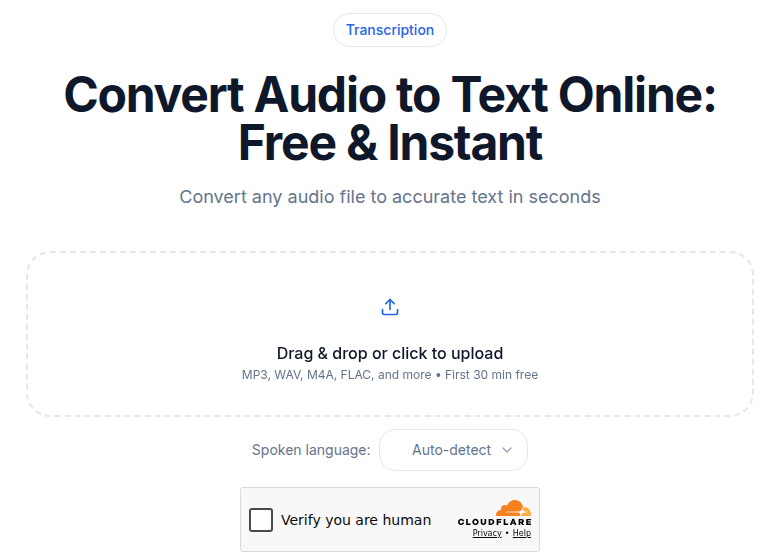 M4A voice memos upload natively
That is the answer for most people. The rest of this post is for when something goes wrong, or when you want to understand what you are actually working with.
What M4A Actually Is (and Why the Name Confuses Everyone)
M4A is a container, not a codec. The MPEG-4 container wraps the actual audio, which is almost always AAC (Advanced Audio Coding). AAC is the compression algorithm that reduces file size while preserving audio quality. The container adds metadata, chapter markers, cover art, and the internal structure that players and tools read.
This matters because the same .m4a extension is shared by two fundamentally different codecs:
| Inside the container | What it means | Typical file size (60 min) |
|---|---|---|
| AAC (lossy) | Compressed, like MP3 but more efficient | 29-58 MB at 64-128 kbps |
| ALAC (Apple Lossless) | No quality loss, like FLAC but Apple | 150-250 MB |
You cannot tell which one you have from the extension alone. On macOS: right-click the file, choose Get Info, and read the Kind field. It will say "AAC audio file" or "Apple Lossless audio file." File size is the rough tell: an hour-long M4A under 60 MB is almost certainly AAC; one approaching 200 MB is likely ALAC.
For transcription, the difference matters only at upload time. Both decode fine with modern tools. ALAC gives the transcription engine slightly more signal to work with, but the accuracy difference for clear speech recordings is negligible.
Where M4A Files Come From
Understanding the source tells you what quality to expect going in.
iPhone Voice Memos are the single biggest source of M4A files in the world. The app records at 48 kHz, ~64 kbps AAC by default. That produces about 30 MB per hour. If you have enabled the "Lossless" quality option in Voice Memos settings, the app switches to ALAC and the files balloon considerably. The default 64 kbps setting is sufficient for speech transcription indoors; outdoor recordings with wind degrade faster.
GarageBand and Logic Pro export M4A (AAC) by default for sharing. Podcast producers using GarageBand export the final mix as M4A before uploading to a hosting platform. For transcription, this is the highest-quality M4A you are likely to encounter: studio-recorded, mixed, typically 128-256 kbps.
Podcast feed files. Many podcast publishers choose AAC/M4A over MP3 for the smaller file size at equivalent quality. When you download a podcast episode directly from an RSS feed link rather than streaming through an app, you usually get an M4A file.
Apple Music purchases (DRM-free). Since January 2009, all music purchased from the iTunes Store has been DRM-free 256 kbps AAC in an M4A container. Spoken-word content bought from the iTunes Store (lectures, comedy specials) falls into this category. These transcribe directly.
QuickTime screen and audio recordings on Mac default to M4A for audio-only captures. If you are recording a meeting through QuickTime rather than via a meeting bot, the output lands as M4A.
The DRM Problem: M4P and Old M4B Files
Some M4A-family files are encrypted and cannot be transcribed without removing the DRM, which is typically a licensing violation.
The three variants to know:
- M4A: standard AAC container, no DRM, works in every player and transcription tool.
- M4B: audiobook format, same container. Books purchased after 2009 are usually DRM-free; older iTunes audiobook purchases carry FairPlay DRM. You can tell by whether the file plays outside of Apple software.
- M4P: the old DRM-locked Apple Music format, protected with FairPlay (Apple's AES-128 encryption layer). Apple removed DRM from music purchases in 2009 and replaced M4P files in user libraries with M4A equivalents. Genuinely M4P files are rare now but still exist in old iTunes libraries.
The diagnostic: if a file plays fine in VLC or Windows Media Player, it is not DRM-locked. If it only plays in Apple software and throws an error everywhere else, the encryption is active and the file cannot be decoded by a third-party transcription tool.
Why Some Tools Still Reject M4A
Even without DRM, you will occasionally encounter tools that refuse an M4A file. Two real reasons:
AAC licensing. Historically, AAC required patent royalties, which made some software vendors avoid building an AAC decoder. The core patents expired in 2012 and the remaining ones expired by 2017, so this should not be an issue with tools built or updated after 2017. If a transcription service launches an error on your M4A file, the tool is probably old or built on a decoder library that predates the patent expiry.
"MP4 audio" confusion. Some upload parsers reject files with a .m4a extension because their MIME type whitelist says audio/mp4 or video/mp4 but not audio/x-m4a. The file inside is identical; the extension pattern-match fails. The workaround: rename the file to .mp4 before uploading. The audio content is unchanged. If that still fails, convert to WAV using the command in the section below.
M4A vs. MP3 for Transcription: The Real Trade-Off
Both formats work well for speech. The difference is efficiency, not quality at the same bitrate.
AAC (inside M4A) was designed as MP3's successor. At equivalent bitrates, AAC preserves more of the high-frequency detail that speech recognition engines use. The practical difference is sharpest at low bitrates: a Voice Memo at 64 kbps AAC still sounds intelligible for transcription; 64 kbps MP3 starts to muddy sibilants and fricatives.
For the formats and file sizes relevant to transcription, here is what 60 minutes of audio costs you:
| Format | Bitrate | Approx. file size (60 min) |
|---|---|---|
| WAV (uncompressed) | 1,411 kbps | ~600 MB |
| FLAC | ~700 kbps | ~300 MB |
| M4A (ALAC) | ~500 kbps | ~200 MB |
| MP3 | 320 kbps | ~142 MB |
| M4A (AAC) | 128 kbps | ~58 MB |
| MP3 | 128 kbps | ~58 MB |
| M4A (iPhone default) | 64 kbps | ~29 MB |
For transcription input, 128 kbps AAC is more than adequate. The iPhone default of 64 kbps works fine for indoor speech.
See how format choice affects transcription for a deeper look at the codec trade-offs.
Format-Specific Gotchas for M4A Transcription
Variable bitrate (VBR) M4A. Some encoders produce VBR M4A where the bitrate fluctuates across the file (from, say, 40 to 130 kbps) based on audio complexity. Modern tools handle this correctly. If a tool returns a decoding error specifically on a VBR file, re-encode to constant bitrate:
ffmpeg -i input.m4a -b:a 128k output_cbr.m4a
Multi-channel and surround M4A. Rare for speech, but it appears in broadcast and film workflows. A 5.1 channel M4A confuses some transcription decoders that expect mono or stereo. Downmix to mono first:
ffmpeg -i surround.m4a -ac 1 mono.m4a
Chapter-marked M4A (audiobook style). M4A supports embedded chapter metadata, commonly used in audiobook and enhanced podcast formats. Transcription pipelines ignore chapter metadata; the audio is transcribed as one continuous stream. The resulting transcript does not map to chapter boundaries. If you need chapter-aligned transcripts, split the file at chapter timestamps before uploading.
ALAC mistaken for AAC. If you send an ALAC M4A to a tool expecting AAC only, some older parsers will choke. The content is recoverable by converting to AAC first:
ffmpeg -i input_alac.m4a -acodec aac -b:a 192k output_aac.m4a
When You Do Need to Convert First
Most of the time, upload M4A directly. Convert only when:
- The tool explicitly rejects the file and renaming to
.mp4does not resolve it. - Multi-channel audio is triggering a decoder error (downmix to mono as above).
- Suspected DRM is blocking playback outside Apple software.
- The tool is genuinely old and predates 2017 AAC licensing reform.
Convert to WAV for maximum compatibility:
ffmpeg -i input.m4a -acodec pcm_s16le -ar 48000 output.wav
Convert to MP3 for tools that accept MP3 but not M4A:
ffmpeg -i input.m4a -acodec mp3 -ab 192k output.mp3
Going from 128 kbps M4A to 192 kbps MP3 is nearly transparent. Going from 64 kbps M4A to 64 kbps MP3 compounds the lossy compression and degrades quality on both ends; use 128 kbps or higher for the MP3 output.
For more on working with the AAC format directly, see how to convert AAC to text.
Pricing Context: What M4A Transcription Costs
M4A is priced by duration, not format. Tools that support M4A natively treat it the same as MP3 or WAV for billing purposes.
A few verified reference points as of July 2026:
- Rev: AI transcription at $0.25/audio minute pay-as-you-go; subscription plans from $25.49/seat/month (billed annually) with 5,000 AI minutes included. Human transcription at $1.99/audio minute.
- Otter.ai: Free tier at 300 minutes/month; Pro at $16.99/user/month (or $8.33 billed annually) with 1,200 minutes/month.
- TurboScribe: Free tier at 3 transcripts/day (30-minute cap each); Unlimited at $20/month or $10/month billed annually.
- Descript: Free tier at 60 media minutes/month; Hobbyist at $24/month with 10 media hours/month; Creator at $35/month with 30 media hours/month.
- Happy Scribe: Basic at 17 EUR/month (or 8.50 EUR billed annually) for 120 minutes; Pro at 29 EUR/month for 600 minutes; pay-as-you-go at 0.20 EUR/minute.
None of these charge differently for M4A vs. MP3. Duration is the only meter.
If you just need a clean transcript without a meeting bot or subscription, ConvertAudioToText's uploader accepts M4A directly: the first file on a free account runs on the premium engine (up to an hour), then free standard transcription for up to 30 files a day, up to 30 minutes each, and the Weekly Pass or a paid plan for longer files. No meeting bot to install.
Common Questions
Does M4A transcription cost more than MP3?
No. Every transcription service prices by audio duration, not file format or container type. An M4A and MP3 of the same 30-minute recording cost exactly the same to transcribe, provided both are accepted formats. A tool that does not support M4A at all might force you to convert first, but the transcription price itself does not change.
Why does my M4A file play fine but a transcription tool still rejects it?
The most common cause is an upload parser that checks the file extension rather than the actual codec. Try renaming the file from .m4a to .mp4 before uploading. If the tool still rejects it, the parser may have a strict MIME type whitelist that excludes audio/x-m4a. In that case, convert to WAV with ffmpeg and upload the WAV.
Can I transcribe Apple Music downloads in M4A format?
If your Apple Music files were purchased from the iTunes Store after January 2009, they are DRM-free 256 kbps AAC in an M4A container and will transcribe without any issues. If you subscribe to Apple Music (rather than purchasing tracks), those streams use FairPlay DRM and cannot be saved as playable M4A files for transcription.
What is the difference between M4A and M4B for transcription?
M4B is the audiobook variant of M4A, same MPEG-4 container and the same AAC codec internally. The difference is metadata conventions and, for older iTunes purchases, DRM. Modern M4B audiobooks purchased after 2009 are DRM-free and transcribe exactly like M4A. Older M4B files from the pre-2009 iTunes Audiobooks store may be DRM-locked. The audio inside is identical to M4A when DRM is not present.
Sources
- Apple Community thread on Voice Memos file format and bitrate: https://discussions.apple.com/thread/6531359
- Wikipedia: Apple Lossless Audio Codec (ALAC), container and extension details: https://en.wikipedia.org/wiki/Apple_Lossless_Audio_Codec
- Wikipedia: FairPlay DRM history and M4P format: https://en.wikipedia.org/wiki/FairPlay
- Rev pricing page (verified July 2026): https://www.rev.com/pricing
- Otter.ai pricing page (verified July 2026): https://otter.ai/pricing
- TurboScribe pricing (verified via third-party sources, July 2026): https://turboscribe.ai/pricing
- Descript pricing page (verified July 2026): https://www.descript.com/pricing
- Happy Scribe pricing page (verified July 2026): https://www.happyscribe.com/pricing
- AudioUtils: M4A format reference: https://audioutils.com/guide/m4a-format-complete-guide
- AudioUtils: M4A and iPhone format explained: https://audioutils.com/blog/what-is-m4a-iphone-format
Try transcription free
Convert any audio or video to clean, unwatermarked text — speaker labels, timestamps, and AI summaries included. First 30 minutes free, no account.
Related Articles
Spotify Transcript Extractor: How to Copy and Download Episode Text
Get a Spotify podcast transcript you can copy and download: paste a public episode link, 30 minutes free with no signup, TXT or SRT files on eligible plans.
Focus Group Transcription for UX Researchers: Turn Multi-Speaker Audio Into Usable Evidence
A practical guide to focus group transcription for UX and insights teams. See how CATT handles speaker labels, timestamps, AI summaries, and clean export.