Multimodal AI and Transcription: What Actually Changes
Summarize this article with:
What Changes with Multimodal
For the first three decades of commercial transcription, every system worked on a single channel: audio in, text out. Even when the source was video, the model processed only the audio track. Speaker labels, on-screen text, name tags, slides, the visual context that a human watching the video would naturally use, were all discarded before the model ever saw the input.
That architecture changed as large multimodal models matured. Gemini 2.5 Pro accepts video files natively, sampling frames alongside audio in a single API call. GPT-4o can process image frames extracted from video in parallel with audio, giving it visual context during transcription. Neither of these is just a transcription model with a screenshot attached. The visual and audio streams inform each other during decoding.
For transcription specifically, this unlocks three things that audio-only systems struggled with for decades.
Better Speaker Identification
Audio-only diarization splits speech by voice characteristics. It works reasonably well for two distinct voices but degrades when speakers share similar pitch, when one person dominates, or when two people speak at once. A multimodal model watching a video meeting can observe who is on camera, read name labels in a video call's gallery view, and correlate visible lip movement with the audio stream.
Research published in the MISP 2025 Challenge, which specifically evaluated audio-visual diarization on meeting recordings, shows the real ceiling here. The best audio-visual system in that challenge achieved a Diarization Error Rate of 8.09%. That is a meaningful improvement over audio-only baselines, but it is not zero. For video meetings where all participants are on screen and labeled, production systems do better. For any segment where a speaker is off-camera, the visual advantage disappears entirely.
One thing worth naming honestly: the popular framing of "AI lip reading" oversells what these models actually do. They are not running a dedicated lip-reading module that decodes phonemes from mouth shapes. They sample frames at roughly 1 frame per second and use that visual context alongside audio during generation. The benefit is real but it is more "visual context to break ties" than "reading lips instead of ears."
Accurate Proper Nouns from On-Screen Text
When someone says "we are using LangGraph" in a video, an audio-only model has to choose between several plausible transcriptions. A multimodal model that can see a product logo on the speaker's screen or read a slide that introduces the term can anchor that choice correctly.
This is one of the most persistent complaints about transcription accuracy: proper nouns, product names, and technical jargon transcribed as common-word homophones. The visual layer helps when the source is video and the relevant term appears on screen. It does not help for audio-only recordings.
Context from Slides and Screen Content
A lecture transcript that reads "let's look at this equation" is less useful than one that includes the equation. Gemini 2.5 Pro, working from video frames, can extract text from slides, code from screen recordings, and headings from whiteboards. The resulting transcript reads more like a document than a stenographic record.
This matters most for technical and educational content: engineering talks, product demos, training videos, university lectures. For those formats, multimodal produces qualitatively different output than audio-only processing.
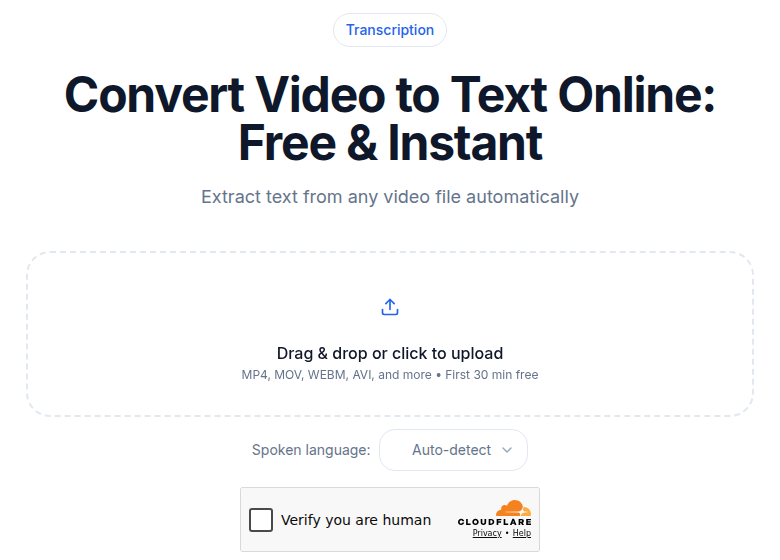 The ConvertAudioToText video-to-text tool
Tools That Use This Today
The multimodal capability exists at the API layer. Whether a user-facing product exposes it depends on the tool.
Gemini 2.5 Pro (Google AI / Vertex AI). Accepts video files natively via the File API. Videos are sampled at 1 frame per second by default, with audio at 1 Kbps. You can upload a long meeting recording and request a transcript with speaker labels, slide content extraction, and timestamps in one call. Gemini processes video at approximately 300 tokens per second of footage. For a one-hour video that amounts to roughly 1.08 million input tokens, falling into the over-200K pricing tier at $2.50 per million tokens for Gemini 2.5 Pro, so input alone runs around $2.70 for that hour before output tokens.
GPT-4o (OpenAI). Does not accept video files directly for transcription. The dedicated gpt-4o-transcribe model is audio-only, priced at $0.006 per minute ($0.36/hour). For video-aware transcription with GPT-4o, the practical path is to extract frames from the video yourself and submit them as image inputs alongside the audio, which requires a multi-step pipeline on your end. Gemini's native video support is simpler for this use case.
Specialized transcription APIs. As of mid-2026, the major dedicated speech-to-text APIs (Deepgram, AssemblyAI) remain audio-only. They do not accept video input or use visual context during transcription. Their advantage is cost and latency: Deepgram Nova-3 pre-recorded audio costs around $0.0043 per minute ($0.26/hour), roughly a tenth of the multimodal processing cost.
The gap is real. For most use cases, audio-only remains the practical default.
Where Multimodal Still Falls Short
Despite the gains, multimodal transcription has clear failure modes.
Off-camera speakers. If a speaker is not visible in the frame, the visual advantage evaporates. Audience questions at a conference, a host narrating over b-roll, an off-camera interviewer: for all of these, the model falls back to audio-only behavior. Because real-world video often has segments like this, actual accuracy improvements are lower than benchmark numbers suggest.
Compressed or low-light video. Visual cues only help if the model can read them. Heavily compressed video, low-frame-rate screen captures, and low-light recordings all degrade the visual input. At 1 frame per second sampling, fast motion also reduces the usefulness of the visual stream.
Long-form cost. The cost differential between multimodal video processing and audio-only transcription is roughly 10x for an hour of content. That is the right tool for a high-value quarterly all-hands; it is not the right default for a hundred routine one-on-one call recordings.
Context window limits on very long video. Gemini 2.5 Pro's 1 million token context window handles approximately 55 minutes of video at default resolution before hitting limits. For a multi-hour recording, you need to chunk the video, which adds complexity and can split speakers mid-sentence.
Foreign-language or mixed-language slides. If the speaker talks in one language but the slides are in another, the model has to handle both simultaneously. English, Spanish, and major European languages work well for text extraction. Smaller languages produce less consistent results.
A Practical Workflow That Works Today
My take: for most production use, audio-only transcription is still the better default, with multimodal as a targeted correction pass.
A workflow that produces strong results without paying for full multimodal processing:
- Extract the audio track and run a fast audio-only transcript using Deepgram Nova-3 or OpenAI Whisper.
- Review the transcript for uncertain segments: proper nouns that look wrong, speaker labels that feel off, jargon that got mangled.
- Run a targeted multimodal pass with Gemini 2.5 Pro on the specific segments that need disambiguation, providing the corresponding video frames.
- Merge the multimodal corrections into the audio transcript.
This costs a fraction of full multimodal processing and usually produces comparable or better output, because the dedicated audio model is more reliable for long unambiguous stretches.
For a single high-value video where accuracy matters throughout (a conference keynote, a product launch recording, a board presentation), a full multimodal pass is worth the premium. For podcast transcription or call recordings where participants are rarely on camera, audio-only wins on both cost and accuracy.
If you need clean transcripts fast without managing any of this pipeline, ConvertAudioToText's video-to-text tool handles the audio extraction and transcription in one step.
What to Watch Over the Next 18 Months
Cost compression. Multimodal video processing is on the same cost-decline curve as text-only LLMs. When the input cost for a one-hour video falls below $0.50, the workflow calculus changes and multimodal becomes a reasonable default rather than a premium option.
Better frame sampling. The current default of 1 frame per second is a cost-accuracy compromise. Higher sampling rates capture more visual context (especially lip movement and rapidly changing slides) but multiply the token cost. Expect adaptive sampling that focuses tokens on high-motion or high-information segments.
On-device multimodal. Apple ships on-device transcription in iOS 18 for Voice Memos and Notes. The models are ~3 billion parameters optimized for Apple silicon. Full on-device multimodal transcription (where the model simultaneously processes audio and video frames without a server call) is not yet available at production quality, but the architectural pieces are in place. For the broader trajectory, see the future of AI transcription.
For speaker diarization specifically, the MISP 2025 research results suggest the best near-term gains will come from combining dedicated audio diarization models with multimodal context rather than replacing the former with the latter.
FAQ
Can a multimodal model read lips to improve transcription?
Partially, and with important caveats. Research models like those evaluated in the MISP 2025 Challenge use visual lip-region encoders and achieved a best Diarization Error Rate of 8.09% on audio-visual tasks, an improvement over audio-only baselines. But production multimodal models like Gemini 2.5 Pro and GPT-4o use sampled video frames (typically 1 frame per second), not dedicated lip-reading modules. They correlate lip movement with audio context rather than decoding phonemes from lips directly. The practical benefit shows up most in speaker identification and disambiguation, not in recovering words the audio missed entirely.
How much does multimodal video transcription cost compared to audio-only?
The gap is significant. Deepgram Nova-3 pre-recorded audio runs about $0.0043 per minute ($0.26 per hour). GPT-4o-transcribe, which is audio-only, costs $0.006 per minute ($0.36 per hour). Gemini 2.5 Pro processes video at approximately 300 tokens per second, which for a one-hour video amounts to roughly 1.08 million input tokens, priced at $2.50 per million tokens for large prompts. That puts the input cost alone for one hour of multimodal video processing around $2.70, roughly ten times the audio-only rate, before output tokens. The premium is real and the workflow section above explains when it is worth paying.
Does GPT-4o process video natively for transcription?
Not the same way Gemini does. The dedicated gpt-4o-transcribe model is audio-only, priced at $0.006 per minute. To use GPT-4o for video-aware transcription you submit extracted frames as image inputs alongside audio, which requires a multi-step pipeline on your end. Gemini 2.5 Pro accepts video files natively via the File API, sampling at 1 frame per second by default, which makes the workflow simpler for video-heavy use cases.
What types of video content benefit most from multimodal transcription?
Structured video where visual information is additive: lecture recordings with slides, product demos with on-screen text, conference panels where name badges or on-screen labels identify speakers, and screen recordings of technical workflows. The gains are smallest for audio-forward content like podcast interviews, phone call recordings, or any scenario where speakers are off-camera. For those, a standard audio-only transcription engine is faster and cheaper with comparable accuracy.
Sources
- Gemini API Pricing, Google AI for Developers
- Gemini Video Understanding documentation
- Advancing video understanding with Gemini 2.5, Google Developers Blog
- OpenAI API Pricing (Audio models, GPT-4o-transcribe)
- Deepgram Nova-3 Pricing
- MISP 2025 Challenge: Audio-Visual Diarization and Recognition
- A Comprehensive Survey of Advancement in Lip Reading Models, IET Image Processing 2025
- GPT-4o-transcribe launch, ScribeWave
Try transcription free
Convert any audio or video to clean, unwatermarked text — speaker labels, timestamps, and AI summaries included. First 30 minutes free, no account.
Related Articles
How to Transcribe Voice Recorder Recordings (Any Device)
Get text from any voice recorder, from Anker SoundCore Work to old Olympus dictaphones. Covers file transfer, formats, WMA conversion, speaker labels, and export options.
The Future of AI Transcription: What to Watch in 2026
A grounded forecast of AI transcription in 2026: on-device shifts, multilingual gains, pricing pressure, diarization progress, and agentic workflows, anchored in verified 2026 trends.