
Transcription for Journalists 2026: Record, Verify, Protect
Summarize this article with:
A journalist's transcript is both a production tool and a legal record. AI transcription reaches 95–97% accuracy on clean audio and 85–94% on noisy or multi-speaker audio, the gap is where journalism errors live. Always verify quotes against the recording before publishing (about 30 seconds per quote with a click-to-seek editor). For confidential sources, use local Whisper tools that never upload audio to the cloud. Flat-rate plans ($14.99/mo) beat per-minute APIs once you exceed a few interviews a week.
The transcript is both your production tool and your record of truth. For journalists, that double function shapes every decision from how you set up a microphone to how you store files after publication. This guide walks the full workflow end to end: recording for transcription, moving from audio to publishable quote, verifying accuracy, protecting sources, and knowing when to route to specialist guidance.
Not legal advice. Laws vary by jurisdiction; consult a media attorney for guidance specific to your situation.
Record for the Tool, Not Just for Your Ears
Before any software, the recording determines everything downstream. AI transcription is trained on relatively clean speech; every decibel of ambient noise you add shrinks the accuracy margin you have to work with.
For in-person interviews, a $20 wired lavalier mic clipped to the source's lapel will outperform any phone mic from 18 inches away. Keep the recorder within 12 inches of the source. Avoid lobbies, marble-floored offices, and glass-walled conference rooms, which produce reverb that confuses speaker separation.
For phone interviews, use a dedicated call-recording app rather than speakerphone. On iOS, Apple restricts native call recording, so a paid third-party app is the practical option. On Android, Google Voice records natively in supported regions. Test the setup before relying on it for an interview that matters.
For video call interviews, Zoom's cloud recording produces an MP4 with usable AAC audio. For cleaner results, ask your source to record their side locally in QuickTime or Windows Voice Recorder and send you the file. That eliminates the bandwidth compression baked into Zoom's audio stream.
At public events and press conferences, record the room audio if you can access a feed near the speaker system. Capturing ambient audience noise from the back of the room gives transcription software the hardest possible problem.
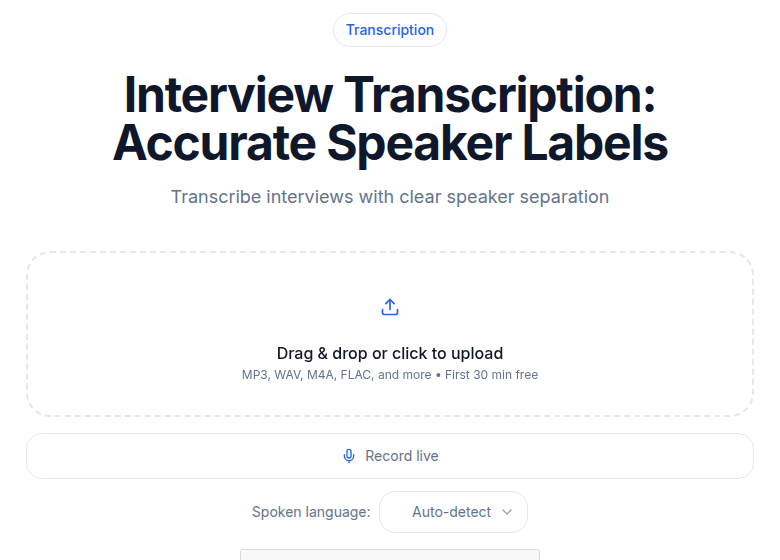 Interview transcription in ConvertAudioToText
From Upload to Working Draft
Once you have clean audio, the steps below convert it to something usable in the time it takes to pour coffee.
1. Specify the language explicitly. Auto-detect works, but manually selecting the language adds two to five accuracy points on non-English audio. If your source code-switches between languages, pick the dominant one.
2. Upload the full file, not a clipped excerpt. Transcription tools handle context better when they can process the whole interview. Clip later; upload everything now.
3. Skim the output, do not read it word for word. A one-hour interview produces 8,000 to 10,000 words of transcript. Read the first and last paragraph of each speaker's answer to find the quotable moments, then use search or timestamps to jump to the verbatim text. Full linear reading defeats the purpose.
4. Extract candidate quotes. Copy the five to ten quotes you might use into a working document. Keep the timestamp for every one. You will need those timestamps in the next step.
5. Verify every quote against the audio before publishing. This is the non-negotiable step. Play back the recording at the timestamp for each quote and confirm every word. It takes about 30 seconds per quote. A 10-quote article takes five minutes. That is the cost of being accurate. For more on what to catch and how to handle cutting within a quote, see the guide on extracting quotes from interview recordings.
6. Note timestamp and context for each quote. In your notes, log the source name, the timestamp, and the question that prompted the answer. A quote stripped of the preceding question can mislead; the notes protect you when an editor or a subject pushes back.
Accuracy Verification for Publication
AI transcription on clean audio with a clear speaker reaches 95 to 97 percent word accuracy in 2026. On real-world audio, with accents, background noise, or multiple overlapping speakers, accuracy falls to 85 to 94 percent.
That gap is where journalism errors live. A 95 percent accurate transcript of a 200-word quote still has a roughly 10-word error budget. Common failure modes:
- Dropped negatives: "did not" becomes "did"
- Swapped homophones: "ail" for "ale," "there" for "their"
- Misheared numbers: "thirty-two" and "twenty-three" are frequent swap pairs
- Misread proper nouns: names, titles, place names
Cross-check every number against a public source: a press release, a filing, a follow-up email with the source. AI transcription is reliable enough for internal notes and first drafts; it is not reliable enough to stand alone as the evidentiary record for a published quote.
For a deeper treatment of checking transcript claims against documentary evidence, the fact-checking from transcripts guide covers specific techniques.
Tool Choice for Different Workflows
Different tools fit different pressures. Rather than picking a single winner, here is an honest read by workflow type.
| Workflow | Tool to consider | Why |
|---|---|---|
| Daily beat, fast filing | Flat-rate unlimited plan (e.g., CATT Pro at $14.99/mo) | Cost-predictable; no per-minute anxiety on busy days |
| Longform feature with multiple sources | Trint Advanced (~$100/seat/mo, annual) | Story Builder assembles quotes from multiple files; collaborative editing for teams |
| Broadcast and podcast editing | Descript Creator ($24/mo annual, 30 hrs/mo) | Transcript-driven video and audio editing in one tool |
| High-volume team newsroom | Trint Enterprise or Trint Advanced per seat | Shared workspaces, role-based permissions, MAM integrations |
| Privacy-first investigative work | Local Whisper (MacWhisper, Buzz, or whisper.cpp) | Audio never leaves the device; free if you install it |
| Occasional use, budget constrained | ConvertAudioToText free account (up to 30 files a day, up to 30 min each) or CATT Weekly Pass ($9.99 one-time for 1,200 min) | Reliable flat-rate for sporadic volume |
For a full use-case tour including multilingual journalism and broadcast-specific workflows, the how journalists use transcription companion piece covers the details.
If you just need clean transcripts without meeting bots or project management overhead, ConvertAudioToText handles audio and video uploads directly with speaker labels and timestamps at a flat monthly rate. The transcription solutions for journalists page covers the full newsroom workflow, from upload to quote extraction.
Source Protection Basics
Transcription tools are cloud services. That is convenient and often a risk.
For confidential sources, do not upload their audio to any cloud transcription service. The transcript, the audio file, and any notes connecting the two should be treated as source-identifying material. A cloud provider in a different jurisdiction than you is subject to legal process from that jurisdiction.
The practical alternative is local transcription. Tools built on OpenAI's Whisper model run entirely on your machine: Buzz and MacWhisper are two well-regarded options as of mid-2026. Audio processed locally never crosses a network. For especially sensitive material, consider running the tool on a device that is not connected to the internet during processing.
For source material that is not confidential but still sensitive, use an encrypted cloud provider that stores data in a jurisdiction with strong journalist-source protections. Trint offers EU or US data storage options and maintains ISO 27001 certification, which matters if your publication has data governance requirements.
Beyond storage, be cautious about what the transcript itself reveals. A verbatim Q&A can expose a source's identity through distinctive phrasing or knowledge of specific details, even with names removed. Consider paraphrasing rather than quoting directly in your working notes when the source is at risk.
For investigative-specific source protection strategies, the tips for investigative reporting guide covers operational security in depth.
Recording Consent: What Journalists Need to Know
This section is general information only and not legal advice. Consult a media attorney before recording in any jurisdiction you are unsure about.
Federal law (18 U.S.C. 2511) sets a one-party consent floor across the United States. One-party consent means a participant in a conversation can record it without telling the other parties. As a journalist, when you are part of the interview, you are the one party.
Roughly 11 to 12 states impose stricter all-party (all-participant) consent requirements, meaning everyone in the conversation must know it is being recorded. The states most consistently listed by the Reporters Committee for Freedom of the Press and Justia as all-party include California, Delaware, Florida, Illinois, Maryland, Massachusetts, Montana, New Hampshire, Pennsylvania, and Washington. Connecticut and Oregon apply all-party rules to some conversation types (phone calls or in-person conversations) but not others. Michigan's statute is written as all-party, but courts have read in a participant exception since a 1982 appellate decision; the law there is contested.
When your source is in a different state than you, the stricter state's law can apply. A reporter in a one-party state recording someone in California or Maryland faces liability under that state's law.
Outside the U.S., EU data protection law treats recorded voice as personal data under GDPR. Recording an interview for journalism purposes falls under a journalism exception in many EU member states, but processing, storing, and sharing the recording may still carry obligations. International sources may also be subject to laws that are stricter than their country's criminal code suggests at first read.
Default to disclosed recording. Verbal consent at the start of an interview, captured on the recording itself, protects you and maintains source trust. The recording laws by state reference covers jurisdiction-specific details.
Archive and Retention
Keep the original audio files. Not the transcript, not an edited version: the unmodified recording.
Organize files by source, date, and story slug from the start. A search through 200 undated audio files labeled "recording-final.mp3" wastes exactly the time you do not have when a dispute arrives.
Cloud backup is fine for non-confidential recordings. For confidential material, use local encrypted storage with an offline backup. Do not rely solely on a single external hard drive.
The general industry expectation is one to seven years of retention depending on story type. Investigative pieces with potential legal exposure warrant longer. Some publications have policies; follow them and keep them on file.
FAQ
How accurate are AI transcripts for journalism?
On clean audio with clear speakers, modern AI transcription reaches 95 to 97 percent accuracy. On real-world audio with background noise, heavy accents, or overlapping speakers, expect 85 to 94 percent. That remaining gap still catches words, drops negatives, and substitutes homophones, so always verify any quote you plan to publish against the original audio.
Can I publish AI-transcribed quotes verbatim?
Only after you have listened to the audio and confirmed every word. AI transcription occasionally swaps homophones, mishears numbers, or drops a short word like 'not.' That verification step takes about 30 seconds per quote. It is not optional if the quote is going into print or broadcast.
What if my source disputes a quote?
Play back the recording. If the audio supports your text, you are protected. If you published a quote without a recording to back it up, you have no defense. Save every original audio file for at least as long as the story could be subject to dispute, which in investigative work is often years.
Is it legal to record an interview without telling the source?
It depends on jurisdiction. Federal law (18 U.S.C. 2511) sets a one-party consent floor, meaning you can record any conversation you are a party to. But around 11 to 12 states impose all-party (all-participant) consent: California, Delaware, Florida, Illinois, Maryland, Massachusetts, Montana, New Hampshire, Pennsylvania, and Washington are the most cited, with Connecticut and Oregon applying all-party rules to some conversation types but not others, and Michigan contested in court interpretations. When source and reporter are in different states, the stricter state law can apply. Get consent before recording when in doubt. This note is general information, not legal advice.
How should I protect a confidential source's identity in transcripts?
Do not upload audio of a confidential source to any cloud service. Use a locally installed transcription tool such as Whisper-based apps that process audio entirely on your device, with no data leaving your machine. Keep source-identifying transcripts on an encrypted drive, separate from your main cloud account. For especially sensitive material, consider an air-gapped device.
How long should I keep interview recordings?
Industry practice is one to seven years depending on story type, with investigative pieces warranting the longer end. Some publications have retention policies you should follow. Default to keeping recordings longer than you think necessary; the challenge you cannot foresee is usually the one that arrives three years later.
Sources
- Reporters Committee for Freedom of the Press: Reporter's Recording Guide
- Descript Pricing (official)
- TurboScribe Pricing (official)
- Trint for Newsrooms (official)
- Sonix: Trint Pricing Review 2026
- RCFP: Introduction to the Reporter's Recording Guide
- Recording Law: Two-Party Consent States 2026
- GoTranscript: AI Transcription Accuracy Benchmarks 2026
Try transcription free
Convert any audio or video to clean, unwatermarked text — speaker labels, timestamps, and AI summaries included. First 30 minutes free, no account.
Related Articles
Ethics of Interview Transcription: Core Obligations
A practical guide to the ethics of interview transcription for researchers: IRB consent scope, anonymization vs pseudonymization, cloud processing disclosure, retention, and participant review.

Fact-Checking From Transcripts: A Practical Workflow (2026)
How journalists and researchers fact-check from interview transcripts. Covers claim extraction, timestamp citation, ASR homophone errors, and audio verification workflow.