Transcription for Non-Native English Speakers: The L2 Workflow
Summarize this article with:
If English is your second or third language, AI transcription does two distinct jobs for you: it captures your own spoken English (with accuracy that has improved substantially since 2022), and it helps you follow, review, and absorb English content you're listening to. This post walks through both workflows, what still breaks, and how to get the best results from each.
If English is your second language, AI transcription is useful in two directions at once: capturing your own spoken English accurately, and helping you follow English content that others produce. Most guides pick one angle. This one covers both, because most L2 speakers need both.
Why These Are Two Different Problems
Transcribing your own speech means the ASR engine is working on your accent, your rhythm, your proper nouns. The main question is accuracy, and accuracy has a direct fix: better audio, explicit language setting, and a post-edit pass.
Using transcription as a comprehension aid means you're receiving English from native or other non-native speakers, processing spoken language in real time, and carrying the cognitive overhead of doing that in a non-primary language. The fix here is not accuracy but workflow: live captions during, transcript review after, native-language summaries as a bridge.
The failure mode is mixing these up. Obsessing about your own accent before your first meeting, when what you actually need is a strategy for following the discussion, is backwards.
The Comprehension Workflow: During and After
The real cognitive cost of an English meeting when it is not your first language is the multi-tasking. You are parsing spoken English, following the argument, noting your own contributions, and managing the social layer of a professional call simultaneously. Research published in Humanities and Social Sciences Communications (a 2025 randomized controlled trial on 84 EFL learners) found that access to AI-generated transcription during listening tasks produced measurable improvements in comprehension scores, reductions in listening anxiety, and a greater sense of being in flow. Critically, the improvements persisted in a follow-up assessment three weeks later.
Practically, this means:
During the meeting. Live captions reduce the pressure to catch every word in real time. You follow the main thread and contribute from your expertise rather than spending cognitive capacity reconstructing phrases. If your platform (Zoom, Teams, Google Meet) does not have live captions enabled, an AI meeting notetaker like Otter.ai (300 free minutes/month on the Basic plan) can join and stream captions in the browser.
After the meeting. This is where transcription pays its real dividend. You can read at your own pace, look up terms you heard but could not process in real time, and re-read any section that was spoken too fast. Written English is almost always easier than spoken English to decode, regardless of your level.
Native-language summaries as a bridge. Some tools can summarize an English transcript in another language. This is not a crutch; it is a legitimate comprehension accelerator. You understand the substance in your primary language, then confirm details in the English transcript. That combination is faster and more complete than parsing an hour of audio again.
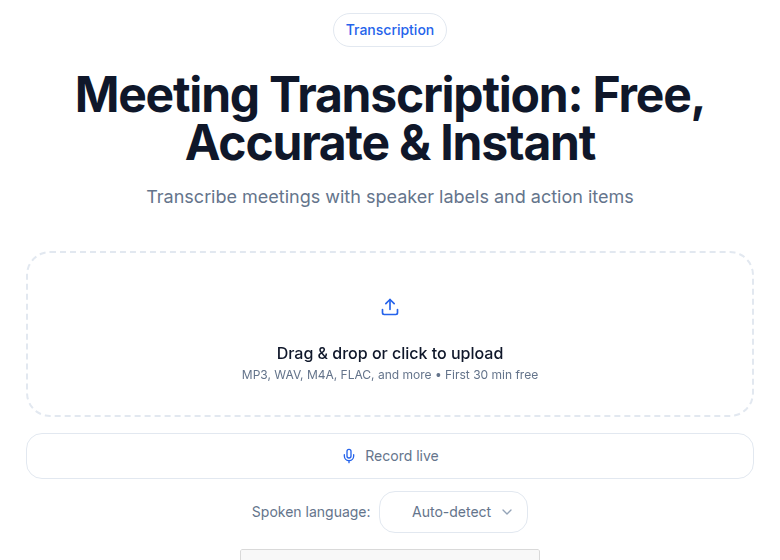 Meeting transcription tool on ConvertAudioToText
The Output Workflow: Transcribing Your Own English
If you are recording yourself speaking English, the accuracy landscape has changed. Before 2022, systemic bias in ASR training data meant non-native speakers consistently saw error rates 10 to 25 percentage points worse than standard US or UK speakers. Whisper Large-v3 (released late 2023 and still the most widely deployed open model) was trained on a deliberately global corpus and closed most of that gap.
The honest picture today: independent research indicates non-native English speakers on standard models see word error rates roughly in the 8-20% range on real-world audio, versus 3-8% for native speakers. That is still a gap, but on clean audio from a good mic and a careful speaker, you can land in the lower part of that range. The specific number depends heavily on your L1 background, how well that accent is represented in training data, your audio quality, and how much domain-specific vocabulary you use. For the deep breakdown by accent group, see transcription for accented English.
Four things reliably improve your results:
Set the Language Explicitly to English
Do not leave it on auto-detect. Heavy non-native accents occasionally trigger the engine to guess your L1 instead. Setting language to "en" forces English mode. This is a one-click change in most tools and costs you nothing.
Record in the Quietest Environment You Can
Recording quality matters more than accent for most professional audio. A clear Indian English or Nigerian English speaker on a decent USB microphone consistently outperforms a mumbling native speaker on a laptop mic. Background noise, room echo, and compression artifacts from mobile networks are the primary degraders. Keep the microphone 15-20 cm from your mouth. A quiet room and an external mic is a better investment than worrying about how your accent sounds.
Pre-load Proper Nouns and Domain Terms
Proper nouns are where errors cluster for non-native speakers: personal names, city names, company names, and domain-specific terms that the engine has not heard enough of. Tools that support custom vocabulary (AssemblyAI's keyterms prompting accepts up to 1,000 terms; other engines have similar features) let you feed those terms in before transcription. Indian place names, Nigerian surnames, product names from specific industries, feeding them in ahead of time anchors the model at its weakest point.
Manage Code-Switching Explicitly
If you naturally mix languages mid-sentence, Hinglish, Spanglish, or similar casual bilingual patterns will confuse the engine. No consumer transcription tool reliably handles mid-sentence language switches in 2025-2026. The engine commits to one language and mistranscribes the other. Your options:
- For a primarily English recording with occasional borrowed words, transcribe as English and clean up afterward.
- For genuinely bilingual recordings with long stretches in another language, transcribe each language segment separately. See the Hindi transcription and code-switching guide for Hinglish-specific tactics, or the Spanish transcription guide for Spanglish.
- For professional output where accuracy matters, treat a code-switched recording as needing human review before publication.
A Practical Workflow Table
| Use case | What helps most | Tool type |
|---|---|---|
| Following a meeting in real time | Live captions | Meeting bot (Otter, Fireflies) |
| Reviewing a meeting you attended | Transcript + native-language summary | Meeting bot or upload |
| Transcribing a recording of your own speech | Good mic + explicit language setting + custom vocab | Upload tool |
| Publishing a podcast or video in English | Post-edit pass after AI transcript | Upload tool |
| Code-switched bilingual content | Separate by language, human review | Varies by language pair |
When AI Transcription Is Not Enough
A few situations where accuracy will not meet professional standards without extra effort:
Heavy L1 influence with specialized jargon. A speaker with a strong first-language phonological system using highly technical vocabulary generates errors at both levels simultaneously. Custom vocabulary helps but does not eliminate errors. Budget for a post-edit pass, or use human transcription for the most important content. Rev's human transcription service currently charges by per-minute rates (the per-minute price varies by plan and turnaround time; check the current Rev pricing directly before budgeting).
Casual code-switching at speed. Bilingual conversations that switch languages every few sentences are still poorly handled by AI. Human transcribers who know both languages remain the best option here.
Poorly-recorded mobile audio. Compression artifacts from mobile networks on local carriers, common in parts of Africa and South Asia, degrade recognition substantially beyond what accent alone explains. A headset or standalone recorder changes the outcome more than any engine choice.
For situations where professional accuracy is needed and AI falls short, see AI vs human transcription.
Where ConvertAudioToText Fits
If you want to transcribe a recording of your own English speech without running a meeting bot or managing integrations, the audio to text tool accepts file upload or URL and lets you set language explicitly. The free tier lets you test on a short clip before committing, and keeps working free for up to 3 files per day. It does not join meetings or record in real time; for that use case, the dedicated meeting transcription tool handles recordings you upload after the call.
FAQ
Does AI transcription accuracy improve if I slow down my speech?
Speaking at a measured pace helps, but "slow down" should not mean unnatural. The more useful tactic is to pause slightly between sentences and pronounce proper nouns deliberately. The engine uses brief pauses to detect sentence boundaries, so clear sentence breaks improve punctuation and readability as much as word recognition.
Should I use a different transcription engine if I am a non-native English speaker?
Whisper Large-v3 generally performs best across diverse English accents because it was trained on a broad multilingual corpus. Deepgram is faster but was trained on a narrower English dataset and tends to perform less well on non-native accents. For most upload and review use cases, Whisper is the sensible default.
Can I use AI transcription to improve my English listening comprehension?
Yes, and there is research backing it. A 2025 randomized controlled trial (published in Humanities and Social Sciences Communications) found that access to AI-generated transcription during English listening tasks improved comprehension scores, reduced listening anxiety, and sustained those gains over a three-week follow-up. Using transcription as a review tool after listening to meetings or lectures is a well-supported practice.
What should I do when the transcript gets my name or company name wrong?
This is expected behavior, not an engine failure. Proper nouns are the weakest point for any ASR system. If your tool supports custom vocabulary or keyterms prompting, add your name, your company's name, and product names before transcribing. If not, a quick find-and-replace pass after the transcript is generated handles it in under a minute.
Sources
- OpenAI Whisper Large-v3 model card and language support: https://huggingface.co/openai/whisper-large-v3
- "The impact of AI-driven speech recognition on EFL listening comprehension, flow experience, and anxiety: a randomized controlled trial" (2025): https://ideas.repec.org/a/pal/palcom/v12y2025i1d10.1057_s41599-025-04672-8.html
- "Automatic Speech Recognition for Non-Native English: Accuracy and Disfluency Handling" (2025 preprint): https://arxiv.org/pdf/2503.06924
- Maraba AI: "Can AI Understand a Nigerian Accent?" (accuracy ranges): https://maraba.ai/blog/can-ai-understand-nigerian-accent/
- Umevo AI: "AI Transcription Accuracy Across Accents": https://www.umevo.ai/blogs/ume-all-posts/ai-transcription-accuracy-across-accents-how-non-native-english-speakers-fare
- IceCubes Blog: "Meeting Transcription for Non-Native English Speakers": https://icecubes.app/blog/meeting-transcription-non-native-english-speakers
- Otter.ai pricing (verified July 2026): https://otter.ai/pricing
- Rev.com pricing (verified July 2026): https://www.rev.com/pricing
- AssemblyAI keyterms prompting: https://www.assemblyai.com/blog/streaming-keyterms-prompting
- Gladia: "Code Switching in Speech Recognition: ASR Guide 2026": https://www.gladia.io/blog/what-is-code-switching-in-speech-recognition
Try transcription free
Convert any audio or video to clean, unwatermarked text — speaker labels, timestamps, and AI summaries included. First 30 minutes free, no account.
Related Articles
Accented English Transcription: The Honest Picture
The documented accuracy gaps by accent, what actually helps (clear audio beats accent every time), and engine progress.
Spotify Transcript Extractor: How to Copy and Download Episode Text
Get a Spotify podcast transcript you can copy and download: paste a public episode link, 30 minutes free with no signup, TXT or SRT files on eligible plans.