Transcription for Virtual Events: A Multi-Session Scale Guide
Summarize this article with:
The Event Pipeline
Record every session, run a single overnight batch, and wake up the next morning with a named, speaker-labeled transcript for each track. That is the core workflow for multi-session virtual events, and everything below is about executing it without the friction that kills follow-through on 200-session conferences.
A single-track webinar is a different problem: one recording, one upload, one transcript. This post covers what happens when you have multiple simultaneous tracks, rotating speakers, and a tight window to publish before attendees stop caring.
The Three Transcription Layers
Every multi-session virtual event has three distinct transcription jobs. Conflating them is how events end up with neither good live captions nor a useful archive.
Layer 1: Live captions during the session. Real-time captions for deaf and hard-of-hearing attendees. Latency matters more than accuracy here. These are typically platform-native or from a CART provider, not a batch tool.
Layer 2: Post-event transcript per session. Higher-accuracy batch transcript published alongside the recording. This is where most of the operational work lives.
Layer 3: Derived content. Blog posts, social quotes, speaker highlight reels, SEO landing pages. Built from the transcript, not from memory.
Treating all three as one is how events end up with blurry auto-captions during the session and no transcript at all afterward.
Layer 1: Live Captions
For live captions, the platform usually handles it adequately for basic accessibility. Zoom Webinars and Microsoft Teams both offer built-in auto-captioning. Zoom also supports third-party captioning via a REST API token the host copies from meeting controls and shares with an external CART provider, enabling real-time caption injection into the session interface.
For most multi-track conferences, the practical call is: use platform-native captions for live sessions, then invest in accuracy on the post-event transcript. The live captions are synchronous and latency-sensitive; the transcript can run overnight.
Accessibility note. WCAG 2.1 Level AA requires live real-time captions for synchronized media. For public-sector organizations, the ADA Title II rule ties digital accessibility directly to that standard, with compliance deadlines phased in for large and small public entities over 2027-2028. The practical floor: live captions during the event, plus a clean written transcript available alongside the recording.
Layer 2: The Batch Transcript Pipeline
This is where multi-session events differ from single webinars. A three-day conference with four tracks produces roughly 150-200 session recordings. Processing them one at a time is not a workflow; it is a weekend you lose.
The pipeline that scales:
- Each session recording is captured by the event platform and made available as a downloadable file (usually MP4 or MP3).
- All recordings are submitted to a transcription API in a single batch request, ideally via script or automated download.
- Processing runs overnight. A 60-minute session typically completes in 2-4 minutes; 200 sessions take no longer than the first batch slot fills.
- Each transcript is written to a session-specific file named by track and session title (for example,
track-a_opening-keynote_2026-07-15.txt). - Transcripts auto-populate session pages on the conference site or internal wiki by the next morning.
The naming convention matters more than it seems. Generic names like recording-001.mp4 produce transcripts that are impossible to route correctly at scale. The format [track]-[slug]-[date] keeps the archive searchable across years.
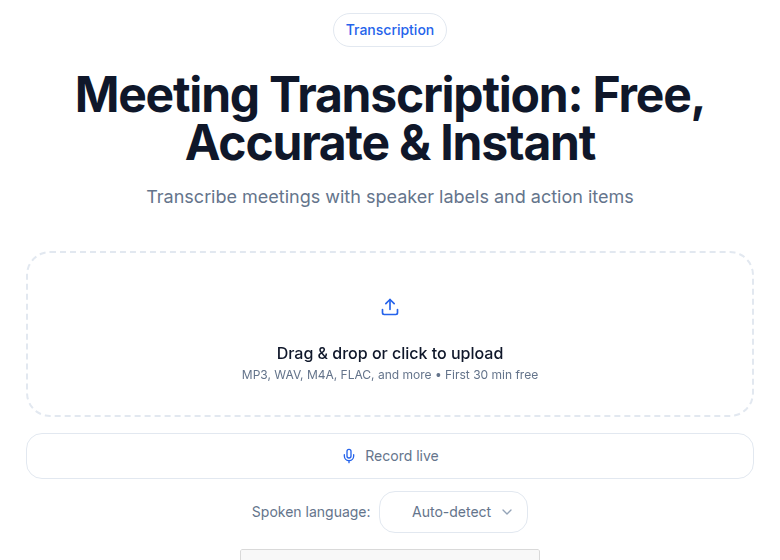 CATT meeting transcription tool processing a multi-speaker session recording
For speaker diarization: the tool labels speakers as "Speaker 0," "Speaker 1," and so on. Renaming takes 1-3 minutes per session. If the same speakers appear across multiple sessions, build a mapping table ahead of time so any editor can apply labels consistently.
Accuracy with 2-3 speakers runs above 95% with clean audio. With 6 or more speakers in a roundtable format, accuracy can drop to 65-80%, so audio quality at recording time pays back here. Separate microphones per speaker outperform a single room microphone for diarization quality.
Speaker Mapping at Scale
For a conference where the same recurring host appears in 40 sessions and 30 panelists rotate across tracks, consistent speaker naming is a real operations problem. A few patterns that work:
Pre-session speaker register. Collect speaker names against session IDs in a spreadsheet before the event. After transcription, apply the map programmatically. One hour of setup saves 10 hours of manual edits.
Self-introduction protocol. Ask every speaker to state their full name in the first 30 seconds of the session. This creates a clear reference anchor for the diarization model and makes post-event labeling faster even when done manually.
Batch find-and-replace. Most transcript editors support global find-and-replace. Rename "Speaker 0" to the host's name across all sessions in one pass rather than per file.
The goal is a transcript where every pull-quote is attributed correctly. That matters for both accuracy and for PR when speakers share excerpts.
Layer 3: Derived Content at Conference Scale
The transcript is the asset. The derived content is the ROI.
From a single 60-minute session transcript:
- Blog post: 800-1,500 words extracted and edited. 45-60 minutes of work versus 5 hours from memory.
- Social pull quotes: 5-10 quotes for LinkedIn and X. Extracted in under 10 minutes.
- Email follow-up: "Here is what we covered" recap with timestamps. Built from the transcript in 20 minutes.
- Speaker highlight page: Permanent speaker profile page with curated quotes and links to sessions. Built once, indexed by search engines indefinitely.
- SEO session pages: Each session gets a permanent page with full transcript, recording embed, and speaker bio. These pages rank for years after the event.
At conference scale (150 sessions), a team of three editors can process everything over a week if the transcript quality is high. Without transcripts, the same three people spend a month on incomplete notes.
My take: the SEO session pages are underused. An annual conference that publishes full transcripts on permanent URLs builds compounding search authority. Someone searching for a topic in year three finds a session from year one. That keeps the event relevant between cycles.
Multilingual Events
International conferences often mix languages across tracks: an English keynote, Spanish breakouts, a French panel. The pipeline handles this cleanly if each track is submitted with the correct language setting.
Single-language event with translated transcripts. Run the original transcription in the source language. Translate the finished transcript for non-source-language audiences. Translating a clean transcript is more accurate than transcribing a live interpreter. See transcription for international teams for the full workflow.
Simultaneous interpretation tracks. If the event provides live interpretation in another language, transcribe the original-language audio, not the interpreter's feed. The interpreter introduces paraphrasing and lag; the original is the authoritative record.
For accented or dialect-heavy audio, test on a real sample before the event. Accuracy varies significantly by accent and domain vocabulary, and a clean demo clip is not representative of a live conference panel.
Platform-Specific Notes
Zoom Webinars. Native auto-captions are available live. Post-event, download the cloud recording (MP4) and batch-submit. Zoom also stores a native transcript you can export, though its accuracy is lower than a dedicated batch run.
Google Meet. Native captions exist during the session but are not downloadable afterward. Post-event work requires pulling the recording for transcription.
Microsoft Teams Live Events. Exports a transcript from the Teams interface. Quality is adequate for most uses. Re-running through a dedicated batch pipeline improves accuracy for technical vocabulary and proper nouns.
Hopin, On24, vFairs. All produce session recordings post-event. Pull the recording files and submit to your batch pipeline. None offer a downloadable transcript at a quality level suitable for publishing directly.
Custom Vimeo or YouTube livestreams. No native live captions unless you build the integration. Post-event, transcribe the recording download. For the post-event flow, see the meeting transcription tool.
Cost at Scale
The honest cost comparison depends on your volume and your workflow model.
| Tool | Pricing model | Import cap | Speaker labels | Best fit |
|---|---|---|---|---|
| Otter.ai Pro | $8.33/user/mo (annual) | 10 files/month | Yes | Individual meetings |
| Otter.ai Business | $19.99/user/mo (annual) | Unlimited imports | Yes | Small team, regular meetings |
| Fireflies.ai Business | $19/user/mo (annual) | Unlimited | Yes (via diarization) | Meeting bot workflow |
| AssemblyAI (API) | $0.15/hr metered (Universal-2) | None | $0.12/hr extra | Developers, batch pipelines |
| Deepgram Nova-3 (API) | $0.26/hr metered (pre-recorded) | None | $0.12/hr extra | High-volume API |
| ConvertAudioToText Pro | $14.99/mo, unlimited | Unlimited | Yes | Manual upload, batch |
For a one-day event with 6 sessions at 60 minutes each: metered API at $0.15/hr (AssemblyAI) runs roughly $1.35 before any add-ons. That scales well for small events. At 200 hours (a three-day, four-track conference), metered billing lands at $30-120 depending on the model and features. Flat-unlimited plans make more sense when you are running 20 or more hours per month across multiple events rather than one large spike per year.
See transcription pricing comparison and unlimited vs metered transcription pricing for a deeper breakdown.
The Otter.ai Pro 10-file monthly cap is the specific limit that breaks for conferences: 200 sessions hit that cap in the first 2% of the event. Otter Business removes the cap at $19.99/user/month, but it is oriented toward a meeting-bot workflow, not batch upload.
Fireflies AI Free stores only 400 minutes per team. Pro expands that to 8,000 minutes per seat but also uses an AI credit system that limits features like summaries and highlights each month.
If you just need clean transcripts uploaded after the event with no meeting bot, ConvertAudioToText handles batch uploads on the Pro plan without session caps.
The Indexed Archive
The largest long-term return from transcribing virtual events is not the immediate post-event blog post. It is the permanent, searchable archive that accumulates across years.
A conference that transcribes every session and publishes each on a stable URL builds a content library that ranks in search, answers questions for late discoverers, and gives sponsors evidence of reach beyond the live headcount. Events that disappear behind a paywall or simply vanish post-livestream leave all of that value on the table.
The hidden costs of transcription services post covers what gets missed when the only transcript you produce is the auto-generated one buried inside Zoom's recording interface.
FAQ
Do I need a dedicated transcription tool if Zoom already provides a transcript?
The Zoom auto-transcript is usable for personal notes, but accuracy on proper nouns, technical terms, and multi-speaker sessions is noticeably lower than a batch-run transcript. For anything published or shared with non-attendees, re-processing the recording through a dedicated engine produces meaningfully better results.
How should I name session recording files to stay organized across a multi-day conference?
Use a consistent naming pattern before the event: [track]-[session-slug]-[YYYY-MM-DD], for example track-a_opening-keynote_2026-09-10.mp4. ISO dates sort correctly in any file system. This structure makes batch submission, transcript storage, and speaker-mapping scripts much easier to maintain.
What is the fastest way to add correct speaker names to transcripts across 100+ sessions?
Build a speaker register before the event: a spreadsheet of session ID, speaker name, and "Speaker N" position. After batch transcription, apply a find-and-replace script against the register. Having speakers state their name in the first 30 seconds of each session also gives editors an unambiguous reference point for any session the register misses.
When does per-minute API pricing make more sense than a flat monthly plan for events?
Per-minute APIs (AssemblyAI at $0.15/hr, Deepgram from $0.26/hr) make sense for teams running one or two large events per year, where a flat monthly plan would go mostly unused in off-months. Flat unlimited plans become more cost-efficient once you exceed roughly 20-30 hours of audio per month, and even more so if you are also transcribing ongoing meetings, interviews, or podcasts alongside events.
Sources
- Zoom Closed Captioning API documentation: support.zoom.com
- Otter.ai pricing (verified July 2026): otter.ai/pricing
- Fireflies.ai pricing (verified July 2026): fireflies.ai/pricing
- AssemblyAI batch transcription pricing (verified July 2026): assemblyai.com/pricing
- Deepgram Nova-3 pricing (verified July 2026): deepgram.com/pricing
- ConvertAudioToText pricing (verified July 2026): convertaudiototext.com/pricing
- ADA Title II WCAG 2.1 AA virtual event requirements: aberdeen.io
- WCAG 2.1 live captions requirement (1.2.4): gotranscript.com
- AssemblyAI batch transcription at scale: assemblyai.com/blog/large-scale-audio-transcription
Try transcription free
Convert any audio or video to clean, unwatermarked text — speaker labels, timestamps, and AI summaries included. First 30 minutes free, no account.
Related Articles

Accessible Lectures with Transcripts: The Delivery Guide
Recorded lectures plus transcripts as universal design: disability-services workflows and the student-facing formats that work.
Podcast RSS with Transcripts: Add the Right Tag
Learn how the podcast:transcript RSS tag works, which apps read it in 2026, the right MIME types for VTT, SRT, and JSON, and how to host the file correctly.