
Accessible Lectures with Transcripts: The Delivery Guide
Summarize this article with:
Providing transcripts for every recorded lecture is the lowest-effort accessibility action most instructors can take, and it serves a far wider range of students than the formal accommodation list suggests. The ADA Title II final rule (April 2024) sets WCAG 2.1 Level AA as the required standard for public institutions, with extended compliance deadlines now in effect. A simple four-step weekly workflow keeps the overhead under 20 minutes per course. This post walks through who benefits, what the law actually says, and how disability-services offices can shift from reactive to proactive.
This post is for informational purposes only. It is not legal advice. Accessibility law questions specific to your institution should go to qualified counsel or your institution's legal office.
A transcript is the cheapest, most scalable accessibility accommodation most instructors can offer. It costs far less than a live captioner, it does not depend on a student filing a formal request first, and it serves more people than most faculty realize. One file, posted alongside the audio, covers a lot of ground.
This guide is for instructors, accessibility coordinators, and disability-services administrators who want to shift transcripts from a reactive one-off accommodation to a default part of the course-delivery workflow.
Who Actually Benefits
The accommodation-by-name population is smaller than the actual benefit population. Research has found that roughly 80% of caption and transcript users are not deaf or hard of hearing. That matters when making the case to faculty or budget committees.
Students with hearing loss are the starting point. A verbatim transcript gives them a text record they can reread at their own pace. Live captioning is better for real-time participation in class, but transcripts cover the asynchronous review case that live captioning cannot.
Students with ADHD benefit from flexible re-engagement. A 2023 study published in the Journal of Attention Disorders found that students with ADHD reported that the ability to engage flexibly with lecture recordings, including adjusting playback speed, helped them manage study time. A transcript extends that benefit: a student who lost focus for several minutes can skim back to the relevant section in seconds without scrubbing through audio.
ESL and international students face a specific barrier that transcripts address well. Spoken academic English uses faster cadence, contracted forms, and field-specific idioms that a textbook reader may not have encountered. A transcript lets them pause on a sentence, look up a term, and re-read at their own speed.
Students missing class due to concussion, migraine, or chronic illness can catch up faster from a transcript than from a recording, especially if post-concussion symptoms make sustained audio or video watching difficult.
Students preparing for exams also use transcripts as study material even when they attended the lecture, because scanning a text document to find a specific argument is faster than rewinding audio. That is not a disability category, but it is a real use case that affects completion rates.
What the Law Actually Says
The legal baseline in the US rests on three sources: Title II of the ADA (public institutions), Section 504 of the Rehabilitation Act (any institution receiving federal funds), and the more recent digital-accessibility rule.
In April 2024, the Department of Justice issued a final rule under Title II that mandates WCAG 2.1 Level AA as the technical standard for web content and digital tools at public institutions, including course videos and LMS materials. The DOJ then extended the compliance deadlines in April 2026: public entities in jurisdictions with populations of 50,000 or more must comply by April 26, 2027, and smaller jurisdictions by April 26, 2028. Those extended dates are now the operative ones. Private institutions that receive federal funding face parallel obligations under Section 504, which has always required equivalent access to course materials for students with documented disabilities.
The landmark case that established proactive captioning as the expected standard is NAD v. Harvard and NAD v. MIT. The National Association of the Deaf filed both suits in 2015, alleging that neither university captioned its publicly available online course content. Harvard settled in November 2019 and MIT settled in February 2020. Both settlements were described by NAD as the most comprehensive online accessibility requirements in higher education at the time, and both required institutions to adopt caption and transcript defaults across their digital course offerings rather than waiting for individual accommodation requests.
The compliance path most institutions now take following these cases is proactive: produce transcripts for every recorded lecture as part of the workflow, not as a reaction to a specific student request. That also avoids the legal exposure that comes from delays in the reactive model.
For a closer look at how these obligations map to specific digital content types, see WCAG compliance with transcripts and ADA compliance and audio content.
The Disability-Services Workflow
The accommodation-by-request model creates bottlenecks. A student files a request, the disability office generates an accommodation letter, the instructor is notified, and then someone has to actually produce the transcript, often on a tight deadline. Multiply that by every student with a hearing-related or processing-related accommodation across every recorded course and the staff load adds up fast.
The proactive alternative shifts the work earlier and flattens the curve. Once transcripts are produced universally, the accommodation letter stops being the trigger for transcript production. The disability-services office role shifts from coordinating transcript logistics to higher-touch work: assistive-technology training, tutoring coordination, testing accommodations, and advising students who need more than a text document.
The metrics that show whether this is working:
- Formal accommodation requests for individual transcription support. This should decline as universal transcripts cover the demand.
- Course completion rates for students with documented disabilities, tracked semester over semester after rollout.
- Staff hours spent on per-student transcript coordination versus other accommodation types.
Colorado State University's 2024-2025 Student Disability Center outcomes are one data point: 4,601 undergraduate students served, with accommodated students passing more than 90% of attempted credits and finishing semesters with slightly higher GPAs than non-accommodated students. That is not attributable to transcripts alone, but it reflects what a well-resourced proactive accommodation system can produce.
A Workflow That Scales for a Full Department
The simplest workflow that holds up across a full semester:
During the lecture: record the audio. A room mic or a lavalier clipped to the instructor's lapel works. Two minutes of setup, then it runs unattended.
Within 24 hours: upload the file. For most asynchronous lecture audio, an AI transcription tool with a strong model under the hood (Whisper Large-v3 or a comparable Deepgram-based engine) handles the heavy lifting. The turnaround is minutes, not days.
Same day: post the transcript to the LMS alongside the audio or video file. Name it with the lecture date and topic so students can find it in week eleven without searching. For screen-reader users, a plain-text or properly tagged PDF is more accessible than a scan or an image-based export.
Once a week: spot-check one transcript for domain-specific terms. Organic chemistry nomenclature, legal Latin, and statistical notation are the categories most likely to trip an AI model. Build a correction glossary for each course and run a find-and-replace pass before posting.
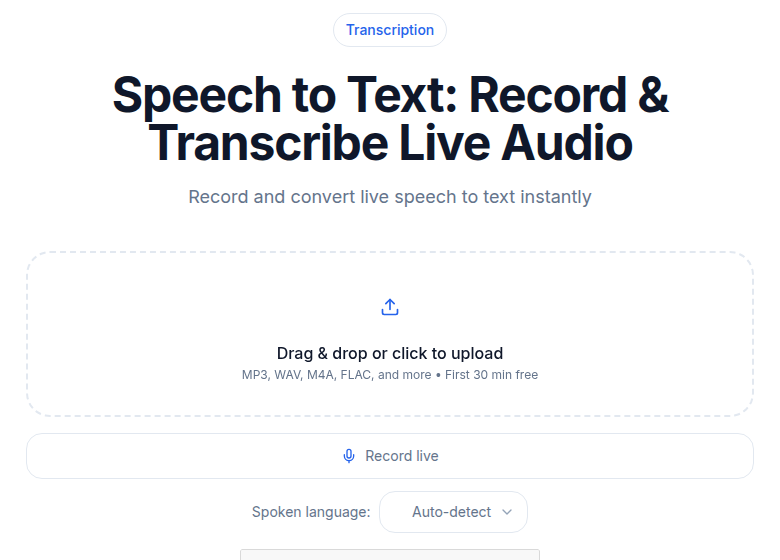 CATT speech-to-text tool interface showing audio upload and transcript output
The whole loop takes a department coordinator roughly 20 minutes per course per week once it is running. That is within reach for most departments without dedicated staff.
If you need batch transcription for a backlog of recorded lectures, ConvertAudioToText's audio-to-text tool handles file uploads without requiring a meeting bot or a persistent integration, which keeps the workflow simple for occasional or pilot use.
Picking a Tool That Handles Lecture Audio
Lecture audio has specific characteristics that not every tool handles well:
- A single dominant speaker with occasional student questions from across the room, sometimes at low volume.
- Background noise during transitions, setup, and group-work periods.
- Extended silences during pauses, which some tools fill with filler transcription.
- Domain-specific vocabulary that off-the-shelf language models mis-spell on first encounter.
For most asynchronous institutional use, an AI tool running Whisper Large-v3 or Deepgram handles the majority of these cases at acceptable accuracy. For high-stakes content where every name, drug, legal term, or formula matters, a hybrid workflow holds up better: AI transcript first, human reviewer second.
Otter.ai is designed for live meetings. Its free tier caps at 300 minutes per month and 30 minutes per conversation, and its Pro tier tops out at 1,200 minutes per month. A single semester of recorded lectures can exhaust those limits fast, and the per-conversation cap makes it unsuitable for longer class sessions without manual workarounds.
Rev offers a human-transcription tier at $1.99 per audio minute (as of 2026), with a 99% accuracy guarantee. That is the right call for high-stakes recorded content where an AI error rate would create downstream problems, such as medical school lectures or legal proceedings. For routine asynchronous course transcription, the cost adds up quickly.
For the middle ground, batch AI transcription with a quick human spot-check on technical vocabulary gives you reasonable accuracy at a fraction of the human-transcription cost. See transcription pricing models explained for a fuller breakdown of when each model makes sense.
Multilingual and International Lecture Contexts
If your institution serves multilingual students, transcripts open an additional lever: machine translation. A transcript in English can be translated into Spanish, French, Mandarin, or Arabic with reasonable fidelity for academic prose. The output is not publication-quality, but it is enough for a student to follow an argument and look up terminology.
International branch campuses often run this in reverse: the lecture is delivered in Mandarin, the transcript is in Mandarin, and exchange students receive a translated version they can read alongside the original audio. That covers a student cohort that formal accommodation processes rarely reach.
For more on how transcripts serve multilingual students specifically, see transcription for deaf and hard-of-hearing students, which covers multi-format access needs across different student populations.
How to Frame It With Faculty
Faculty resistance to lecture transcripts usually comes from three places:
"It will hurt attendance." The post-pandemic research is more nuanced than the fear. Faculty in one 2023 biosciences survey were more comfortable being recorded than they were in 2019, but those who opposed lecture capture still cited attendance as their main concern. The more consistent finding across the literature is that students who would skip lecture to use a transcript were going to skip anyway. The students who attend do so for reasons transcripts do not address: interaction, live Q+A, the social structure of the room.
"Students will not engage if they can read it later." This is a course-design problem, not a transcript problem. Active learning activities during class time, cold-calling, in-class polling, and peer discussion require attendance and cannot be captured in a transcript. Restricting transcript access does not make passive lectures more engaging.
"My recordings are not for distribution." Transcripts posted to a password-protected LMS are not public distribution. Most accessibility offices treat them as student-specific course materials with the same distribution constraints as any other course document.
The fastest way to get a resistant faculty member on board is to show them a transcript of one of their own lectures and ask whether anything in it is inaccurate or sensitive. The answer is almost always no, and the practical question becomes how to make the process easy rather than whether to do it at all.
Format Checklist Before You Post
Before a transcript goes to students, run through these:
| Format check | Why it matters |
|---|---|
| Named with lecture date and topic | Students can search the LMS folder without opening every file |
| Speaker labels included | Helps students who missed class understand when a student question is being answered vs. the main lecture |
| Technical terms verified | One pass through domain vocabulary before posting prevents confusion on study materials |
| File is plain text or tagged PDF | Screen readers handle these better than scanned images or untagged exports |
| Paired with the audio or video file | The combination is more useful than either alone for students who want to read along |
For a step-by-step guide to posting captions alongside the lecture video, see how to create an SRT file and how to add subtitles to video.
Start With One Course
If you are an instructor, pick one course next term and add transcripts as the default. Tell students on day one, post the first transcript by the end of week one, and ask for feedback at the midterm.
If you are an administrator, find one faculty member who is already recording lectures and fund a one-semester pilot. A working example is faster than a top-down policy.
The legal direction is clear, the tooling is accessible, and the student benefit is wider than the formal accommodation list. The main reason most departments have not done this yet is inertia, not cost or complexity.
FAQ
Are transcripts legally required for recorded lectures in the US?
Under the ADA and Section 504, students with documented disabilities must receive equal access to course content. The 2024 ADA Title II final rule requires public institutions to meet WCAG 2.1 Level AA for digital content, including course videos, with extended compliance deadlines now set at April 26, 2027 for larger jurisdictions and April 26, 2028 for smaller ones. Private institutions receiving federal funding face comparable obligations under Section 504. Many institutions now treat proactive transcripts as the lowest-risk compliance path.
Do lecture transcripts hurt attendance?
The research is mixed. A post-pandemic survey of biosciences faculty found that the main concern among those opposed to lecture recordings was attendance impact, but the same study found no significant shift in overall faculty views since 2019. The more consistent finding: students who skip lecture to read a transcript were likely to skip regardless. Active learning structures in class address engagement; restricting transcripts does not.
Which student groups benefit most from lecture transcripts?
The clearest beneficiaries are students who are deaf or hard of hearing, students with ADHD (who benefit from pace control and the ability to re-engage without rewinding audio), ESL and international students (who can look up unfamiliar academic vocabulary after the fact), and students missing class due to concussion, chronic illness, or other medical reasons. Research has also found that roughly 80% of people who use captions and transcripts are not deaf or hard of hearing, which points to broader-than-expected benefit.
What file format should I use when posting lecture transcripts to my LMS?
Post the transcript as a plain-text or accessible PDF file, named with the lecture date and topic so students can search it. If the lecture includes slides, a separate SRT or VTT file paired with the recorded video lets students follow along with synchronized captions. For students using screen readers, plain text or a properly tagged PDF is more accessible than an image-based scan.
Sources
- ADA.gov: Fact Sheet on the 2024 Title II Web Accessibility Final Rule
- Federal Register: Extension of ADA Title II Compliance Dates, April 2026
- 3Play Media: Overview of NAD v. Harvard and NAD v. MIT
- Section508.gov: Captions and Transcripts
- PMC: Effects of captions, transcripts and reminders on learning and perceptions of lecture capture (2022)
- SAGE Journals: Learning From Recorded Lectures: Perceptions of Students With ADHD (2023)
- Colorado State University: Student Disability Center 2024-2025 Student Outcomes
- Rev: Pricing
- Otter.ai: Pricing
- PMC: Video Captions Benefit Everyone
Try transcription free
Convert any audio or video to clean, unwatermarked text — speaker labels, timestamps, and AI summaries included. First 30 minutes free, no account.
Related Articles
Accessibility for Online Courses: The 2026 Compliance Checklist
A practical checklist for making online courses accessible: captions, transcripts, live sessions, course materials, and the legal requirements under ADA Title II and Section 504.
Best Transcription Tools for Students in 2026: Budget-Ranked
Ranked by real cost and verified free-tier limits: the best transcription tools for students in 2026, from free university options to paid picks for heavy lecture loads.