How to Translate a YouTube Video with AI (2026 Reality Check)
Summarize this article with:
YouTube auto-dubs videos into 27 languages free for eligible creators, so start with auto-dubbing in YouTube Studio before paying for anything; viewers can also auto-translate captions on any video. Pay for a dedicated AI dubbing or subtitle tool only when you need voice control, languages beyond the 27, or corrected captions. Never machine-translate YouTube's raw auto-captions: translation compounds their errors, so fix the source transcript first.
The Fast Path
YouTube now auto-dubs your videos into 27 languages at no cost. As of February 4, 2026, the feature is live for all eligible creators worldwide. For most videos, the workflow starts here: enable auto-dubbing in YouTube Studio, wait for YouTube's AI to generate the tracks, and you reach native-language viewers without uploading a single extra file.
That free baseline is the right starting point. Where paid AI tools (ElevenLabs, HeyGen, DeepL) earn their keep is quality, voice identity, lip-sync, and full control over the output. This guide maps out every path.
YouTube's Free Built-In Options
Auto-dubbing (AI-generated, free)
YouTube's auto-dub uses Google's AI to generate translated audio tracks in 27 languages, attached directly to your video. Viewers pick their language from the audio menu. You do nothing after enabling it.
Key facts verified against YouTube's help documentation:
- Free to creators, enabled by default for eligible channels.
- Video must be under 120 minutes, contain detectable speech, have no Content ID claims, and not be primarily music.
- Expressive Speech (preserves pitch and emotion) is available in 8 languages: English, French, German, Hindi, Indonesian, Italian, Portuguese, and Spanish.
- A lip-sync pilot that adjusts the speaker's visible mouth movements is currently in limited testing as of mid-2026.
- If a YouTube auto-dub exists for a language, you cannot upload a custom dub for that same language without deleting the auto-dub first. This is the most common gotcha.
Auto-dubbing is "all gain and no pain," per the YouTube Blog announcement: it does not hurt your original video's discovery ranking.
Auto-translate captions (viewer-side, free)
Viewers can already translate your subtitles themselves: Settings gear in the player, then Subtitles, then Auto-translate, then pick any of 100+ languages. YouTube runs it through Google Translate on the fly.
This does not require any action from you as a creator, but it has a dependency: your video needs captions in the first place. Auto-generated YouTube captions are the floor. Manually uploaded, accurate captions produce noticeably better auto-translations because Google Translate works from text, not audio.
The catch: auto-translate does not improve your video's discoverability. Only manually added subtitle tracks and translated metadata (title, description) affect search ranking in other languages.
When to Pay for Paid AI Translation Tools
The free options have real limits. Here is where the paid tier earns its cost:
You want to keep your actual voice. YouTube's auto-dub uses a generic AI voice. ElevenLabs and HeyGen both offer voice cloning, so the dubbed track sounds like you.
Your video needs lip-sync. Talking-head or on-camera content where mouth movement mismatches are obvious requires a tool with lip-sync, not just dubbed audio.
You need to distribute outside YouTube. If the video also goes to Instagram, LinkedIn, or a client portal, you need your own translated file, not a YouTube-internal track.
Your branded content quality bar is high. Auto-translate subtitle quality is 70-90% accurate depending on source language; professional content with proper nouns, product names, and idioms usually needs a cleanup pass.
The Four Translation Paths Compared
| Path | Cost | Languages | Voice identity | Viewer effort |
|---|---|---|---|---|
| YouTube auto-dub | Free | 27 | Generic AI | None (auto-selected) |
| YouTube auto-translate captions | Free | 100+ | N/A (text only) | Viewer enables manually |
| AI dubbing tools (ElevenLabs, HeyGen) | Paid, per-minute | 30+ | Clone available | None if uploaded to YouTube |
| Human voiceover | $100-500/video | Any | Native speaker | None if uploaded to YouTube |
Subtitle Translation: The Source Quality Problem
Auto-translate captions and any AI translation downstream are only as good as the source text. If YouTube's auto-generated captions for your video are mediocre (technical jargon, accents, fast speech), the translated subtitles in all 100+ languages will be mediocre too.
The fix is clean source captions. Generate an accurate transcript of your video, edit it, and upload it as a manual subtitle track before relying on auto-translate.
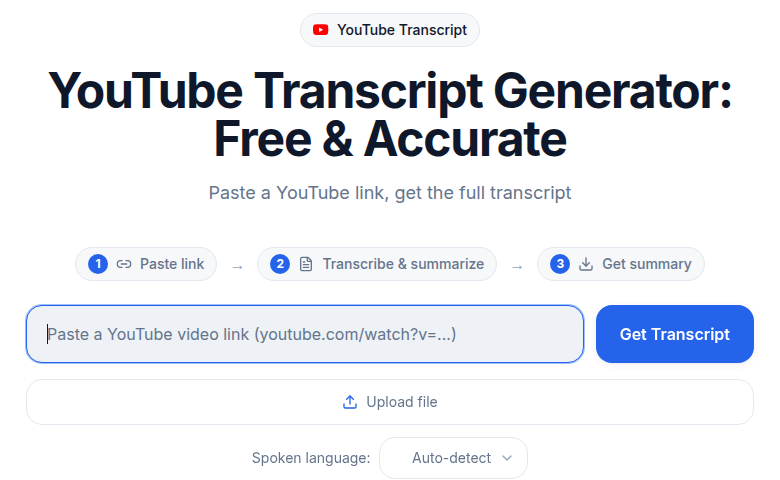 ConvertAudioToText YouTube transcript tool
If you need subtitles that can be reliably translated, start from a transcript you trust. ConvertAudioToText's YouTube transcript tool pulls audio from a YouTube URL, transcribes it, and exports SRT or VTT ready for upload. For the mechanics of formatting and timing subtitle files, see the subtitle translation workflow guide.
The Subtitle Upload Steps (YouTube Studio)
Once you have a translated SRT or VTT file:
- Open YouTube Studio on desktop.
- Select the video, then go to Subtitles in the left menu.
- Click Add Language, choose the target language.
- Under the Subtitles column, click Add, then Upload file.
- Choose "With timing" if your file has timestamps (SRT and VTT both qualify).
- Review sync in the editor, then click Publish.
YouTube processes the file within a minute or two. Do this for title and description as well: YouTube lets you add per-language video metadata, which directly affects search ranking in that language. See how to transcribe and translate in a single workflow for automating both steps.
AI Dubbing Tools: What They Actually Cost
If you go beyond YouTube's free auto-dub, here are the two tools most creators use, with prices sourced from their own pricing pages as of July 2026.
ElevenLabs Dubbing
Plans start at $6/month (Starter, 30,000 credits). The key billing rule: dubbing costs 2,000 credits per minute for automatic dubbing with watermark, or 3,000 per minute without watermark. Every target language is billed separately, so a 10-minute video dubbed into Spanish, French, and German costs 30 minutes of dubbing credits, not 10. Pay-as-you-go top-ups are available when monthly credits run out.
HeyGen Video Translation
Plans start at $29/month (Creator, 600 credits). Audio-only dubbing without lip-sync costs 2 credits per minute and has been unlimited on all paid plans as of February 2026. Full video translation with lip-sync costs 5 credits per minute. Via API, video translation runs approximately $2 per source minute.
Human voiceover remains the quality ceiling at roughly $100-500 per video, rarely worth the gap over today's AI voice quality for standard YouTube content.
For a deeper look at AI translation quality versus human work, see AI translation vs. human translator.
Which Languages to Prioritize
Not all translations return equal reach. The highest-ROI targets for most English-language creators, ranked by YouTube audience size:
- Spanish - 500+ million speakers, large Latin American and US Latino YouTube audience.
- Portuguese (Brazilian) - Very active YouTube market, especially for how-to and entertainment.
- Hindi - Fast-growing mobile YouTube audience in India.
- Indonesian - 200 million speakers, heavy mobile YouTube consumption.
- French - 320 million speakers across multiple continents, strong RPM for ad-supported content.
Spanish is usually the first move. For the full workflow including translated audio and written content, see translating a podcast to Spanish.
Translating Metadata: The Step Most Creators Skip
Subtitles and dubbing increase comprehension. Translated metadata increases discovery.
YouTube surfaces videos in target-language search based on title and description language. An English title on a Spanish-dubbed video does not rank well in Spanish YouTube search. Add translated title and description for every language where you want organic reach:
- Go to Video details in YouTube Studio.
- Click Add Language (top right).
- Add translated title and description.
- Save.
This is the highest-leverage step most creators skip.
My Take
The 2026 picture is: use YouTube's free auto-dub to test whether a language audience exists for your content. If a language generates 5-10% or more of your watch time within 60 days, that language is worth investing in, meaning a proper voiced dub with ElevenLabs or HeyGen, uploaded as a custom track (after deleting the auto-dub for that language). If it does not move, that is useful signal too.
Start with Spanish. Translate your three most-viewed, most universally relevant videos. Watch the 60-day trend. Expand from there.
Common Questions
Does YouTube auto-dubbing cost money for creators?
No. YouTube's auto-dub feature is free for eligible creators. Videos must be under 120 minutes, contain detectable speech, and have no Content ID claims. The feature went global in February 2026 and supports 27 languages, with no action needed beyond enabling it in your channel settings.
What is the difference between auto-translate captions and auto-dubbing?
Auto-translate captions are text subtitles that viewers enable themselves in the video player settings. They work on any video with existing captions and cover 100+ languages, but they do not change the audio and do not help search discovery. Auto-dubbing adds a separate audio track in the translated language that plays automatically for viewers whose preferred language matches. Both are free; dubbing is more impactful for reach, captions are easier for creators to control.
Can I upload my own dubbed audio if YouTube already auto-dubbed my video?
Not directly. If YouTube has already created an auto-dub for a given language, you cannot add your own custom audio track for that same language unless you delete the YouTube-generated one first. Once deleted, you can upload your own file via the Languages section in YouTube Studio.
How accurate is AI subtitle translation compared to human translation?
Accuracy depends heavily on the source captions. When source captions are accurate, AI translation tools like DeepL produce results that are publication-ready for most content, though proper nouns, idioms, and brand-specific terms often need a cleanup pass. YouTube's on-the-fly auto-translate (viewer-side) ranges from 70-90% accuracy depending on source language pair. Human translators remain the quality ceiling for legal, medical, and high-stakes branded content.
Sources
- YouTube Help: Use automatic dubbing: https://support.google.com/youtube/answer/15569972
- YouTube Help: Add multi-language features to your videos: https://support.google.com/youtube/answer/13338784
- YouTube Blog: Unlocking a global audience with auto dubbing (Expressive Speech announcement): https://blog.youtube/news-and-events/youtube-auto-dubbing-expressive-speech/
- YouTube Help: Manage caption settings: https://support.google.com/youtube/answer/100078
- ElevenLabs pricing page: https://elevenlabs.io/pricing
- HeyGen pricing page: https://www.heygen.com/pricing
Try transcription free
Convert any audio or video to clean, unwatermarked text — speaker labels, timestamps, and AI summaries included. First 30 minutes free, no account.
Related Articles
How to Transcribe a YouTube Video to Text
Turn any YouTube video into text. Paste the URL into CATT, review the auto transcript, and export TXT, SRT, or VTT subtitles in a few very easy steps.

AI Translation vs Human Translator: When Each One Is Right
A stakes-based decision guide for AI vs human translation in 2026. Covers legal, marketing, and subtitle use cases with verified costs and the PEMT hybrid workflow.