
Best Zoom Transcription Tools 2026, by Workflow
Summarize this article with:
For live Zoom calls, Otter.ai and Fireflies.ai both send a bot into the meeting and deliver transcripts automatically. Zoom AI Companion is the path of least resistance if you're already on a paid Zoom plan. For existing recordings sitting on your drive, ConvertAudioToText handles post-upload transcription at a flat $14.99/month with speaker labels and AI summaries. The right pick depends entirely on whether you need the transcript during the call or after it.
For Zoom transcription, the first question is not which tool is best, but when you need the transcript: during the meeting, immediately after it ends, or from a recording you already have. The answer splits every tool on this list into a different category. Each group works well. Picking across categories creates friction.
The tools below are grouped by approach, with verified prices checked against vendor pages in July 2026.
Live Bot Approach: Joins Your Zoom Call Automatically
Otter.ai
Otter's OtterPilot is the most established bot-joins-Zoom integration available. You connect your calendar once, and OtterPilot joins every scheduled Zoom meeting, transcribes in real time with speaker labels visible in a sidebar, and delivers the transcript plus an AI summary to your inbox within minutes of the meeting ending.
The free tier gives you 300 transcription minutes per month with a 30-minute cap per meeting and 3 lifetime file imports. That is enough to try the workflow but not enough for regular professional use. The Pro plan at $8.33 per user per month (billed annually, or $16.99 monthly) raises the cap to 1,200 minutes per month and a 90-minute meeting length. Business at $20 per user per month (billed annually) removes meeting-length limits entirely and allows up to 4 hours per call.
Where Otter struggles: upload-based workflows. If you have a Zoom MP4 on your drive, Otter processes it, but the experience is not as polished as tools built around uploads. Three or more simultaneous speakers can also confuse the speaker labels.
For the bot-joins-Zoom workflow, Otter is the clearest choice.
Fireflies.ai
Fireflies wins on integration breadth. Its bot covers Zoom, Google Meet, Teams, and Webex, and pushes transcripts and summaries to Slack, Notion, Asana, HubSpot, and Salesforce. For sales teams or operations teams that want meeting notes to flow into other systems automatically, Fireflies handles that routing better than most alternatives. See the Fireflies vs Otter comparison for a side-by-side on transcription quality.
The free plan offers unlimited transcription with 800 minutes of storage per seat (per Fireflies' knowledge base, checked July 2026) and 20 AI credits. That storage cap fills quickly with daily meetings. Pro is $10 per seat per month (billed annually) and raises storage to 8,000 minutes per seat. Business at $19 per seat per month (billed annually) gives unlimited storage and 30 AI credits.
Where Fireflies struggles: pure transcription quality is competitive but not the strongest in the category. The interface is more complex than Otter's, which matters if your team resists new tools.
Tactiq
Tactiq takes a different approach: a Chrome extension that captures Zoom captions directly from the browser tab without sending a bot into the meeting. For teams that find meeting bots intrusive, or organizations whose IT policy blocks third-party bots, Tactiq is a practical alternative.
The free plan caps at 10 meeting transcripts and 5 AI credits per month. Pro runs $8 per user per month (billed annually) for unlimited transcripts and 10 AI credits per month. The trade-off: you have to remember to start Tactiq before the meeting opens, and the extension only works when you have Chrome open with the meeting tab active.
Where Tactiq falls short: no independent recording, no CRM integrations at the free tier, and a thinner feature set than dedicated meeting-intelligence platforms.
Zoom-Native Approach: Built Into the Platform You Already Pay For
Zoom AI Companion
If your organization already pays for a Zoom Pro, Business, or Enterprise plan, AI Companion is included at no additional cost. It transcribes cloud recordings, generates meeting summaries, and surfaces action items without leaving the Zoom client. There is no calendar integration to configure, no bot to authorize, no extra vendor to vet.
The real limitations: Zoom's native audio transcription works only with cloud recordings, not local recordings saved to your hard drive. Processing time can run up to twice the meeting duration for a 1-hour call that takes up to 2 hours to produce a transcript. Independent testing has put native Zoom transcription accuracy in the 85% range with AI Companion enabled, which is serviceable but lower than dedicated tools on clean audio. Language support for audio transcription is primarily English, though live captions cover more languages.
The privacy story is simpler than third-party bots: data stays within your Zoom tenant. For organizations where that matters, it tips the scale toward AI Companion even if accuracy is not best-in-class.
Read.ai
Read.ai joins meetings and layers meeting analytics on top of the transcript: engagement scoring, talk-time distribution, and sentiment signals. For managers tracking meeting effectiveness or organizations running culture initiatives around meeting quality, it is the only tool in this list with serious investment in that analytics layer.
The free plan caps at 5 meetings per month with a 1-hour maximum meeting length. Pro runs $15 per user per month (billed annually). Meeting analytics and video highlights are the reason to pick Read.ai. As a transcription tool alone, the price is higher than alternatives that offer only transcripts. See speaker diarization explained for context on how speaker-label accuracy compares across these tools.
Fellow
Fellow combines transcription with structured meeting management: agendas, decision logs, and meeting templates. It records and transcribes in 36 languages, with action items automatically extracted and assignable. The free plan covers teams of up to 10 users with AI transcription and summaries. The Team plan starts at $7 per user per month (billed annually) but caps transcription credits; the Business plan at $15 per user per month (billed annually) gives unlimited transcription and summarization.
Fellow's differentiator is the workflow wrapper around the transcript, not the transcript itself. If you want the raw text as your primary output, the structured meeting-management layer adds friction. If you run recurring 1:1s and team standups that need documented decisions and action owners, Fellow fits that workflow.
Post-Upload Approach: You Already Have the Recording
ConvertAudioToText
If you just need a clean transcript from a Zoom MP4 or M4A file sitting on your drive, ConvertAudioToText's meeting transcription tool handles post-upload transcription without requiring a bot or a Zoom integration.
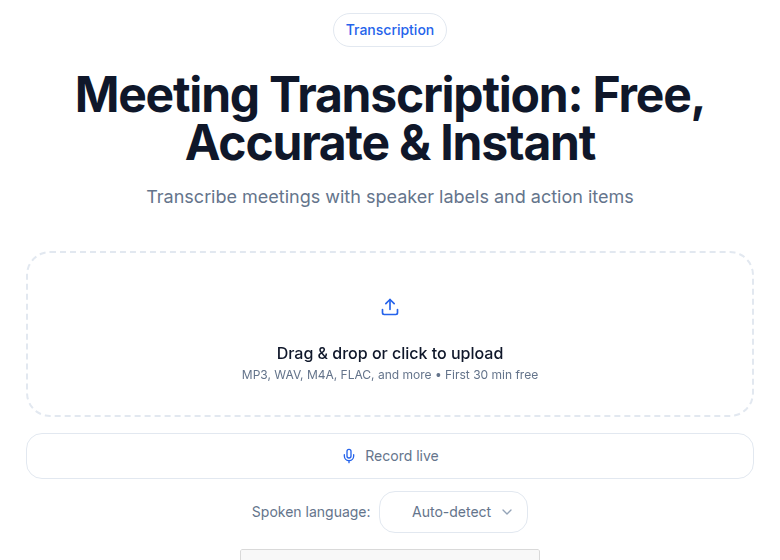 Meeting transcription tool for uploading existing Zoom recordings
Upload the recording, get a transcript with speaker labels, timestamps, and an AI summary in a few minutes. A free account runs your first file on the premium engine with speaker labels (up to an hour), then keeps transcribing free: up to 30 files a day, up to 30 minutes each. Pro is $14.99 per month month-to-month, or $99.99 a year billed annually, for unlimited transcription across 99+ languages, all AI templates (action items, decisions, email drafts), and every export format: SRT, VTT, DOCX, PDF, JSON, and TXT (on the free tier you can read and copy every transcript and download it as TXT; DOCX, PDF, SRT, VTT and JSON after the first file need the Weekly Pass, a minutes top-up or a paid plan).
My take: for post-meeting transcription of existing recordings, CATT is the lowest-friction option at this price point. Where it does not fit: live transcription during the call. There is no bot, no calendar integration, no in-meeting sidebar. If you need a transcript in real time, one of the bot-based tools above is the right answer.
For the full Zoom-specific workflow including how to set up cloud recordings and export files, see how to transcribe a Zoom meeting.
How to Pick by Workflow
Bot joins every meeting automatically: Otter (best live experience) or Fireflies (best integrations with other tools).
No-bot, Chrome-based capture: Tactiq, with the understanding that you start it manually before each meeting.
Already on a paid Zoom plan and want zero extra cost: Zoom AI Companion. Set up cloud recording, enable AI features, done.
Meeting analytics beyond the transcript: Read.ai.
Structured agendas plus transcription: Fellow.
Have a recording file and want a clean transcript fast: ConvertAudioToText.
What to Configure in Zoom Regardless of Tool
A few Zoom account settings improve transcript quality across every tool on this list.
Enable cloud recording with separate audio files: Zoom's cloud recording option can also save a separate audio-only M4A track. It is smaller, easier to upload, and produces identical transcript quality to the full MP4. Enable it in Zoom Settings, then Recording.
Disable join and leave chimes: Zoom's notification sounds for participant arrivals and departures sometimes get transcribed as garbled text. Disable them in your account settings.
Use real microphones: The single biggest lift in transcript accuracy costs nothing extra: have participants use a USB headset or a dedicated mic instead of laptop built-ins. The accuracy difference on compressed Zoom audio is significant.
Have participants introduce themselves at the start: For diarization tools that identify speakers by voice rather than a participant list, the first 30 seconds where each person says their name helps the AI assign labels correctly and keep them aligned through the meeting.
FAQ
Does Zoom have built-in transcription, and is it any good?
Yes. Zoom AI Companion includes transcription for all paid plan subscribers (Pro, Business, Enterprise) at no extra cost. It works only on cloud recordings, not local saves, and processes at roughly twice the meeting's duration. Accuracy with AI Companion enabled has tested around 85% in independent evaluations, which is functional but not best-in-class. It is a reasonable starting point if you are already on a paid Zoom plan and do not want to add another tool.
What is the best free Zoom transcription tool?
Otter.ai's free tier gives 300 minutes per month with a 30-minute meeting cap and is the most complete free bot-based option for live Zoom calls. Tactiq's free tier gives 10 transcripts per month via Chrome extension without needing a bot. Fireflies' free tier offers unlimited transcription with 800 minutes of storage per seat. The right free option depends on whether you need a bot (Otter, Fireflies) or a browser extension (Tactiq).
Can I transcribe a Zoom recording I already have without a bot?
Yes. Tools built for post-upload transcription, like ConvertAudioToText, accept Zoom MP4 or M4A files directly. You do not need a bot, a Zoom integration, or even an active Zoom account. Upload the file, get the transcript. This also works for recordings made by other participants or exported from Zoom cloud storage.
What is OtterPilot and does it require a paid plan?
OtterPilot is Otter.ai's meeting bot that joins Zoom, Google Meet, and Teams calls from your calendar. Basic calendar connection and bot joining work on the free plan, but the 300-minute monthly cap and 30-minute meeting length limit make it impractical for regular use beyond occasional short calls. Removing those limits requires the Pro plan at $8.33 per user per month (billed annually).
Do meeting bots affect the experience for other participants?
Most participants see the bot listed as a participant in the meeting. Whether that is intrusive depends on context. In sales calls or sensitive interviews, some users prefer no bot. Tactiq's Chrome extension avoids this since it reads captions from your own browser tab without joining as a participant. Zoom AI Companion is entirely invisible to other participants since it operates within your own Zoom account.
Sources
- Otter.ai pricing page: https://otter.ai/pricing (checked July 2026)
- Fireflies.ai pricing page: https://fireflies.ai/pricing (checked July 2026)
- Fireflies free plan knowledge base: https://guide.fireflies.ai/articles/4027724828-learn-about-the-fireflies-free-plan (checked July 2026)
- Tactiq pricing page: https://tactiq.io/buy (checked July 2026)
- Read.ai plans and pricing: https://www.read.ai/plans-pricing (checked July 2026)
- Zoom AI Companion: https://www.zoom.com/en/products/ai-assistant/ (checked July 2026)
- Zoom audio transcription (cloud recordings): https://support.zoom.com/hc/en/article?id=zm_kb&sysparm_article=KB0064927 (checked July 2026)
- ConvertAudioToText pricing: https://convertaudiototext.com/pricing (checked July 2026)
Try transcription free
Convert any audio or video to clean, unwatermarked text — speaker labels, timestamps, and AI summaries included. First 30 minutes free, no account.
Related Articles
Best Transcription for Podcasts in 2026: Honest Tool Guide
The transcription tools that fit podcasters: long files, speaker labels, exports. Ranked honestly by use case with verified pricing.

Best Transcription Tools in 2026: Honest Picks by Use Case
The best transcription tools in 2026 ranked by use case: podcaster, student, journalist, and team. Verified pricing, honest trade-offs, no hype.