
How AI Transcription Works: The Product Pipeline Explained (2026)
Summarize this article with:
When you upload an audio or video file to an AI transcription tool, the service runs six sequential stages before returning your transcript: ingest and preprocess, voice activity detection, acoustic encoding and speech recognition, diarization, post-processing, and export formatting. Each stage has its own failure modes and speed trade-offs. Understanding them helps you choose the right tool, diagnose bad output, and record better audio from the start.
When you upload an audio file and a transcript comes back a few minutes later, six distinct pipeline stages happen between those two moments. This post walks through each one in order, from the file hitting the server to the formatted export landing in your downloads folder. Understanding the pipeline tells you where errors come from, why some tools are faster, and what you can do to improve results without switching services.
This is the product pipeline post. For the technical neural architecture behind the ASR stage, see how AI speech recognition works. For the historical evolution from rule-based systems to deep learning, see how speech recognition works.
Stage 1: Ingest and Preprocess
The first thing a transcription service does is convert your file into a standard internal format. Most pipelines downsample to 16 kHz mono PCM, because that is what the underlying speech models expect. If your file is a 48 kHz stereo MP4 from a Zoom recording, the service strips the video track, mixes or separates the audio channels, and resamples.
Video files add one extra step: the audio track is extracted with a tool like FFmpeg before the audio pipeline runs. That is why a 60-minute MP4 takes slightly longer than a 60-minute MP3 from the same source.
This stage is also where format errors surface. A corrupted M4A header, a file with no audio stream, or an encrypted file accidentally uploaded as audio are all caught here. A well-built service validates the input and returns a clear error before processing further or charging you for a failed job.
Stage 2: Voice Activity Detection
Before feeding audio to the speech model, the pipeline identifies which portions contain actual speech and which contain silence, noise, or music. This step is called voice activity detection (VAD).
VAD is a gatekeeper: it segments the audio into speech and non-speech regions. A simple energy-based approach measures audio amplitude and marks low-energy regions as silence. Modern neural VAD systems go further, using machine-learning models trained on real-world noise to distinguish speech from background sounds that have similar energy levels, like keyboard noise or HVAC hum.
Without VAD, a speech model would attempt to transcribe silence and noise as words, producing hallucinated text in the pauses. With it, the model only receives audio that is likely to contain speech, which conserves compute, speeds processing, and reduces spurious word insertions.
For a deeper look at how VAD models work at the signal level, the VAD explainer covers the technical detail.
Stage 3: Acoustic Encoding and Speech Recognition
This is the stage most people mean when they say "the AI." It has two parts.
First, the audio is turned into a feature representation the model can read. Neural networks do not consume raw audio samples. They consume a log-mel spectrogram, which is a two-dimensional map of how energy is distributed across frequency bands over time. If you have seen a music visualizer with stacked horizontal bars, you are looking at something similar to what the model sees. Mel scaling compresses high-frequency bins to match human hearing perception, producing a compact input that retains the acoustic information that distinguishes one phoneme from another.
Second, a neural network maps those features to text tokens. Three families of models dominate production pipelines in 2026:
| Engine | Type | Key strength |
|---|---|---|
| OpenAI Whisper Large-v3 | Open-source | Strong multilingual coverage across 99 languages |
| Deepgram Nova-3 | Closed SaaS | Sub-300 ms batch latency, 54.2% lower WER than nearest competitor in Deepgram's own benchmarks |
| AssemblyAI Universal-3.5 Pro | Closed SaaS | Highest accuracy on pre-recorded audio, natural-language keyterm prompting |
Whisper Large-v3 on a modern GPU achieves a real-time factor (RTF) somewhere between 0.072 and 0.15, meaning it processes audio 7 to 14 times faster than real-time depending on the GPU. Deepgram's batch mode achieves much higher throughput at scale. CPU-only Whisper can be 20 to 30 times slower, which is why self-hosted setups on underpowered hardware feel so different from cloud APIs.
My take: the engine choice matters less than audio quality and vocabulary coverage for most business audio. A well-recorded meeting file will transcribe accurately on any of these three. A noisy phone call recorded through a speakerphone will struggle on all of them.
For the full accuracy and pricing comparison across these and other APIs, see best speech-to-text APIs in 2026 and speech-to-text API pricing.
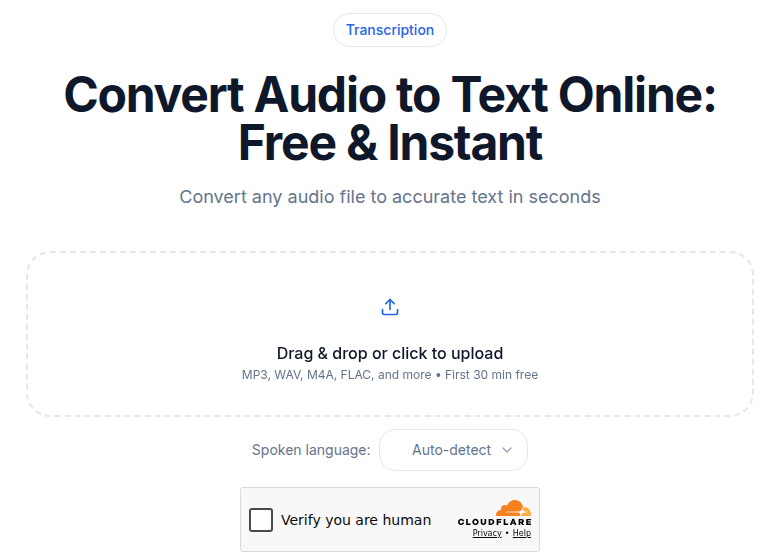 The audio upload tool at ConvertAudioToText, showing the file drop interface before processing begins
Stage 4: Diarization (Who Said What)
For one-speaker recordings, this stage is either skipped or trivial. For interviews, meetings, and podcasts, diarization is what separates a readable transcript from an undifferentiated wall of text.
Diarization runs a separate model in parallel with recognition. It listens to voice characteristics (pitch, timbre, speaking cadence) and clusters audio segments by speaker, then attaches "Speaker 1:" and "Speaker 2:" labels to each utterance.
The hard cases are well-documented: overlapping speech (two people talking simultaneously) and similar-sounding voices (two men with the same accent and pitch range). Research benchmarks measuring diarization error rate (DER) across leading systems consistently land in the 10 to 20 percent range on conversational meeting audio, with datasets that contain 15 to 19 percent overlapping speech being the toughest condition. On clean two-speaker audio recorded close to each microphone, real-world performance is substantially better.
For a full technical explanation of how diarization clustering works, see speaker diarization explained.
Stage 5: Post-Processing
The raw output of a speech model is a stream of lowercase tokens, often without punctuation. "the meeting is at four pm we should bring the laptop" is technically correct transcription but is not useful as a document.
Post-processing transforms raw tokens into readable text through several layers:
- Inverse text normalization (ITN): converts "four pm" to "4 PM" and "twenty twenty six" to "2026." Modern ITN systems use finite state transducers or neural models trained on spoken-to-written form pairs.
- Punctuation restoration: inserts commas, periods, and question marks based on pauses, intonation, and language model predictions.
- Capitalization: handles sentence starts, proper nouns, and acronyms.
- Filler removal (optional): strips "um," "uh," and false starts for clean-mode output.
This is where the verbatim vs. clean distinction is enforced. If you need the exact spoken form for research, legal, or medical use, choose verbatim. Clean mode is better for readability when exact disfluencies do not matter. See transcription accuracy explained for more on how each layer affects the final text.
Stage 6: Export and Formatting
The final stage converts the structured transcript data, text plus timestamps plus speaker labels, into the format your workflow needs.
Common export formats:
- TXT: plain text, no timestamps. Fastest to scan, easiest to paste into documents.
- SRT: SubRip format with numbered cue blocks and timestamps. The standard for YouTube, Facebook, LinkedIn, Premiere Pro, and DaVinci Resolve.
- VTT: Web Video Text Tracks, a superset of SRT used natively by HTML5 video players and many online platforms.
- DOCX or PDF: word-processor documents with speaker labels and time codes in the margins.
- JSON: structured data with word-level timestamps, confidence scores, and speaker IDs, useful for developers building downstream applications.
The format you choose is determined by what you do with the transcript next, not by accuracy. SRT and VTT files are the formats to request if you are adding captions to video. JSON is the format to request if you are piping the output into another system. Plain TXT is fine for anything that stays human-read.
If you need a clean transcript without a meeting bot joining your call, ConvertAudioToText's audio tool takes any file you upload and runs this full pipeline without requiring a calendar integration.
What Determines Speed
Three variables set total turnaround time:
- Model throughput. Deepgram Nova-3 in batch mode achieves very high real-time factors at scale, keeping latency under 300 ms for streaming. Whisper Large-v3 on a GPU runs at roughly 0.1 to 0.15 RTF for batch. CPU-only setups are in a different tier entirely.
- GPU availability. SaaS APIs scale horizontally. Self-hosted Whisper is bound by your GPU queue.
- Stage parallelism. Well-built pipelines run diarization in parallel with recognition rather than sequentially. Poorly designed pipelines run them in series and pay the penalty twice.
Common Failure Modes
AI transcription is accurate on most business audio but fails predictably in specific conditions:
- Proper nouns and brand names. "Coolify" becomes "Cool if I." The fix is a custom vocabulary list supplied at the API level, or a find-and-replace pass after the fact.
- Homophones. "Their" vs. "there." Models use context to choose, and context sometimes misleads.
- Code-switching. Speakers who switch languages mid-sentence confuse models trained on single-language data.
- Whispered or shouted speech. Both sit outside the acoustic distribution the model was trained on.
- Numbers in ambiguous contexts. "Suite 200" vs. "sweet two hundred." Inverse text normalization handles the common patterns but misses unusual combinations.
A five-minute proofreading pass with the audio playing alongside the transcript is enough to catch the 1 to 3 percent a model typically gets wrong on clean business audio.
FAQ
How long does AI transcription take for a one-hour file?
It depends on the engine and infrastructure. Deepgram Nova-3 in batch mode can process audio at hundreds of times real-time speed, so a 60-minute file may finish in under a minute. Whisper Large-v3 on a modern GPU runs around 0.1 to 0.15 times real-time factor, putting a 60-minute file at 6 to 9 minutes. CPU-only setups are far slower. On most SaaS tools with proper GPU infrastructure, a one-hour file returns in 2 to 8 minutes including diarization.
What is the difference between a clean transcript and a verbatim transcript?
A verbatim transcript includes every filler word (um, uh, like), false start, and repeated word exactly as spoken. A clean transcript strips those out and may lightly reformat run-on speech into readable sentences. The AI post-processing stage decides which version you get. Most tools offer a toggle; for legal, medical, or research use cases where exact spoken language matters, always choose verbatim.
Why does AI transcription get names and brand names wrong?
Speech models are trained on large general corpora and have never encountered your specific brand name, colleague's name, or product term. The acoustic sequence for "Coolify" sounds like "Cool if I" to a model with no prior context. Solutions include custom vocabulary lists (supported by Deepgram Nova and AssemblyAI Universal-3), which you supply at the API level, or a manual find-and-replace pass after the transcript arrives.
How accurate is speaker diarization?
On clean, single-microphone audio with two clearly distinct voices, modern diarization models identify speakers correctly most of the time. On real-world meeting audio with overlapping speech, similar-sounding voices, or phone-quality audio, diarization error rates (DER) measured across leading academic and commercial systems consistently land in the 10 to 20 percent range. The main failure modes are overlapping speech and voices with similar pitch and accent.
Can I improve AI transcription accuracy without switching tools?
Yes. The biggest lever is audio quality: a USB microphone 15 cm from the speaker outperforms any laptop mic across a conference room. Beyond hardware, closer microphone placement, a quiet room, and individual recording tracks for each participant in a meeting all reduce the noise floor the model has to work against. At the API level, supplying a custom vocabulary list for domain-specific terms (medical, legal, technical) measurably reduces proper-noun errors.
Sources
- Deepgram Nova-3 benchmarks and latency
- Understanding latency in speech-to-text APIs
- AssemblyAI Universal-3.5 Pro product page
- AssemblyAI October 2025 releases: multilingual streaming and diarization improvements
- State of speaker diarization 2026: pyannote vs Falcon benchmark
- AssemblyAI: boosting transcript readability with punctuation, casing, and ITN
- Silero VAD guide and setup
- Transcript formats explained: SRT, VTT, TXT, DOCX
- Whisper Large-v3 benchmark: speed and accuracy analysis
Try transcription free
Convert any audio or video to clean, unwatermarked text — speaker labels, timestamps, and AI summaries included. First 30 minutes free, no account.
Related Articles
Open Source vs Proprietary Transcription Models 2026
Honest tradeoffs between Whisper open-source and Deepgram, AssemblyAI, and other proprietary APIs. Verified costs, accuracy ranges, and when each actually makes sense.
How to Transcribe Voice Recorder Recordings (Any Device)
Get text from any voice recorder, from Anker SoundCore Work to old Olympus dictaphones. Covers file transfer, formats, WMA conversion, speaker labels, and export options.