
Is Free Transcription Worth It? What You Actually Get in 2026
Summarize this article with:
Quick verdict
Free transcription is genuinely worth it for occasional use, one-off projects, and evaluation. Once you cross a modest volume threshold or need diarization, SRT exports, or reliable retention, the caps and restrictions add up fast. The honest answer is: free works well until it doesn't, and knowing exactly where it breaks saves you time.
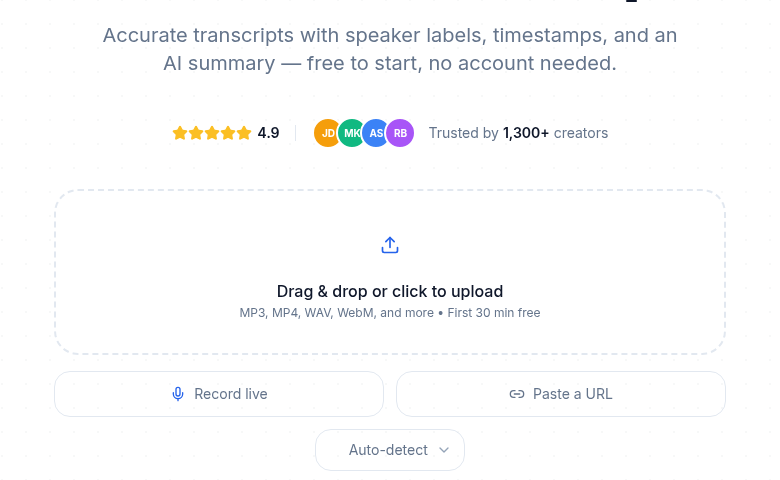 A genuinely free start: upload and preview without an account
What "free" actually means in 2026
Not all free tiers are the same kind of free. There are four meaningfully different categories.
Truly free and unlimited. Open-source Whisper running on your own hardware. No per-minute cost, no cap, no account. You pay in setup time and compute.
Free tiers of paid services. A recurring monthly allowance, typically 10 to 300 minutes per month. The most common kind, and the most variable in what they include or exclude.
One-time trial credits. Some tools give you a fixed budget at signup (Deepgram's $200 in API credits, OpenAI's $5 in credits). Generous for evaluation, but they expire.
Free as a platform side feature. YouTube auto-captions, iPhone dictation, Google Recorder. Free because it's bundled into a larger product, not because it's a serious transcription offering.
What the major free tiers actually include
Verified as of July 2026:
| Tool | Free allowance | File cap | Export formats | Key restriction |
|---|---|---|---|---|
| TurboScribe | 3 files per day | 30 min per file | TXT, SRT, DOCX | 1 file at a time; bulk export locked |
| Otter.ai | 300 min per month | 30 min per conversation | Limited (PDF/DOCX locked to paid) | 3 lifetime audio/video imports; only 25 conversations kept |
| Rev.com | 45 min per month | No stated per-file cap | Standard | English only; overage billed at $0.25/min |
| Happy Scribe | 10-minute one-time trial | N/A | TXT, SRT (video exports watermarked) | Not a recurring allowance |
| Fireflies.ai | Unlimited transcription | 150 min per file, 100 MB | Transcript viewing only | 800 min storage per seat; downloading transcripts requires paid plan |
| Deepgram | $200 in API credits (one-time, 1-year expiry) | None | Full API | Developer-facing; no UI |
| OpenAI Whisper API | $5 in credits (one-time, 3-month expiry) | None | Full API | Developer-facing; no UI |
| Whisper (self-hosted) | Unlimited | None | Text file only | Requires setup; no UI, no diarization out of the box |
| ConvertAudioToText | First file on the premium engine, then up to 30 free files a day | 30 min per file | Read, copy and TXT download free; other formats paid after the first file | The Weekly Pass or Pro covers the rest of a longer file |
| YouTube auto-captions | Unlimited | Within YouTube only | Caption/SRT download | Must stay inside YouTube ecosystem |
A few things to note from this table. Happy Scribe's "free tier" is a one-shot 10-minute trial, not a monthly allowance. Fireflies transcribes meetings for free but locks downloading your transcripts behind a paid plan. TurboScribe's free allowance is more generous than it looks: three 30-minute files per day adds up to 90 minutes daily if you use it consistently.
Myth 1: "Free tiers don't watermark"
Reality: some do, some don't, and the distinction matters for professional use.
Happy Scribe watermarks MP4 video exports on the free plan. This means any subtitle-burned video you produce from the free tier carries their branding. Text exports (TXT, SRT) are not watermarked, but SRT is the only subtitle format freely available.
Fireflies is a different kind of lock: transcripts are visible in-app but cannot be downloaded at all on the free plan. You can read your meeting notes; you cannot export them to a file, a spreadsheet, or another tool without paying. That is a softer watermark, but functionally similar for anyone trying to integrate transcripts into a workflow.
Otter locks PDF and DOCX exports to paid plans. Free users get basic text, but not the formatted documents most professionals actually want to share.
Myth 2: "Free is fine as long as you stay under the cap"
Reality: caps come in multiple dimensions, not just monthly minutes.
Volume is one axis. But four other limits catch people off-guard.
Per-meeting caps. Otter's free plan caps individual conversations at 30 minutes. A 45-minute interview produces a truncated transcript.
Lifetime import caps. Otter allows only 3 audio or video file imports in total, for the lifetime of the account. Hit that early and you cannot upload another file, ever, without upgrading.
Retention limits. Otter free keeps only the 25 most recent conversations. Older transcripts are deleted. If you transcribed something six months ago and want to retrieve it, it is gone unless you exported it at the time. Fireflies caps storage at 800 minutes per seat; once that fills up, older recordings start getting pushed out.
Download locks. Fireflies transcribes every meeting but will not let you download the transcript without paying. The audio and the text exist; access is gated.
These are the real catches. They are not always visible in the headline "minutes per month" number.
Myth 3: "Self-hosted Whisper is free unlimited with no catch"
Reality: it is genuinely free and unlimited, but the catches are setup complexity, hardware cost, and missing features.
Running Whisper Large-v3 locally requires at least 6 GB of VRAM for comfortable operation (an RTX 3060 or better on Windows/Linux, or an Apple Silicon Mac with 16 GB unified memory). On modern hardware, faster-whisper processes audio at roughly 25 to 30x real time at INT8 quantization. A 60-minute file finishes in about 2 to 3 minutes.
What you do not get: a UI, speaker diarization out of the box (pyannote requires a separate install and model download), export format options, or any editing environment. You get a text file and a command line.
For privacy-sensitive work, this is the right answer. Journalists with confidential interviews, researchers with embargoed audio, anyone who cannot send audio to a third-party server. The setup cost is real but one-time. The ongoing cost is effectively zero beyond electricity.
For everyone else, the question is whether saving $10 to $20 per month is worth the maintenance and lack of polish. Usually it is not.
For a deeper look at Whisper's API costs when using it as a service, see OpenAI Whisper API pricing in 2026.
Myth 4: "Free tiers are the same quality as paid"
Reality: some services deliberately tier model quality.
YouTube auto-captions lag standalone transcription tools by a noticeable margin on accented speech, technical vocabulary, and overlapping speakers. This is not a limitation of the technology; it is a resource allocation choice.
Some services use older or smaller models on free tiers and reserve their newest model for paid users. The published model details (usually in the documentation or FAQ) tell you what to expect. Before drawing conclusions about a tool's accuracy from a free trial, confirm you are testing the same model the paid tier uses.
For general-purpose transcription of clean audio in common languages, most modern free tiers are good enough to evaluate. For difficult audio, dialect-heavy content, or multi-speaker recordings, the model tier matters.
See transcription accuracy explained and speaker diarization explained for what to look at when comparing tools on quality.
When free is genuinely enough
Be concrete about this. Free works for:
- A podcaster recording one or two episodes per month, if each episode is under 30 minutes (TurboScribe's free plan covers this).
- A researcher transcribing occasional interviews, if the volume stays under 300 minutes per month and they do not need the transcripts retained indefinitely (Otter's free plan covers this, with caveats on the 25-conversation limit).
- A developer evaluating API options with Deepgram's $200 in trial credits. That covers hundreds of hours of audio before committing to a paid plan.
- Anyone who needs transcription once for a specific project and will not need it again. Trial credits and free tiers are purpose-built for this.
My take: the users who most consistently overpay for transcription are occasional users who upgraded to handle a single large project and then kept paying. The users who most consistently hit walls are regular users who assumed the free tier would scale with them.
For a fuller framework on the upgrade decision, see when to pay for transcription and free vs paid transcription services.
When free runs out fast
Three patterns that break free tiers quickly.
Regular interview workflows. A journalist or UX researcher doing 10 to 20 hours of audio per month will blow past every free tier within days. Otter's 300 minutes is the most generous recurring option here, and even that covers roughly 5 hours of audio.
Multi-speaker recordings. Speaker diarization is often locked to paid tiers. If you need labeled speaker turns rather than a wall of text, check whether the free tier actually includes diarization or just mentions it as a feature.
Anything requiring download or export. Fireflies's download lock is the clearest example. But Otter's limited export formats and Happy Scribe's watermarked video exports create similar friction for users trying to use transcripts downstream.
For a comparison of tools worth paying for, see best transcription tools in 2026 and best free transcription tools in 2026.
The developer path: trial credits
For anyone building with transcription APIs rather than using a consumer product, the free-tier math is different.
Deepgram's $200 in credits (no credit card required, valid for one year) covers hundreds of hours of transcription at pay-as-you-go rates. This is enough to build and test a full integration, validate accuracy on your actual audio, and make an informed choice before any recurring spend.
OpenAI's Whisper API gives new accounts $5 in credits (3-month expiry), covering roughly 833 minutes at $0.006 per minute. Smaller, but enough for initial testing.
Neither is technically a "free tier" in the ongoing sense. They are evaluation budgets that expire. For ongoing low-volume API use, you will eventually pay per minute once credits run out.
For a full breakdown of API costs, see speech-to-text API pricing in 2026.
If you just need clean transcripts without managing an API, without installing anything, and without a meeting bot joining your calls, ConvertAudioToText has a 30-minute no-signup preview and a free tier that keeps working after signup: your first file runs on the premium engine with speaker labels, then up to 30 files a day, up to 30 minutes each. On a free account, read, copy and download every transcript as TXT for free, or upgrade for DOCX, PDF, SRT, VTT and JSON downloads.
FAQ
How many free transcription minutes do I get per month on the main tools?
Otter gives 300 minutes per month (30 minutes per conversation max). TurboScribe gives 3 files per day up to 30 minutes each, which is up to 90 minutes daily but not measured in monthly totals. Rev gives 45 minutes per month. ConvertAudioToText transcribes the first 30 minutes of any file with no account, and a free account handles up to 30 files a day, up to 30 minutes each. Happy Scribe's free tier is a one-time 10-minute trial, not a recurring monthly allowance.
Do free transcription tools watermark your output?
Some do. Happy Scribe watermarks MP4 video exports (burned-in subtitles) on the free plan. Fireflies does not watermark but blocks transcript downloads entirely until you upgrade. Otter restricts export formats (PDF and DOCX locked to paid). Most tools that only produce text output do not apply visual watermarks, but feature locks on export formats create equivalent friction.
Is self-hosted Whisper actually free?
Yes, but with real costs in other forms. You need hardware (6+ GB VRAM recommended for Large-v3, or Apple Silicon with 16 GB unified memory), setup time, and ongoing maintenance. Speaker diarization requires a separate install. There is no editing UI or formatted export. For high-volume users with technical skills and privacy requirements, it is the right answer. For everyone else, the friction typically outweighs the savings.
When should I stop using a free transcription tier and pay?
When any of these are true: you consistently hit the monthly cap and delay work to wait for it to reset; you need speaker labels or diarization that is locked to paid; you need formatted exports (DOCX, SRT, VTT) the free tier restricts; or you need older transcripts that the free plan's retention limit deletes. A $10 to $20 monthly plan pays for itself quickly once transcription is part of a regular workflow.
Sources
- TurboScribe pricing: https://turboscribe.ai/pricing
- Otter.ai pricing: https://otter.ai/pricing
- Rev pricing: https://www.rev.com/pricing
- Happy Scribe pricing: https://www.happyscribe.com/pricing
- Fireflies.ai free plan: https://guide.fireflies.ai/articles/4027724828-learn-about-the-fireflies-free-plan
- Deepgram pricing: https://deepgram.com/pricing
- OpenAI API pricing: https://developers.openai.com/api/docs/pricing
Try transcription free
Convert any audio or video to clean, unwatermarked text — speaker labels, timestamps, and AI summaries included. First 30 minutes free, no account.
Related Articles
Best Transcription Tool Alternatives, Honestly Compared (2026)
Leaving Otter, Descript, Transkriptor, Rev, or TurboScribe? Honest, sourced comparisons of every major transcription tool: real limits, verified pricing, and where each one genuinely wins.
Otter AI Pricing Explained: Plans and Limits
Otter AI pricing explained: Pro from $8.33 per user a month billed annually, Business, the free plan's limits, and a file-first alternative for uploads.