
Multilingual Meeting Transcription: What Works
Summarize this article with:
Most transcription tools require you to pick one language per file, but international meetings rarely cooperate. The key is identifying your dominant language, setting that as your primary, and accepting that in-sentence code-switching still requires a short review pass. This guide covers the three mixing patterns that break standard pipelines and how to work around each of them.
The short answer: set your transcription language to whichever language fills more than half the meeting, run a single pass, then review the code-switched sections. For most international business meetings, this produces a usable transcript in under an hour of total work. The rest of this guide covers when that simple rule breaks and what to do instead.
Three Mixing Patterns That Need Different Approaches
Not all multilingual meetings are the same. The pattern matters more than the language count.
Sequential switching is the easiest case. Speaker A talks in English for five minutes, Speaker B responds in Spanish for five minutes. Modern AI transcription handles sentence-boundary switching well. Set the dominant language and most tools produce accurate output without any special configuration.
In-sentence code-switching is harder. "Voy a check this with the customer mañana" mixes Spanish and English within a single utterance. "Notre client veut un upgrade urgent" slips French-English. This is where pipelines break down. Cascade systems that assign one language label per utterance fail completely here, because by the time they identify the language, the sentence has already changed. Research on monolingual models shows 30-50% higher word error rate on code-switched data compared to clean single-language audio. In the worst cases, intra-sentential error rates range from 38.7% to 73.9% depending on the language pair.
End-to-end multilingual models handle this better because they operate at the token level rather than routing through a separate language-identification step. Apple research demonstrated a 55.5% relative reduction in word error rate on intra-sentential code-switching tasks using concatenated tokenizers. The practical takeaway: for meetings with heavy in-sentence mixing, you need a multilingual-native model, not a standard transcription tool with a language-selector dropdown.
Translated meetings are their own category. One speaker presents in French, an interpreter repeats in English. Both voices appear in the recording. No AI tool reliably identifies which side is the original and which is the interpretation without additional cues. Transcribe both sides, label the interpreter track manually, and treat translation as a separate downstream step.
What "Dominant Language" Actually Means
Pick whichever language fills more than 50% of speaking time and set that as your transcription language. The model anchors phoneme resolution to that language. Passages in the secondary language transcribe correctly when they occur at sentence boundaries. They produce phonetic approximations when they occur mid-sentence.
If the split is genuinely 50-50, the two-pass approach produces better results than any single-pass configuration:
- First pass with Language A selected. Passages in Language A transcribe well. Passages in Language B come back as phonetic approximations in Language A's script.
- Second pass with Language B selected. Passages in Language B transcribe well.
- Merge by taking the better passage from each run.
This is more work but the accuracy improvement on truly balanced audio is significant. For most business meetings, which lean 70-30 or more toward one language, a single pass is fine.
Speaker Diarization Across Languages
Diarization is acoustic, not linguistic. The model detects pitch, formants, and prosody, not vocabulary. A speaker who alternates between English and Spanish gets the same label throughout. Two speakers, one per language, get separate labels.
Practical accuracy ranges:
- Two-speaker bilingual meeting: around 90-94% speaker accuracy.
- Four-to-six-speaker international call: 80-88%.
- Large multilingual round-table with overlapping speech: 70-80%.
For more on how diarization works and where it fails, see speaker diarization explained.
Per-participant audio improves these numbers significantly. Zoom lets you enable a separate audio file per participant in cloud recording settings, up to 200 tracks. Microsoft Teams supports per-participant export from cloud recordings as well. Uploading individual speaker files rather than a mixed recording eliminates the cross-talk that drives diarization error. If your meeting platform supports it, enable it before the call starts.
Translation Is a Separate Step
A common mistake is conflating transcription with translation. They are separate operations and should be treated as such.
Transcribe to the original languages first. Verify that the source text looks correct, especially for names, product terms, and anything that might have triggered a phonetic error in a code-switched passage. Only then run translation on the verified transcript.
This matters for three reasons. First, translating a phonetically corrupted transcript compounds the error. Second, you preserve the original language record, which matters for legal documents, regulatory submissions, and anything requiring audit-trail accuracy. Third, you can choose which passages to translate and which to leave in the original, which is often more useful than a full translation.
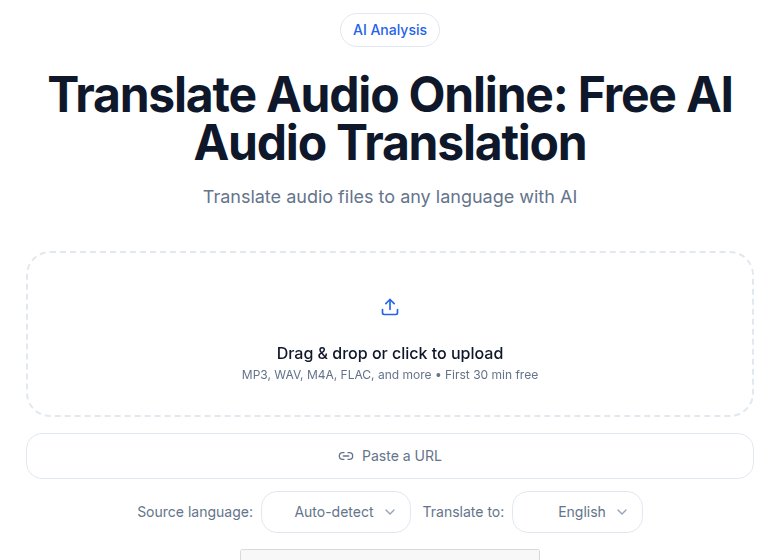 Audio translation tool interface showing language selection and file upload
If your team produces meetings in multiple languages and distributes summaries in a shared language, the workflow is: transcribe in original, review, then translate the verified transcript. Running AI summaries on the translated text, rather than the mixed-language original, also produces cleaner output.
Per-Language Accuracy: What to Expect
Not all 99-language models perform equally across languages. English, Spanish, French, German, and Portuguese consistently produce the lowest word error rates on standard benchmarks. Japanese and Chinese perform well on clean audio but degrade faster on phone-recorded or heavily accented input. Languages with smaller training data representation, including many African and Southeast Asian languages, can produce higher error rates even on clean audio.
For an international meeting in a higher-error-rate language, budget more review time. A 5-10 minute review pass per hour of audio is realistic for English-dominant meetings with occasional secondary-language content. For meetings in less-represented languages, plan for closer to 15-20 minutes per hour. For detail on how to read accuracy metrics, see transcription accuracy explained.
Comparing Multilingual Meeting Tools
| Tool | Languages | Free tier | Paid (monthly billing) | Code-switching approach | Meeting bot |
|---|---|---|---|---|---|
| Otter.ai | 6 (EN, ES, FR, DE, JA, ZH) | 300 min/month | $16.99/user | Single-language per session | Yes |
| Fireflies.ai | 100+ | 400 min storage/team | $18/user | Single language selection per meeting | Yes |
| Happy Scribe | 150+ | 10-min trial of AI | from €17/month | Per-file language setting | No |
| Trint | 50+ | None | Seat-based, Starter ~7 files/month | Per-file language, translation add-on | No |
| ConvertAudioToText | 99+ | First file free on premium; then up to 30 files a day, up to 30 min each | $14.99/month unlimited | Upload recording, set dominant language | No |
A note on Fireflies free tier: the "unlimited transcription" label sits on top of 400 storage minutes per team, not per user. That limit fills faster than it sounds for a team of four meeting daily.
Otter is genuinely limited at six languages. If your team runs meetings in Hindi, Arabic, or Polish, Otter is not an option. Fireflies and Happy Scribe cover 100-150+ languages but require you to pick one per meeting.
For a deeper look at how Fireflies and Otter compare on meeting-specific workflows, see Fireflies vs. Otter honest comparison.
If you want a meeting bot that auto-joins calls and captures transcripts passively, Otter and Fireflies are built for that workflow. If you already have the recording and just need an accurate multilingual transcript without installing a bot in every call, you can upload it directly at ConvertAudioToText's meeting transcription tool and set the language before processing.
Real-World Workflow Examples
International marketing team
A team with members in Spain, Brazil, and the US meets weekly in English with occasional Spanish and Portuguese side conversations. The practical workflow:
- Record the meeting as an MP4 from Zoom or Teams.
- Upload the recording with English selected as the primary language.
- The English-dominant transcript comes back with Spanish and Portuguese passages intact at sentence boundaries.
- Run AI summary in English for action items. For how to turn that into structured meeting minutes, see create meeting minutes from audio.
European policy organization
A team across French-speaking, German-speaking, and English-speaking Europe meets primarily in French with secondary German and English passages:
- Record the meeting.
- Set French as the primary language for transcription.
- German and English passages at sentence boundaries transcribe in their original languages.
- Review any in-sentence code-switching sections before distributing.
Brazilian-US business team
A Brazilian sales team coordinates with US executives. Mix of Portuguese and English throughout:
- Record the call.
- Set Portuguese as the primary language (more total speaking time in Portuguese).
- English executive passages at sentence boundaries come back accurately.
- Translate the verified Portuguese transcript to English for executive distribution.
Tips for Consistent Results
- Identify the dominant language before you upload. Set transcription to match. Getting this wrong produces phonetic errors on the majority of your content.
- Enable per-participant audio recording before the meeting starts. You cannot go back and separate tracks after the fact. Both Zoom and Teams support this.
- Build a glossary of proper nouns in all relevant languages. Person names, company names, and product codenames cause consistent errors in multilingual audio. A glossary submitted before processing reduces those errors.
- Accept a review pass on heavy code-switching. In-sentence language mixing still produces errors even on the best models. Ten to fifteen minutes of review per hour of heavily mixed audio is realistic.
- Decide summary language upfront. Cross-border teams that need consistent documentation should pick one output language before they start, not after.
- Transcribe first, translate second. Never run translation on an unreviewed transcript. The compounding errors make the output harder to fix than starting from the source.
Frequently Asked Questions
Can AI transcription tools handle meetings where speakers switch languages mid-sentence?
Some can, but with limits. End-to-end multilingual models like those powering AssemblyAI Universal-3 handle intra-sentential switching better than cascade systems that assign one language label per utterance. Research shows monolingual models produce 30-50% higher word error rates on code-switched audio compared to clean single-language recordings. For meetings with heavy mid-sentence mixing, plan a short review pass.
What language should I select when my meeting mixes two languages roughly equally?
Pick the language that accounts for more than half the speaking time. The transcription model anchors to that language for phoneme resolution. If the split is truly 50-50, consider running two passes, one per language, and merging the better passage from each. A single pass on genuinely balanced audio produces phonetic approximations for both languages.
Does speaker diarization work across language switches?
Yes. Diarization is acoustic, not linguistic. It detects voice characteristics like pitch and prosody, not vocabulary. If one speaker alternates between English and Spanish, they get the same speaker label throughout. The practical accuracy ranges from around 90-94% for two-speaker bilingual meetings down to 70-80% for large multilingual round-tables with overlapping speech.
Should I transcribe or translate first?
Transcribe first. Translation after transcription preserves the original language record, which matters for verification, legal documents, or any context where exact wording counts. Running translation on a mixed-language transcript also gives you cleaner input because you can review the source text before sending it through a translation step.
Which meeting tools let me export per-participant audio to improve diarization?
Zoom lets you enable a separate audio file per participant in cloud recording settings, up to 200 tracks. Uploading individual per-participant files rather than a mixed recording significantly improves speaker separation because each file contains only one voice. Microsoft Teams also supports per-participant audio export from cloud recordings.
Sources
- Otter.ai pricing and language support: https://otter.ai/pricing
- Fireflies.ai pricing and free tier: https://fireflies.ai/pricing
- Happy Scribe pricing: https://www.happyscribe.com/pricing
- Trint pricing overview: https://sonix.ai/resources/trint-pricing/
- Gladia code-switching in ASR research: https://www.gladia.io/blog/what-is-code-switching-in-speech-recognition
- AssemblyAI multilingual streaming: https://assemblyai.com/docs/universal-streaming/multilingual-transcription
- ConvertAudioToText pricing: https://convertaudiototext.com/pricing
Try transcription free
Convert any audio or video to clean, unwatermarked text — speaker labels, timestamps, and AI summaries included. First 30 minutes free, no account.
Related Articles
How to Transcribe a Microsoft Teams Meeting (2026 Guide)
Transcribe Microsoft Teams meetings: license requirements, where files live, and the external-tool path when Teams transcription is locked.

Action Items from Meeting Recordings: What AI Catches
Honest look at what AI tools actually catch when extracting action items from meeting recordings, including accuracy limits, fabrication risks, and the verification pass that makes it reliable.