Transcribe a 30-Minute Podcast Quickly: The 2026 Speed Guide
Summarize this article with:
The Fastest Path
A 30-minute podcast episode transcribes in about two minutes in 2026, upload time and review are the only things left to manage. Modern batch speech-to-text engines run far faster than real time: AssemblyAI's docs peg a typical RTF at around 0.008x, meaning 30 minutes of audio processes in roughly 15 seconds of compute. The bottleneck moved from the model to your upload connection.
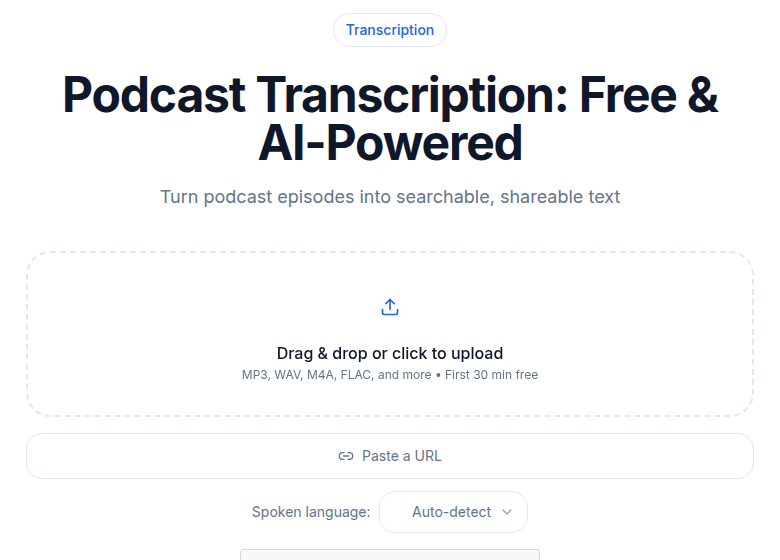 A 30-minute episode returns in a few minutes
The guide below is the actual path from final mixdown to ready-to-use transcript, without the detours.
Before You Upload: One Export Setting That Matters
Export the final mixdown as 128 kbps mono MP3. A 30-minute episode at that setting is about 30 MB and uploads in a minute or less on any home broadband connection. That is all you need.
There is no transcription accuracy benefit to stereo or high bitrates. Speech-to-text engines downsample audio to 16 kHz mono internally. A 320 kbps stereo WAV is six times the upload size for identical accuracy output. The faster the upload, the faster the total turnaround.
Do not upload the multi-track session export. Transcribe the final mixdown only.
Why Modern STT Engines Are This Fast
The compute stopped being the bottleneck a few versions ago. Enterprise-grade batch APIs run at 100 times real time or faster, meaning a full hour of audio can finish in under a minute of processing time. For a 30-minute episode, the model is done before a large file even finishes uploading.
A few factors that do affect your actual wall-clock time:
- File upload: 30 MB on a 50 Mbps connection takes about 5 seconds. On a 10 Mbps connection, closer to 25 seconds.
- Queue position: Free tiers and off-peak times are faster. High-traffic slots add seconds, not minutes.
- Diarization (speaker labels): Multi-speaker identification adds a small overhead. For a two-person interview, expect roughly 20-30 seconds more than a solo episode. For three or more voices with crosstalk, allow 45 seconds extra.
My take: for a 30-minute episode with one or two speakers and a decent upload connection, total time from drop to transcript is about 2 minutes, upload included.
The Actual Workflow
Step 1: Export at 128 kbps mono MP3. Your audio editor takes 30 to 60 seconds to render. While it renders, open the transcription tool in your browser.
Step 2: Upload the file. Drag and drop to audio to text or your tool of choice. Most tools start processing as soon as the file lands, before the upload confirms on your screen.
Step 3: Wait for the transcript. For a typical English-language episode with two speakers, expect about 2 minutes wall-clock from drop to complete text. Non-English episodes or files with three or more overlapping voices take a little longer, plan for 3 minutes.
Step 4: Skim for errors, do not rewrite. At 95+ percent word accuracy, fixing a clean transcript is editing, not composing. Five minutes of spot-checking is all most episodes need. For speaker diarization, a quick pass to confirm speaker labels is usually enough.
That is the workflow. Everything else, show notes, chapter markers, pull quotes, comes after the transcript exists. See how to create podcast show notes automatically and podcast chapter markers guide for the downstream steps.
What Makes a 30-Minute File Faster or Slower
Not all 30-minute files are equal:
| Factor | Faster | Slower |
|---|---|---|
| Speakers | Solo | 3+ voices, crosstalk |
| Language | English | Multilingual, code-switching |
| Upload speed | 50+ Mbps | Under 10 Mbps |
| Background noise | Quiet studio | Heavy ambient noise |
| File format | MP3, M4A | Uncompressed WAV or FLAC |
The biggest wild card is speaker count, not file length. A clean solo episode with good recording quality is the fastest case. A panel with four voices and a few dropped connections is the slowest.
What About Audio Quality?
A moderately clean file transcribes accurately. Over-processed audio, heavy compression, aggressive noise reduction stacked on EQ, sometimes hurts more than it helps. A flat, clean export of your mastered episode is the right input, not an extra-processed version.
If your raw recording is genuinely noisy (outdoor interview, Zoom with a weak mic), light noise reduction before exporting is worth it. Full studio post-processing is not needed.
After the Transcript: What You Actually Do With It
The 30-minute transcript unlocks the rest of the production workflow:
Show notes shrink from 30 minutes to 5. With a transcript in front of you, writing the episode description is editing, not composing. You skim for the key points instead of re-listening.
Chapter markers stop being guesswork. Topic transitions surface in the text. You timestamp them in Spotify, YouTube, and Apple Podcasts without scrubbing audio. See the podcast chapter markers guide for the exact process.
Pull quotes take 2 minutes, not 20. The best line in the episode is in the text. Skim, copy, post. Without a transcript, finding it means re-listening to the whole thing.
Search engines can finally index the episode. Audio is invisible to crawlers. A published transcript is 4,000 to 6,000 words of indexable content, every topic the episode covers becomes a potential search entry point, years after publication.
Human Transcription: When It Still Wins
For a speed workflow, human transcription is the wrong choice. At a per-minute rate (Rev's help center lists its human service around $1.99/minute as of mid-2026), a 30-minute episode costs roughly $60 and arrives the next business day, not the next 90 seconds. The turnaround is measured in hours, not seconds.
The legitimate case for human transcription is content where word-level accuracy is legally or professionally critical: depositions, medical dictation, verbatim court records. For podcasts where a 5-minute proofread catches the gaps, AI transcription at 95 to 98 percent accuracy wins on both speed and cost. See AI vs human transcription for a full comparison by use case.
When to Use a Free Tool vs. a Paid One
For a single test episode, a no-signup tool works. Best no-signup transcription tools covers the field. Most free options have minute caps that a 30-minute episode will hit, or they gate speaker labels and export formats.
For a weekly podcast, the math tips toward a paid plan quickly. If you need show notes automation or consistent export formats across every episode, a low-cost unlimited plan is cheaper per episode than the time spent working around free-tier limits.
If you just need a clean transcript without a meeting bot or a large software subscription, ConvertAudioToText handles the upload, transcript, and speaker labels in a single pass.
FAQ
How long does it actually take to transcribe a 30-minute podcast?
Wall-clock time is typically about 2 minutes for a clean English-language episode with one or two speakers. That includes upload time for a 30 MB MP3 file on a standard broadband connection. Processing runs at about 3 minutes per hour of audio, so a 30-minute episode needs roughly 90 seconds. Non-English episodes or files with three or more overlapping voices may take closer to 3 minutes.
Does audio quality affect transcription speed?
Not meaningfully. Processing speed is determined by file length and model, not audio quality. Quality affects accuracy: a clean studio recording will have fewer word errors than a noisy outdoor interview. Speed stays roughly constant either way.
Should I export mono or stereo for fastest transcription?
Export mono. A 30-minute mono MP3 at 128 kbps is about 30 MB. The stereo version is roughly twice that for zero accuracy gain, because the engine converts to mono internally anyway. Smaller file means faster upload, which is the actual variable you control.
What if my episode is longer than 30 minutes?
Processing time scales nearly linearly with audio length. A 60-minute episode takes roughly double a 30-minute one. The upload time increases proportionally too, which is another reason the mono MP3 export matters more as episodes get longer. Very long files (over 90 minutes) occasionally queue behind shorter jobs on some platforms during peak hours.
Sources
- AssemblyAI transcription time FAQ: https://www.assemblyai.com/docs/faq/how-long-does-it-take-to-transcribe-a-file
- Deepgram Nova-3 announcement: https://deepgram.com/learn/introducing-nova-3-speech-to-text-api
- Deepgram speech-to-text benchmarks: https://deepgram.com/learn/speech-to-text-benchmarks
- Rev pricing help center: https://support.rev.com/hc/en-us/articles/18893487380365-Pricing
- Rev.com pricing page: https://www.rev.com/pricing
- MP3 bitrate and file size for podcasts (Blubrry): https://blubrry.com/manual/creating-podcast-media/audio/mp3-mpeg-layer-3-tips/
Try transcription free
Convert any audio or video to clean, unwatermarked text — speaker labels, timestamps, and AI summaries included. First 30 minutes free, no account.
Related Articles
How to Transcribe a Podcast Episode: Creator Guide 2026
A working podcaster's guide to transcribing episodes: file upload vs RSS URL path, multi-track advantage, show notes workflow, chapter markers, and repurposing tips.

Spotify Transcript Extractor: How to Copy and Download Episode Text
Get a Spotify podcast transcript you can copy and download: paste a public episode link, 30 minutes free with no signup, TXT or SRT files on eligible plans.