How to Transcribe Interviews for Research: A Practical Pipeline
Summarize this article with:
The Pipeline
Transcribing research interviews well means making the right decisions before you press record, not after. Get informed consent on paper, record cleanly, generate an AI first draft, review it against the audio, apply your methodological conventions, de-identify the text, and store everything per your IRB protocol. Each stage shapes the validity of your data; skipping or reordering them creates gaps your committee or journal reviewer will find.
This guide walks the full pipeline in order. For what to do with the transcript once it exists, the thematic analysis and qualitative coding guides pick up from there.
Stage 1: Consent and Recording Setup
Before any recording starts, your participants must consent to it in writing. IRBs are specific: consent for recording is a separate, explicit disclosure, not a line buried in a general study agreement. Your consent form needs to cover:
- That the interview will be audio-recorded
- Who will transcribe it (your team, a third-party vendor, or an AI tool)
- Where recordings and transcripts will be stored and who can access them
- How long recordings will be retained before deletion
- Whether the transcript will be sent back to the participant for review (member checking)
Some university IRBs since 2025 treat AI transcription vendors as "engaged in human subjects research" when they process participant data, which means naming the type of tool used (AI-assisted) in your consent form is the safer practice, even if your institution does not yet require it explicitly. Check with your IRB coordinator.
One practical tip: send the consent form by email before the interview. This gives participants time to read it and ask questions, and gives you a timestamped record of receipt.
For recording equipment, a dedicated audio recorder outperforms a phone or laptop microphone in most settings. Place it close to the speaker, test levels before the session, and keep a backup running (many researchers use their phone as a second device). Label each file immediately with participant code, date, and interview number.
Stage 2: Choose Your Transcription Level
Before uploading a single file, decide what level of detail your methodology requires. This is a design decision, not a transcription decision.
Full verbatim captures every word, filler (um, uh, like), false start, repetition, and pause. Some conventions also note non-verbal elements: laughter, sighs, emphasis, emotional shift. Use full verbatim when your analysis depends on how something is said: conversation analysis, discourse analysis, or research into communication patterns and speech acts.
Intelligent verbatim (also called clean verbatim) preserves the full content and meaning while removing filler words, false starts, and redundant repetitions. Grammar may be lightly smoothed for readability. This is the standard choice for most qualitative work, including thematic analysis and grounded theory, where the analytic focus is what was said rather than its verbal texture.
Summary transcription condenses the interview into key points. It is used for preliminary mapping or feasibility work, not for primary data analysis.
Document this decision in your methods section before transcription begins. Changing conventions midway through a multi-interview project produces inconsistency that undermines cross-case comparison.
Stage 3: Generate the AI First Draft
Once recordings are clean and your transcription level is set, upload to your transcription tool and enable speaker diarization. Diarization automatically assigns labels to different speakers, which matters enormously in interview data where the entire unit of analysis depends on knowing who said what.
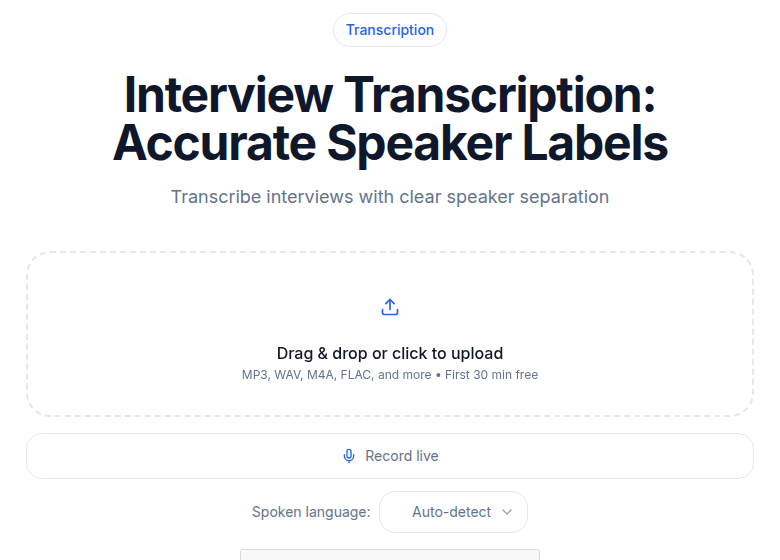
For interviews in languages other than English, select the correct language before processing. Most tools recognize 99 or more languages, and accuracy drops significantly when the wrong language is selected.
A 60-minute interview typically produces a first draft in 3 to 5 minutes. AI transcription accuracy on clear audio in quiet conditions runs high, but it drops with accents, technical vocabulary, crosstalk, or emotionally charged speech (which participants often deliver quietly or with hesitation). See transcription accuracy explained for a realistic benchmark.
The AI draft is your starting point, not your final data. Never analyze an unreviewed AI transcript as research data.
Stage 4: Review Against the Audio
This is the most time-consuming step, and it is not optional. Play the audio at 1.0x to 1.25x speed while reading the transcript. Correct errors as you go.
Pay special attention to:
- Discipline-specific or community-specific terms. AI models transcribe general speech well but struggle with specialized vocabulary your participants use fluently. Build a terminology glossary before review and correct these systematically.
- Proper nouns. Names of people, organizations, places, and cultural references are consistently mis-transcribed or phonetically guessed.
- Emotionally charged or quiet speech. Passages where participants speak softly, hesitate, or become upset are harder for AI to capture. These are often exactly the passages that matter most analytically.
- Inaudible sections. Mark them explicitly as
[inaudible 12:34]. Do not guess. If you can partially hear something, write[unclear: "something about funding"]and flag it.
For a single 60-minute interview, thorough review typically takes 90 minutes to 2.5 hours, compared to 4 to 6 hours to transcribe from scratch manually. For a study with 20 interviews, that difference represents roughly 60 to 80 hours of researcher time.
If multiple team members are reviewing transcripts, check consistency early: have two people independently review the same 15-minute section and compare their corrections. Discrepancies surface where your transcription conventions need more detail. This is a quality check on the transcription process, distinct from inter-rater reliability checks on coding (that's a later stage, covered in qualitative coding).
Stage 5: Apply Your Transcription Conventions
After factual corrections, format the transcript to your methodological standard:
- Speaker labels, consistent throughout:
Interviewer:andParticipant 3:, orP3:if you prefer brevity. Pick one format and use it in every transcript. - Pause markers if your methodology requires them:
[pause],[long pause], or Jefferson notation if you are doing conversation analysis. - Non-verbal elements:
[laughs],[sighs],[becomes emotional]. - Emphasis, if relevant: italics for stressed words, or caps per your chosen convention.
- Timestamps at natural intervals, or at every speaker turn if your QDAS software expects them.
Consistency is the whole point here. Before your team starts reviewing, write a one-page style guide covering each of these points. NVivo, MAXQDA, and ATLAS.ti all import standard formats (TXT, DOCX, SRT, VTT), and consistent speaker labels allow auto-coding by speaker, which can save significant time in analysis. MAXQDA and ATLAS.ti sync SRT and VTT timestamps to audio clips for clip-based coding; NVivo typically works better with DOCX or timestamped CSV.
Stage 6: Anonymize the Transcript
Most ethics protocols require de-identification of transcripts before analysis begins. The exception is oral history research, where participants often want to be named. Confirm your protocol's requirements.
Anonymization and pseudonymization are not the same thing. Anonymization permanently removes identifiers, making the data untraceable; under GDPR, fully anonymized data is no longer regulated. Pseudonymization replaces identifiers with codes (the participant becomes "P04" or "Maya"), but a re-identification key exists and the data remains regulated.
Most qualitative research uses pseudonymization. The re-identification key (the list linking "P04" to the real person) is stored separately from the transcript, with restricted access and its own retention and deletion plan.
What to replace or alter in the transcript:
- Full names, including names of people participants mention
- Specific addresses, named institutions, and identifiable locations
- Job titles or roles that are unique enough to identify a person in context
- Dates that could narrow identity when combined with other information
- Any direct quotes that participants asked to keep off record
Keep an anonymization log: for each transcript, record what was replaced and with what. Store it separately from the transcript. This log supports your audit trail and is evidence you followed your approved protocol.
Stage 7: Store and Retain Per IRB Norms
IRBs require a documented plan for how long you keep recordings, transcripts, and consent forms, and how each will be destroyed. Getting this right before you start saves compliance problems at publication and archiving.
General guidance from U.S. institutions is that research records must be retained for a minimum of three years after study closure (per 45 CFR 46). Sponsor or funder requirements may extend this; federal grants often require five to seven years. Check your specific grant terms.
Audio recordings carry more risk than transcripts because they contain the participant's actual voice. Many IRBs recommend destroying recordings once transcripts have been verified against the audio and member checking (if applicable) is complete. If you retain recordings, they require the same security controls as any other identifiable data.
Practical storage controls:
- Encrypt audio files and transcripts at rest; use access controls so only the research team can open them.
- Store on institutional servers or a research-grade cloud service, not personal devices or consumer storage.
- Keep identifiable data (recordings, un-anonymized transcripts) separate from de-identified data.
- Document your storage location, access list, retention schedule, and deletion method in your ethics application.
When using an AI transcription tool, read the vendor's privacy policy and document what you find in your ethics application. Specifically, confirm: whether audio is retained after processing and for how long, whether content is used to train AI models, where data is processed geographically, and whether a data processing agreement is available for GDPR compliance. Consult your institution's data protection officer if your study involves participants in the EU or UK.
If you need transcription with minimal data footprint, consider whether a privacy-oriented tool or a local/on-premise solution fits your protocol better. For general academic transcription without clinical PHI, an encrypted, no-retention web tool is typically sufficient, provided you document it.
Quality Checks Worth Building In
Beyond reviewing each transcript against the audio, two practices support the trustworthiness of your data:
Member checking. Lincoln and Guba's 1985 framework for trustworthiness in qualitative research identifies sending transcripts back to participants for review as a key technique for establishing credibility. Participants can clarify statements, correct misunderstandings, and confirm the transcript reflects their intent. This is common in phenomenological and grounded theory research; it is less standard in conversation analysis, where the transcript represents verbatim speech rather than interpreted meaning.
Audit trail. Document which tool you used, who reviewed each transcript, the conventions you followed, and any judgment calls about ambiguous audio. This record supports both the rigor of your published findings and any institutional audit of your data handling.
A Note on Tool Choice
If you want to avoid meeting-bot workflows and just upload a file directly to get a clean transcript, ConvertAudioToText handles MP3, WAV, M4A, MP4, and most other formats, with speaker diarization and multilingual support. For ethics compliance, read the privacy policy carefully and document what it says in your IRB application, as with any vendor.
Frequently Asked Questions
Should I use AI transcription for academic research?
Yes, with a mandatory human review step. AI transcription produces a strong first draft in minutes rather than hours, reducing total transcription time substantially for large interview sets. The requirement is that you always review the output against the original audio before treating it as data. An unreviewed AI transcript is a draft, not a dataset.
How do I disclose AI transcription in my research methodology?
Describe your process in the methods section: state that initial transcripts were generated using AI transcription software (name the tool if your methodology section warrants it), and that all transcripts were subsequently reviewed and corrected by the research team against the original audio recordings. Some journals and IRBs now ask you to specify how AI tools were used with participant data, so match your disclosure to your institution's current guidance.
What file format should I record and transcribe in?
WAV provides the highest audio fidelity and is lossless. For most research purposes, MP3 at 128 kbps or higher is adequate and produces files that are far more manageable in size. The quality of the recording environment, particularly background noise and distance from the microphone, matters more than file format for AI transcription accuracy.
How do I handle inaudible or unclear sections?
Mark them with a timestamp: [inaudible 23:45]. If you can partially hear content, write what you hear and note the uncertainty: [unclear: "something about the funding"]. Do not guess. Document the frequency and location of inaudible sections in your methods, since they can affect the completeness of your analysis, and flag any that fall in analytically significant passages.
How long should I keep research interview recordings and transcripts?
Most U.S. institutions require research records to be retained for a minimum of three years after study closure per 45 CFR 46. Federal grant requirements often extend this to five to seven years. Audio recordings, which contain identifiable voice data, carry higher risk than de-identified transcripts; many IRBs recommend destroying them once transcription is complete and verified. Check your specific funder requirements, your IRB protocol, and your institution's data retention policy, since these three may differ.
Sources
- Penn State IRB Guideline XI: Research Involving Audio, Video or Digital Recordings of Research Participants: https://researchsupport.psu.edu/orp/irb/irb-resources-training-and-events/irb-guidelines/irb-guideline-xi-research-involving-audio-video-or-digital-recordings-of-research-participants/
- GoTranscript: Using AI Transcription in Human-Subjects Research: IRB Risk Checklist and Controls: https://gotranscript.com/en/blog/ai-transcription-human-subjects-research-irb-risk-checklist-controls
- GoTranscript: Retention Timeline for Recordings and Transcripts (IRB-Friendly Plan): https://gotranscript.com/en/blog/retention-timeline-recordings-transcripts-irb-friendly-plan-template
- GoTranscript: IRB Consent Script for Audio-Recorded Interviews: https://gotranscript.com/en/blog/irb-consent-script-audio-recorded-interviews-template
- Skimle: How to Anonymise and Pseudonymise Qualitative Research Data: https://skimle.com/blog/how-to-anonymise-qualitative-research-data-irb-compliant-pseudonymisation
- Statistics Solutions: Member Checking in Qualitative Research: https://www.statisticssolutions.com/member-checking-in-qualitative-research/
- ATLAS.ti: Data Anonymization in Qualitative Research: https://atlasti.com/research-hub/data-anonymization-qualitative-research
- University of Florida IRB: Investigator Requirements for Retaining Research Data: https://irb.ufl.edu/index/data/investigator-requirements-for-retaining-research-data.html
- Qualtranscribe: What the EU AI Act Means for Researchers Who Use AI Transcription: https://www.qualtranscribe.com/post/eu-ai-act-ai-transcription-researchers
Try transcription free
Convert any audio or video to clean, unwatermarked text — speaker labels, timestamps, and AI summaries included. First 10 minutes free, no account.
Related Articles

Best Transcription Tools for Research Papers and Interviews 2026
Academic researchers need transcription that handles long interviews, specialized vocabulary, and multiple speakers with citation-grade accuracy. Here are the eight tools that deliver.
How to Extract Quotes from an Interview Recording
A workflow-led guide for journalists and writers: how to extract publishable quotes from interview transcripts, with editing ethics, context rules, and approval flows.