
How to Choose the Right Transcription Software (2026)
Summarize this article with:
Five Questions That Decide It
The right transcription software is whichever one matches your actual situation. Not the one with the most features, the lowest advertised price, or the loudest marketing. Answer these five questions in order and you will narrow dozens of tools down to two or three worth testing.
Question 1: How Much Audio Are You Transcribing Each Month?
Volume is the first filter because it determines which pricing model costs you the least.
Under 2 hours per month, free tiers cover most people. Rev gives 45 AI minutes per month at no cost. TurboScribe allows 3 files per day up to 30 minutes each on its free plan. Otter.ai's Basic plan includes 300 minutes with a 30-minute cap per conversation. All three require no credit card to start.
2 to 20 hours per month is the most common range for professionals. Here, monthly subscriptions win over pay-per-use. Otter.ai Pro costs $8.33 per seat per month (annual billing) and includes 1,200 recording minutes with 10 file imports. Fireflies.ai Pro runs $10 per seat per month (annual) with 8,000 minutes of storage and unlimited transcription. TurboScribe's unlimited plan is $10 per month on annual billing.
Above 20 hours per month, per-unit costs matter more than plan labels. Rev's Essentials plan pools 5,000 AI minutes per seat per month at $25.49 per seat per month (annual). Happy Scribe's Business tier includes 6,000 AI minutes per month at $59 per month (annual). Both charge for overages, so project your real volume before committing.
For a deeper look at how these models compare across providers, see the transcription pricing comparison 2026.
Question 2: What Languages Do You Need?
English-only work opens every tool on the market. Multilingual work cuts the list fast.
For Spanish and English combined, most major tools work. Rev's Essentials plan supports English and Spanish. Otter.ai, Fireflies.ai, and TurboScribe all handle Spanish.
For 5 to 15 languages, check the specific languages, not just the count. TurboScribe claims 98 language support on its paid plan. Descript supports transcription in multiple languages but focuses on English for its AI editing features. Always test with a real audio sample in your target language before buying, because listed support and practical accuracy are often different things.
For rare or regional languages, API-based solutions give more control. Deepgram, OpenAI Whisper, and Google Cloud Speech-to-Text each cover 30 to 100-plus languages via per-minute metered pricing. The tradeoff is integration work. See best speech-to-text APIs 2026 for a breakdown of those options.
My take: language support claims are often marketing. Ask for a trial, feed it 5 minutes of your actual audio, and count the errors on proper nouns and domain-specific terms. That test takes 10 minutes and tells you more than any feature comparison table.
Question 3: How Sensitive Is the Audio?
Privacy requirements eliminate entire product categories.
Low-sensitivity audio (podcasts, public lectures, marketing content): Any cloud-based tool is fine. Data leaves your device and is processed on vendor servers, which is standard practice and acceptable for non-confidential content.
Medium-sensitivity (internal meetings, business strategy, HR conversations): Check where data is stored and whether it is used for model training. Read the privacy policy, not just the marketing page. Otter.ai, Fireflies.ai, and most cloud tools process audio on their own infrastructure. Most give you the option to opt out of model-training data use on paid plans.
High-sensitivity (legal, medical, financial, government): You need one of three things: a signed Business Associate Agreement (HIPAA), a Data Processing Agreement (GDPR), or on-premise processing. Rev's Unlimited plan and Fireflies Enterprise offer HIPAA compliance. For GDPR, tools that keep data within EU infrastructure satisfy the cross-border transfer requirement without additional steps.
Classified or legally privileged content: Cloud tools are off the table. Self-hosted Whisper-based deployments run entirely on your own infrastructure, meaning audio never leaves your control. Setup requires technical work, but for regulated industries it is often the only viable path.
Question 4: Do You Need a Meeting Bot or File Upload?
This question splits the market into two mostly non-overlapping categories.
Meeting bots join your calendar automatically and transcribe live. Otter.ai, Fireflies.ai, and tools like Fathom or Read.ai use a bot that joins Zoom, Google Meet, or Microsoft Teams calls without you doing anything after the initial setup. The bot is visible to all participants. If real-time transcription during the call and CRM sync after the call are priorities, these tools are purpose-built for that.
File upload tools transcribe recordings after the fact. Upload an MP3, MP4, WAV, or paste a YouTube URL and get a transcript back. No calendar integration, no visible bot, no meeting platform permissions required. Descript, TurboScribe, Happy Scribe, Rev, and Trint all work this way.
The distinction matters for two reasons: privacy (a visible bot changes participant behavior and raises consent questions in many jurisdictions) and workflow fit (a sales team that needs Salesforce sync after every call needs a bot; a podcast editor transcribing episodes does not).
For meeting-specific guidance, see best transcription for Zoom 2026 and the Otter vs Fireflies honest comparison.
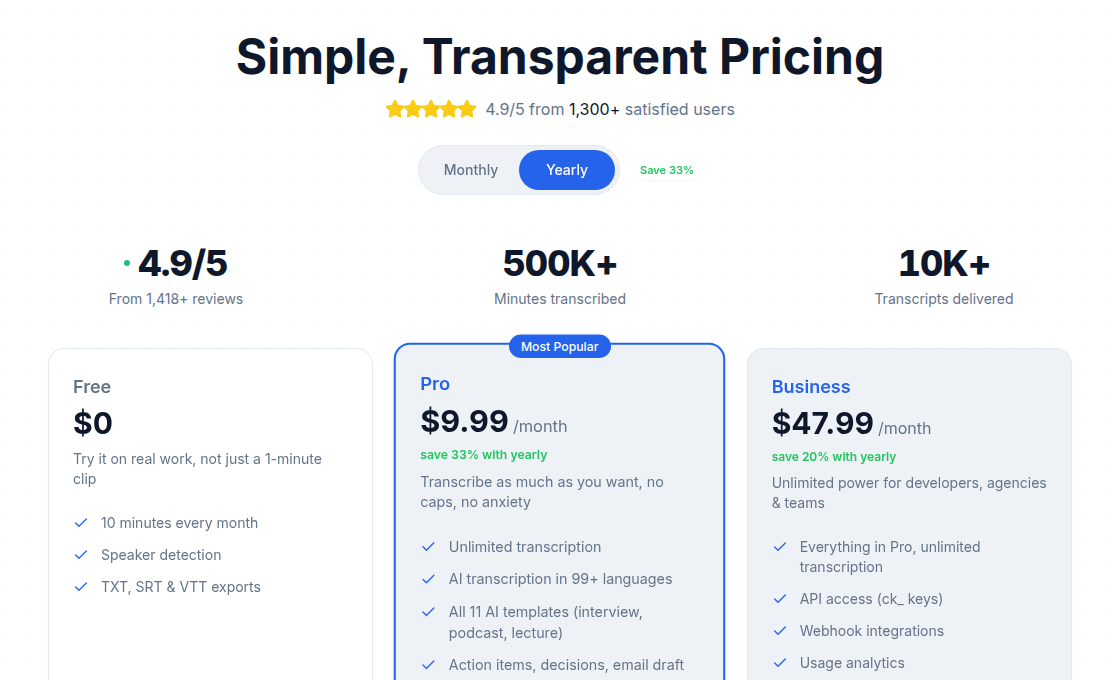
If you just need a clean transcript from a file or a URL without setting up a bot or granting calendar access, ConvertAudioToText's audio-to-text tool starts without a sign-up.
Question 5: What Is Your Budget Structure?
The dollar amount matters less than the pricing model matching your consumption pattern.
| Pricing Model | How It Works | Fits When |
|---|---|---|
| Free tier | Capped minutes or files at no cost | Under 2 hours per month, occasional use |
| Monthly subscription | Fixed seat price for a monthly allowance | Predictable volume, team billing |
| Pay-per-minute | Charged per audio minute processed | Variable volume, no baseline commitment |
| Enterprise / unlimited | Negotiated flat rate | High volume, compliance needs, team scale |
| One-time purchase | No subscription, perpetual license | Some desktop tools only |
A few current reference points from verified pricing pages:
Budget range (under $15/seat/month): Otter.ai Pro at $8.33 (annual), Fireflies.ai Pro at $10 (annual), TurboScribe unlimited at $10 (annual).
Mid-range ($15 to $35/seat/month): Happy Scribe Basic at $8.50 per month (annual) for 120 AI minutes, Happy Scribe Pro at $19 (annual) for 600 AI minutes, Rev Essentials at $25.49 (annual) for 5,000 AI minutes.
Premium ($35-plus/seat/month): Descript Creator at $24 per month (annual) focused on video editing, Trint Advanced at roughly $100 per seat per month for unlimited files, Rev Pro at $47.99 (annual) for 10,000 AI minutes across 37-plus languages.
For the full breakdown of what drives per-minute vs. flat-rate decisions, see unlimited vs. metered transcription pricing.
Red Flags Worth Knowing
"99% accuracy" without conditions. No AI transcription tool reaches 99% across all audio. That claim without specifying clean audio, single speaker, and quiet environment is not trustworthy. Look for providers that cite benchmark datasets (like academic word error rate scores) or show real examples.
No trial before payment. Every tool worth using lets you test with your own audio before charging you. Trint offers a 7-day trial with 3 files. TurboScribe's free plan gives 3 daily files. Otter and Fireflies both have permanent free tiers.
Essential features locked behind higher tiers. Speaker diarization, subtitle export (SRT/VTT), and file imports above a few minutes are not premium features. If a tool charges extra for these, check the total cost against what you actually need, not just the headline plan price. See hidden costs of transcription services for a full accounting.
How to Test Your Shortlist
Pick two or three tools that survive the five questions above. Transcribe the same 5-minute sample on each, using audio that represents your real content: same speaker count, same recording conditions, same domain vocabulary. Compare on accuracy (proper nouns, technical terms), speaker label quality, and export format. That 20-minute test will tell you more than any vendor comparison.
FAQ
What is the best transcription software for most people?
There is no single answer because the five decision axes point to different tools. For live meetings with Zoom or Teams, Otter.ai or Fireflies.ai win on integration depth. For file uploads across many languages without a subscription, TurboScribe or ConvertAudioToText fit better. For video editing workflows, Descript is the obvious pick. Start with the five questions in this post and you will land on the right shortlist.
Do I need a meeting bot, or is file upload enough?
If you need live transcription during a call so participants can follow along in real time, a meeting bot is necessary. Otter.ai and Fireflies.ai both join meetings automatically on Zoom, Google Meet, and Microsoft Teams. If you record first and transcribe afterward, file upload tools are simpler, faster to start, and do not require calendar or meeting-platform access.
How many languages does typical AI transcription support?
Most major tools list 60 to 100-plus languages, but accuracy drops sharply outside the top 10 to 15. English, Spanish, French, German, Portuguese, Japanese, and Mandarin get strong support across Otter, Fireflies, TurboScribe, and Rev. For less common languages, test with your actual audio before committing to a plan. TurboScribe claims 98 languages with translation to 134-plus on its paid tier.
What transcription software is HIPAA or GDPR compliant?
Rev's Unlimited plan and Fireflies Enterprise offer HIPAA compliance with a Business Associate Agreement. For GDPR, the safest path is a tool that processes and stores data within EU borders or runs on-premise. Self-hosted options built on open-source Whisper eliminate third-party data transfer concerns entirely. Always request a signed BAA before processing any protected health information.
How much should I budget for transcription software?
Light individual use (under 2 hours per month) fits within free tiers from Rev (45 AI minutes), TurboScribe (3 files per day up to 30 minutes each), or Otter.ai (300 minutes). Regular use of 2 to 20 hours per month costs roughly $10 to $30 per seat per month on annual billing across most tools. High-volume or team use above 20 hours per month typically warrants an enterprise or unlimited plan, where costs vary by negotiation.
Sources
- Otter.ai Pricing - verified July 2026
- Rev Pricing - verified July 2026
- Fireflies.ai Pricing - verified July 2026
- TurboScribe Pricing - page returned 403; figures drawn from third-party reviews (opentools.ai, vook.ai) checked July 2026
- Descript Pricing - via search results and fluxnote.io summary, checked July 2026
- Happy Scribe Plans and Pricing - via search results, checked July 2026
- Trint Pricing - via brasstranscripts.com summary, checked July 2026
- Best Privacy-Focused Meeting Transcription Tools 2026 - checked July 2026
Try transcription free
Convert any audio or video to clean, unwatermarked text — speaker labels, timestamps, and AI summaries included. First 10 minutes free, no account.
Related Articles

Transcription for Journalists 2026: Record, Verify, Protect
Journalist transcription workflow 2026: AI hits 95–97% on clean audio, drops to 85–94% on noisy recordings. Verify every quote in 30 sec before publishing. Flat-rate at $9.99/mo vs $1.50–$2/min human for legal-grade accuracy.
How to Transcribe Audio to Text Online Free in 2026
Honest guide to free online audio transcription in 2026. Verified caps, no-signup options, a tool comparison table, and tips to get 95%+ accuracy without paying.