How to Transcribe Audio to Text in 2026: All 4 Methods Compared
Summarize this article with:
Transcribing audio to text takes four distinct paths in 2026: type it yourself (slowest), speak it back using dictation, run a local AI model like Whisper, or upload to an online tool or human service. For most recordings, an online AI tool is the fastest and cheapest starting point. Manual and human services still win for sensitive or legally critical content where every word must be right.
To transcribe audio to text, you have four distinct paths: type it yourself, speak it back via dictation, run a local AI model on your own machine, or upload to an online tool or human service. Which one to use depends on your recording length, accuracy needs, privacy requirements, and budget.
Method 1: Manual Transcription
Manual transcription is the baseline that every other method is measured against. You listen, you type. No software cost, no privacy concerns, full control over formatting.
The process is straightforward:
- Open your audio in a media player that supports speed control (VLC, for example, can slow playback to 0.75x).
- Open a text editor alongside it.
- Listen in five-to-ten second chunks, pause, and type what you hear.
- Rewind whenever you are unsure about a word.
- Do a full proofread once you reach the end.
The honest cost is time. Industry data consistently puts the ratio at four to six hours of typing per hour of audio for an experienced typist, and longer for a beginner. For a 30-minute interview, that is two to three hours of your afternoon. Manual transcription makes sense for short, sensitive recordings where you cannot send audio to a third party and where every word must be right.
Method 2: Dictation
Dictation is different from transcription. You are not typing from a recording; you are re-speaking the audio into a microphone while a speech recognition engine writes it down in real time. The result is a transcript without uploading a file anywhere.
Google Docs Voice Typing (Tools menu, free) handles this well for clear speech, reaching roughly 90-95% accuracy. Apple Dictation works system-wide on macOS and iOS. Windows has its own built-in dictation via Win+H. Dragon NaturallySpeaking Professional Individual is still available for around $699, aimed at medical and legal professionals who need higher accuracy, but the consumer Dragon Home edition was discontinued.
Dictation works best when you are re-reading a short script or narrating something from memory. For a pre-recorded interview, you would need to play the audio back through a speaker while speaking along, which gets awkward fast. For live voiceover or note-taking, it is a solid zero-cost option.
Method 3: Local AI Transcription (Self-Hosted)
Running OpenAI Whisper on your own hardware is free, private, and surprisingly accurate. The large-v3 model benchmarks at roughly 2.7% word error rate on clean English audio and around 8-12% on real-world recordings with noise and varied accents, per published benchmarks. That puts it in the same tier as most commercial AI services.
The tradeoff is setup friction. You need Python, a few gigabytes of disk space, and the patience to install dependencies. A modern GPU cuts processing time dramatically: on a good consumer GPU, Whisper processes an hour of audio in a few minutes. On CPU alone, expect something closer to real-time or slower.
This path suits developers, researchers, and anyone whose data cannot leave their own machine. For everyone else, the setup cost is not worth it when online tools are nearly as accurate and take 30 seconds to start.
Method 4: Online Transcription Tools
Online tools, both AI-powered and human-staffed, do the heavy lifting in the background while you do something else. This is the right choice for the majority of use cases in 2026.
AI-Powered Online Tools
You upload a file (or paste a URL), the service processes it in the cloud, and you get a transcript in minutes. Accuracy for clear audio sits at 90-96% across leading engines. Most tools support dozens of languages and common export formats including TXT, SRT, and VTT.
Free tiers exist at most services, though they cap monthly usage. If you need to process more than a few hours per month, a paid subscription or pay-as-you-go pricing makes sense. See the transcription pricing comparison for a side-by-side breakdown of what major tools actually charge.
Human Transcription Services
For recordings where 99%+ accuracy is required, Rev, GoTranscript, and TranscribeMe employ trained human transcriptionists who review every word. Expect to pay:
- TranscribeMe: from $0.79 per audio minute (first-draft human-edited, approximately 95-98% accuracy, one business day turnaround)
- Rev: from $1.99 per audio minute for human transcription; AI-only tiers start lower via subscription
- GoTranscript: per-minute rates vary by turnaround time and volume; check their pricing calculator directly for a live quote
Rush turnaround, verbatim style, or multiple speakers raise the price. For high-volume work, most services offer volume discounts.
Comparing All Four Methods
| Method | Speed | Typical Cost | Accuracy | Best For |
|---|---|---|---|---|
| Manual typing | Very slow (4-6x real time) | Free (your time) | Very high | Short, sensitive recordings |
| Dictation | Real-time (1x) | Free to $699 (Dragon) | High (90-95%) | Live narration, short re-reads |
| Local AI (Whisper) | Fast with GPU, slow on CPU | Free | High (90-95%) | Privacy-sensitive, technical users |
| Online AI tool | Very fast (minutes) | Free tier to low subscription | High (90-96%) | Most everyday use cases |
| Human service | Slow (12h-5 days) | $0.79-$2.00/min | Very high (99%+) | Legal, medical, verbatim |
Step-by-Step: Uploading to an Online AI Tool
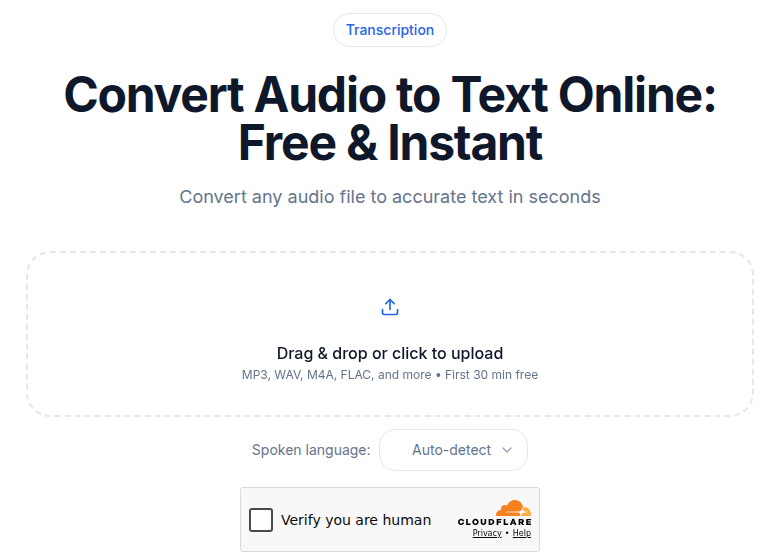
This walkthrough uses ConvertAudioToText's audio-to-text tool, but the steps map closely to any comparable online service.
Step 1: Prepare your file. Clear audio with a single speaker and minimal background noise will always produce a cleaner transcript. If your recording has significant noise, run it through a noise-reduction tool first. Supported formats include MP3, WAV, M4A, FLAC, OGG, and most other common audio types. Video files work too; the tool extracts the audio track automatically.
Step 2: Upload or paste a URL. Drag your file into the upload area or click to browse. No account is required to start, so you can test on a real file before deciding whether to sign up. File processing begins immediately.
Step 3: Select your language. Choose the language spoken in the recording. The tool supports 99+ languages including auto-detection, so if you are unsure, let it detect rather than guess.
Step 4: Start transcription. Click to begin. Files under 30 minutes typically return a transcript in under two minutes. Longer files take proportionally longer but the process is unattended.
Step 5: Review and edit. Read through the output and fix errors, particularly proper nouns, brand names, and technical terms that the AI is most likely to mishear. Pay extra attention to any sections where audio quality dips.
Step 6: Export. Download in the format you need: plain TXT for copy-pasting, SRT or VTT for subtitles, or DOCX/PDF on paid plans. For subtitle work, see the guide to SRT vs VTT vs TTML formats to pick the right one.
If you just need a clean transcript without any meeting bot or integrations, ConvertAudioToText handles it without requiring an account. Free users get 10 premium transcription minutes once at signup, then keep transcribing free on the standard engine (3 files/day, 10 minutes per file, plus a free-finish button for up to 2 more hours of a long file). Pro and Business plans remove those caps.
Tips for Better Results Regardless of Method
Start with the best audio you can get. A dedicated microphone placed 6-12 inches from the speaker's mouth makes a larger difference than any software choice. Background noise, reverb from hard surfaces, and low recording levels all degrade accuracy across every method.
Encourage clear speech. If you are recording an interview or meeting and know it will be transcribed, brief speakers beforehand: speak at a moderate pace, avoid talking over each other, and pause between sentences. This one preparation step meaningfully improves AI accuracy.
Use the right tool for the content type. For meeting transcription with multiple speakers, a tool with speaker diarization assigns words to speakers automatically, which saves significant editing time. For podcast or interview work, a batch uploader beats a real-time dictation tool. See the guide to how to transcribe an interview recording for interview-specific advice.
Always proofread. No method is error-free. Build a proofread pass into your workflow before publishing, sharing, or quoting from any transcript.
Common Use Cases
Podcasters and content creators. A text transcript lets search engines index what you said. Publishing a full transcript alongside each episode helps episodes rank for the topics they cover. Transcripts also repurpose into blog posts, social snippets, and email newsletters with minimal extra work. See best transcription for podcasts in 2026 for tool recommendations tuned to that workflow.
Students and researchers. Lecture and interview recordings become searchable study material once transcribed. AI tools work well here because students often need to process many hours of audio quickly and on a tight budget.
Business professionals. Meeting transcripts create a searchable record of decisions, action items, and context. The whole team can search the transcript later rather than relying on one person's handwritten notes. For recurring meetings, see how to create meeting minutes from audio.
Journalists and writers. A full transcript of an interview makes it easy to pull accurate quotes and trace sources back to the exact moment they spoke. The accuracy required for published quotes often warrants either a careful proofread of AI output or a human service when the recording is noisy.
Frequently Asked Questions
How accurate is AI audio transcription in 2026?
Modern AI transcription reaches 90-96% accuracy on clear, single-speaker audio. Accuracy drops with background noise, strong accents, overlapping speakers, or dense technical vocabulary. For everyday recordings, meeting notes, and podcast transcripts, that accuracy is enough to use with a quick proofread pass. Human transcriptionists consistently clear 99% on the same material.
Can I transcribe audio to text for free?
Yes. Several online tools offer free tiers for short files. ConvertAudioToText gives 10 free transcription minutes at signup, given once rather than each month, with no credit card required. Google Docs Voice Typing is free for live dictation. Running OpenAI Whisper locally is also free if you have the technical setup. Manual transcription costs nothing but your time.
What audio formats can be transcribed?
Most online tools accept MP3, WAV, M4A, FLAC, OGG, WMA, and AAC. Many also accept video formats such as MP4, MOV, and WebM, extracting the audio track automatically. Check the specific tool's documentation for size limits, as some impose caps on free tiers.
How long does it take to transcribe one hour of audio?
With AI transcription, one hour of audio typically processes in two to five minutes. Manual transcription takes four to six hours on average for an experienced typist, and longer for a beginner. Human transcription services usually deliver within 12 to 24 hours for standard turnaround, with rush options at a premium.
When does it make sense to pay for human transcription?
Human transcription is worth the cost when accuracy is legally or professionally non-negotiable, such as depositions, medical dictations, or verbatim court records. It is also useful when audio quality is very poor, multiple speakers overlap frequently, or the vocabulary is so specialized that AI engines make systematic errors. Expect to pay roughly $0.79 to $2.00 per audio minute depending on the service and turnaround time.
Can I run transcription locally without uploading my audio anywhere?
Yes. OpenAI Whisper is open source and can run entirely on your own machine. The large-v3 model achieves around 95% accuracy on clear English audio. A GPU speeds things up considerably, but Whisper will run on CPU as well, just more slowly. This path suits anyone with privacy requirements who cannot send audio to a cloud service.
Sources
- Rev pricing (verified 2026-07-02): https://www.rev.com/pricing
- TranscribeMe pricing (verified 2026-07-02): https://www.transcribeme.com/transcription-services/
- GoTranscript pricing (verified 2026-07-02): https://gotranscript.com/pricing-and-cost-estimate
- ConvertAudioToText audio tool (verified 2026-07-02): https://convertaudiototext.com/tools/audio-to-text
- Whisper WER benchmarks: https://vexascribe.com/how-accurate-is-whisper
- Manual transcription time data: https://www.rev.com/resources/how-long-does-it-take-to-transcribe-audio-video
- Dragon consumer discontinuation and dictation alternatives: https://usevoicy.com/blog/best-dictation-software-2026
Try transcription free
Convert any audio or video to clean, unwatermarked text — speaker labels, timestamps, and AI summaries included. First 10 minutes free, no account.
Related Articles
How to Convert AAC to Text: Streams vs M4A Explained
AAC to text: the raw-stream vs M4A container distinction that trips tools, broadcast origins, and the reliable workflow.
How to Convert FLAC to Text: Lossless Audio Guide 2026
FLAC to text for field recordings and archival interviews: why lossless helps, half-of-WAV file sizes, and the upload workflow.