Build a Searchable Audio Archive With Transcripts in 2026
Summarize this article with:
Most audio archives are unsearchable because the recordings stay recordings. Transcribing every file and indexing the text solves this: any moment in any recording becomes findable in seconds. This post walks through the full build, from naming your files to picking a search backend, with honest math on storage costs and where each approach breaks down.
Turning an audio archive into a searchable one takes three things: transcripts for every file, a consistent naming and metadata scheme, and an index those transcripts can be queried against. The technology for all three is mature and affordable in 2026. The harder part is the workflow that keeps the system fed as new recordings arrive.
This post covers the practical build, in the order you would actually do it.
Step 1: Get Your Files Into Shape Before You Transcribe
Before running a single file through a transcription pipeline, a naming convention saves hours of cleanup later.
A consistent filename pattern is the cheapest metadata layer you have. A file named 2024-11-14_q4-planning_alice-bob.mp3 gives you date, project, and speakers before you open any database. A file named recording_final_v2_USE_THIS.mp3 gives you nothing.
The pattern that works at scale: YYYY-MM-DD_project-slug_optional-speakers.ext. Use ISO dates so filenames sort chronologically in any file browser. Use lowercase slugs with hyphens (no spaces, no special characters). Add speakers only when the recording is a 1:1 or has a small fixed cast; skip for large roundtables.
For backfilling a legacy archive, a batch rename script that reads a spreadsheet of old names to new names is faster than renaming by hand. The spreadsheet also becomes your first metadata record.
Step 2: Batch Transcription
For a new file or two, uploading to a browser tool is fine. For 200 to 10,000 files, you need a batch workflow.
The approach that scales:
- Store all audio in a cloud bucket (R2 or S3, covered in Step 3).
- Generate a signed URL for each file.
- Send the URL to a transcription API with your target language, diarization flag, and timestamp mode.
- Write the returned transcript text, JSON, and word-level timestamps to a database row keyed by the file's canonical name.
- Mark the file as transcribed so re-runs skip completed files.
A Python or Node script that loops over the bucket, checks a transcribed flag in a Postgres table, and calls the API handles this in a few dozen lines. Run it overnight for a large archive and check the failure log in the morning.
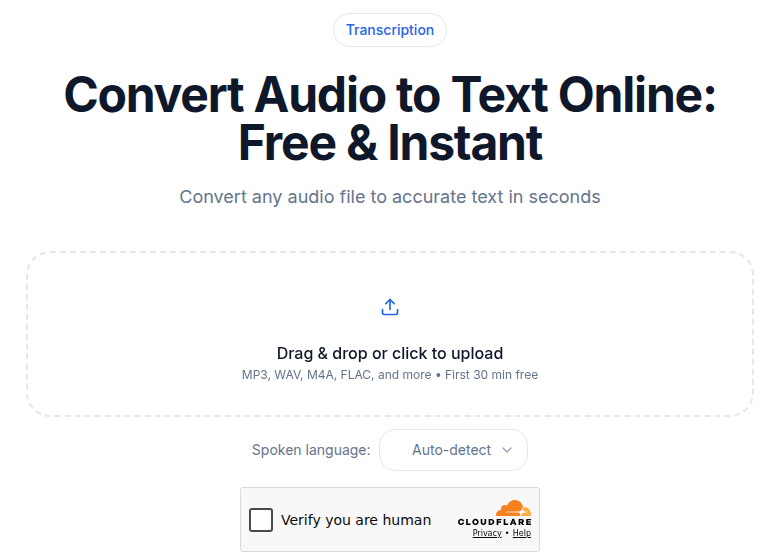 The CATT audio upload tool handles one-off and moderate-volume batch jobs via URL submission
For one-off backfills or moderate volumes, ConvertAudioToText's audio-to-text tool accepts URL submissions with no account required to get started. For large archives or ongoing pipelines, use the API so the process is scriptable and resumable.
Transcription quality is the foundation. If accuracy is below roughly 90%, searches return false negatives: the topic was discussed, but the engine misheared the keyword and the recording never surfaces. Invest in a model that handles your content type (phone calls, studio podcasts, and noisy field recordings each need different tuning).
Speaker diarization, where the transcript labels who said what, matters for multi-person recordings. A search for "what Alice said about pricing" only works if the index knows which words are Alice's. Use a tool with diarization built in for any meeting or interview archive; see the meeting transcription tool for a workflow example.
Step 3: Storage and Cost Math
Cloud object storage is the right place for source audio. Each file gets a URL; the transcription pipeline reads from it; search results link to a player that streams from it.
The two main options:
| Storage | Price per GB-month | Egress fees |
|---|---|---|
| Cloudflare R2 Standard | $0.015 | None |
| AWS S3 Standard (us-east-1) | $0.023 | ~$0.09/GB after 100 GB free/mo |
Storage math for a 10,000-hour archive at 96 kbps MP3 (43 MB per hour, roughly 430 GB total):
- R2: 430 GB x $0.015 = about $6.45 per month, egress free
- S3: 430 GB x $0.023 = about $9.90 per month, plus egress costs each time a user streams a file
For most audio archive use cases, R2 is cheaper, especially when users are actively listening. The no-egress model means you do not get charged per play.
At 1,000 hours (43 GB), storage cost on either platform is under $1 per month. Storage is not the budget concern; compute and indexing are.
MinIO is the standard self-hosted alternative for organizations that need full data control. If audio already lives on a podcast host like Buzzsprout or Transistor, the existing CDN URLs work for the search index without any re-upload.
Step 4: Pick Your Search Backend
The index choice depends on what kind of search you need.
Full-Text (Lexical) Search
Users type words; the index returns records that contain those words. Right for most archives.
Meilisearch and Typesense are the sensible defaults for archives under 100,000 transcripts. Both are open-source (MIT license), self-hostable for free, and opinionated enough that they work well out of the box. A minimal cloud-hosted Meilisearch instance starts around $30/month; self-hosted on a small VPS costs $5 to $20/month in server fees.
Elasticsearch is the heavy-weight option. It scales to billions of documents, supports complex query syntax, and has a large ecosystem. For most audio archives, it is overkill and harder to operate.
Semantic (Vector) Search
Users describe what they are looking for in natural language; the index returns records that are conceptually related, even if the exact words do not appear.
To enable this, each transcript chunk (typically 200 to 500 words) gets converted into an embedding vector. OpenAI's text-embedding-3-small produces 1536-dimensional vectors; text-embedding-3-large produces 3072-dimensional vectors (and supports Matryoshka truncation to as few as 256 dimensions to cut storage cost). Both are the current OpenAI default models as of mid-2026.
Storage for those vectors:
- Pinecone managed: Standard plan starts at $50/month (usage-based; $4/million write units, $16/million read units, $0.33/GB storage)
- pgvector: adds vector search to an existing PostgreSQL database at no additional software cost; you pay for the database server you already have
- Chroma or Weaviate: self-hosted options for teams that want to avoid per-query costs
Hybrid Search
The 2025-2026 best practice for production archives is hybrid: lexical plus semantic. A user who searches "quarterly pricing discussion" gets results with those exact words (lexical) and results that discuss pricing strategy without using those exact words (semantic). The query layer blends the scores.
For a 5,000-file archive, a practical stack is Meilisearch for lexical, pgvector for semantic, and a lightweight Python or Node service that calls both and merges results by score. The self-hosting cost is dominated by server size.
Step 5: Enrichment (What Makes Search Results Useful)
Raw transcript text in an index is searchable. Enriched records are much more useful.
Summaries: A 2 to 3 sentence summary per recording becomes the preview snippet in search results. Summaries answer "is this the right recording?" without clicking through.
Topics and segments: For recordings longer than 30 minutes, splitting the transcript into topic-coherent chunks (each 200 to 500 words) and indexing each chunk separately lets the search return the specific 3-minute section where a match occurs, not just "it's somewhere in this 90-minute episode." With word-level timestamps in the transcript, each chunk links to an exact playback position.
Structured tags: Project name, content type, date, speaker list, language. These power filter facets in the search UI ("show me only Q4 2024 customer calls") and make results interpretable. The transcription for knowledge management post covers taxonomy design for larger corpora.
Without word-level timestamps, search results cannot jump to the right moment. Users have to listen from the start or scroll through the transcript. Confirm any transcription pipeline you use produces word-level or utterance-level timestamps before building the rest of the stack.
Step 6: The Result Interface
Three patterns, from simplest to most elaborate.
Pattern 1: Classic search results. A list of matches, each showing the recording title, date, a snippet from the matching segment, and a play button that jumps to the timestamp. The play-from-timestamp feature is what makes the archive feel useful rather than just searchable.
Pattern 2: Browse plus search. The archive supports browsing (by date, project, topic) and search. Users start by browsing when they remember roughly when something happened; they switch to search when they do not. For most archives, this hybrid default is more useful than pure search.
Pattern 3: Question answering (RAG). Users ask a natural-language question; the system embeds the question, retrieves the top 5 to 20 most relevant transcript chunks from the vector index, passes those chunks with the question to an LLM, and returns an answer with citations linking to specific recordings and timestamps. The mitigation for LLM hallucination here is strict citation: every claim in the answer should link to a specific source passage, and the prompt should instruct the model to refuse when the material does not support a clear answer.
Implementation Tiers
Smallest teams (under 200 transcripts): Store audio in Google Drive or Dropbox. Transcribe manually or via automation. Put transcripts and metadata in a Notion database. Use Notion's built-in search. Total cost under $50 per month; setup time a few hours. Limitation: Notion search is keyword-based and slows on larger databases.
Mid-sized archives (200 to 10,000 transcripts): S3 or R2 for storage, transcription API for batch processing, PostgreSQL with pgvector, Meilisearch for lexical search, a simple Next.js or Vue frontend. Hosting cost roughly $50 to $200 per month; setup time 1 to 3 weeks for a developer.
Large archives (10,000+ transcripts): S3 with lifecycle policies, dedicated vector database (Pinecone or Weaviate), Elasticsearch for lexical, custom UI with playback, transcripts, and filters. Add query analytics (no-results rates, click-through rates) to surface where the archive falls short. Hosting cost $1,000 per month and up depending on scale.
Privacy and Access Control
For archives with sensitive content (customer interviews, internal strategy, legal recordings):
- Access control at the index level: different users see different subsets of the corpus
- Audit logging of all queries and result clicks
- Data retention policies: older audio may need deletion or offline archiving
- Consent records attached to each recording
Do not index sensitive fields as free-text search tokens if a user should not be able to discover the content by searching for a keyword from it. The access control layer must match the transcript index, not just the audio file.
Maintenance
A searchable archive degrades slowly without attention.
Re-transcribe periodically. STT models improve on roughly a 12-month cycle. Re-running a backlog of older recordings against a newer model can recover accuracy on hard-to-transcribe content and improve search recall. The raw audio in storage is the reprocess target; you only need to replace the transcript text in the index, not re-upload the audio.
Monitor search quality. No-results rate and click-through rate on results are the two most useful signals. A high no-results rate means vocabulary in the archive does not match how users search: add synonyms to the index or improve tags. Low click-through means snippets are not representative: tune the summary format or improve segmentation.
Backfill metadata. As you discover what metadata would have been useful (which project, which customer, which quarter), update the older records. It is faster to backfill structured tags from a spreadsheet than to re-extract them from transcripts later.
Where to Start
Pick the 50 recordings your team references most often. Transcribe them, put the transcripts in a shared Notion database with date and project fields, and see if anyone uses the search. If they do (measured by queries and navigations), expand the corpus and invest in heavier infrastructure. If they do not, the problem is adoption, not technology.
Most failed audio archive projects fail at the adoption layer. The workflow for keeping transcripts and metadata current as new recordings arrive is the harder problem. The technology in 2026 is ready; the human habit of tagging a recording before dropping it in storage is not automatic.
Every recording added to a well-maintained archive becomes more retrievable as the corpus grows. The first hundred prove the concept. The first thousand make it a load-bearing tool.
If you just need clean transcripts to feed into the archive without building a full upload pipeline first, ConvertAudioToText handles batch URL submission with no setup. Each transcript includes word-level timestamps and speaker detection, which is the right shape for indexing.
For deeper reading on related workflows: building a second brain with audio, integrating transcription with Notion and Obsidian, and how to transcribe interview recordings.
FAQ
How much storage does a 10,000-hour audio archive actually cost?
At 96 kbps MP3 (a reasonable quality for speech), each hour of audio is about 43 MB. Ten thousand hours is roughly 430 GB. On Cloudflare R2, that costs about $6.45 per month in storage with no egress fees. On AWS S3 Standard (us-east-1), the same data costs about $9.90 per month in storage, plus egress fees each time a file is streamed. Both figures are for storage only; transcript storage, indexing, and compute are additional but typically smaller costs.
Do I need vector embeddings, or is keyword search enough?
For most archives, full-text keyword search is enough and is simpler to build and operate. Add vector embeddings when users need to find recordings by concept ("discussions about pricing pressure") rather than by exact words, or when the vocabulary in the archive differs from the vocabulary users search with. A hybrid setup (lexical plus vector) gives the best of both but requires more infrastructure.
What is the minimum a transcript needs to include for a useful search archive?
The transcript text itself plus a timestamp for each utterance or word. Without timestamps, search results can identify the recording but cannot jump to the relevant moment, which makes the archive feel like reading a table of contents without page numbers. Speaker labels are important for multi-person recordings if you ever want to filter or search by who said something.
How often should I re-transcribe old recordings?
Re-transcription makes sense when a significantly better STT model becomes available, roughly every 12 to 18 months based on recent cycles. The raw audio in storage is the stable asset; transcript text is replaceable. Prioritize re-transcribing your most-searched recordings first, since improved accuracy on frequently-accessed content has the highest return. For a large archive, running re-transcription on the tail (oldest, least-used recordings) is lower priority and can wait for cost to come down further.
Sources
- Cloudflare R2 pricing: https://developers.cloudflare.com/r2/pricing/
- AWS S3 pricing (us-east-1): https://aws.amazon.com/s3/pricing/
- Pinecone pricing (verified April 2026): https://www.pinecone.io/pricing/
- OpenAI embedding models: https://platform.openai.com/docs/guides/embeddings
- Meilisearch cloud pricing: https://www.meilisearch.com/pricing
- Typesense self-hosted documentation: https://typesense.org/docs/
Try transcription free
Convert any audio or video to clean, unwatermarked text — speaker labels, timestamps, and AI summaries included. First 30 minutes free, no account.
Related Articles

Spotify Transcript Extractor: How to Copy and Download Episode Text
Get a Spotify podcast transcript you can copy and download: paste a public episode link, 30 minutes free with no signup, TXT or SRT files on eligible plans.
Focus Group Transcription for UX Researchers: Turn Multi-Speaker Audio Into Usable Evidence
A practical guide to focus group transcription for UX and insights teams. See how CATT handles speaker labels, timestamps, AI summaries, and clean export.