
Transcription for Team Standups: When It's Worth It (2026)
Summarize this article with:
Most standups don't need a transcript. If your whole team attends live and uses the same Slack channel afterward, a 3-line summary covers everything useful. Transcription earns its place when people miss the meeting, spans time zones, or when you're onboarding someone who needs to catch up on weeks of context fast. For those cases, the workflow is low-friction and worth building.
For most synchronous standups, a transcript is overkill. If your team attends the same 15-minute Zoom call every morning and uses a shared Slack channel afterward, a quick three-line written summary does everything the transcript would do, with none of the storage, tooling, or consent overhead.
There are specific situations, though, where a full transcript actually earns its place: distributed teams where someone is always asleep during the call, async-first teams where "standup" means a video message rather than a live meeting, and onboarding stretches where a new engineer needs to absorb weeks of context fast. Those cases are worth building a workflow for. The synchronous, co-located daily ritual is not.
The Honest Test: Do You Actually Need It
Ask two questions before setting anything up.
First: can everyone on the team attend the standup live, without heroics? If yes, the synchronous group has the context. A shared notes doc or a three-line Slack thread captures the decisions. You do not need a transcript.
Second: does your standup produce anything worth searching or referencing later? A standup where people say "still on the auth feature, no blockers" for three days straight is not producing data worth mining. A standup where engineers surface blockers, name specific systems, and describe dependencies between their work is producing something you will want to search in six weeks when a similar problem recurs.
If the answers point toward yes, read on. If not, a simple meeting minutes template and a shared doc are the right tools.
Where Transcription Actually Pays Off
Distributed teams are the clearest case. When your engineering team spans time zones, someone is always missing the live standup. Transcribing and summarizing the recording means the Tokyo engineer can read a two-minute summary at the start of their day instead of piecing together context from Slack threads. That is a genuine time save. See also multilingual meeting transcription if your distributed team operates in more than one language.
Async-first standups work better with transcription. Some teams run standups as short Loom or voice recordings posted to a channel. In this format, transcription is almost mandatory: reading a transcript is three times faster than watching the video, and it is searchable. The meeting transcription tool handles these well because the files are typically short and format-consistent.
Onboarding compresses dramatically. A new engineer who joins mid-sprint can read two weeks of standup summaries in under 30 minutes and know who is working on what, which systems are causing friction, and how the team communicates. This shortcuts the informal "what is everyone on?" phase significantly. The same applies when a project manager from another team needs to understand your team's current priorities without sitting in your standup.
Pattern spotting over weeks, not days. A single standup tells you almost nothing. Three weeks of standups, searchable and skimmable, will surface patterns a manager cannot notice in real time: the engineer whose blockers always involve the same legacy module, the project that has been "almost done" for eight days, the dependency between two engineers' work that nobody mapped explicitly. This value accrues slowly and requires the discipline to actually review the archive periodically.
The Workflow, Kept Honest
If you have decided it is worth doing, the friction is low.
Record the standup. Zoom, Google Meet, and Microsoft Teams all record natively. If your standups are voice memos or async video clips, they are already discrete files. Enable recording once and forget the setup step. See how to transcribe a Zoom meeting or Google Meet for the exact steps.
Upload and summarize the same day. The recording goes to a transcription tool. For a 15-minute standup, you want a summary output, not just a raw transcript. The AI summary condenses the standup to speaker-labeled bullet points. That is what gets posted to Slack or your shared notes doc. The full transcript sits behind it as a searchable backup.
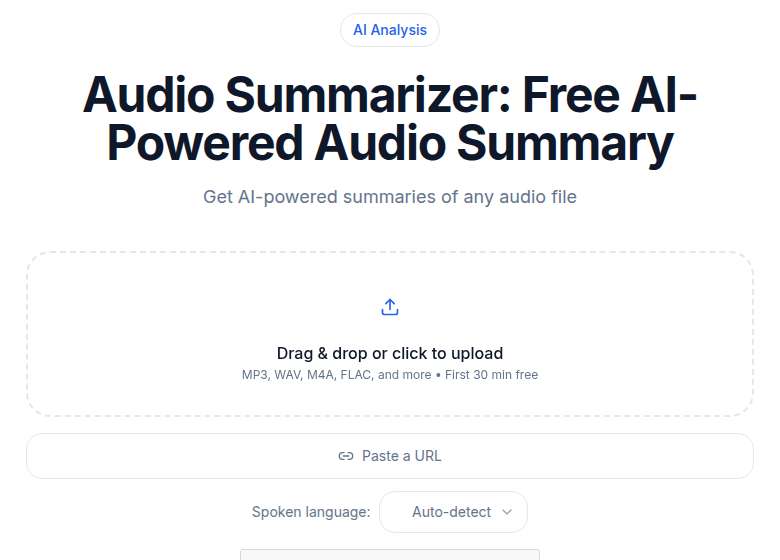 ConvertAudioToText summarizer tool for turning standup recordings into bullet-point summaries
Weekly review, not daily. The team lead or scrum master skims the week's summaries on Friday afternoon. This takes 10 minutes. The goal is pattern detection: repeated blockers, stalled projects, unresolved dependencies. A daily deep-read of standup transcripts is not the workflow; that would create more overhead than the meetings themselves.
Skip the quarterly data-mining fantasy. Several guides will tell you to analyze quarterly standup archives for velocity trends and cultural signals. That is technically possible. In practice, almost no team does it consistently, and engineering management tools like sprint burndown and 1-on-1 notes usually surface those patterns earlier. If you have the habit already, the archive is available. Do not set up the workflow expecting a quarterly analysis to happen just because you have the data.
Tools and What They Actually Do
Otter.ai adds an AI notetaker bot as a participant in your Zoom, Google Meet, or Teams call. The bot joins automatically and produces a live transcript plus a summary. Free plan gives 300 minutes per month with a 30-minute cap per conversation. Pro is $8.33/month billed annually (or $16.99 month-to-month) with 1,200 minutes per month. Business is $19.99/user/month annually with unlimited meeting transcription. The meeting-bot model works well for large recurring calls but can feel intrusive in a 4-person standup where the bot shows up as a visible attendee. See a full Otter vs. Fireflies comparison if you are evaluating both.
Fireflies.ai works the same way: a bot joins the call, transcribes, and produces AI summaries and action items. Free plan has 400 minutes of storage per team with a limited one-time AI credit pool. Pro is $10/seat/month annually. Business is $19/seat/month annually with unlimited storage and CRM integrations. Fireflies is well-suited for sales calls and cross-functional meetings with action items that need to flow into a CRM. For a development standup, most of those features go unused.
My take: for a small engineering standup, the meeting-bot model is usually more friction than it saves. A bot joining a 6-person call and appearing in the participant list shifts the dynamic in ways that a background recording does not. The cleaner path is to record natively and upload afterward.
If you want a no-bot upload path without per-minute caps, ConvertAudioToText handles standup recordings directly. You upload the file, get a speaker-labeled summary, and keep the full transcript as a searchable reference. The Pro plan at $14.99/month is unlimited, which means a team running daily standups does not have to count minutes. There is also a real-time vs. post-meeting transcription explainer if the live-vs-async question matters for your team's setup.
Privacy, Briefly
Record with the team's knowledge, not silent assumption. One conversation at the start of the initiative is sufficient: "We are going to start recording standups to help with async catch-up and onboarding. Transcripts will be accessible to the whole team, not used in reviews." Store transcripts somewhere the team can access, not just in a management folder. 12 to 18 months is a reasonable retention window.
For teams with formal data handling requirements, check that your transcription vendor does not train on uploaded files, and that they offer a data processing agreement if your team is in the EU.
When to Skip It Entirely
Skip transcribing if:
- Everyone attends live and has full context
- The meeting content is not worth searching later
- The standup runs under 10 minutes and produces a Slack summary anyway
- Team members have expressed a preference not to be recorded
The last point is the only non-negotiable one. The other three are judgment calls where the workflow's overhead might exceed its value.
FAQ
Does transcribing standups make the meeting feel more formal?
In practice, no. After the first couple of sessions, the recorder fades into the background entirely. The friction risk is not the tool, it is what you do with the output. If transcripts start appearing in performance reviews or public critiques, the team will notice. Use them for pattern spotting and async catch-up, not evaluation.
What if my team prefers not to be recorded?
Respect the preference. No workflow benefit outweighs team trust. If part of the team objects, the honest path is either to skip recording entirely or to move the async documentation to a text-based standup format instead.
How long should I keep standup transcripts?
12 to 18 months covers most coordination needs, including onboarding lookbacks and retrospectives. Older standups rarely get accessed and can be archived or deleted. Set a retention policy before you start so the team knows what they are agreeing to.
Do I need a meeting bot added to the call?
Not necessarily. If you record natively via Zoom, Google Meet, or Teams, you can upload the recording directly afterward. Tools like Otter.ai and Fireflies.ai add a bot as a participant, which some small teams find distracting in a 6-person standup. A no-bot upload path avoids that friction entirely.
Sources
Try transcription free
Convert any audio or video to clean, unwatermarked text — speaker labels, timestamps, and AI summaries included. First 30 minutes free, no account.
Related Articles
Spotify Transcript Extractor: How to Copy and Download Episode Text
Get a Spotify podcast transcript you can copy and download: paste a public episode link, 30 minutes free with no signup, TXT or SRT files on eligible plans.
Focus Group Transcription for UX Researchers: Turn Multi-Speaker Audio Into Usable Evidence
A practical guide to focus group transcription for UX and insights teams. See how CATT handles speaker labels, timestamps, AI summaries, and clean export.