Transcription While Traveling: The Road Workflow
Summarize this article with:
Traveling journalists, researchers, and podcasters can build a transcription workflow that fits any connection quality by separating capture, sync, and processing into three distinct phases. Compress audio before uploading over hotel wifi or roaming data. If you have no connection, local Whisper on a laptop handles offline transcription. Cloud services let timezone differences work in your favor: submit overnight and wake up to finished transcripts.
The Road Workflow Is Not the Desk Workflow
Travel breaks every assumption the desk workflow is built on. A foreign correspondent has hotel wifi, a phone, and recordings piling up between interviews. They do not have gigabit ethernet, a desktop mic, and four undisturbed hours.
The fix is to stop treating capture, sync, and processing as one sitting. Decouple them and the workflow survives any conditions.
Phase 1: Capture in the Field
Phone capture is the right default for most travelers. An iPhone 15 or recent Pixel held close in a quiet room can produce audio accurate enough for modern AI transcription. The caveat: accuracy drops sharply with ambient noise. Per industry testing, business-meeting recordings run 80-92% word accuracy and field/outdoor recordings can fall well below that. A phone pointed at someone across a cafe table in a busy city is not the same as a controlled recording, and no transcription engine fixes bad audio.
A few habits that protect the recording quality:
A $20-50 lavalier mic (Rode SmartLav+, Boya BY-M1) plugged into a phone changes the result more than any software switch. Wind is the other silent wrecker: a foam mic cover is cheap and saves recordings that wind would otherwise ruin. Test the actual environment with a 30-second throwaway recording before the real interview starts.
The dedicated recorder (Zoom H1, Tascam DR-05) gives better dynamic range for difficult environments, at the cost of another device to carry.
Name Files While the Context Is Fresh
Rename every recording immediately after stopping. "Recording-47.m4a" is useless six weeks and 30 files later. A pattern like 2026-07-01_Nairobi_interview_water-rights.m4a takes 20 seconds and saves real work later.
Also note: who was interviewed, where, and what was agreed about recording use. A great quote you cannot verify consent for is a quote you cannot publish.
Phase 2: Sync Off the Device Fast
Once the recording exists only on a phone, it is one dropped device away from being gone. The goal is to get it off as soon as any connection exists.
Auto-sync is the most reliable approach. On iPhone, Voice Memos can sync to iCloud automatically. On Android, most recording apps support background upload to Google Drive. Either way, the file leaves the phone within minutes.
If auto-sync is off for any reason (sensitive interviews, remote locations where you disabled background data), copy manually to cloud storage at the end of each field day. The manual habit protects against silent sync failures.
For sensitive source material, encrypted cloud storage plus an encrypted local backup is the appropriate minimum. Two copies in different locations is the floor; three is better.
Phase 3: Process When Connection Allows
Hotel Wifi: Compress First, Then Upload
Hotel wifi is inconsistent. A property might advertise solid speeds but deliver much less per-room during peak evening hours when most guests are streaming. Uploading a raw .m4a or WAV file from a full day of interviews over a congested connection is slow and unreliable.
The practical fix: compress the audio before uploading. A single ffmpeg command converts a field recording to a small mono MP3 suitable for transcription:
ffmpeg -i input.m4a -ac 1 -ar 16000 -b:a 64k output.mp3
A 60-minute interview captured as a 500 MB WAV comes out under 30 MB at 64 kbps mono. Voice clarity stays high enough for accurate transcription. Upload time over 2-3 Mbps hotel wifi drops from impractical to a few minutes.
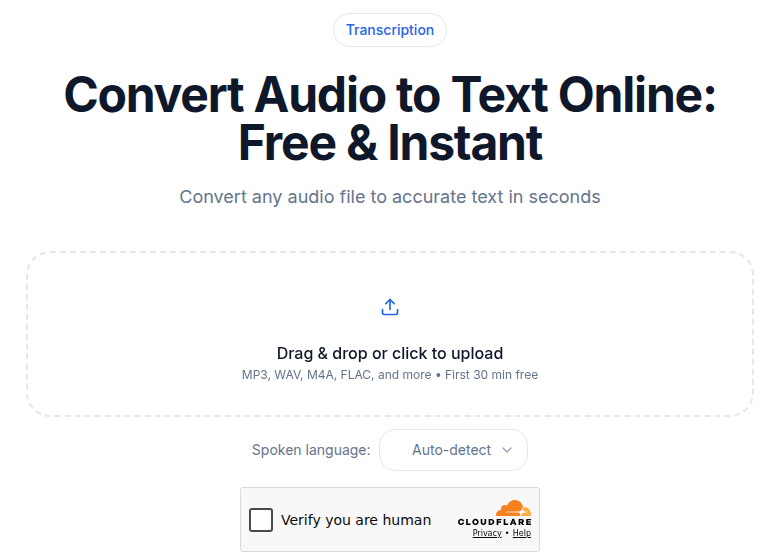 Audio upload tool for processing field recordings after compression
Once uploaded to the audio to text tool, set the language explicitly. Auto-detect adds a few seconds and occasionally misidentifies accented speech. For a 60-minute file at 64 kbps, processing typically finishes in a few minutes. A quick review on a phone or laptop completes the session.
For additional strategies on working with a bad connection, see transcribing when internet is slow.
Roaming Data: Treat It as Metered
Roaming data costs vary wildly. Within the EU, roam-like-home rules let EEA residents use their domestic plan across member states at no extra charge. Outside that, US carrier day passes run around $10-12 per day for international access, which adds up fast. Unplanned pay-per-use on a US carrier can reach $2/MB, making a raw audio upload genuinely expensive.
Two approaches that keep roaming costs reasonable:
Compress to a small MP3 before uploading (same command above). A 25 MB file over roaming costs a small fraction of what a 500 MB original would. The other approach: defer all uploads to the next available wifi connection. Most recording apps queue sync requests and push when wifi reconnects.
For travelers on longer trips, a local SIM or travel eSIM cuts data costs significantly compared to carrier roaming plans. The math on a compressed audio upload makes more sense than trying to push raw files.
For a broader look at what transcription actually costs across different scenarios, see the hidden costs of transcription services.
Offline: Local Whisper on the Laptop
When there is no connection at all, airplane mode on a long flight or a truly remote location, cloud transcription is not an option. Local Whisper is.
OpenAI Whisper is open-source and runs entirely on your own hardware, with no data leaving the device. On an M1/M2 Mac, apps like MacWhisper can transcribe a 10-minute clip in 30-60 seconds. On a laptop with a modern GPU, faster-whisper with the large-v3 model processes a 60-minute file in under 5 minutes. On older hardware without a GPU, the tiny or base Whisper models via whisper.cpp run slower but still work.
The setup is one-time: install once at home, carry the model weights on the device. For any trip where connectivity is uncertain, this is worth doing before departure. For a detailed comparison of local versus cloud approaches, see on-device vs cloud transcription.
Timezone-Shifted Turnaround
One underrated advantage of cloud transcription for travelers in different time zones: submit at 10pm local time, and a long-form podcast or research interview can finish processing while you sleep.
This is the overnight-batch pattern applied to travel. Submit everything in the evening, set notifications, and transcripts are ready before the next morning's interviews. Timezone differences that feel like a disadvantage for communication become an asset for async processing. For more on this approach, see transcribing overnight in batches.
If you need transcripts for same-night use, for example to verify a quote before filing a story, the evening hotel workflow above handles that. For everything else, the overnight queue is lower stress.
The Airplane Window
A long-haul flight with airline wifi is a constrained but usable transcription window. Submit compressed files at the gate before boarding, or use the first minutes of in-flight wifi before speeds drop. For everything about what realistically works at 30,000 feet, see transcribing from airplane wifi.
Equipment Worth Carrying
The weight-to-value ratio favors a short list:
Lavalier mic. A wired lav (Rode SmartLav+, Boya BY-M1) costs $20-50 and is the highest-leverage audio upgrade available. The difference in transcription accuracy on a noisy interview is meaningful.
Foam windscreen. Weighs almost nothing. Outdoor recordings without one in wind are often unusable.
Phone stand or small tripod. A stable mic position reduces handling noise. Even a simple clip clamp helps.
Portable battery. Field days drain phones. Running out of battery mid-interview with no backup is a recoverable problem, until it is not.
What Goes Wrong (And How to Avoid It)
Skipping file renaming. The cost is trivial in the moment and significant a month later when 60 files are all "Voice Memo 47."
One storage copy. Phones break, get stolen, or fall in rivers. An auto-sync that silently failed is not a backup. Manual confirmation matters for anything irreplaceable.
Uploading raw files over limited bandwidth. A 500 MB WAV over 2 Mbps hotel wifi during peak hours fails or takes long enough to miss the window. Compress first.
Processing in the field when it can wait. The overnight queue and the airplane window both serve the same function. Save battery, save bandwidth, and batch the work for when conditions allow.
The One Setup That Changes Everything
Before your next trip, configure auto-sync from your phone's recording app to cloud storage. iCloud for Voice Memos, Google Drive for Android apps. That single step protects every recording from device loss and makes the three-phase workflow automatic. The rest (compression, processing, overnight queue) improves on top of it.
If you record occasional interviews and do not need unlimited monthly volume, ConvertAudioToText lets you try a file without creating an account first, with the first 30 minutes of any file transcribed free. With an account, the structured output (speaker detection, AI summary, action items, SRT export) is useful for interviews where you need more than a raw transcript dump.
FAQ
Can I transcribe audio without any internet connection while traveling?
Yes, but only with a local tool running on your device. OpenAI Whisper is open-source and can be installed once at home and run entirely offline. Apps like MacWhisper (Mac) and Buzz (cross-platform) wrap the model in a desktop interface. Cloud services including ConvertAudioToText require an upload, so they need at least some bandwidth. The practical split: use local Whisper on the plane or in areas with no connectivity, then use a cloud service for anything that benefits from structured output like speaker labels and summaries.
How much mobile data does uploading a compressed interview recording use?
A 60-minute interview compressed to mono 64 kbps MP3 using ffmpeg runs around 28-30 MB. On most travel data plans or day-pass plans, that is manageable. Raw audio files are far larger: a WAV or high-bitrate M4A of the same session can be 500 MB to 1 GB, which is not realistic over roaming at standard carrier rates. Compress before uploading over any limited connection.
Is hotel wifi fast enough to upload field recordings?
Hotel wifi is inconsistent. Properties that provision 10-25 Mbps per room on paper often deliver a fraction of that per guest during evening peak hours when most rooms are active. The safest approach is to upload compressed files rather than raw audio. A 30 MB compressed file finishes in a few minutes even on a slow connection; a 500 MB raw file may stall or time out entirely.
Does it matter which recording app I use on a phone for transcription later?
The recording format matters slightly, but any modern recording app produces audio that transcription tools accept (M4A, MP3, WAV, FLAC). The bigger factor is audio quality at capture time. A lav mic, a wind shield for outdoor recordings, and minimizing background noise at the source improve transcription accuracy more than any app or format choice. Whatever app you use, check that it supports background sync to cloud storage so files leave the device automatically.
Sources
- ConvertAudioToText pricing page (checked 2026-07-02)
- International roaming costs 2026: Simology (checked 2026-07-02)
- 1GB mobile data prices worldwide 2026: CelleSIM (checked 2026-07-02)
- Hotel wifi technology guide 2026: HotelTech Review (checked 2026-07-02)
- Run Whisper locally 2026: Local AI Master (checked 2026-07-02)
- FFmpeg audio compression: AudioUtils (checked 2026-07-02)
- AI transcription accuracy benchmarks 2026: PlainScribe (checked 2026-07-02)
Try transcription free
Convert any audio or video to clean, unwatermarked text — speaker labels, timestamps, and AI summaries included. First 30 minutes free, no account.
Related Articles
Transcribe From Airplane WiFi: The 2026 Playbook
A honest workflow for transcribing audio over in-flight WiFi, covering Starlink vs legacy systems, compress-first tactics, cloud-staging tricks, and when to go offline.
Spotify Transcript Extractor: How to Copy and Download Episode Text
Get a Spotify podcast transcript you can copy and download: paste a public episode link, 30 minutes free with no signup, TXT or SRT files on eligible plans.