
Best Transcription Tools With AI Summary in 2026
Summarize this article with:
The 2026 Short List
The tools worth considering for AI summary in 2026 are not the ones that added a summary button as an afterthought. The difference is template depth, speaker attribution, and whether the summary output is actually useful for your workflow. The eight tools below each have a genuine reason to exist in this category. Fireflies leads for recurring business meetings. AssemblyAI leads for developers building summary features. CATT is the honest pick for upload-based transcription with structured templates. Read the whole list before deciding.
A note on scope: most tools here are live-meeting bots. They join your calls via Zoom, Meet, or Teams and generate a summary post-call. If you are summarizing pre-recorded files (podcasts, lectures, uploaded interviews), see the section on ConvertAudioToText and AssemblyAI, which work without a meeting bot.
1. Fireflies.ai (Strongest for Recurring Business Meetings)
Fireflies auto-generates a multi-part summary after every call: keywords, a meeting overview, chapter-stamped notes, action items, and custom template outputs. The free plan includes unlimited summaries but caps total storage at 400 minutes across all meetings. Pro is $10/user/month billed annually ($18 monthly) and expands storage to 8,000 minutes per seat. Business at $19/user/month (annually) adds unlimited storage, CRM sync (Salesforce, HubSpot), conversation intelligence, and video playback.
Where Fireflies wins: 18+ pre-built templates including BANT and MEDDIC for sales teams. CRM field population directly from summary data. Breadth of meeting platform support.
Where Fireflies does not lead: free-tier storage is a real cap at 400 minutes total. Summary quality on non-meeting content (podcasts, lectures) is less differentiated than meeting-first tooling. See also the Fireflies vs. Otter honest comparison for a head-to-head.
2. Otter.ai (Strongest for Speaker-Attributed Meeting Summaries)
Otter's summary identifies decisions, action items, and key topics with speaker attribution, which makes it easy to see who said what without re-reading the full transcript. The Basic free plan gives 300 minutes per month with automated summaries. Pro is $8.33/user/month billed annually ($16.99 monthly) and adds 1,200 monthly minutes and advanced meeting templates. Business is $19.99/user/month annually ($30 monthly) and removes the recording cap with a 4-hour per-meeting limit.
Where Otter wins: speaker-attributed action items on Pro. Live transcript with inline summary. Tight integration across Zoom, Meet, and Teams. Strong free tier for occasional users.
Where Otter struggles: summary quality drops noticeably on larger meetings with three or more concurrent speakers. AI workflow customization is limited until the Business tier.
3. Granola (Strongest for Note-Takers Who Want AI to Augment, Not Replace)
Granola takes a genuinely different approach: you write rough notes during the meeting, and Granola combines those notes with the full audio transcript into a structured summary that reflects your perspective, not a generic AI interpretation. It runs as a desktop app and captures computer audio directly without joining as a bot. The free plan caps history at 25 notes. Business is $14/user/month and unlocks unlimited notes, integrations (Notion, Slack, HubSpot, Zapier), and the API.
In 2026, Granola added Recipes: curated prompt templates you apply to a meeting after the fact. Examples include "Coach Me" (communication feedback) and "Write a Brief" (turns a brainstorming session into a structured PRD). This is the most flexible post-meeting prompt interface of any consumer-grade tool in this list.
Where Granola wins: the human-plus-AI note workflow. Recipes for custom post-meeting outputs. No bot joins the call.
Where Granola struggles: desktop-only, so mobile recording is out. Less useful if you do not take any notes yourself. History cap on the free plan is restrictive if you are a heavy meeting user.
4. Fellow.app (Strongest for Manager-Led Meeting Summaries)
Fellow's summary is built around manager workflows: 1:1 talking points, standup decisions, board meeting action items, with due dates and assignees attached to each action. The free tier is capped at 5 AI notes and 5 recordings lifetime, which is barely a trial. The Team plan at $7/user/month (annually) gives 10 AI notes and recordings per month. Business at $15/user/month unlocks unlimited AI notes, sales recap templates, and Salesforce/HubSpot integration.
Where Fellow wins: pre-meeting agenda plus post-meeting summary in a single flow. Action item assignment with due dates is genuinely better than most competitors. Calendar integration is tight.
Where Fellow struggles: the lifetime cap on the free tier makes it almost unusable for evaluation. Summary quality is tuned for structured business meetings; less helpful for unstructured content.
5. AssemblyAI (Strongest for Developers Building Summary Into Their Product)
AssemblyAI's LeMUR lets you run custom prompts against any transcript: "summarize as bullet points," "extract objections from this sales call," "list all action items with owners." The transcription API costs $0.21/hour for the Universal-3.5 Pro model and $0.15/hour for Universal-2. LeMUR adds per-token costs on top of transcription. There is no fixed subscription: you pay per use.
This is a fundamentally different product from the meeting-bot tools above. There is no consumer UI, no calendar integration, and no bot that joins calls. The value is for teams building summary features into their own application. See the speech-to-text API pricing comparison for context on how AssemblyAI stacks against other API providers.
Where AssemblyAI wins: fully custom prompts against transcripts. No subscription lock-in. Handles audio files up to 10 hours through LeMUR's context window. Speaker diarization included as an add-on.
Where AssemblyAI struggles: developer-only tooling with no end-user product. Usage costs add up at scale. Not relevant if you need a meeting bot.
6. Sembly AI (Strongest for Multilingual Team Meetings)
Sembly generates structured summaries across 48 languages and handles mixed-language meetings, which is the differentiator no other tool in this list matches cleanly. The Basic plan is $10/user/month (annually, $17 monthly) for a single-user workspace with unlimited meetings, transcription, and summaries. Pro is $20/user/month (annually, $29 monthly) and adds multi-meeting AI chat, custom templates, sentiment analysis, and risk detection. MAX is $30/user/month (annually, $39 monthly) with up to 500 users and HD video recording.
Where Sembly wins: multilingual summary quality across 48 languages. Mixed-language meeting handling. Automatic risk and issue flagging inside the summary.
Where Sembly struggles: the Basic plan allows only one user per workspace, which limits it to solo use. Template customization is a Pro-only feature. Less polished UI than Fireflies or Otter for English-only teams.
7. ConvertAudioToText (For Uploaded Files and Interviews, Not Live Meetings)
CATT does not join meetings and does not function as a meeting bot. What it does: you upload an audio or video file, paste a URL, or drop in a YouTube link, and it returns a transcript with AI summary output.
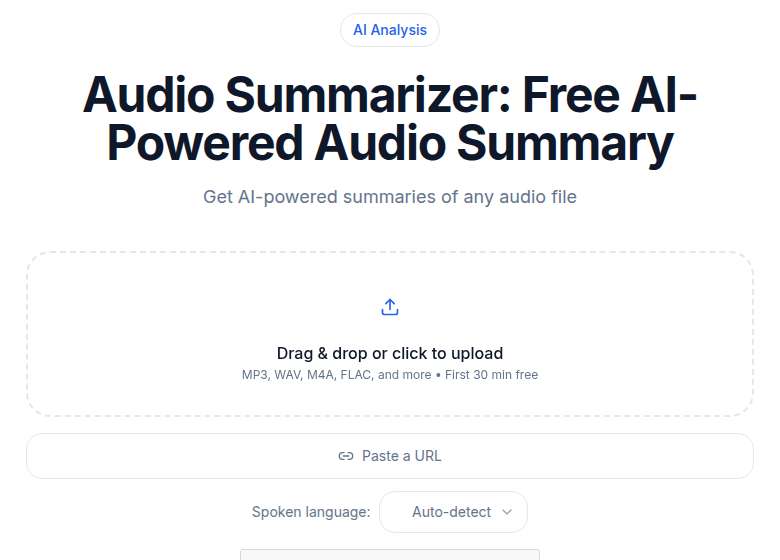 ConvertAudioToText AI summarizer tool interface
The Pro plan ($14.99/month, or $99.99/year billed annually) includes all AI templates and structured summary outputs. A free account runs your first file on the premium engine with the AI summary included (up to an hour), then keeps transcribing up to 30 files a day, up to 30 minutes each. Anyone can transcribe the first 30 minutes of any file without an account to try the output.
My take: if your content is pre-recorded (podcast episodes, interviews, research recordings, lectures) rather than live meetings, CATT's structured template outputs are more relevant than a meeting bot that can not join a call you already recorded. For live meetings, use one of the bot-based tools above.
Where CATT wins: upload-first workflow. No bot joining your calls. Structured output by content type.
Where CATT does not lead: no live meeting capture. No CRM integration. Template outputs are English-first (AI summary features are limited for non-English content, per the service's own documentation).
8. Microsoft 365 Copilot (For Teams and Organizations Already on M365)
Copilot summaries inside Teams meetings are available wherever you already work in the Microsoft ecosystem, which is the value: integration, not category-leading summary quality. Copilot is an add-on license priced at $30/user/month for enterprise (on top of the M365 base license). For small and medium businesses, a promotional rate of $18/user/month applies, with the price scheduled to increase to $21/user/month from July 1, 2026.
Where Copilot wins: seamless access inside Teams, Word, Outlook, and the rest of M365. No separate tool to adopt.
Where Copilot struggles: the all-in cost ($66-$87/user/month when combined with E3 or E5 base licenses) is significantly higher than any standalone tool in this list. Summary quality is competitive but not category-leading. Not relevant if your team does not use Teams.
Comparison: Summary Features by Content Type
| Content type | Best option | Why |
|---|---|---|
| Sales calls | Fireflies (Business) | BANT/MEDDIC templates, CRM push |
| Recurring team meetings | Otter or Fireflies | Speaker attribution, action items |
| 1:1s and manager workflows | Fellow (Business) | Pre-meeting agenda, due-date actions |
| Multilingual team meetings | Sembly (Pro) | 48-language summary support |
| Uploaded interviews and podcasts | ConvertAudioToText | Template-based structured output, no bot |
| Custom developer summaries | AssemblyAI (LeMUR) | Any prompt, any domain |
| Note-augmented meetings | Granola (Business) | Human notes plus AI, Recipes |
| M365 ecosystem | Copilot | Zero new-tool adoption friction |
What to Look For When Evaluating Summary Quality
The single biggest variable in summary quality is template specificity. A tool using "summarize this meeting" as its internal prompt will produce a different (usually shallower) output than a tool with a domain-specific structure for, say, a sales discovery call versus a board meeting. Before committing to a paid plan, export two or three summaries from your actual meeting types and check whether the output is usable or needs heavy editing.
Speaker attribution matters too. A summary that says "the team decided to move the launch date" is less useful than "Sarah confirmed the launch will move to Q4 and Alex will send the revised timeline by Friday." Only tools with working speaker diarization can produce the latter. Test with a real multi-speaker recording, not a demo.
For a broader cost comparison across the category, see transcription pricing models explained and the guide on hidden costs of transcription services.
FAQ
Which transcription tool has the best AI summary for meetings?
Fireflies.ai leads for recurring business meetings: it auto-generates summaries with action items, chapter markers, and 18+ pre-built templates including BANT and MEDDIC for sales. For manager-led workflows, Fellow's structured 1:1 and standup summaries are the tightest fit. Otter.ai is a reliable middle ground with speaker-attributed summaries on the Pro plan ($8.33/user/month billed annually).
Do any transcription tools summarize pre-recorded audio, not just live meetings?
Yes. ConvertAudioToText, AssemblyAI, and Sembly all handle uploaded files and URLs. Meeting-bot tools like Otter, Fireflies, Fellow, and Granola focus on live calls and need a bot to join the session. If you are summarizing podcast recordings, interviews, or lecture files rather than live meetings, CATT or AssemblyAI fit better.
Is AI summary included in free transcription plans?
Sparingly. Fireflies free includes unlimited summaries but caps storage at 400 minutes total (not per month). Otter free gives 300 monthly minutes and automated summaries with action items. Fellow free is capped at 5 AI notes lifetime. Granola free caps meeting history at 25 notes. For meaningful free summary access, Fireflies or Otter are the strongest options.
What makes summary quality differ between tools?
Template specificity is the biggest lever: a generic summarize prompt produces a generic output. Tools with domain-specific templates (sales call, 1:1, BANT) produce better structured outputs than single-template alternatives. Speaker attribution matters for multi-person meetings; without diarization the summary cannot identify who said what. AssemblyAI LeMUR stands out for developers because you can inject custom prompts rather than relying on a fixed template.
Can I get an AI summary without signing up anywhere?
ConvertAudioToText transcribes the first 30 minutes of any file without an account, and a free account (no card) adds an AI summary on your first file. That is the shortest path to a summarized transcript with zero friction. For live meetings, every bot-based tool (Fireflies, Otter, Granola, Fellow) requires an account before it can join your calls.
Sources
- Fireflies.ai pricing page (checked 2026-07-02)
- Otter.ai pricing page (checked 2026-07-02)
- Granola pricing page (checked 2026-07-02)
- Fellow pricing page (checked 2026-07-02)
- Sembly AI pricing page (checked 2026-07-02)
- AssemblyAI pricing page (checked 2026-07-02)
- ConvertAudioToText pricing page (checked 2026-07-02)
- Microsoft 365 Copilot pricing (checked 2026-07-02)
Try transcription free
Convert any audio or video to clean, unwatermarked text — speaker labels, timestamps, and AI summaries included. First 30 minutes free, no account.
Related Articles
Best Transcription for Podcasts in 2026: Honest Tool Guide
The transcription tools that fit podcasters: long files, speaker labels, exports. Ranked honestly by use case with verified pricing.

Best Zoom Transcription Tools 2026, by Workflow
Zoom transcription tools ranked by actual workflow: live bots, native Zoom AI, and post-upload. Verified prices, free-tier limits, and honest trade-offs for 2026.