Meeting Notes Automation: Bot, Upload, or Manual? (2026 Guide)
Summarize this article with:
The Three Automation Levels
Most automated meeting notes fail not because the AI is bad, but because teams pick the wrong automation level for their situation. There are three real options, and choosing between them is the first decision you need to make.
The levels are: a bot that joins your calls automatically, a post-hoc workflow where you upload the recording afterward, and a hybrid where someone still attends but uses AI to clean up sparse manual notes. Each has different privacy costs, integration depth, and per-seat expense.
This post walks through all three, when each one makes sense, and where the tradeoffs actually bite.
Level 1: Meeting Bots
A bot-in-meeting tool joins your call as an extra participant, records everything live, and pushes a structured summary somewhere useful (Slack, CRM, Google Docs) within minutes of the meeting ending. The main names in this space are Otter.ai, Fireflies.ai, and tl;dv.
What they actually cost (verified July 2026):
| Tool | Free Tier | Paid Entry | Team Tier |
|---|---|---|---|
| Otter.ai | 300 min/mo, 30 min/conversation max | $8.33/user/mo (annual) | $19.99/user/mo (annual) |
| Fireflies.ai | 400 min/team storage, 20 AI credits | $10/user/mo (annual) | $19/user/mo (annual) |
| tl;dv | Unlimited recordings, 10 lifetime AI summaries | $18/user/mo (annual) | $59/user/mo (annual) |
What they get right: the calendar-connect-and-forget setup genuinely works. Otter's OtterPilot auto-joins scheduled calls; Fireflies syncs with HubSpot and Salesforce out of the box; tl;dv pushes timestamped clips to CRM fields. For a sales team running 50 calls a week, the native CRM write-back alone earns the cost.
What they get wrong:
The bot is visible in your participant list. That sounds minor until you notice that candidates clam up during hiring screens, enterprise customers ask about your data practices mid-call, or a sensitive internal conversation goes sideways because the room knows it is on record.
In 2026, this is no longer just a vibe problem. A BIPA class action filed in March 2026 against Fireflies.ai alleges the bot collected voiceprints from participants who never signed up for the service, including people who simply joined a meeting hosted by a Fireflies customer. The plaintiff never consented and never created an account. That case is pending but illustrates a consent exposure that the post-hoc approach avoids entirely.
For a fuller comparison of Otter vs Fireflies specifically, see the Otter vs Fireflies comparison.
Platform-native bots (Zoom, Meet, Teams) sit in the same level but are bundled with your existing subscription:
- Zoom AI Companion: included with paid Zoom plans at no extra license cost; auto-summary and action items post-meeting.
- Google Meet "Take notes for me": available on Business Standard ($12/user/mo) and above; notes saved to organizer's Drive.
- Teams Copilot: requires a Microsoft 365 Copilot add-on at $30/user/mo; real-time summary and intelligent recap.
If your whole team is already on one platform and cost is the primary concern, the platform-native option is worth checking before paying for a third-party bot.
Level 2: Post-Hoc Upload
The post-hoc approach separates recording from transcription. You record the meeting with whatever native tool your platform offers (or a voice recorder for in-person), then run the audio file through a transcription service afterward. No extra participant in the call. Full control over what gets processed.
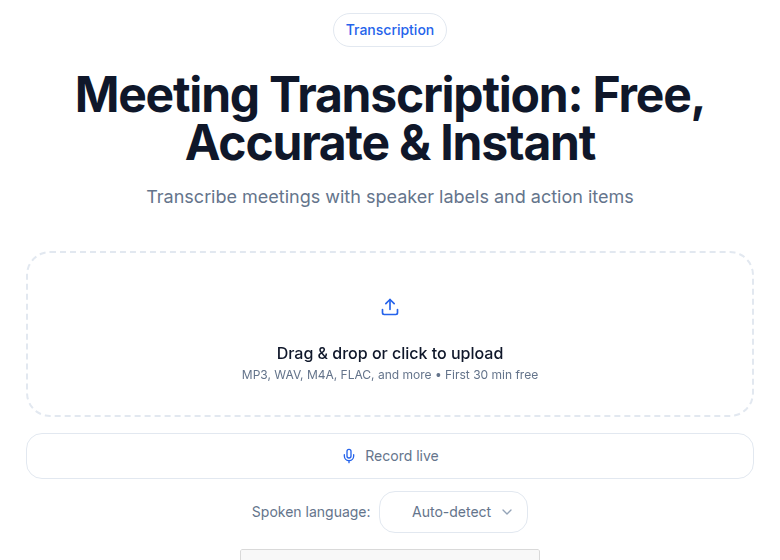 ConvertAudioToText meeting transcription tool
This is the approach I use for internal planning sessions and any meeting that includes clients. The tradeoff is a delay of a few minutes to a couple of hours between meeting end and summary availability, depending on your workflow.
The workflow that works:
- Enable cloud recording in Zoom, Meet, or Teams. All three save to cloud storage automatically when you toggle it once.
- After the meeting, download or access the recording and upload it to your transcription tool.
- Run the transcript through an AI prompt to extract decisions, action items, and open questions. The AI meeting summary templates post covers prompt structure in detail.
- Share the structured output with attendees, keep the full transcript as a searchable archive.
For a team running 20 meetings a week, the overhead is under 30 minutes once the download-upload flow is routine.
Integration honesty: post-hoc tools do not auto-push to Slack or CRM without you building that connection. ConvertAudioToText's Business plan ($59.99/mo) includes API access and webhooks, so you can wire it into your tooling, but that requires someone on your team to set it up. If you need out-of-the-box Slack or CRM routing today, a Level 1 bot does that without engineering work.
If you just need a clean transcript without a bot joining your calls, ConvertAudioToText handles meeting recordings uploaded directly with speaker labels, AI summaries, and export to TXT, SRT, or VTT. The Pro plan is $14.99/mo.
Level 3: Manual Notes + AI Cleanup
This level is underrated and often the right answer for meetings under 20 minutes. Someone in the meeting takes sparse bullets covering decisions and commitments, then pastes them into an LLM prompt that expands, structures, and formats them into meeting minutes.
This is not fully automated, but it is faster than writing polished notes from scratch and produces output that is structured the same way every time. For standups and short 1-on-1s, a 10-row bullet list can become a formatted summary in under 2 minutes.
The downside is that the output is only as good as the bullets. If the note-taker misses something, the AI cannot recover it. For high-stakes meetings where the exact wording of a commitment matters, a recording-based approach is more reliable.
See how to create meeting minutes from audio and action items from meeting recordings for prompt templates that work across all three levels.
How to Choose
| Bot-in-Meeting | Post-Hoc Upload | Manual + AI Cleanup | |
|---|---|---|---|
| Setup effort | Low (calendar OAuth) | Low-medium (recording habit) | None |
| Latency to notes | 2-5 min post-meeting | 5-30 min post-meeting | During or right after |
| Consent / privacy risk | High (third-party bot visible) | Low (standard recording) | None |
| Native integrations (Slack, CRM) | Yes, out of the box | Requires API/webhook setup | Manual copy-paste |
| Cost model | Per-user/month, scales with team | Per-month flat or per-upload | LLM cost only |
| Best for | High-volume sales/CS teams | Internal or sensitive meetings | Short meetings, 1-on-1s |
The privacy risk column matters more than it used to. If your meetings regularly include external participants or touch HR-sensitive topics, a bot that records everyone without individual consent is a legal exposure, not just a UX awkwardness.
For real-time versus post-meeting tradeoffs, the real-time vs post-meeting transcription post covers the latency case in detail.
The Pitfalls That Kill Any Automation Level
Inconsistent recording is the most common failure. If some meetings are recorded and others are not, the archive becomes unreliable and people stop trusting it. Make recording the default for any meeting type where decisions are made. The cost of extra recordings you never use is negligible compared to a missing record when a dispute comes up.
Audio quality breaks transcription faster than anything else. A laptop microphone in a noisy open office will produce a transcript full of [inaudible] gaps no matter which tool you use. USB headsets for remote participants and a dedicated microphone or speakerphone for in-room meetings are the most impactful investments you can make.
Notes that go nowhere provide no value. Auto-generated summaries sent to a channel nobody reads are not an improvement over no notes at all. Route output to wherever the team already coordinates, and have one person responsible for glancing at each summary before it gets filed.
Consent Policy for Teams
Once meeting automation is standard practice, the consent question needs a written policy rather than ad-hoc judgment.
For internal meetings, a standing policy works: "We record team meetings for documentation. Recordings are stored in [location] and accessible to [audience]." Publish it in your team handbook and revisit it when you add a new automation layer.
For external meetings, individual consent at the start of each call remains the safest practice. "I'm going to record this for notes, is that okay?" takes five seconds and avoids the exposure that bot-in-meeting tools face when participants never opted in.
HR-sensitive meetings (performance reviews, investigations, complaints) should follow your legal or HR team's guidance regardless of what automation you use elsewhere.
For related guidance on specific platforms, see how to transcribe a Zoom meeting, Google Meet, and Microsoft Teams.
My Take
For most internal teams, post-hoc upload is the right default. It avoids bot-visibility friction, keeps consent simple, and produces transcripts that are just as accurate as a live bot. The only real cost is the habit of uploading the recording, which takes about a minute once cloud recording is configured.
Bots earn their keep on high-volume external-facing teams: sales, customer success, recruiting. The CRM write-back and automatic action-item logging save real time at volume. For those use cases, Otter Business or Fireflies Pro at $10-20/user/month is justifiable. Just sort out your consent disclosure before rolling it out.
Level 3 is underrated for short, low-stakes meetings. Not every standup needs a full transcript pipeline.
FAQ
What is the difference between a meeting bot and a post-hoc transcription tool?
A meeting bot joins your call as an extra participant and processes audio in real time, producing notes within minutes of the meeting. A post-hoc tool processes a recording file you upload after the meeting ends. Bots offer faster turnaround and native integrations (Slack, CRM), but are visible to participants and create consent exposure. Post-hoc tools require an extra step but do not affect the meeting dynamic.
Do I need consent to record and transcribe meetings?
Requirements vary by jurisdiction. In the US, most states require only one-party consent for recording, but all-party-consent states (California, Illinois, and about a dozen others) require disclosure to everyone on the call. Illinois is particularly relevant because BIPA lawsuits around AI tools have been filed there. For external meetings, verbal disclosure at the start of the call is both the safest and most professional approach regardless of local law.
Can I automate meeting notes without a bot that joins my call?
Yes. Enable cloud recording in Zoom, Google Meet, or Teams, then upload the file to a transcription service afterward. The result is a transcript and AI summary without any third-party bot in the meeting. This approach works for any meeting where you control the recording settings.
How accurate are AI meeting summaries?
Transcript accuracy from current AI models is high enough for reliable note-taking (generally above 90% word-error-rate accuracy on clear audio). The weak point is usually AI summarization, not transcription: generic prompts produce generic summaries. Structuring your prompt to specify meeting type, desired sections (decisions, action items, open questions), and context produces significantly more useful output than a bare "summarize this."
Which meeting note automation approach is best for a sales team?
Sales teams typically benefit most from a bot-in-meeting tool with CRM integration. Fireflies Business ($19/user/mo annual) and tl;dv Business ($59/user/mo annual) both push summaries and action items directly to Salesforce and HubSpot. The volume of external calls justifies the per-user cost, and the CRM write-back is the feature that saves the most time at scale. Make sure your disclosure practice is solid since external participants did not consent to the recording.
Sources
- Otter.ai pricing page: https://otter.ai/pricing (verified July 2026)
- Fireflies.ai pricing page: https://fireflies.ai/pricing (verified July 2026)
- Fireflies.ai BIPA class action, Workplace Privacy Report (April 2026): https://www.workplaceprivacyreport.com/2026/04/articles/artificial-intelligence/ai-meeting-assistants-and-biometric-privacy-governance-lessons-from-the-fireflies-ai-lawsuit/
- tl;dv pricing: https://tldv.io/app/pricing/ (via search, July 2026)
- Google Meet "Take notes for me" rollout, Pipeline Digital: https://pipelinedigital.co.uk/blog/google-workspace-updates/take-notes-for-me-feature-can-finally-be-set-as-default/
- Zoom AI Companion meeting notes: https://www.zoom.com/en/products/ai-assistant/features/ai-note-taking/
- Microsoft 365 Copilot pricing: https://www.microsoft.com/en-us/microsoft-365-copilot/pricing
- ConvertAudioToText pricing: https://convertaudiototext.com/pricing (verified July 2026)
Try transcription free
Convert any audio or video to clean, unwatermarked text — speaker labels, timestamps, and AI summaries included. First 30 minutes free, no account.
Related Articles
How to Transcribe a Google Meet Recording
Turn a Google Meet recording into searchable text, speaker-labeled notes, action items, and subtitles with a clear step-by-step upload or URL workflow.
How to Transcribe a Sales Call
Learn how to transcribe a sales call, label speakers, and pull action items with CATT. Turn a recording or meeting URL into clean notes and follow-ups.