YouTube Auto-Captions vs AI Tools: When Each Wins
Summarize this article with:
YouTube's automatic captions are free, instant, and now support 99 languages, so the old "they barely cover any languages" argument is dead. The gap that still matters in 2026 is quality: auto-captions land around 85 to 95 percent on clean speech but drop to roughly 60 to 75 percent with music, noise, accents, or multiple speakers, and they skip reliable punctuation, casing, and speaker labels. The FCC and DCMP treat 99 percent as the accessibility floor, which auto-captions miss on every content type. Use YouTube auto-captions for casual, low-stakes video. Use a dedicated AI tool when accuracy, accessibility compliance, clean exportable files, or search visibility actually matter.
The comparison most "vs" posts get wrong
Most articles that pit YouTube auto-captions against AI subtitle tools still lead with language coverage, claiming YouTube only auto-captions a dozen languages while paid tools cover the world. That claim is out of date. Google's own support documentation now lists 99 languages for automatic captioning, from Afrikaans and Amharic to Zulu, including Arabic, Hindi, Swahili, Vietnamese, and most of the Indian-subcontinent languages people used to say YouTube ignored.
So coverage is no longer the differentiator. If you only needed some caption track in some language, YouTube already gives you that for free on almost any video with audible speech. The real questions in 2026 are narrower and more useful: how accurate is that free track on your actual audio, is the output clean enough to publish, and does it help or hurt the way people find your video? This post answers those three, names real alternatives with their real tradeoffs, and tells you plainly when the free option is the right call.
Where YouTube auto-captions actually stand in 2026
YouTube's automatic speech recognition runs on Google's internal speech models, the same lineage that powers Google Meet live captions and the Pixel Recorder app. The captions are generated automatically for any supported-language video, usually within minutes of processing, at no cost.
Accuracy is genuinely good on clean input and genuinely shaky on everything else. Independent testing and accessibility audits across 2026 put auto-caption accuracy in a wide band depending on conditions:
| Audio condition | Typical auto-caption accuracy | What goes wrong |
|---|---|---|
| Studio mic, single clear speaker | 90 to 95% | Mostly punctuation and casing |
| Educational talk, decent mic | 88 to 94% | Proper nouns, technical terms |
| Accented English or multiple speakers | 75 to 85% | Names, overlapping speech, who-said-what |
| Background music or outdoor noise | 60 to 75% | Whole phrases dropped or invented |
| Niche jargon, code-switching | Highly variable | Domain terms reliably wrong |
Those bands come from accessibility testing and caption-quality reporting in 2026, not from a single benchmark, so treat them as ranges rather than guarantees. The pattern is consistent: the cleaner and more conversational your audio, the closer auto-captions get to usable; the messier it gets, the faster they fall apart.
Two quality problems show up regardless of accuracy. Auto-captions punctuate weakly and capitalize proper nouns unreliably, so the track reads as a run-on stream rather than sentences. And YouTube inserts line and "speaker" breaks based on silence, not on an actual change of speaker, so a two-person interview gets chopped at pauses instead of at turns. For accessibility that is workable. As publishable text, a transcript, or a clean SRT, it usually is not.
How that compares to dedicated AI transcription
A dedicated tool is not magic, and on a pristine studio recording the gap is small. Where dedicated AI pulls ahead is exactly where auto-captions struggle: noisy audio, multiple speakers, accents, and the need for a clean, structured, exportable file.
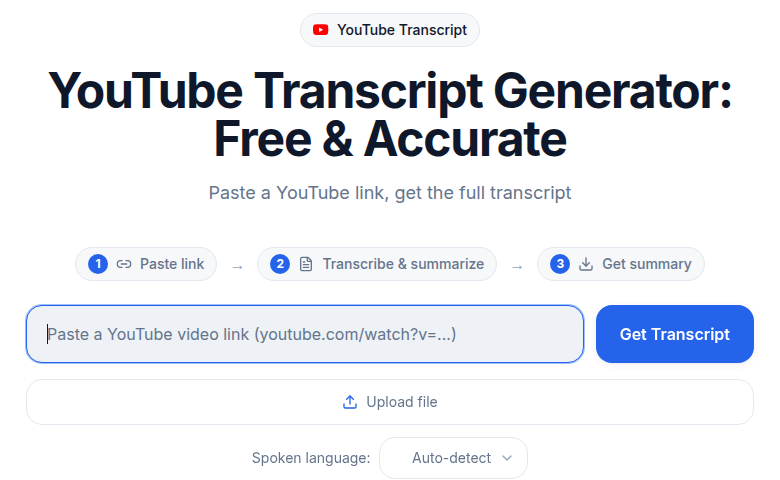 The YouTube transcript generator on ConvertAudioToText: paste a video link, get the full transcript with speaker labels
The underlying models have measurably low error rates on standard tests. OpenAI's Whisper large-v3 reaches about 2.7 percent word error rate on clean read-speech benchmarks (LibriSpeech test-clean), rising to roughly 8 to 12 percent on real-world meetings, podcasts, and calls. Deepgram's Nova-3 reports median word error rates around 5.26 to 6.84 percent in production English, and its March 2026 multilingual update cut batch error rates by about a third. Those numbers are not directly comparable to YouTube's "accuracy percentage," because a benchmark word error rate and a caption-audit accuracy figure measure different things in different conditions. The honest takeaway is the direction, not a single chasm number: on clean audio everyone is good; on messy audio the dedicated engines degrade more gracefully.
Just as important is what you get back. A dedicated tool like ConvertAudioToText returns a properly punctuated, cased transcript with real speaker labels, timestamps, and one-click export to SRT, VTT, TXT, DOCX, or PDF. CATT is free to start with no signup for the first 30 minutes of any file, supports 99+ languages, and quotes up to 99 percent accuracy on clear audio (with the honest caveat that accuracy varies with noise, accents, and audio quality). You can paste a YouTube URL straight into the YouTube transcript generator and get a clean transcript back, or use the subtitle generator to produce a YouTube-ready SRT.
The point is not that the dedicated tool always wins. It is that it wins on the audio and the output that auto-captions handle worst.
Honest comparison: the real alternatives
If you decide auto-captions are not enough, CATT is one of several dedicated options, and a fair comparison names the tradeoffs. Here is how the free tiers actually stack up for caption and subtitle work in 2026:
| Tool | Free tier (real limits) | Output quality | Best for |
|---|---|---|---|
| YouTube auto-captions | Unlimited, free, on-platform | Weak punctuation/casing, silence-based breaks | Casual video where SEO and compliance do not matter |
| ConvertAudioToText | First 30 min of any file, no signup; free account: up to 30 files a day, up to 30 min each | Clean SRT/VTT/TXT/DOCX/PDF, speaker detection, 99+ languages | Clean exportable files from URL or upload |
| Happy Scribe | ~10 minutes on the free trial | Professional, broadcast formats (incl. STL) | Broadcast and agency workflows |
| Descript | ~1 hour transcription free | Strong, tied to its editor | Editing podcasts/video in one app |
| Kapwing / VEED | ~10 min, watermark on export | Good, styled burned-in captions | Social clips with on-screen styling |
A few honest notes. Happy Scribe and Descript are excellent, but their free tiers are short trials, not standing free allowances. Kapwing and VEED are built for styled, burned-in social captions rather than clean SRT files, and they watermark free exports. CATT's edge is the no-signup start and the generous per-file allowance for reading and copying clean transcripts, with free TXT downloads on a free account and other file exports on paid plans, not styled on-screen captions. If your job is burning animated captions onto a vertical TikTok, a social editor is the better fit; if your job is a publish-ready SRT or transcript, a transcription tool is. Pick by the output you actually need, not by which brand shouts loudest.
The accessibility floor most creators miss
This is the part auto-captions cannot quietly clear. The FCC and the Described and Captioned Media Program treat 99 percent as the minimum accuracy for compliant captions (roughly 15 or fewer errors per 1,500 words). YouTube's auto-captions typically land in the 85 to 95 percent range on good audio and lower on bad audio, which means they do not meet the 99 percent accessibility standard on any content type.
For a personal vlog that is a non-issue. For a university lecture, a government video, a medical or legal explainer, a course you sell, or anything covered by ADA or WCAG obligations, the auto-caption track is not a defensible accessibility solution on its own. It is a starting point you are expected to correct. There is also a fairness angle: 2026 research on YouTube's Spanish captioning found measurable accuracy differences across dialects and speaker groups, which is a reminder that "good enough on average" can still fail specific audiences. (That study reports the disparities qualitatively here; we are not quoting a specific figure from it.)
The SEO angle, stated honestly
YouTube indexes the text of your captions, which expands the surface of text that search can match to a query. Every misrecognized word is a keyword you do not rank for. If you say "subtitle generator" and the auto-caption hears "subtle generator," the video simply is not associated with the term you targeted.
Beyond indexing, the practitioner consensus is that an accurate, creator-uploaded caption track is treated more favorably than a rough machine track, on the logic that low-quality, auto-generated text reads like the "spammy gibberish" search engines try to demote. Treat that as a durable best-practice model rather than a confirmed ranking rule, because it comes from SEO practitioners and audits, not from a published Google ranking factor. What is not in dispute: clean captions get indexed cleanly, and rough ones bury keywords inside errors. Uploading a corrected SRT removes that risk for the life of the video.
The workflow that wins
For uploads you actually care about, here is the pipeline that takes the least time for the most payoff:
- After you finish editing but before you publish, paste the draft YouTube URL (or upload the export file) into the YouTube transcript generator or the subtitle generator.
- Get the SRT back, usually in a few minutes for a typical clip.
- Open the SRT in any text editor. Scan for proper nouns, brand and product names, technical terms, and any errors clustered around the noisiest sections. This is where the AI saved you the typing; you are only proofing.
- Upload the corrected SRT in YouTube Studio, replacing the auto-generated track.
- Publishing in more than one language? Run the source SRT through subtitle translation and upload one corrected track per language.
For a clean 30-minute video this is roughly 15 minutes of real work, most of it proofreading, and the accessibility and search payback accrues for the life of the upload.
The middle path: editing the auto-caption track
Some creators skip the AI tool entirely: download the auto-caption SRT from YouTube Studio, fix the errors by hand, and re-upload. This trades software for human time, and the trade is usually bad on noisy audio. A track sitting at 85 percent accuracy means roughly one wrong word every six or seven words, and hunting those down line by line is slower than proofreading a clean draft that was 95-plus percent right to begin with.
The exception is real: if your audio is genuinely clean and your speech is conversational, auto-captions can clear 95 percent, and hand-fixing the handful of errors is fast. Single-host talking-head channels with a good mic often live in that bucket. Most channels with guests, music, field audio, or jargon do not.
When YouTube auto-captions are genuinely enough
Plenty of cases do not justify any extra step. Auto-captions are the right call for:
- Casual personal vlogs where the audience is small and discovery is not the goal.
- Live streams, where there is no opportunity to upload a corrected SRT before going out.
- Internal or unlisted training videos watched once by a known team.
- Test uploads where you are checking the publish flow, not promoting the content.
For these, the free track is fine and the dedicated tool is overkill. The dividing line is simple: the more you need the video to be accurate, accessible, exportable, or findable, the more the dedicated tool earns its 15 minutes.
The 2026 verdict
My take in one sentence: YouTube auto-captions are a solid free accessibility baseline and a weak publishing layer, and that has not changed even though the language gap closed. They cover 99 languages now, but they still miss the 99 percent accuracy floor, still hand you a punctuation-poor track with silence-based breaks, and still bury keywords inside recognition errors on anything noisier than a quiet studio.
If you have never run the math on your own channel, do this once: pick your last three uploads, transcribe them with a free transcription tool or by pasting the URL into the YouTube transcript generator, and read the result next to the auto-caption track. On clean audio you may decide the free track is fine. On anything with guests, music, accents, or field noise, the gap usually decides for you.
Frequently asked questions
How many languages do YouTube auto-captions support in 2026?
Google's support documentation lists 99 languages for automatic captioning, including Arabic, Hindi, Swahili, Vietnamese, Zulu, and most major Indian-subcontinent languages. This is separate from auto-translate, which lets viewers machine-translate an existing caption track into 100-plus more.
Are YouTube auto-captions accurate enough to publish?
On clean, single-speaker studio audio they reach roughly 85 to 95 percent, which reads acceptably but still needs casing and punctuation fixes. With music, background noise, accents, or multiple speakers they drop to about 60 to 75 percent, which is usually not publish-ready. They also fall short of the 99 percent accessibility standard the FCC and DCMP use.
Is a dedicated AI tool actually more accurate than YouTube?
On pristine audio the difference is small, because both are good. The advantage shows up on noisy, accented, or multi-speaker audio, and in the output: a dedicated tool returns a punctuated, cased transcript with real speaker labels and clean SRT, VTT, TXT, DOCX, or PDF export. The models behind these tools report low error rates (Whisper large-v3 around 2.7 percent on clean benchmarks, Deepgram Nova-3 around 5.26 to 6.84 percent in production English), though those lab figures are not directly comparable to YouTube's caption-audit percentages.
Do uploaded captions help YouTube SEO more than auto-captions?
YouTube indexes caption text either way, so every recognition error is a missed keyword. Practitioners widely report that an accurate, creator-uploaded track is treated more favorably than a rough machine track, since low-quality auto-text resembles the spammy content search engines demote. Treat that as a durable best practice rather than a confirmed ranking rule, but the safe move is to upload a corrected SRT.
Should I fix the auto-caption track by hand or use an AI tool?
If your audio is clean and your speech is conversational and already near 95 percent, hand-fixing the few errors is fast. If the track is sitting at 85 percent or lower, proofreading a clean AI draft is faster than hunting down one wrong word every six or seven words. The noisier the audio, the more the AI tool wins on time.
Is ConvertAudioToText free?
Yes. The first 30 minutes of any file are transcribed free with no account, and a free account transcribes up to 30 files a day, up to 30 minutes each. It supports 99+ languages. Reading, copying and TXT downloads are free on a free account, and DOCX, PDF, SRT, VTT and JSON come with your first file, the Weekly Pass, a top-up or a paid plan. You can paste a YouTube URL directly into the YouTube transcript generator.
What is the fastest way to caption a YouTube video accurately?
Before publishing, paste the draft URL into the subtitle generator, get an SRT back in a few minutes, proofread it for names and jargon in any text editor, then upload that corrected SRT in YouTube Studio to replace the auto-generated track. For multilingual channels, run the source SRT through subtitle translation and upload one corrected track per language.
Related reading
Try transcription free
Convert any audio or video to clean, unwatermarked text — speaker labels, timestamps, and AI summaries included. First 30 minutes free, no account.
Related Articles
How to Translate a YouTube Video with AI (2026 Reality Check)
Translate a YouTube video with AI: the auto-dub state in 2026, caption-track translation, and the reliable manual path.
How to Transcribe a YouTube Video to Text
Turn any YouTube video into text. Paste the URL into CATT, review the auto transcript, and export TXT, SRT, or VTT subtitles in a few very easy steps.