
AI Meeting Assistant: From the Calendar Invite to the Follow-Up Email
It joins your calls from Google Calendar, takes the notes, answers questions about what was said and drafts the follow-up
No account? The first 30 minutes of any file are free. Create a free account for premium on your first file.
An AI meeting assistant handles the work around a meeting: it joins the calls on your calendar, records them, writes the summary, decisions and action items, answers questions about what was said and drafts the follow-up email. Here it works with Zoom, Google Meet, Microsoft Teams and Webex. The meeting notetaker comes with Pro and higher plans, the Weekly Pass and minutes top-ups. It is not part of the free or Starter plans.
Before, during and after the meeting
Before: it reads your calendar
Connect Google Calendar and choose the meetings it joins, or turn on auto-join for every call with a video link.
During: it records
It joins as a named participant you can rename, and leaves when the meeting ends.
After: it does the follow-up
Summary, decisions, action items with owners and a follow-up email draft.
Later: ask it
Ask AI chat what was decided or who owns a task, and search every transcript in your account.
How it works
Connect Google Calendar
In Settings. Or paste a meeting link to send the assistant to one call.
Meet as usual
Admit the assistant if there is a waiting room.
Act on the notes
Check the action items, ask questions, send the follow-up.
What the meeting assistant handles
The jobs it takes off your plate
| Job | Done by hand | With the assistant |
|---|---|---|
| Remember to record | Someone presses record, or forgets | It joins the meetings you picked in Google Calendar |
| Take notes while talking | One person half listens | Everyone talks, the transcript keeps every line |
| Write the recap | Done that evening, from memory | Summary, decisions and action items when the call ends |
| Answer what was agreed | Ask around, scroll chat | Ask AI chat on the meeting, or search all transcripts |
| Send the follow-up | Written from scratch | A draft email ready to edit and send |
Set up auto-join with Google Calendar

- Open Settings in your dashboard and connect Google Calendar under Calendar connections.
- Your meetings with a video link for the next 7 days appear in Meetings. Send the assistant to the ones you want, or turn on auto-join in Settings for all of them.
- Optional: set the assistant's name and turn on the recording notice email for attendees.
Summaries you can trust
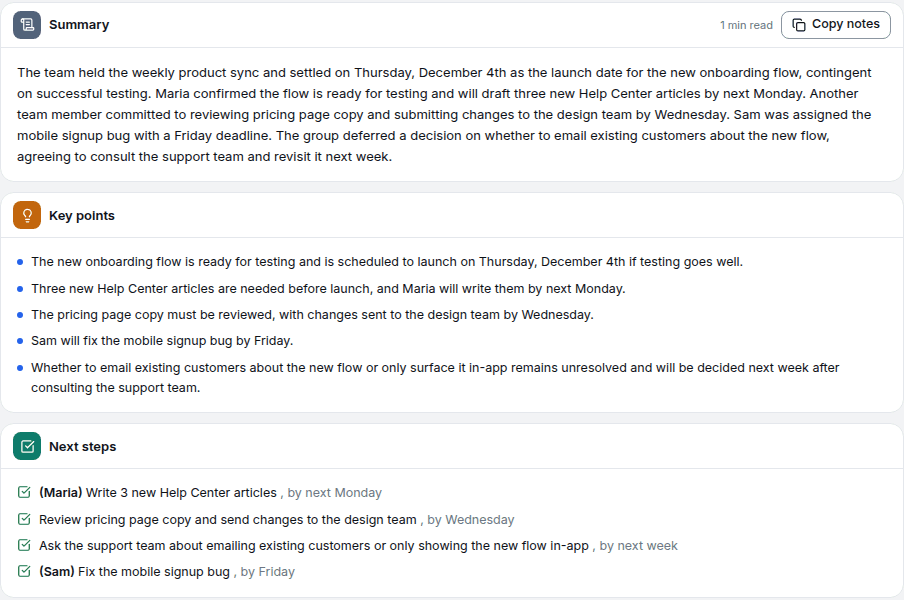
Every summary sits next to the transcript it came from, with timestamps, so you can check a decision against what was really said before you act on it. Action items only appear when someone stated them; the assistant does not invent owners or deadlines.
Automatic transcripts can miss words in noisy audio, crosstalk or unusual names, so read the transcript and fix what matters before you use it.
AI meeting summary templatesExtract action items from meetingsDraft a follow-up email from a meeting
When an upload is the better assistant
- The meeting is on an app without a link the assistant can join, or on the phone.
- You already have the recording from Zoom cloud, Teams or a voice recorder.
- Someone in the meeting does not want a bot in the call.
Privacy
- Files and transcripts are encrypted in transit (TLS) and at rest (AES-256).
- Recordings are processed by automated systems only. No person listens to your files.
- On the free plan, source audio is deleted automatically, usually after 7 days. On paid plans you choose how long source audio is kept, from 7 days to a year, or with no time limit.
- Deleting a transcript moves it to the Trash for 30 days. Delete forever or Empty Trash removes it at once.
What it costs
| You have | What you get |
|---|---|
| No account | The first 30 minutes of any file transcribed, readable on screen |
| A free account | Up to 30 files a day, up to 30 minutes each, TXT download on every file; your first file runs up to 60 minutes with every export format |
| Weekly Pass | $9.99 for 20 hours over 7 days, full-length files and every export format |
| Pro | $14.99/month or $99.99/year, full-length files, every export format and the AI tools |
Frequently asked questions
It joins your calls, records them and turns the conversation into notes: a summary, the decisions, action items with owners and deadlines, open questions and a draft follow-up email. You can then ask it questions about the meeting in plain language.
The meeting notetaker comes with Pro and higher plans, the Weekly Pass and minutes top-ups. It is not part of the free or Starter plans. You can still upload or record a meeting for free and get the AI summary on your first file with a free account.
Yes. Open the meeting and ask AI chat, for example what was decided about the budget or who is sending the contract. Answers come from that meeting's transcript. To find something across meetings, search all your transcripts by word.
It drafts the follow-up email for you to copy and send. The only email it can send on its own is an optional recording notice to attendees, which you turn on in Meetings.
The spoken language is detected automatically across 99+ languages, or you can pick it before you start for the most reliable result. The summary and action items are written in the language of the meeting, and you can translate the transcript into 99 languages.
Related tools
AI Note Taker
Paste a meeting link and the notetaker joins, records and writes the notes: transcript with speakers, summary, decisions and action items
Meeting Recorder
Send a recorder to your video call, record a meeting in the room with your phone or laptop, or upload a recording you already have
Meeting Minutes from Recording
Upload the meeting recording and get the transcript, decisions and action items to write the minutes from
Audio Summarizer
Get AI-powered summaries of any audio file
Meeting Transcription
Send a notetaker to the call, or upload the recording, even a 3-hour one. Get every word, who said what, and a summary.