
Meeting Recorder: Record Any Meeting, Online or in the Room, and Get the Transcript
Send a recorder to your video call, record a meeting in the room with your phone or laptop, or upload a recording you already have
No account? The first 30 minutes of any file are free. Create a free account for premium on your first file.
For a video call, paste the link above and a recorder joins the call. For a meeting in a room, record it in your browser or on your phone and upload the file. Either way you get a transcript with speakers, a summary and action items. The meeting notetaker comes with Pro and higher plans, the Weekly Pass and minutes top-ups. It is not part of the free or Starter plans. Recording yourself and uploading is free to start.
One recorder for every kind of meeting
Video calls
A recorder joins Zoom, Google Meet, Microsoft Teams and Webex calls and leaves when they end.
In the room
Your phone or laptop is the recorder. No device to buy.
Any file
MP3, M4A, WAV, MP4, MOV and more, from a phone, a voice recorder or a cloud recording.
Transcript and notes
Speakers labeled, summary, decisions and action items from the same recording.
How it works
Record
Send the recorder to the call, or record the room on your phone or laptop.
Upload
Online calls arrive by themselves. Upload recordings from the room.
Read and share
Transcript with speakers, summary and action items, ready to export.
How to record a meeting
Pick the recorder for your meeting
| Meeting | Best recorder | Cost |
|---|---|---|
| Zoom, Google Meet, Teams or Webex call | Paste the link above, or let Google Calendar send the recorder | Pro and higher plans, the Weekly Pass or a minutes top-up |
| In a room, up to about 8 people | One phone or laptop in the middle of the table | Free to start |
| Large room or a lot of echo | A conference microphone or a dedicated voice recorder, then upload | Free to start |
| A call on another app, or a phone call | Record on your device, then upload | Free to start |
Record a meeting in the room
- Put one phone or laptop in the middle of the table, on a cloth or notebook so the table does not thump.
- Turn on Do Not Disturb so calls and notifications do not cut the recording.
- Record a few seconds and play them back before the meeting starts.
- Ask people to say their name the first time they speak: it makes renaming speakers quick.
- Upload the file here, or record in your browser with the online voice recorder.
Online voice recorderRecording in-person interviewsHandling room noise
Phone, laptop or AI recorder device
| Recorder | Good for | Watch out for |
|---|---|---|
| Phone | Small meetings, interviews, anywhere | Notifications and a full storage |
| Laptop in the browser | Meetings at your desk or in a small room | Keep the tab open and the laptop awake |
| Dedicated recorder or AI recorder device | Large rooms, long days, field work | Export the audio file so you can upload it |
| Recorder joining the call | Video calls you host or attend | The host may need to admit it from a waiting room |
What you get from the recording
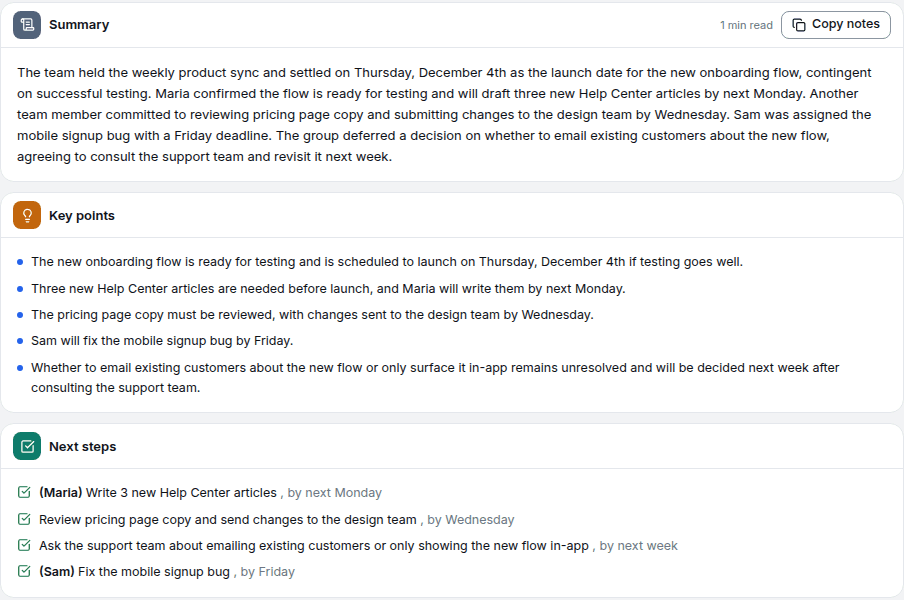
- A transcript with a timestamp on every line and each speaker labeled.
- A summary with decisions and action items, written in the meeting's language.
- Exports to Word, PDF, TXT, SRT and more.
Privacy
- Files and transcripts are encrypted in transit (TLS) and at rest (AES-256).
- Recordings are processed by automated systems only. No person listens to your files.
- On the free plan, source audio is deleted automatically, usually after 7 days. On paid plans you choose how long source audio is kept, from 7 days to a year, or with no time limit.
- Deleting a transcript moves it to the Trash for 30 days. Delete forever or Empty Trash removes it at once.
What it costs
| You have | What you get |
|---|---|
| No account | The first 30 minutes of any file transcribed, readable on screen |
| A free account | Up to 30 files a day, up to 30 minutes each, TXT download on every file; your first file runs up to 60 minutes with every export format |
| Weekly Pass | $9.99 for 20 hours over 7 days, full-length files and every export format |
| Pro | $14.99/month or $99.99/year, full-length files, every export format and the AI tools |
Frequently asked questions
Yes. Record it with your phone's voice recorder app, or in your browser with the online voice recorder, and upload the file. Recording on this page also works: without an account it stops after 2 minutes, with a free account it runs up to 30 minutes, and paid plans record as long as your minutes last.
No. A recent phone in the middle of the table records a small meeting well enough for a clean transcript. A dedicated recorder or a conference microphone helps in large or echoing rooms, and its files upload here like any other.
Recording yourself and uploading is free to start. The first 30 minutes of any file are transcribed free with no signup. A free account transcribes up to 30 files a day, up to 30 minutes each, and your first file can run up to 60 minutes. The meeting notetaker comes with Pro and higher plans, the Weekly Pass and minutes top-ups. It is not part of the free or Starter plans.
Tell people before you record and follow the consent rules where you are: some places require everyone's consent. When the recorder joins a video call it shows up as a named participant everyone can see.
Full-length files come with the Weekly Pass ($9.99 for 20 hours over 7 days), a minutes top-up or Pro ($14.99/month or $99.99/year). On the free plan, files are transcribed up to 30 minutes each.
Related tools
AI Note Taker
Paste a meeting link and the notetaker joins, records and writes the notes: transcript with speakers, summary, decisions and action items
Online Voice Recorder
Record audio from your microphone directly in the browser
Meeting Transcription
Send a notetaker to the call, or upload the recording, even a 3-hour one. Get every word, who said what, and a summary.
Speaker Identification
Upload a conversation and get a transcript split by speaker, with a timestamp on every turn
AI Meeting Assistant
It joins your calls from Google Calendar, takes the notes, answers questions about what was said and drafts the follow-up