Transcription for Podcasters: The Complete 2026 Guide
Summarize this article with:
Transcribing your podcast episodes unlocks show notes, social clips, chapter markers, accessibility, and search traffic, all from a single text file. AI transcription has made this practical for independent podcasters: a 45-minute episode processes in a few minutes for cents or a flat monthly fee. This guide covers the workflow, the tools that fit different budgets, and routes to the deeper guides for each use case.
A podcast transcript turns one recording into a week's worth of distribution assets. Most independent podcasters skip transcription and spend their limited post-production time on tasks that would take a fraction of the time with a text version of the episode in hand. This guide covers why transcription matters, how to fit it into a practical weekly workflow, which tools are available at different price points, and where to go deeper on each use case.
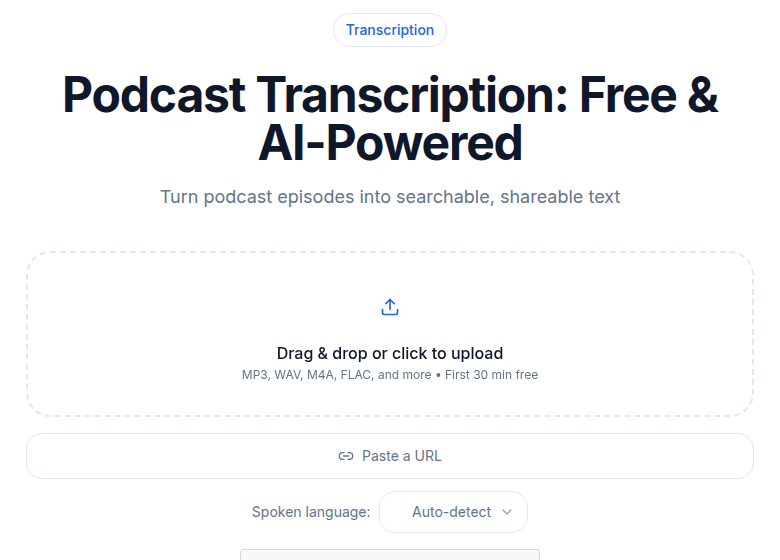 Podcast transcription: upload an episode or paste the feed URL
What a Transcript Actually Unlocks
The transcript itself is not the value. The work that becomes possible because you have it is.
Show notes built from a transcript are 10 to 20 times longer than notes written from memory. A 45-minute episode produces roughly 6,000 to 8,000 words of transcript. A good set of show notes draws from that: a tight summary, timestamped highlights, quotes for social media, and links to everything mentioned. See the how to create podcast show notes automatically guide for the workflow, or the podcast show notes template for a ready-made structure.
Clips for social media. Spotting the strongest 60-second moment in a 45-minute conversation is fast when you can scan text. The podcast clips for social media guide covers clip selection criteria and the export workflow.
Chapter markers. Structured transcripts make it straightforward to identify topic breaks and write chapter titles. See the podcast chapter markers guide for the format and how to add them to your RSS feed.
Accessibility. Hearing-impaired listeners cannot access your show without a transcript. Neither can people consuming content in environments where audio is not feasible. The podcast accessibility transcripts guide covers legal and ethical dimensions.
Monetization. Transcripts open sponsor mention verification, premium content tiers, and licensing opportunities. See monetizing podcast transcripts for the approaches that work at different audience sizes.
RSS transcript tags. The Podcasting 2.0 podcast:transcript tag lets Apple Podcasts, Spotify, and other clients display your transcript directly inside the app. The podcast RSS with transcripts guide covers the spec and which hosting platforms write the tag automatically.
The Cost of Transcription in 2026
Three years ago, transcribing a weekly 45-minute podcast through a human service cost $40 to $90 per episode. Annual cost for a weekly show: somewhere between $2,000 and $4,700. Most independent podcasters could not justify that.
AI transcription has changed the math. The question now is which pricing model fits your output volume.
Per-minute pricing (Rev, Happy Scribe top-up credits) works for occasional use. Rev charges $0.25/minute for AI transcription, which is roughly $11.25 per 45-minute episode. Human transcription from Rev runs $1.99/minute, so about $90 for that same episode.
Unlimited flat-rate plans make more sense for weekly or daily publishers. At that output, per-minute pricing compounds quickly. For a deeper look at where the crossover point sits, see transcription pricing models explained.
For help picking a specific tool, best transcription for podcasts 2026 does a direct comparison ranked by use case.
The Standard Podcast Transcription Workflow
A five-step workflow covers most solo and two-host podcasts.
Step 1: Record Clean Audio
Transcription accuracy starts with recording quality. The single biggest predictor of a clean transcript is each speaker on their own microphone and their own track. For solo shows, a single condenser mic in a quiet room is sufficient. For two-host or interview formats, separate tracks matter more than microphone quality. For the technical setup on guest interviews specifically, see the interview podcast workflow guide.
Step 2: Edit the Audio First
Edit out crosstalk, retakes, and dead air before uploading. AI transcription processes everything you send, including the section where you flubbed the intro four times. An edited 45-minute episode produces a cleaner, more useful transcript than an unedited 60-minute recording.
Step 3: Upload and Transcribe
Upload the edited file to your transcription service. A 45-minute episode returns in roughly 3 to 6 minutes on a modern AI pipeline. If speed is a hard constraint, how to transcribe a 30-minute podcast quickly covers the fastest options.
Step 4: Review for Errors
Plan 10 to 15 minutes of review per episode. The errors that matter most:
- Guest names and credentials
- Brands, products, and tools mentioned
- Numbers, dates, and statistics
- Proper nouns and place names
Fix these before you do anything else with the transcript.
Step 5: Route to Your Use Case
From a clean, reviewed transcript, every downstream task becomes faster. Generate show notes, pull clip candidates, identify chapter breaks, and post the full transcript to your episode page. Each of those tasks has its own guide linked throughout this post.
Comparing AI Transcription Options for Podcasters
The tools below cover the main options at different price points. Prices are verified as of August 2026.
| Tool | Best for | Pricing model | Starting cost |
|---|---|---|---|
| Rev | Pay-as-you-go | Per minute | $0.25/min AI, $1.99/min human |
| TurboScribe | Unlimited volume, simple pricing | Flat monthly/annual | $20/month or $10/month annually |
| Descript | Podcasters who also edit in the same tool | Monthly subscription with hour caps | $16/month annually (Hobbyist) |
| Otter.ai | Meeting-heavy shows, team accounts | Monthly subscription | $8.33/user/month annually (Pro) |
| Happy Scribe | European teams, multilingual | Monthly subscription with minute caps | from €8.50/month annually (Basic, 120 min) |
| Trint | Journalism, enterprise compliance | Per-seat subscription | ~$80/seat/month (Starter, 7 files/month) |
A few notes on these:
Descript bundles transcription inside a full editing environment. The Hobbyist plan ($16/month annually) gives 10 hours of media per month. The Creator plan ($24/month annually) gives 30 hours. If you already edit in Descript, transcription is effectively included. If you only need transcription, paying for the editor is overhead you do not need.
Otter.ai is more meeting-bot than podcast tool. Its Pro plan ($8.33/month annually) caps file imports at 10 per month and tops out at 1,200 minutes. For a twice-weekly podcast that is tight. The Business plan removes file import limits but costs $19.99/user/month annually.
TurboScribe's flat $10/month annual rate with no file or minute caps is straightforward for weekly or daily publishers who just want transcripts without managing credits.
Happy Scribe prices in euros; the dollar equivalent varies with exchange rates. For podcasters who need multilingual transcription across European languages, it has good coverage.
Trint is built for journalism and media teams that need collaboration, comment workflows, and compliance features. Solo podcasters rarely need what they are paying for at that price.
For a direct price-per-hour breakdown across these and other services, see the cost of transcription per hour analysis.
If you just need a clean transcript without an editor or meeting bot attached, ConvertAudioToText handles the transcription step directly and supports 99+ languages with speaker detection. Its free account transcribes your first file on the premium engine (up to an hour), then up to 30 files a day, up to 30 minutes each. Reading and copying the transcript is free; TXT downloads are free, and DOCX, PDF, SRT, VTT and JSON downloads after the first file need the Weekly Pass, a minutes top-up or a paid plan. For heavier use, Pro is $14.99/month or $99.99/year unlimited, and a Weekly Pass gives 1,200 minutes for $9.99 one-time.
When Human Transcription Still Makes Sense
Three situations still favor human transcription over AI.
You publish transcripts as primary content. Medical, legal, and scholarly podcasts that treat the transcript as a citable document need every word verified.
The audio has serious quality problems. When AI accuracy drops below about 80 percent, cleaning the AI output takes longer than just sending it to a human transcriptionist.
You need broadcast-grade subtitle timing. AI tools export SRT and VTT files, but cue timing is often loose. For broadcast subtitles where frame-accurate timing matters, human review of the timing is worth the cost.
For most independent podcasters, none of these apply. AI is the default workflow.
Multi-Language Podcasts
Podcasts in Spanish, French, Portuguese, and other major languages have grown substantially. The AI transcription tooling has kept pace. Most services listed above support 50 to 150 languages.
The workflow is identical. Record clean audio, edit, upload, review. The review step matters slightly more for non-English languages because name and proper noun accuracy varies by language.
Time Budget for a Weekly Show
A weekly 45-minute podcast with this workflow:
- Recording: 60 to 90 minutes including setup
- Editing: 60 to 120 minutes
- Transcription processing: 5 minutes
- Transcript review: 15 minutes
- Show notes and clip work: 30 to 45 minutes
- Publishing: 15 minutes
Total post-production: roughly 3 to 4 hours per episode.
Without the transcript, the same outputs (show notes, clip selection, SEO) take 5 to 7 hours because everything has to be done by re-listening or from sparse notes. Over a full year, that is 100 to 200 hours saved on a weekly show.
Three Mistakes That Plateau Podcasts
Publishing without transcripts. Audio is invisible to search engines. Episodes from 18 months ago that had transcripts are still pulling search visitors. Episodes without them are not.
Publishing short show notes. Three lines and a link is not show notes. Notes built from a transcript can include a summary, timestamped moments, pullquotes, and links to everything mentioned. That is what drives recurring traffic.
Spending all time on production, none on distribution. A great episode that no one finds grows nothing. The transcript is what makes distribution work tractable on a weekly schedule.
The discipline of growing a podcast in 2026 is more about distribution than production quality past a baseline threshold. The transcript is the asset that makes most distribution work possible. Start with one episode, run the full workflow, and compare it to what you have been doing.
FAQ
Is AI transcription accurate enough for podcast show notes?
For clean recordings with a good microphone in a quiet room, AI accuracy typically lands between 90 and 97 percent. That is good enough for show notes with a 10-15 minute review pass. If a guest name or product is mis-transcribed, you catch it in review before publishing. Human transcription still makes sense if you publish the transcript as a primary document or if the audio quality is poor.
How long does it take to transcribe a podcast episode?
A 45-minute episode processed by a modern AI transcription service typically returns in 3 to 6 minutes. Some services with heavier processing pipelines (diarization, chapter detection) take slightly longer. The constraint shifts from waiting for the transcript to reviewing and using it.
Which podcast hosting platforms support transcript uploads?
Buzzsprout, Transistor, Castos, and RSS.com all accept transcript uploads and write the RSS transcript tag automatically. Apple Podcasts and Spotify both display transcripts to listeners when the tag is present. If your host does not support transcript uploads, post the transcript on your own website and link to it from your episode description.
Do podcast transcripts help with SEO?
Yes. Search engines cannot index audio, but they do index text. A transcript page for a 45-minute episode can contain 6,000 to 8,000 words of naturally occurring keyword-rich content. Guest names, tools discussed, specific phrases, and long-tail questions mentioned in the conversation all become searchable. Episodes from 12 to 18 months ago can still pull search traffic if they have transcripts.
What is the cheapest way to transcribe podcasts?
For low-volume use, Rev charges $0.25 per minute for AI transcription, which works out to about $11.25 for a 45-minute episode. For consistent weekly output, a flat-rate unlimited plan (TurboScribe at $10/month annually, or similar services) is typically cheaper past two or three episodes per month. Descript includes transcription within its editing environment if you already pay for it.
Can I use my podcast transcript for more than show notes?
A transcript is the source document for most distribution work: show notes, social media clips, chapter markers, accessibility, newsletter content, blog posts, and RSS transcript tags. The deeper guides in this cluster each cover one of these use cases. See the links throughout this post.
Sources
- Descript pricing: https://www.descript.com/pricing
- Otter.ai pricing: https://otter.ai/pricing
- Rev pricing: https://www.rev.com/pricing
- TurboScribe pricing: https://turboscribe.ai/pricing (verified via search, page 403'd)
- Happy Scribe pricing: https://www.happyscribe.com/pricing
- Trint pricing: https://app.trint.com/plans (verified via search, page not fetched)
- Podcasting 2.0 transcript tag: https://podcasting2.org/docs/podcast-namespace/tags/transcript
Try transcription free
Convert any audio or video to clean, unwatermarked text — speaker labels, timestamps, and AI summaries included. First 30 minutes free, no account.
Related Articles
How to Convert AAC to Text: Streams vs M4A Explained
AAC to text: the raw-stream vs M4A container distinction that trips tools, broadcast origins, and the reliable workflow.

How to Convert FLAC to Text: Lossless Audio Guide 2026
FLAC to text for field recordings and archival interviews: why lossless helps, half-of-WAV file sizes, and the upload workflow.